Gigapixel vs Photo AI: Which AI Tool Will Make Your Photos Better?
Published: 24 Aug 2026
Are you confused about Gigapixel vs Photo AI because both seem to improve image quality? At first, the two tools can look almost identical, especially when you simply want a sharper and better-looking photo. But they are made with different goals in mind.
Gigapixel puts more focus on enlarging images while keeping details clear, while Photo AI takes a wider approach to fixing and improving different image problems. That difference matters when choosing the right tool.
A low-resolution image that needs a major size increase may need a different solution than a photo with noise, blur, or other quality issues.
So, Gigapixel vs Photo AI is not just about which program produces the sharper image. It is about understanding what your photo needs before deciding which tool to use.
What Is Topaz Gigapixel?
Topaz Gigapixel is an AI-powered image tool mainly designed to make small or low-resolution images larger. Instead of simply stretching pixels, it uses AI models to study the image and create extra detail during the enlargement process.
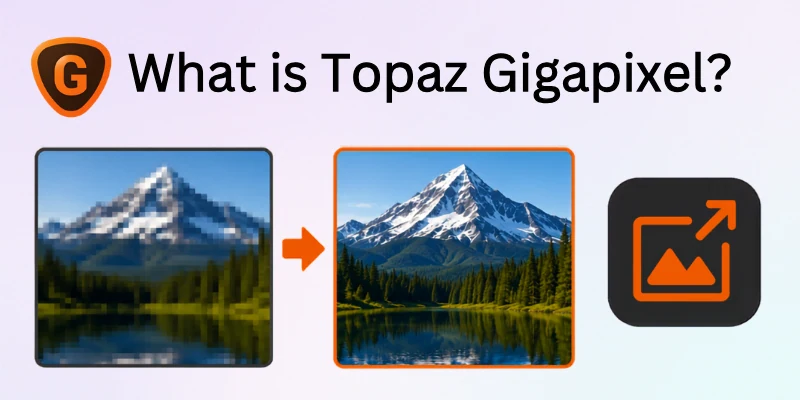
It can be useful when you have an old photo, a small image, or a file that needs a higher resolution for printing or other larger uses. This makes Gigapixel vs Photo AI image enlargement an important part of the overall comparison.
- Enlarges images using AI-based processing
- Helps improve low-resolution pictures
- Adds detail while increasing image size
- Uses different AI models for different image needs
- Can be useful for photos that need a larger output
In simple words: Topaz Gigapixel is mainly built for making images bigger without relying only on basic resizing. That focused purpose is one reason it can suit users whose main goal is image upscaling rather than complete photo correction.
What Is Topaz Photo AI?
Topaz Photo AI is an AI-powered photo enhancement tool that handles more than just image enlargement. It is designed to look at a photo and help improve common problems such as noise, blur, and softness, depending on what the image needs.
This broader approach makes it useful for general photo processing. Instead of using a tool focused mainly on upscaling, Photo AI brings several enhancement tasks into one workflow. This is an important difference when looking at Gigapixel vs Photo AI image enhancement.
- Helps reduce unwanted image noise
- Can sharpen soft or blurry photos
- Supports image upscaling
- Offers broader photo enhancement tools
- Can handle different types of image corrections in one place
- Includes batch processing capabilities for working with multiple photos
In simple words: Topaz Photo AI is like an all-in-one photo improvement tool. If your image needs more than just a larger size, it gives you several ways to improve it in one workflow.
Gigapixel vs Photo AI: Quick Comparison
Before going into the detailed comparison, here is a simple look at how both tools differ. Gigapixel vs Photo AI comparison mainly comes down to one question: do you need focused image upscaling or broader photo improvement?
| Feature | Topaz Gigapixel | Topaz Photo AI |
| Main purpose | Image upscaling | Overall photo enhancement |
| Best for | Low-resolution images | Photos with different quality issues |
| Upscaling | Main focus | Included feature |
| Noise reduction | Limited | Available |
| Sharpening | Supports enhancement | Dedicated sharpening tools |
| Face recovery | Available | Available |
| Workflow | More focused | More all-in-one |
| Batch processing | Available | Available |
| Ideal user | People needing larger images | Photographers needing wider editing tools |
In simple words: Gigapixel is the stronger match when your main job is making an image larger, while Photo AI is more useful when the photo needs several types of improvement.
Gigapixel vs Photo AI: A Closer Comparison
Both tools can improve images, but they are designed for different types of work. To make the Topaz Gigapixel vs Photo AI decision easier, it helps to compare them through separate points instead of repeating the same upscaling difference in different words.
Here are the key areas I will cover in detail:
- Main Purpose and Best Use
- AI Models and Processing
- Upscaling and Low-Resolution Recovery
- Noise, Blur, and Sharpness
- Face and Portrait Enhancement
- Batch Processing and Workflow
- Speed and Hardware Needs
- File Support and Software Integration
Let’s discuss this further in detail:
1. Main Purpose and Best Use
The biggest difference is the main job each tool is built to do. Gigapixel focuses mainly on making images larger and increasing their resolution, while Photo AI looks at the overall condition of a photo and applies different improvements where needed.
Gigapixel:
- A larger version of an image
- Better resolution for a small photo
- Dedicated AI upscaling
- Large images for printing or other high-resolution use
Photo AI:
- More than one type of photo correction
- Help with noise, blur, or softness
- A broader image enhancement workflow
- One tool for several common photo problems
Quick Difference: Gigapixel is mainly for focused image enlargement, while Photo AI is for overall photo improvement.
2. AI Models and Processing
Both tools use AI, but they process images with different priorities. Photo AI first analyzes the image to identify what kind of improvement may be needed, whereas Gigapixel is more focused on generating extra pixels and detail during the upscaling process.
With Gigapixel:
- AI focuses strongly on resolution growth
- Processing aims to add believable image detail
- The main goal is to improve the enlarged result
With Photo AI:
- AI examines the photo before making corrections
- Different issues can be handled in one workflow
- Processing can focus on the specific problems found in the image
Quick Difference: Gigapixel uses its processing mainly to build a larger image, while Photo AI uses AI to analyze and improve the image more broadly.
3. Upscaling and Low-Resolution Recovery
When an image is small, increasing its size is not always enough. The real challenge is keeping important details clear after enlargement. Gigapixel is built around this task, with dedicated upscaling models that can increase pixel dimensions while trying to preserve texture and edges.
Photo AI also includes upscaling, so it can handle smaller images too. Its advantage appears when the source has other problems at the same time, such as noise or softness. In that situation, Photo AI can combine several improvements instead of focusing only on increasing the image size.
Gigapixel
- Strong focus on enlarging images
- Supports scaling by up to 6×
- Useful for prints, artwork, and detailed images
- Gives more control over the upscaling process
Photo AI
- Can upscale smaller images
- Works well when the source also needs correction
- Can combine upscaling with other enhancement tools
- Useful for imperfect photos that need several fixes
Quick Difference: Gigapixel is the better fit when upscaling is the main task, while Photo AI is more useful when a low-resolution image also needs other improvements.
4. Noise, Blur, and Sharpness
Not every photo needs the same type of correction. A picture may have grain from a high ISO setting, softness from missed focus, or blur from camera movement. Photo AI is designed to handle these issues as part of its broader enhancement workflow.
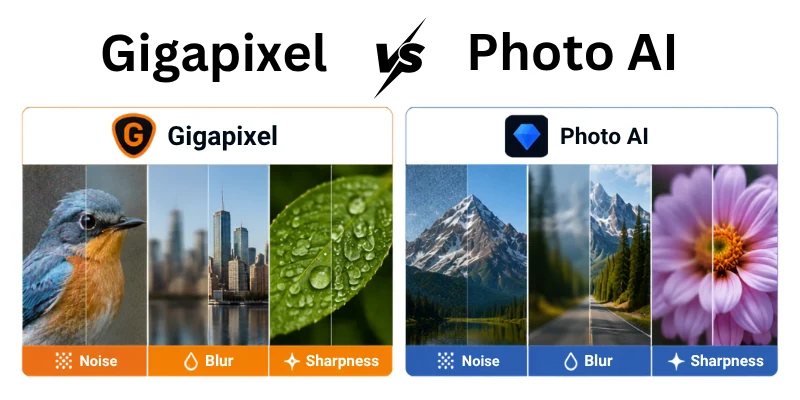
Gigapixel can apply some denoising and sharpening during its processing, but it is still primarily an upscaling tool. Topaz recommends using the dedicated Denoise and Sharpen tools in Photo AI when these corrections are the main reason you are editing the photo.
Gigapixel
- Can apply some denoising during enlargement
- Includes sharpening options
- Works well when the original image is already fairly clean
- Is not mainly designed for fixing severe blur or noise
Photo AI
- Provides dedicated noise reduction
- Can improve soft and blurry images
- Offers stronger correction options for difficult photos
- Can combine corrections before or during enlargement
Quick Difference: Gigapixel is better when the image is already in good shape, while Photo AI is more suitable when noise, blur, or softness needs fixing first.
5. Face and Portrait Enhancement
Portraits need more than just a bigger image. Faces can lose detail because of blur, heavy cropping, poor lighting, or a low-quality source. Photo AI is especially useful here because it includes face recovery and other tools that can improve facial details as part of the same workflow.
Gigapixel can also enlarge portraits and improve face detail, but its main strength remains image enlargement. If the original portrait is already clean and sharp, it can produce a strong result. If the face has several problems, Photo AI gives you more tools to work with.
Photo AI
- Useful for portraits with soft or damaged details
- Includes face recovery
- Can combine face improvement with sharpening and denoising
- Helpful for cropped or low-quality portraits
Gigapixel
- Works well when a clean portrait needs enlargement
- Can improve facial detail during upscaling
- Useful for making portraits larger for prints
- Gives more focus to the resizing process
Quick Difference: Photo AI is a better choice when the face needs fixing, while Gigapixel works well when the portrait mainly needs to be enlarged.
6. Batch Processing and Workflow
Working with one photo is easy, but photographers often need to process dozens or even hundreds of files. Both tools support batch processing, but their workflows are not exactly the same. Gigapixel lets you apply upscale settings across multiple images, while Photo AI can analyze images and use Autopilot to apply suitable adjustments.
This can make Photo AI useful for mixed photo collections where every image may have a different problem. Gigapixel can be a better fit when many files need similar enlargement settings and you want a focused workflow.
Gigapixel
- Processes multiple images together
- Can apply the same scale or output size to a batch
- Offers Auto and Manual batch workflows
- Works well for large upscaling jobs
Photo AI
- Can process multiple images in one session
- Autopilot can analyze images individually
- Allows presets and shared settings
- Useful for batches with different image problems
Quick Difference: Gigapixel is useful for consistent large-scale upscaling, while Photo AI is better suited to mixed batches that need different enhancements.
7. Speed and Hardware Needs
Speed can matter a lot when you work with many large images. Gigapixel is built for focused upscaling, so its workflow can feel faster when your main task is enlarging images. Large files and higher upscale sizes still need strong computer resources, especially GPU memory.
Photo AI also depends on your computer’s hardware because its AI tools may perform several corrections on one image. If you are working on many photos, using a computer with enough RAM and GPU power can make the process smoother.
Gigapixel
- Works well for focused enlargement jobs
- Large upscales can need more GPU memory
- Useful for users handling many large images
- Auto mode can help speed up the setup
Photo AI
- May do several enhancement tasks in one workflow
- Processing can take more time when several corrections are applied
- Benefits from a capable GPU and enough system memory
- Suitable for photographers working with different image problems
Quick Difference: Gigapixel can be more efficient for straightforward upscaling, while Photo AI may need more processing when several improvements are applied together.
8. File Support and Editing Integration
Your normal editing setup can also affect which tool feels more useful. Both programs support common image formats, but their connections with other editing apps are not exactly the same. Topaz currently lists integrations with tools such as Photoshop and Lightroom Classic, along with other supported workflows.
For Gigapixel vs Photo AI for photo editing, the better choice may depend on where you normally finish your work. Gigapixel can work as a plugin with Photoshop and Lightroom Classic, while Photo also supports several editing and catalog workflows.
Gigapixel
- Supports JPG, PNG, TIFF, DNG, and RAW files
- Works with Photoshop and Lightroom Classic
- Supports batch work inside supported workflows
- Useful when upscaling is one step in a larger editing process
Photo AI
- Supports common photo formats
- Works with Photoshop and Lightroom workflows
- Designed for broader image enhancement
- Gives photographers more correction tools before final editing
Quick Difference: Gigapixel fits well into workflows where upscaling is the main step, while Photo AI is better when you want more image corrections before finishing the photo.
Tips for Choosing Between Gigapixel and Photo AI
Not sure which tool fits your photo work? A few simple checks can make the choice much easier. Think about the type of images you edit, the problems you need to fix, and the final result you want.
- Think about your main goal: For Gigapixel vs Photo AI for photographers, Gigapixel makes more sense when image enlargement is your main task.
- Check the photo quality first: If you often work with Gigapixel vs Photo AI low resolution images, consider whether you mainly need size improvement or several corrections.
- Look at the final size: Gigapixel vs Photo AI upscaling matters more when you need a much larger image for printing or detailed displays.
- Consider portraits: For Gigapixel vs Photo AI for portraits, choose based on whether the face mainly needs enlargement or needs extra correction.
- Check your editing needs: If you want Gigapixel vs Photo AI for photo editing, Photo AI can be more useful when one image needs several improvements.
- Think about batch work: If you process many files, compare Gigapixel vs Photo AI batch processing to see which workflow saves you more time.
- Do not judge by one photo: Test both tools on different images before making your final choice.
- Keep your workflow simple: Choose the tool that solves your most common photo problem without adding extra steps.
My simple tip: If your biggest need is making images larger, start with Gigapixel. If your photos need wider AI-based corrections, Photo AI may be the more practical choice.
Conclusion
After comparing Gigapixel vs Photo AI, I think the right choice depends on what you usually do with your images. Gigapixel is a better match when you mainly want to enlarge photos while keeping the details clean. Photo AI makes more sense when your images need several types of improvement, such as noise removal, sharpening, or face enhancement.
Personally, I would recommend Gigapixel for photographers, designers, and creators who mostly need reliable image enlargement. If you often work with photos that have multiple quality issues, Photo AI would be the more practical option.
Before buying either one, test both with a few of your own images and choose the tool that gives you the results you actually need.
FAQs
If you are still unsure which tool fits your photo work, these FAQs can make the choice easier. Each answer focuses on a different question so you can compare both tools without confusion.
Yes, Gigapixel is a strong choice when your main goal is to enlarge an image. It focuses heavily on increasing resolution while keeping the result detailed and natural.
Photo AI can also upscale images, but it is better suited to cases where you need several improvements at the same time.
Yes, Photo AI can help improve soft or blurry images through its enhancement tools. It is useful when the photo has more problems than just low resolution.
This makes it a practical option for photos that need overall correction before you use or enlarge them.
The better choice depends on your regular workflow.
- Choose Gigapixel for dedicated image enlargement.
- Choose Photo AI for wider photo enhancement.
- Consider how often you need each type of editing.
Yes. Gigapixel is especially useful when you have a small image that needs to become much larger. It can create additional detail during the enlargement process.
For images that also have heavy noise, blur, or other issues, Photo AI may offer a more complete workflow.
Yes, Photo AI includes tools designed to improve facial details. This can be helpful when working with portraits where faces look soft, small, or lacking in detail.
Gigapixel can also improve enlarged faces, but Photo AI is more suitable when the face needs additional correction.
Both can work well for beginners, but the easier choice depends on the task. Gigapixel can feel simpler when you only want to enlarge an image.
Photo AI may take a little more exploration because it offers a wider set of enhancement options.
Gigapixel can provide some enhancement during its image processing, including improvements related to noise and sharpness.
However, if noise reduction or sharpening is your main concern, Photo AI may be more suitable because these tasks are part of its broader enhancement workflow.
Both tools can be useful when you need to work with multiple images. Your choice should depend on the type of batch you are processing.
Gigapixel makes more sense for batches that mainly need enlargement, while Photo AI is useful when different photos need different types of correction.
Photo AI can be the better option if you want one tool for several common image problems. It can handle tasks such as noise reduction, sharpening, and other improvements.
Gigapixel is more focused, so it may be preferable when your editing needs mainly revolve around increasing image size.
I would choose Gigapixel if image enlargement is your main reason for buying an AI tool. If you regularly fix different photo problems, Photo AI is the more practical choice.
Before buying, test both with the same few images. Your own results will give you the clearest answer





- Be Respectful
- Stay Relevant
- Stay Positive
- True Feedback
- Encourage Discussion
- Avoid Spamming
- No Fake News
- Don't Copy-Paste
- No Personal Attacks
- Be Respectful
- Stay Relevant
- Stay Positive
- True Feedback
- Encourage Discussion
- Avoid Spamming
- No Fake News
- Don't Copy-Paste
- No Personal Attacks
