How to Use AI to Clean Data – Step by Step Guide
Published: 16 Apr 2026
Data is the foundation of every business decision, analysis, and report. But messy, inconsistent, or incomplete data can lead to wrong conclusions. Cleaning data manually is time-consuming and prone to errors.
In this guide, you will learn how to use AI to clean data step by step. By the end, you will know how to prepare high-quality datasets efficiently for analysis, reporting, or machine learning.
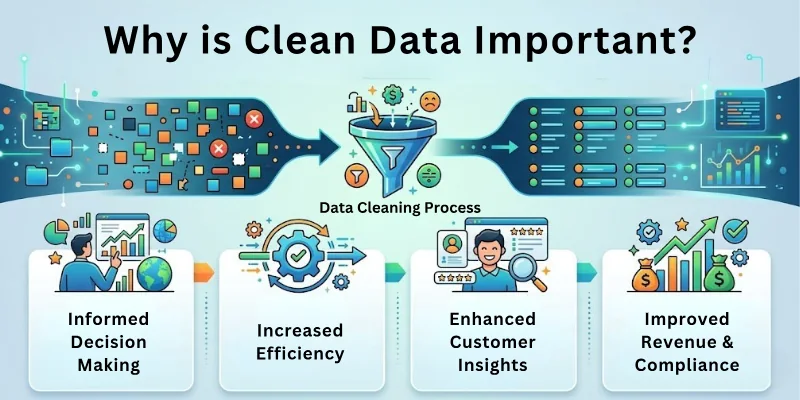
Why Clean Data is Important
Data cleaning ensures your data is accurate, consistent, and reliable.
- Poor data leads to wrong insights and poor decisions.
- Clean data saves time and reduces errors during analysis.
- Automated cleaning with AI is faster than manual methods.
High-quality data is essential for successful business operations and analytics.
Steps on How to Use AI to Clean Data
Here’s a quick overview of the main steps:
- Identify the Type of Data to Clean
- Choose the Right AI Data Cleaning Tool
- Remove Duplicate Data Entries
- Correct Inconsistencies and Standardize Formats
- Fill Missing Values Intelligently
- Detect and Remove Outliers
- Validate and Verify the Cleaned Data
- Automate Repetitive Cleaning Tasks
- Monitor Data Quality Continuously
- Document the Cleaning Process
Let us cover all these steps in detail.
Step 1: Identify the Type of Data to Clean
Know what kind of data you are working with before starting.
- Identify structured data like spreadsheets and databases.
- Identify unstructured data like text, emails, or logs.
- Decide which fields or columns need cleaning, such as names, dates, or addresses.
This ensures AI cleaning focuses on the right areas and saves time.
Step 2: Choose the Right AI Data Cleaning Tool
Pick a tool suitable for your data type and workflow.
- OpenRefine → Cleans structured datasets efficiently
- Trifacta → Offers AI-based suggestions for cleaning and formatting
- Talend Data Quality → Automates validation and standardization
- DataRobot Paxata → AI-powered data preparation platform
- Excel + AI plugins → Quick AI-assisted cleaning for smaller datasets
Choosing the right tool makes the cleaning process faster and accurate.
Step 3: Remove Duplicate Data Entries
Duplicates create confusion and inaccurate analysis.
- Use AI to identify exact or fuzzy duplicates.
- Merge or remove repeated entries automatically.
- Keep one clean version of each record.
Removing duplicates ensures accurate results and smaller datasets.
Step 4: Correct Inconsistencies and Standardize Formats
Inconsistent data can ruin analysis.
- Standardize date formats, currency symbols, and text capitalization.
- Correct spelling mistakes and abbreviations automatically.
- Ensure all fields follow the same format across the dataset.
Consistency helps in combining datasets and accurate reporting.
Step 5: Fill Missing Values Intelligently
Missing data can affect results and machine learning models.
- Use AI to predict missing values based on patterns in the dataset.
- Replace missing entries with averages, medians, or logical estimates.
- Avoid leaving blanks unless absolutely necessary.
This ensures the dataset is complete and ready for analysis.
Step 6: Detect and Remove Outliers
Outliers may skew analysis and insights.
- Use AI algorithms to detect unusual values automatically.
- Decide whether to correct, remove, or flag these outliers.
- Ensure that valid extreme values are not mistakenly removed.
Handling outliers improves the accuracy of data-driven decisions.
Step 7: Validate and Verify the Cleaned Data
Always check the data after cleaning.
- Compare cleaned data with original sources for accuracy.
- Validate key fields like IDs, email addresses, and phone numbers.
- Ensure AI didn’t introduce new errors during cleaning.
Verification guarantees your dataset is reliable.
Step 8: Automate Repetitive Cleaning Tasks
AI can save time by automating frequent cleaning processes.
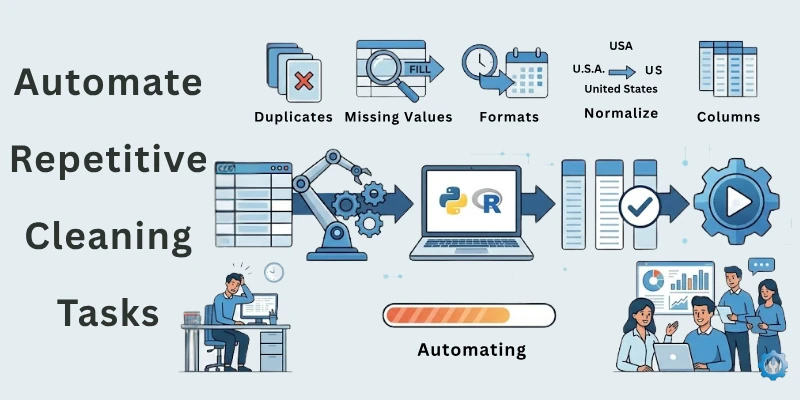
- Set AI workflows to clean data automatically on import.
- Schedule regular cleaning for recurring datasets.
- Use templates or macros to apply consistent rules.
Automation reduces manual effort and ensures ongoing data quality.
Step 9: Monitor Data Quality Continuously
Data quality must be maintained over time.
- Track metrics like completeness, accuracy, and consistency.
- Use AI alerts for errors or anomalies.
- Update rules and workflows as datasets grow or change.
Continuous monitoring prevents issues from accumulating.
Step 10: Document the Cleaning Process
Keep a record of all cleaning actions.
- Note the tools, methods, and rules used.
- Maintain logs of changes for auditing or replication.
- Share documentation with your team for transparency.
Documentation ensures that cleaning is repeatable and understandable.
Top 10 AI Tools for Data Cleaning
Here are some of the best AI-powered tools to clean data efficiently:
- OpenRefine → Structured data cleaning and transformation
- Trifacta → Intelligent data wrangling and formatting
- Talend Data Quality → Validation and standardization automation
- DataRobot Paxata → AI-driven data preparation
- Excel + AI Plugins → Quick fixes for small datasets
- IBM Watson Studio → Data cleaning and machine learning prep
- Alteryx Designer → Automated data preparation and cleaning
- RapidMiner → AI-based data preprocessing and analysis
- Data Ladder → Duplicate detection and standardization
- Informatica Data Quality → Enterprise-level AI cleaning and validation
Common Mistakes to Avoid
Here are some of the most common mistakes to avoid:
- Cleaning data without understanding the dataset
- Ignoring missing values or inconsistencies
- Over-removing outliers that are valid
- Not testing AI cleaning results
- Skipping documentation and monitoring
- Relying solely on AI without human checks
Avoiding these mistakes ensures reliable, high-quality datasets.
Final Note
In this guide, we have covered how to use AI to clean data in great detail. You now know how to identify, clean, verify, and maintain datasets effectively using AI tools.
Remember, clean data is the foundation of accurate decisions. Combine AI with careful monitoring and validation to get the best results. With the right approach, your data will always be ready for analysis and insights. Good luck and enjoy working with clean data!
FAQs: How to Use AI Tools to Clean Data
Here are some of the most commonly asked questions related to the how to use artificial intelligence tools for data cleaning:
AI data cleaning uses intelligent tools to detect and fix errors in datasets automatically. It identifies duplicates, missing values, and inconsistencies. This process saves time and ensures your data is accurate for analysis.
Dirty data can lead to wrong insights and poor business decisions. Cleaning ensures accuracy, consistency, and completeness. Using AI makes this process faster and reduces human errors.
You can use AI-powered tools like OpenRefine or Trifacta. These tools automatically detect duplicates, correct inconsistencies, and fill missing values. Following a structured workflow improves overall efficiency.
Popular tools include OpenRefine, Talend Data Quality, DataRobot Paxata, and IBM Watson Studio. Each tool has features for automated validation, formatting, and deduplication. Choose one based on your dataset size and type.
AI compares records for similarities, even if small differences exist. Fuzzy matching techniques identify nearly identical entries. This ensures duplicates are removed without losing important data.
Yes, AI predicts missing values based on patterns in your data. It can use averages, medians, or other intelligent estimates. This results in a complete dataset ready for analysis or machine learning.
Compare cleaned data with original sources and check critical fields. Verify consistency, accuracy, and completeness of all records. Proper validation ensures AI did not introduce new errors.
Do not skip testing, ignore missing values, or remove valid outliers. Avoid over-relying on AI without human checks. Following these steps ensures high-quality, reliable data.
Yes, AI can automate repetitive cleaning tasks using workflows or scheduled processes. This reduces manual effort for large or frequently updated datasets. Automation ensures consistent data quality over time.
Clean data provides accurate insights and reduces errors in reports or models. Decision-making becomes more reliable with consistent, validated data. Using AI to clean data ensures speed, accuracy, and efficiency.






- Be Respectful
- Stay Relevant
- Stay Positive
- True Feedback
- Encourage Discussion
- Avoid Spamming
- No Fake News
- Don't Copy-Paste
- No Personal Attacks
- Be Respectful
- Stay Relevant
- Stay Positive
- True Feedback
- Encourage Discussion
- Avoid Spamming
- No Fake News
- Don't Copy-Paste
- No Personal Attacks
