Best AI Tools for Social Media Marketing: Top Picks 2026
Published: 11 Mar 2026
AI tools are smart software that help you create, post, and manage your social media content with less effort. They think fast, they save time, and they take over the tasks that usually drain your energy.
As a marketer, you already know how busy social media gets. You have to write captions, design posts, schedule content, respond to messages, and track performance. AI tools make all of this easier. They help you stay consistent, understand your audience better, and create content that actually performs.
With AI, you can write posts in seconds, design graphics without any skills, schedule content for the whole month, and track analytics in a clean dashboard. It also helps you boost engagement by replying faster and creating content your audience already likes.
This guide will show you the best AI tools for social media marketing and how you can use them to work smarter, not harder.
Types of AI Tools Used in Social Media Marketing
Here are the main types of artificial intelligence tools used in social media marketing. Each one has a different purpose, and together they make your entire workflow smoother and faster.
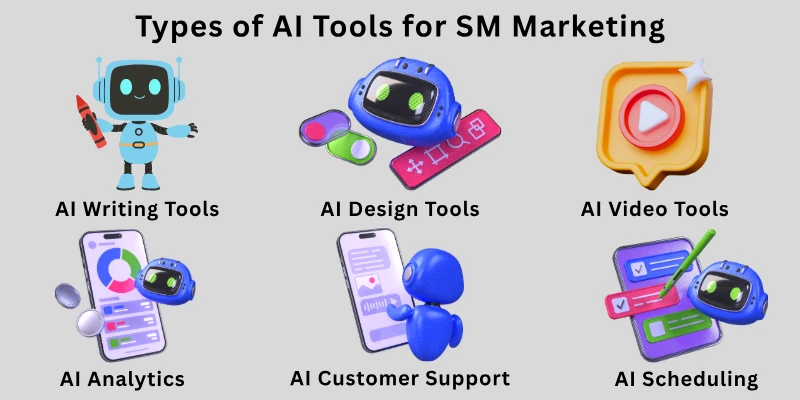
- AI Writing Tools: These tools help you write captions, hashtags, scripts, ad copy, replies, and full content ideas in seconds.
- AI Design Tools: These tools create banners, posts, thumbnails, carousels, and graphics without needing any design skills.
- AI Video Tools: These tools help you make short videos, reels, stories, voiceovers, and animations quickly.
- AI Scheduling & Automation Tools: These tools plan your posts, schedule them, automate daily tasks, and keep your content consistent.
- AI Analytics Tools: These tools show you what’s working, what’s not, and how your audience behaves. They help you make smarter decisions.
- AI Customer Support & DM Assistants: These tools reply to messages, manage comments, answer FAQs, and handle customer queries on autopilot.
In the next section, I will explain each purpose in detail and share the best AI tools under every category, so you know exactly what to use and why.
Best AI Writing Tools for Content Creation
When you’re doing social media marketing, having strong AI writing tools at your side can save you huge amounts of time, for brainstorming ideas, writing captions, drafting ad copy, or even building long-form content like blogs.
Below are some of the top AI writing tools, and then I’ll explain the most powerful ones in more detail.
- ChatGPT
- Jasper AI
- Writesonic
- Copy.ai
- Anyword
- Rytr
- Neuroflash
- GrammarlyGO
- Wordtune
ChatGPT
ChatGPT is one of the most flexible and widely used AI writing tools.
- It lets you write conversationally (“chat”) to generate ideas, outlines, captions, scripts, and more.
- Because it’s very flexible, you can give it very specific instructions, tone, length, purpose, and it adapts.
- You can use it for brainstorming new content topics or rewriting existing text.
- It doesn’t come with rigid templates, so you can be very creative, but that means you need to craft good prompts.
- It’s super useful when you don’t know exactly what to write next or need help starting something from scratch.
Jasper AI
Jasper is built especially for marketers. Best for marketing copy, social media posts, blog intros, ad text.
Key features:
- Over 50 built-in templates for different content types (ads, emails, blog, etc.)
- Helps you maintain a brand voice: you can train Jasper on how you sound.
- Collaboration tools (great for teams) and integrations with CMS or SEO tools.
Pros:
- Saves a ton of time for marketing workflows
- Quality of output tends to be very good
- Useful for scaling content production
Cons:
- Can be expensive for small teams or solo creators
- Requires a learning curve to get the best out of templates
Writesonic
Writesonic is a very versatile AI writing platform, especially good when you need different formats.
Why use it: It supports both short-form (like ads, captions) and long-form (blog articles).
Key features:
- Integrated “ChatSonic” (a chat-style AI) for interactive writing.
- SEO suggestions to make content search-friendly.
- Multi-language support, so you can write in different languages.
Pros:
- Affordable compared to some high-end marketing AI tools
- Good for both social media and blog content
- Lightweight and fast for quick ideas
Cons:
- Long-form content may feel somewhat generic — you might need to edit it
- For deep SEO content, you might need to combine with other tools
Copy.ai
Copy.ai is focused heavily on creative marketing content.
Strengths:
- 90+ content templates (social posts, product descriptions, ad copy)
- Supports multiple AI models, which can improve the variety of its output.
- Very fast generation — good when you need lots of variations or ideas.
Use cases:
- Social media captions
- Ad campaigns
- Email headlines
Pros:
- Great for marketers who want multiple creative ideas quickly
- Flexible and creative; not rigidly “SEO only”
Cons:
- Might not be ideal for deep long-form content
- Requires human editing for best tone and clarity
Anyword
Anyword is more data-driven: it’s not just generating text, but optimizing for performance.
What makes it special:
- Its AI is designed for marketing copy that converts.
- It gives you suggested variants based on predicted performance (e.g., which caption might get more clicks).
- You can use it to write for ads, social media, emails, and more.
Pros:
- Helps you write content with a goal (engagement, clicks)
- Good for testing different versions of copy
Cons:
- May feel more “business-copy” than “creative story”
- Requires understanding how to use the performance metrics
Rytr
Rytr is powerful and very budget-friendly.
What it does well: Short-form content, blog outlines, social media, ads, SEO text.
Key features:
- 40+ writing templates / use-cases.
- Supports 20+ tones (friendly, professional, persuasive, etc.)
- Rich-text editor with AI commands: expand, rewrite, shorten, etc.
- Chrome Extension for writing directly in places like Gmail or WordPress.
Pricing:
- Free plan: limited characters.
- Paid plan (~$9/month) for more usage.
Pros:
- Very affordable for individual marketers or small teams
- Easy to use, with strong tone customization
- Good for quick content generation
Cons:
- Not as “powerful” as Jasper for very large or complex content
- Might need manual polishing for certain content types
Neuroflash
Neuroflash is more advanced, combining psychology with AI writing.
What makes it unique:
- Uses neuropsychological insights to make content more emotionally engaging.
- Good for marketing content where emotional resonance matters (ads, branding, social media).
- Supports multiple content types: social media, blog, presentations, etc.
Pros:
- Content feels more “human” and psychologically tuned
- Useful if you want to deeply connect with your audience
Cons:
- More specialized, might be overkill for simple social captions
- Can cost more and require more thought for prompt design
GrammarlyGO
GrammarlyGO is an AI-powered writing assistant built into Grammarly.
Why it’s helpful:
- It can rewrite your text for different tones (friendly, formal, etc.) using generative AI.
- It helps you reply to messages, write drafts, or improve existing content.
- Because it’s part of Grammarly, you also get grammar checks, clarity suggestions, and plagiarism checks.
Pros:
- Very handy for polishing AI-generated drafts
Keeps your brand voice consistent and clear - Easy to use: integrated into a writing workflow most people already use
Cons:
- Not a full “content generator” like Jasper — more about refining
- May not generate very long pieces from scratch
Wordtune
Wordtune is like an AI co-writer focused especially on rewriting and clarity.
Key abilities:
- Suggests paraphrases, rephrases sentences, or changes tone to fit your style.
- Helps make your sentences clearer, shorter, or more varied.
- Works well for both creative writing and marketing content.
Pros:
- Perfect for improving rough drafts or refining AI-generated text
- Helps you avoid repetitive sentence structures
Very lightweight: great for users who don’t want full-blown content generation
Cons:
- Not meant for generating long-form content — more for rewriting
- You’ll still need to supply the bulk of the original idea or draft
Best AI Tools for Designing (Graphics & Visual Content)
AI design tools are a game-changer for social media marketers, they let you create beautiful images, graphics, and visuals fast, even if you don’t know how to design.
These tools help you generate images from text, edit photos, and maintain a consistent brand look, all with a few clicks.
- Canva Magic Studio (Canva AI)
- Adobe Firefly
- Midjourney
- Figma (with AI plugins)
- Kittl
- Runway ML
- Microsoft Designer
- Designs.ai
Canva Magic Studio (Canva AI)
Canva’s Magic Studio brings smart AI features into its easy drag-and-drop interface.
Why it’s great: Perfect for marketers who need to quickly make social media images, presentations, and posts without hiring a designer.
Key Features:
- Magic Design: You type a prompt (“post about summer sale”), and it gives you ready-made design templates.
- Magic Edit / Eraser: Easily remove or add objects in images.
- Magic Write: Generate text right inside the design — captions, taglines, post copy.
- Magic Resize: One-click to resize your design for different platforms (Instagram, LinkedIn, etc.).
- Brand Kit: Automatically keep colors, fonts, and logos consistent across all your designs.
Pros:
- Very user-friendly — no design skills needed
- Fast and efficient for high-volume social media content
- Good free tier + powerful paid options
Cons:
- The AI-generated designs are not always super “high art” — more for practical posts
- Sometimes you’ll need to tweak templates to get them exactly right
Adobe Firefly
Adobe’s generative AI tool is powerful, especially for professional-grade designs.
Why use it: If you already use Adobe’s suite (Photoshop, Illustrator), Firefly integrates well and adds AI creativity.
Key Features:
- Generative Fill: Remove or expand parts of an image seamlessly with AI.
Text Effects: Turn text into stylized graphics or visual elements. - Safe Models: Trained on Adobe Stock and public domain — reduces copyright risk.
Pros:
- Very creative control + high-quality output
- Ideal for campaign visuals, photo editing, and generative art
- Enterprise- or professional-friendly with Adobe ecosystem
Cons:
- Can be more complex than “just type and go” tools
- Requires Adobe subscription for full power
Midjourney
Midjourney is one of the most popular AI art generators — great for concept art, branding, and creative visuals.
Why use it: For truly unique, stylistic, or imaginative graphics that stand out.
Key Features:
- Text-to-image generation with highly detailed, creative styles.
- Powerful prompt customization: you can define style, mood, color, and more.
- Community-driven: many designers use it for mood boarding and concept exploration.
Pros:
- High-quality, artistic, and very flexible visuals
- Inspires creative brainstorming — not just “stock graphics”
Cons:
- Learning curve: effective prompts matter a lot
- Less “template + layout” support — best when you or a designer refine the output
Figma (with AI Plugins)
Figma is a familiar design tool for many, and with AI plugins, it becomes even more powerful.
Why use it: For UI/UX design, prototyping, and collaborative design workflows.
Key Features:
- Text-to-Design: Plugins like Magician or Galileo AI turn copy into UI layouts or wireframes.
- Auto-layout suggestions: AI helps generate layout variations that look good.
- Icon and design asset generation: You can auto-create icons, illustrations, or repetitive design elements.
- Collaboration: Design teams can work together in real time and use AI jointly.
Pros:
- Super flexible + powerful for design teams
- Combines design, prototyping, and AI in one place
Cons:
- Some AI plugins are paid separately
- AI-generated UI still needs human review and polish
Kittl
Kittl is a graphic design platform focused on typography and vector art.
Why it’s good for social media: If you want clean text-based graphics, logos, or vector illustrations, Kittl is very efficient.
Key Features:
- Vector-based design: Everything is scalable without losing quality.
- AI-powered illustration: It uses AI models (like DALL-E) to generate or enrich art.
- Font library: Over 1,400 fonts plus powerful typography tools.
- Background removal & logo generation: Easy to make polished graphics for brand use.
Pros:
- Ideal for brand kits, logos, social media graphics that need vector output
- Great typography tools make it friendly for typographic designs
Cons:
- Not built for photo-realistic AI art — better for stylized or vector-based graphics
- Collaboration features may be less mature than Figma or Canva for team workflows
Runway ML
Runway ML is more than static graphics — it supports motion design, video, and advanced creative workflows.
Why use it: For animated social media posts, video content, or motion graphics powered by AI.
Key Features:
- Text-to-video: You type a prompt, and Runway generates video.
- Green-screen removal: Automatically separate subjects from background.
- Real-time collaboration: Teams can work on design + video together.
- Audio editing: Includes features to edit or generate voice or music.
Pros:
- Brilliant for social media video content creation
- Lets non-video designers make motion graphics without learning complex tool
Cons:
- More resource-intensive (video = heavier to work with than pictures)
- May require more time / learning for best results
Microsoft Designer
Microsoft Designer is a cloud-based design tool from Microsoft that uses AI to simplify graphic creation.
Why use it: If you want a simple, AI-powered design tool within Microsoft’s ecosystem.
Key Features:
- Text-to-image generation: You input a prompt, and it creates visuals.
- Easy layout tools: Built for people who aren’t professional designers.
- Web-based: No heavy software install is needed; you can design right in your browser.
Pros:
- Very accessible for beginners
- Ideal for social media visuals and quick campaign graphics
- Integrates smoothly with other Microsoft tools
Cons:
- Less powerful than specialized design suites like Adobe or Figma
- Fewer advanced customization options for very detailed design work
Designs.ai
Designs.ai is a suite for creating brand visuals, videos, and marketing assets all in one place.
Why it’s useful: For marketers who want to generate not only images but also branding kits, video ads, and social media visuals from a single tool.
Key Features:
- Logo Maker: Generate logos quickly with AI.
- Brand Kit: Automatically create a set of brand visuals (colors, layouts, icons).
- Video Maker: Turn text into short video ads or social clips.
- Voiceover: Create voiceovers in multiple languages for videos.
Pros:
- Very versatile — works across different design needs
- No need for separate tools for logo, video, and graphics
- Good for solopreneurs or small teams
Cons:
- Might be less customizable than dedicated design software
- Export formats or quality may be limited compared to high-end design tools
Best AI Tools for Video Creation
AI video tools make your video creation process fast, simple, and stress-free. You don’t need a camera, fancy editing skills, or expensive equipment. These tools help you create reels, stories, ads, explainer videos, product demos, and even talking-avatar videos with just a few clicks.
Below are the best and most popular AI video tools that creators and marketers use every day.
- Runway ML
- Synthesia
- Pictory
- Lumen5
- CapCut
Runway ML
Runway ML is one of the most advanced AI video tools. It helps you create videos from text, edit clips easily, and generate visuals that look cinematic. It is perfect for creative storytelling, ads, and high-quality short videos.
Key Highlights:
- Text-to-video generation through powerful AI models like Gen-4
- Background removal, motion tracking, and advanced editing features
- Great for cinematic content, ads, and creative video projects
- Collaboration features for teams
- Very useful for creators who want unique and eye-catching visuals
Synthesia
Synthesia is the best tool for creating AI avatar videos. You just write a script, choose an avatar, and the tool speaks the script in a natural voice. It saves a lot of time, especially for explainer videos.
Key Highlights:
- Create videos using realistic AI avatars
- Supports many languages and voice styles
- Great for tutorials, training videos, and business presentations
- No camera, actor, or mic needed
- Very easy to scale up content production
Pictory
Pictory turns your text, blog posts, or scripts into videos automatically. It picks visuals, adds captions, and creates a clean, shareable video. It is perfect for social media and marketing teams.
Key Highlights:
- Converts scripts, blogs, and long text into short videos
- Auto-add captions, background music, and visuals
- Very beginner-friendly
- Great for repurposing content for social media
- Saves a lot of editing time
Lumen5
Lumen5 helps you convert ideas or text into animated, story-style videos. It is simple to use and gives you ready-made templates for marketing and social media content.
Key Highlights:
- Turns text into animated explainer-style videos
- Drag-and-drop editor for fast creation
- Perfect for marketing videos, social posts, and brand stories
- AI suggests visuals, transitions, and music
- No editing skills needed
CapCut
CapCut is a very popular tool for editing short-form videos like Reels and TikToks. It comes with strong AI features that make editing super quick.
Key Highlights:
- AI captions, background removal, and smart editing
- Free and easy to use on mobile or desktop
- Best for short videos, social media clips, and trending content
- Comes with templates, effects, filters, and transitions
- Works great for creators who post daily
Best AI Tools for Scheduling & Automation
AI scheduling tools make your social media life so much easier. Instead of posting manually every day, these tools handle the timing, planning, and automation for you.
They help you stay consistent, save hours of work, and keep your content active even when you’re busy.
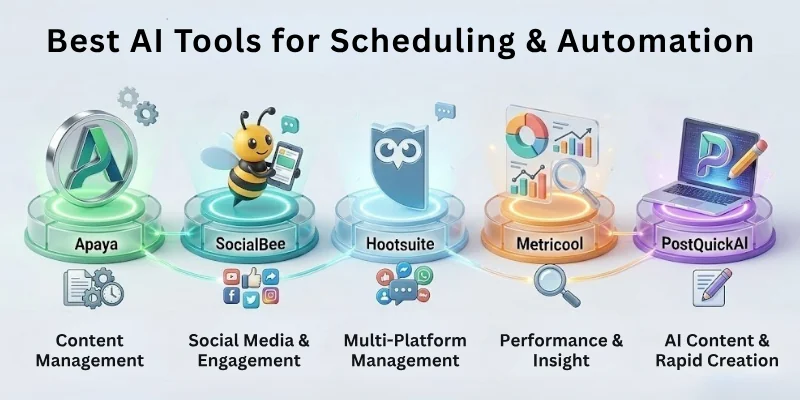
Here are the best AI tools that help you schedule posts, automate tasks, and keep your social media running smoothly.
- Apaya
- SocialBee
- Hootsuite (OwlyWriter AI)
- Metricool
- PostQuickAI
Apaya
Apaya is a smart all-in-one scheduling tool that learns your brand voice and posts content at the perfect time. You can plan your posts ahead of time. It helps you stay organized every week. You don’t need to check your accounts constantly. It makes sure your content reaches people when they are most active.
Key Highlights:
- AI Publishing Engine posts your content automatically
- Learns your brand voice from your website
- Picks the best time to post for maximum engagement
- Tracks performance to improve future schedules
- Lets you choose between full automation or manual control
SocialBee
SocialBee makes scheduling easy by organizing your posts into categories. You can plan different types of content like tips, promos, or evergreen posts. It automatically shares your content without manual effort. You can keep your accounts active every day. It saves time and keeps your content consistent.
Key Highlights:
- AI Copilot writes or rewrites captions
- Category-based posting for balanced content
- Evergreen posts get reshared automatically
- Supports all major social platforms
- Gives performance insights for smarter scheduling
Hootsuite (OwlyWriter AI)
Hootsuite is a classic tool for scheduling posts across platforms. OwlyWriter AI helps you create captions and content ideas quickly. It suggests the best times to post so your content reaches more people. You can also reply to comments and messages faster. It’s perfect for teams managing multiple accounts.
Key Highlights:
- Writes captions, ideas, and repurposed posts
- Suggests best posting times using AI
- Helps you reply to comments with smart responses
- Tracks audience sentiment and tone
- Works for teams and agencies managing many accounts
Metricool
Metricool helps you plan posts, track performance, and create better content. It suggests captions, hashtags, and posting times. You can see all your content in a simple dashboard. It works for Instagram, TikTok, and other platforms. Metricool saves time and improves your posting strategy.
Key Highlights:
- AI assistant suggests captions and hashtags
- Smart hashtag recommendations for TikTok & Instagram
- Learns your tone for better caption ideas
- Clean dashboard for planning and analytics
- Integrates with Canva, Zapier, and more
PostQuickAI
PostQuickAI is made for fast content creation and automatic posting. You can create captions, images, and videos in one place. It posts your content at the best times automatically. You can manage multiple accounts easily. It keeps your social media active without much effort.
Key Highlights:
- Creates captions, images, and videos with AI
- YOLO mode auto-posts at optimal times
- Works across TikTok, Instagram, YouTube, LinkedIn
- Easy visual content calendar
- Manage multiple accounts easily
Best AI Tools for Analytics (Social Media)
AI analytics tools help you understand your audience, track how your content is doing, and make smarter decisions, without spending hours digging through data. These tools use AI to analyze sentiment, trends, engagement patterns, and competitor behavior.
When you use them, you can spend less time guessing and more time creating content that actually works.
- Sprinklr
- YouScan
- Brandwatch (Emplifi)
- SocialInsider
- Brand24
Sprinklr
Sprinklr is a powerful, enterprise-grade analytics platform that combines AI models and generative insights. Quorage lists it as “#1: Best Overall” for social media analytics.
Key Highlights:
- It gathers data from 30+ social and digital channels (social media, blogs, forums, news)
- Uses its internal AI + generative models to provide deep audience insights
- Offers competitor analysis so you can benchmark against industry peers
- Provides unified reporting, letting you track sentiment, performance, and engagement in one dashboard
- Helps teams make data-driven decisions for both marketing and customer experience
YouScan
YouScan is a social listening and media monitoring tool powered by AI. It helps you understand what people are saying about your brand, in both text and images.
Key Highlights:
- Uses AI to analyze user opinions across social media and the web
- Has image recognition: it can scan visual posts (like photos) for logos, objects, or brand moments
- Helps you spot trends, sentiment shifts, or viral brand mentions early on
- Useful for reputation management and crisis monitoring because you see both what people say and what people show about your brand
Brandwatch / Emplifi
Brandwatch (which is part of Emplifi’s analytics suite) uses AI to track brand sentiment, audience behavior, and competitive trends. According to Digital Marketing Supermarket, they offer “real-time social listening” and advanced analytics.
Key Highlights:
- Monitors millions of sources for conversations about your brand or industry
- Sentiment analysis with high accuracy to help detect positive, neutral, or negative mentions
- Identifies influencers or opinion leaders in your niche to help with partnerships or content strategy
- Offers crisis alerts so you can respond fast if something negative is gaining traction
- Provides benchmarking and trend forecasting to plan your content around real audience insights
SocialInsider
SocialInsider is very useful for comparing your performance with competitors. Quorage highlights it as a “best for competitive analysis” AI analytics tool.
Key Highlights:
- Automatically generates benchmarks using AI-powered metrics
- Lets you compare your content performance with other brands on the same platforms
- Analyzes which content pillars (types of posts) are working better for you vs competitors
- Helps you spot performance opportunities by combining competitor data + your own insights
Brand24
Brand24 is a simpler yet powerful tool for sentiment analysis, mentions tracking, and brand reputation. It uses machine learning to monitor brand presence and sentiment.
Key Highlights:
- Tracks online mentions across social media, blogs, forums, and news sources
- Uses NLP (natural language processing) to detect sentiment (positive, negative, neutral) for your brand or campaign
- Alerts you when brand mentions spike, so you can act quickly if something goes viral (good or bad)
- Provides “influencer detection” so you can see who’s talking about you and possibly partner with them
- Easy interface for non‑technical marketers to navigate and extract insights
Best AI Tools for Customer Support & DM Assistants
AI tools for customer support and DM assistants make replying to your customers much easier. They help answer common questions quickly without you doing everything manually. These tools can also handle multiple conversations at the same time.
You can focus on important tasks while your customers get fast responses. Here are the best tools to improve your support and messaging.
- Intercom Fin AI
- Ada CX AI
- ManyChat
- Tidio AI (Lyro)
- Zendesk Answer Bot
Intercom Fin AI
Intercom Fin AI helps you talk to customers naturally and quickly. It can remember past conversations and make replies feel personal. You don’t need to reply to every question manually. It can also pass complex issues to your team. This tool keeps customers happy and saves your time.
Key Highlights:
- Resolves common customer queries automatically
- Builds personalized conversations
- Escalates complex issues to human agents
- Sends proactive messages based on customer behavior
- Integrates with CRMs and support tools
Ada CX AI
Ada CX AI is made for handling a lot of customer questions at once. You can set it up without coding skills. It works on social media, email, and chat. It can even support many languages. It reduces your team’s workload and keeps customers satisfied.
Key Highlights:
- Automates high-volume questions across channels
- Resolves 70%+ of common issues
- No-code chatbot setup
- Supports over 50 languages
- Integrates with Salesforce, Zendesk, and other tools
ManyChat
ManyChat is perfect for Instagram, Messenger, and WhatsApp chats. It can answer FAQs and qualify leads automatically. You can move people from comments into private chats. Complex questions can still reach your team. It’s great for support and marketing at the same time.
Key Highlights:
- Build chatbots for social media messaging apps
- Create automated workflows for FAQs or leads
- Comment-to-DM flows for engagement
- Escalates complex questions to humans
- Helps with both support and marketing
Tidio AI (Lyro)
Tidio AI is simple but powerful for live chat and messaging. It learns from your FAQ and website content. The responses get smarter over time. It works on multiple channels at once. Customers get answers quickly, and your team saves time.
Key Highlights:
- Automates a large portion of conversations
- Learns from your knowledge base
- Improves with deep learning and NLP
- Multi-channel support (chat, messaging apps)
- Reduces response time
Zendesk Answer Bot
Zendesk Answer Bot adds AI to your existing support system. It can suggest helpful articles and route tickets. Complex issues still reach humans. It works across chat, email, and social media. You get insights about common problems too.
Key Highlights:
- Suggests help center articles automatically
- Triages and routes tickets
- Learns from your internal knowledge base
- Supports multiple channels
- Provides analytics on conversations
How to Choose the Best AI Tool for Your Social Media Strategy
Here’s a quick guide to help you pick the right one:
- Budget: Pick a tool that fits your budget without compromising essential features.
- Type of Content: Some tools are better for text, images, or videos; choose based on what you post most.
- Team Size: Bigger teams may need multi-user support, while solo creators need simpler tools.
- Posting Frequency: High-frequency posting needs stronger scheduling and automation features.
- Platforms You Manage: Make sure the tool supports all social media platforms you use.
- Customization Needs: Look for tools that let you match your brand voice, templates, and workflow.
Common Mistakes to Avoid When Using AI in Social Media Marketing
Using AI can boost your social media, but mistakes can waste time and reduce results. Avoid these common errors:
- Relying completely on AI: Don’t remove human creativity and judgment.
- Ignoring analytics: Always track performance and engagement metrics.
- Posting without review: AI-generated content still needs proofreading.
- Over-automation: Too many automated posts can feel impersonal to followers.
- Choosing the wrong tool: Match the tool to your content type, platforms, and team size.
- Neglecting brand voice: Ensure AI content aligns with your tone and style.
- Skipping updates: Keep AI tools updated for latest features and algorithms.
Final Note
In this guide, we have covered the best AI tools for social media marketing. You now know which tools can help you write content, design visuals, create videos, schedule posts, analyze performance, and support your customers.
Our recommendation: Choose the tools that match your goals, the type of content you post, your team size, and how often you share updates. Start small, test a few, and see what works best for you before going all in.
Thanks for reading! Check out the FAQs below for more tips and answers to common questions.
FAQs: AI Tools in SMM
Here are some of the most commonly asked questions related to the tools for social media marketing:
The best AI tools help you create content, design posts, make videos, schedule, and track results. Popular tools are Canva, ChatGPT, Hootsuite, Metricool, and ManyChat. They save time and improve engagement. Pick tools that fit your content and platforms.
AI tools can write captions, posts, and ads quickly. They make content planning easier. Tools like Jasper, Writesonic, and Copy.ai are very useful. You can focus more on creativity and ideas.
Yes, tools like Hootsuite, Apaya, and SocialBee can post automatically. They share content at the best times. You don’t need to post manually every day. Automation saves time and keeps accounts active.
Analytics tools track likes, shares, comments, and audience behavior. Sprinklr, Brandwatch, and SocialInsider show what works and what doesn’t. You can improve posts and posting times. This grows your audience faster.
Yes, chatbots like Intercom, Ada CX, and ManyChat answer questions fast. They handle many chats at the same time. This keeps followers happy. They also guide leads and save your team time.




- Be Respectful
- Stay Relevant
- Stay Positive
- True Feedback
- Encourage Discussion
- Avoid Spamming
- No Fake News
- Don't Copy-Paste
- No Personal Attacks
- Be Respectful
- Stay Relevant
- Stay Positive
- True Feedback
- Encourage Discussion
- Avoid Spamming
- No Fake News
- Don't Copy-Paste
- No Personal Attacks
