How to Use AI for Writing Emails: Complete Beginner Guide
Published: 8 Apr 2026
Writing professional emails can be hard, especially when you have many to send every day. It is easy to make mistakes, waste time, or write unclear messages. In this guide, you will learn how to use AI for writing emails step by step. By the end, you can create clear, polite, and effective emails in minutes.
This guide will cover everything, from simple email drafting to advanced personalization, making sure even a beginner can follow easily.
What Are AI Email Writing Tools?
Before learning how to use them, it is important to know what these tools do. AI email writing tools are programs that help you write, edit, and improve emails automatically.
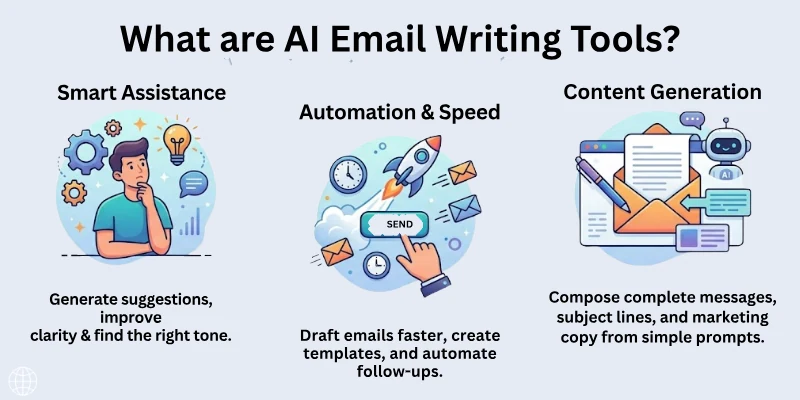
They suggest words, correct mistakes, and even help you write in a tone suitable for your audience.
How They Work
Speedy go to steps:
- Suggest better subject lines
- Write professional sentences
- Fix grammar and spelling errors
- Adjust tone for different audiences
- Offer multiple versions of the same email
Why Use AI Tools for Writing Emails
Using these tools has many benefits. They reduce mistakes, save time, and help you communicate better. You can focus more on your ideas instead of worrying about structure and words.
Benefits
The major advantages of using AI for email writing are:
- Write emails faster
- Improve grammar and spelling
- Make your emails sound professional
- Adjust tone according to the recipient
- Reduce stress while drafting multiple emails
Types of Emails You Can Write With AI Tools
These tools can help with almost any email type. Examples include:
- Business proposals
- Follow-up emails
- Job applications
- Marketing emails
- Customer support replies
- Newsletters
- Invitations or announcements
Using AI for different types makes communication smoother and consistent.
How to Use AI for Writing Emails: Step by Step
This is the main part of the guide. Follow each step carefully.
Step 1: Choose the Right AI Tool
Choose a tool that matches your skill level and email type. Popular options include ChatGPT, Grammarly, Jasper AI, and Writesonic. Some tools are free with limited features, while others offer advanced paid options.
AI tools work differently, so test a few and see which one feels easier for you. Some tools are better for long emails, while others focus on grammar and tone. Make sure the tool has simple controls and supports the kind of emails you need to write. If you send emails in different languages, choose a tool that supports multilingual writing.
Tips
- Free tools are good for practice
- Paid tools offer templates and better suggestions
- Check if it supports multiple languages if needed
Step 2: Decide Your Email Goal
Know the purpose of your email before you start writing. Clear goals help the tool understand what you want. Examples include:
- Ask for information
- Send a follow-up
- Reply to a complaint
- Introduce your business
A clear goal gives your email direction and keeps it short and focused. It also helps the tool avoid adding unnecessary lines or confusing points. When your purpose is strong, the email sounds confident and professional. This step saves a lot of editing later.
Why This Matters
- Helps AI write accurate content
- Keeps your message focused
- Saves time editing
Step 3: Provide Basic Instructions
AI tools need a short prompt to start writing. Your prompt should include your goal, tone, and main points. For example:
- “Write a polite follow-up email for a job interview”
- “Create a friendly email for product promotion”
- “Reply professionally to a customer complaint”
The clearer your instructions, the better your email draft will be. You don’t need long explanations, just direct and simple details. This helps the tool understand your intent and avoid creating a generic or unclear message. A good prompt often reduces the editing work by half.
Step 4: Review and Edit Drafts
AI tools give you a draft, but always check it before sending. Review:
- Grammar and spelling
- Tone and politeness
- Accuracy of facts
- Clarity and flow
Read the email like you are the receiver and see if it makes sense. Change any line that feels too formal, robotic, or unclear. Make sure the message matches your personal style and your goal. Checking the subject line is also important because it affects how fast the reader opens your email.
Tips
- Edit only what needs improvement
- Keep the voice personal if needed
- Make sure subject line matches the content
Step 5: Personalize Your Emails
Add personal details to make your emails more effective. AI can suggest placeholders for:
- Names
- Dates
- Company names
- Specific references
Personal touches make people feel valued and increase the chance of getting a reply. Mentioning something small, like a past conversation or project, shows genuine connection. Even in business emails, a human touch makes a big difference. AI helps you structure the email, but your personal details make it meaningful.
Step 6: Send and Track
Some AI tools integrate directly with email platforms. You can send emails instantly and track:
- Open rates
- Reply rates
- Engagement for marketing emails
Tracking helps you understand what kind of emails perform better. You can learn which subject lines attract more clicks and which tone works best. This makes every next email stronger and more effective. Over time, tracking data helps you improve your communication style.
Common Mistakes to Avoid
Even with AI tools, beginners make mistakes. Avoid these:
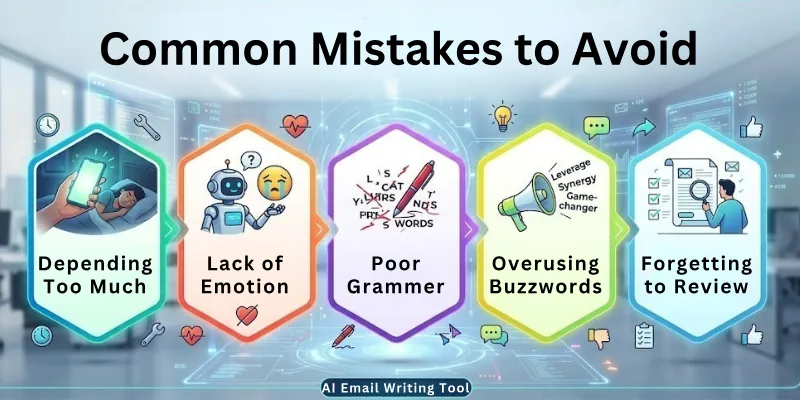
- Avoid using vague instructions because unclear prompts lead to weak email drafts.
- Never send emails without reviewing them to ensure accuracy and tone.
- Don’t rely on AI too much or you may lose the personal touch your message needs.
- Always consider the recipient’s preferences so your email feels relevant and respectful.
- Avoid copying AI content without customization because it makes your email look generic.
- Fixing these mistakes keeps your emails professional and effective.
Correcting these ensures your emails are professional and effective.
Best Practices for Using AI Email Tools
Follow these tips for maximum benefit:
- Always review the generated emails to ensure they match your purpose clearly.
- Adjust the tone to match your audience so your message feels natural and appropriate.
- Keep your goals clear in every prompt to help the tool create accurate content.
- Use AI as a helper, not a replacement, to keep your emails personal and authentic.
- Learn from AI suggestions to improve your own writing skills over time.
Top 10 AI Tools for Writing Emails
Here is a list of tools to make your work easier:
- ChatGPT – Write professional and casual emails
- Grammarly – Grammar, tone, and clarity checks
- Jasper AI – Marketing and sales email drafting
- Writesonic – Quick drafts for any type of email
- Copy.ai – Friendly and professional email writing
- Lavender – Email personalization and analytics
- Flowrite – Transform short instructions into full emails
- MailMentor – Suggestions for better subject lines
- Anyword – AI email marketing content
- SmartWriter – Personalized cold emails
Final Note
In this guide, we covered how to use AI for writing emails in detail. You learned step by step, from choosing tools to personalizing emails. Always remember to review and add your personal touch to make emails effective.
Practice daily, explore different tools, and soon writing professional emails will feel easy and natural. Good luck, and happy emailing! ✨
FAQs: How to Use AI Tools for Email Writing
Here are some of the most commonly asked questions related to the how to use ai for writing emails:
Yes, beginners can use these tools easily because they guide you step by step. You do not need advanced skills. Many people search for how to use AI for writing emails to save time and improve clarity.
AI tools can help with business proposals, follow-ups, job applications, newsletters, marketing emails, and customer replies. This makes your communication professional and consistent.
Yes, AI can adjust tone for formal, casual, friendly, or persuasive messages. It ensures your email sounds polite and clear to the recipient. This is useful for both work and personal communication.
Yes, always review the email. AI may not fully understand context, facts, or personal touches. Reviewing ensures accuracy, professionalism, and personal connection.
Yes, many tools allow you to add names, dates, and company references automatically. Personalized emails get better engagement and responses. You can also customize suggestions manually.
Yes, tools like ChatGPT, Grammarly, and Copy.ai offer free versions. Paid versions give extra features like templates, advanced tone options, and automatic personalization.
AI can generate catchy and relevant subject lines that encourage recipients to open your email. It can suggest multiple options and optimize for clarity and impact.
Yes, AI can draft follow-ups based on previous emails. It can keep the tone polite, remind the recipient, and summarize earlier messages. This saves time and improves response rates.
Yes, some tools integrate with email clients to track opens, replies, and engagement. This helps you learn which style works best and improve future emails.
No, if you review and personalize them, AI emails can sound natural and friendly. Treat AI as a helper that saves time while keeping your voice in the message.






- Be Respectful
- Stay Relevant
- Stay Positive
- True Feedback
- Encourage Discussion
- Avoid Spamming
- No Fake News
- Don't Copy-Paste
- No Personal Attacks
- Be Respectful
- Stay Relevant
- Stay Positive
- True Feedback
- Encourage Discussion
- Avoid Spamming
- No Fake News
- Don't Copy-Paste
- No Personal Attacks
