Top AI Tools for Email Writing – Boost Email Productivity
Published: 25 Jun 2026
Email writing has become one of the most important daily tasks for professionals and marketers. Studies from recent workplace productivity reports show that people spend nearly 28% of their workday on emails, and a large portion of that time goes into writing and rewriting messages. This makes email communication slow and mentally tiring.
Many users now turn to automation to handle this workload, and that is where the top AI tools for email writing are changing the game. These tools help create faster, clearer, and more effective emails without wasting hours on editing.
In this article, we will discuss the top AI tools for email writing in detail. You will also learn how these tools improve productivity and help you write emails that get better responses and stronger results.
What Are AI Tools for Email Writing?
AI tools for email writing help people create emails quickly, clearly, and in a more professional way. These tools reduce the effort of thinking and typing by generating ready-to-use email content based on simple instructions. They are widely used in workplaces, marketing, and business communication to save time and improve writing quality.
Definition: AI tools for email writing are software that use artificial intelligence to create, improve, and personalize emails. They turn user input into clear, structured messages using NLP, templates, and predictive text.
Types of email tasks:
- Cold emails
- Marketing emails
- Follow-ups
- Professional replies
AI Writing Tools for General Emails
AI writing assistants make email creation faster and more efficient by helping users generate clear and professional messages. These tools are suitable for daily communication, business emails, customer interactions, and quick responses.
Below are some of the best AI writing assistants for general emails:
- ChatGPT
- Jasper AI
- Reply.io AI
- Smartwriter AI
- Mailchimp AI
- Copy.ai
- Grammarly AI
- Writesonic
1. ChatGPT
ChatGPT is one of the most flexible AI tools for writing emails. It helps users create professional, clear, and well-structured emails in seconds. You can use it for daily communication, business messages, or quick replies without spending time on drafting.
Key features:
Following are the key features of ChatGPT:
- Email drafting in seconds
- Tone control (formal, friendly, persuasive)
- Rewrite and improve existing emails
- Custom prompts for different situations
Pros:
Below are the pros of using ChatGPT:
- Very flexible for all email categories
- Easy for beginners and professionals
- Produces fast and high-quality outputs
- Helps overcome writer’s block
- Supports multiple writing styles
Cons:
Here are the cons of ChatGPT:
- Requires clear instructions for best results
- No built-in email sending system
- Output may need slight editing
- Depends on user prompt quality
- Not specialized for automation workflows
Best use case: Daily email writing and quick replies
Pricing summary: Free plan available, paid version for advanced features

2. Jasper AI
Jasper AI is a powerful AI writing tool that helps users create professional and engaging emails. It is especially popular among marketers and businesses because of its advanced templates and brand voice features.
Key features:
Following are the key features of Jasper AI:
- Pre-built email templates for various purposes
- Brand voice customization for consistent messaging
- Marketing-focused content generation
- Team collaboration capabilities
- AI-powered content enhancement tools
Pros:
Below are the pros of using Jasper AI:
- Creates high-quality email content
- Maintains consistent brand messaging
- Offers a wide range of templates
- Suitable for teams and businesses
- Supports multiple marketing use cases
Cons:
Here are the cons of Jasper AI:
- No fully functional free plan
- Can be expensive for individual users
- Requires some learning for beginners
- Advanced features may feel overwhelming
- Best results often require detailed inputs
Best use case: Marketing emails and business communication
Pricing summary: Paid plans available with different feature levels
3. Reply.io AI
Reply.io AI is designed for sales professionals and businesses that rely on email outreach. It helps automate cold email campaigns and follow-ups while improving personalization.
Key features:
Following are the key features of Reply.io AI:
- AI-powered cold email generation
- Automated email sequences and follow-ups
- CRM integration support
- Personalized outreach at scale
- Campaign performance tracking
Pros:
Below are the pros of using Reply.io AI:
- Saves time on manual outreach
- Improves sales workflow efficiency
- Supports large-scale campaigns
- Helps increase response rates
- Strong integration options
Cons:
Here are the cons of Reply.io AI:
- Primarily focused on sales teams
- Can be difficult for beginners
- Premium plans may be costly
- Setup requires some effort
- Limited usefulness outside outreach campaigns
Best use case: Cold email outreach and lead generation
Pricing summary: Paid plans with advanced outreach features
4. Smartwriter AI
Smartwriter AI focuses on creating highly personalized emails. It gathers relevant information about prospects and uses it to generate outreach emails that feel more natural and engaging.
Key features:
Following are the key features of Smartwriter AI:
- Personalized email generation
- Prospect research automation
- LinkedIn-based personalization
- AI-generated icebreakers
- Outreach campaign support
Pros:
Below are the pros of using Smartwriter AI:
- Creates highly personalized emails
- Helps improve reply rates
- Saves research time
- Useful for sales professionals
- Enhances outreach effectiveness
Cons:
Here are the cons of Smartwriter AI:
- Limited free access
- Requires setup and configuration
- Can be expensive for small teams
- Learning curve for new users
- Dependent on available prospect data
Best use case: Personalized cold email campaigns
Pricing summary: Paid plans with various usage limits
5. Mailchimp AI
Mailchimp AI helps businesses create and manage email marketing campaigns more efficiently. It offers AI-powered suggestions that improve content quality and audience engagement.
Key features:
Following are the key features of Mailchimp AI:
- AI-assisted email content creation
- Audience segmentation tools
- Marketing automation workflows
- Campaign analytics and reporting
- Subject line recommendations
Pros:
Below are the pros of using Mailchimp AI:
- Easy-to-use interface
- Strong marketing automation features
- Reliable email delivery system
- Detailed campaign analytics
- Suitable for businesses of all sizes
Cons:
Here are the cons of Mailchimp AI:
- Advanced features require paid plans
- Free plan has limitations
- Costs increase as contact lists grow
- Some features require technical understanding
- Limited customization in basic plans
Best use case: Email marketing campaigns and newsletters
Pricing summary: Free plan available with paid upgrades
6. Copy.ai
Copy.ai is an AI writing platform that helps users generate email marketing content quickly. It offers templates and tools that simplify the email creation process.
Key features:
Following are the key features of Copy.ai:
- AI-generated marketing emails
- Email campaign templates
- Subject line generation
- Multiple tone options
- Content idea generation tools
Pros:
Below are the pros of using Copy.ai:
- Fast content generation
- User-friendly interface
- Suitable for marketers and businesses
- Provides creative content ideas
- Supports various writing styles
Cons:
Here are the cons of Copy.ai:
- Output may require editing
- Free plan has usage restrictions
- Limited advanced automation features
- Can produce generic content occasionally
- Less effective for highly technical emails
Best use case: Marketing and promotional email writing
Pricing summary: Free and paid plans available
7. Grammarly AI
Grammarly AI helps users improve the quality of their emails by correcting grammar, enhancing clarity, and adjusting tone. It is useful for professional communication and everyday writing.
Key features:
Following are the key features of Grammarly AI:
- Real-time grammar correction
- Tone detection and suggestions
- Sentence rewriting assistance
- Clarity improvement recommendations
- Vocabulary enhancement tools
Pros:
Below are the pros of using Grammarly AI:
- Improves email professionalism
- Easy to integrate with browsers and apps
- Accurate grammar checking
- Free version available
- Works in real time while writing
Cons:
Here are the cons of Grammarly AI:
- Not a complete email generator
- Advanced features require a subscription
- Limited creative writing capabilities
- Some suggestions may not fit context
- Internet connection is required for full functionality
Best use case: Editing and improving existing emails
Pricing summary: Free plan available with premium upgrades
8. Writesonic
Writesonic is an AI writing tool that helps users generate email drafts, subject lines, and marketing content quickly. It is a good option for users looking for a balance between simplicity and functionality.
Key features:
Following are the key features of Writesonic:
- AI-powered email generation
- Email subject line suggestions
- Ready-to-use templates
- Multiple writing tones
- Fast content creation tools
Pros:
Below are the pros of using Writesonic:
- Easy for beginners to use
- Free plan available
- Generates content quickly
- Suitable for multiple email types
- Simple and clean interface
Cons:
Here are the cons of Writesonic:
- Free plan includes limited credits
- Output may need manual editing
- Advanced features require paid plans
- Can generate repetitive content at times
- Less effective for highly specialized emails
Best use case: Quick email drafts and everyday email writing
Pricing summary: Free plan available with paid subscription options
Comparison Table of Top AI Tools for Email Writing
The following table compares the top AI tools for email writing based on their best use cases, pricing models, key strengths, and overall ratings:
| Tool Name | Best For | Free/Paid | Key Strength | Rating |
| ChatGPT | General email writing and quick replies | Free + Paid | Flexible email generation for multiple use cases | 4.9/5 |
| Jasper AI | Business and marketing emails | Paid | Brand voice consistency and advanced templates | 4.7/5 |
| Reply.io AI | Cold email outreach | Paid | Automated outreach and follow-up sequences | 4.6/5 |
| Smartwriter AI | Personalized cold emails | Paid | Deep personalization using prospect data | 4.6/5 |
| Mailchimp AI | Email marketing campaigns | Free + Paid | Marketing automation and audience targeting | 4.8/5 |
| Copy.ai | Promotional and marketing emails | Free + Paid | Fast content generation and template library | 4.5/5 |
| Grammarly AI | Email editing and improvement | Free + Paid | Grammar correction and tone optimization | 4.8/5 |
| Writesonic | Quick email drafting | Free + Paid | Fast AI-generated email content | 4.5/5 |
How to Use AI Tools for Writing Better Emails
Using AI tools effectively can help you create professional, engaging, and goal-focused emails in less time. By following a few simple steps, you can improve both the quality and effectiveness of your email communication.
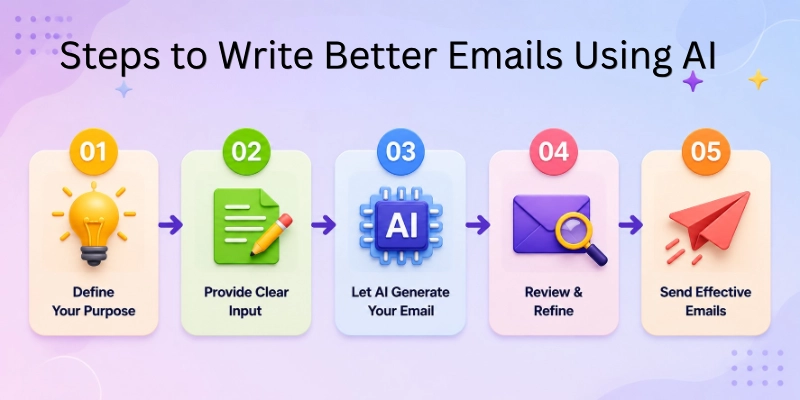
Follow these steps to get the best results from AI email writing tools:
- Step 1: Choose Your Goal: Define the purpose of your email, whether it is for sales outreach, a follow-up message, customer communication, or a marketing campaign.
- Step 2: Select the Right Tone: Choose a tone that matches your audience, such as formal, friendly, professional, persuasive, or conversational.
- Step 3: Add Relevant Context: Provide key details, background information, and objectives so the AI can generate a more accurate and personalized email.
- Step 4: Generate and Refine the Email: Let the AI create a draft, then review and edit the content to ensure it matches your expectations and goals.
- Step 5: Personalize Before Sending: Add personal touches such as the recipient’s name, company details, or specific references to make the email more engaging and authentic.
Common Mistakes to Avoid When Using AI Email Writing Tools
AI tools can save time and improve email quality, but relying on them without proper review can reduce effectiveness. Avoiding a few common mistakes will help you create more professional, personalized, and engaging emails.
The following are some common mistakes to avoid when using AI tools for email writing:
- Over-Relying on AI: Do not depend entirely on AI-generated content, as human review helps ensure accuracy, relevance, and authenticity.
- Sending Generic Emails: Avoid sending emails exactly as generated because generic messages often fail to engage recipients and receive fewer responses.
- Ignoring Tone Customization: Always adjust the tone to match your audience and purpose so the email feels appropriate and professional.
- Not Editing the Output: Review and refine the generated content to correct mistakes, improve clarity, and add important details.
- Using Spam-Like Wording: Stay away from overly promotional language and excessive sales phrases that can trigger spam filters or reduce trust.
Conclusion
In this guide, we have covered top AI tools for email writing. We explored what these tools are, their benefits, the best options available, and how they can help you create professional emails faster and more effectively.
Whether you need help with daily communication, cold outreach, or email marketing campaigns, the right AI tool can save time and improve your results. Choosing a tool that matches your specific needs will help you get the most value from AI-powered email writing.
Personal Recommendation: If you need an all-purpose solution, ChatGPT is an excellent choice because of its flexibility and ease of use. For email marketing and outreach, tools like Mailchimp AI and Reply.io AI offer specialized features that can improve campaign performance.
Thank you for taking the time to read this guide. I hope it helps you find the best AI email writing tool for your workflow and communication needs.
💬 We’d love to hear your thoughts! Share your experience or favorite AI email writing tool in the comments below. 🚀✨
FAQs
Below are some frequently asked questions about top AI tools for email writing:
The top AI tools for email writing help users create professional emails faster with less effort. Popular options include ChatGPT, Jasper AI, Grammarly AI, Mailchimp AI, and Copy.ai. Each tool offers different features for business emails, marketing campaigns, and daily communication.
The following points explain the availability of free AI email writing tools:
- Many tools offer free plans or free trials.
- ChatGPT, Grammarly AI, and Writesonic provide free access with limitations.
- Premium plans unlock advanced features and higher usage limits.
Yes, AI email generators can create professional business emails in seconds. They help improve grammar, structure, and tone while maintaining a professional style. Most tools also allow users to customize the message before sending it.
Below are some reasons why certain tools work well for cold email outreach:
- Reply.io AI helps automate outreach campaigns.
- Smartwriter AI focuses on personalized cold emails.
- Both tools help improve response rates through targeted messaging.
AI email writing tools use natural language processing and machine learning to understand user input. They analyze prompts, identify intent, and generate relevant email content. Many tools also use templates and predictive text to improve results.
The following benefits can help increase email engagement:
- Better subject lines attract more opens.
- Personalized content encourages replies.
- Clear and professional writing improves communication.
Most reputable AI email writing tools are safe when used responsibly. However, users should avoid sharing sensitive information in prompts. Reviewing AI-generated content before sending is also a good practice.
Below are some popular choices for email marketing:
- Mailchimp AI offers campaign management and automation.
- Copy.ai helps create promotional email content quickly.
- Jasper AI supports marketing-focused email writing.
AI tools support writers by reducing the time spent on drafting and editing. They work best when combined with human review and personalization. This approach helps create more accurate and authentic emails.
The following features are important when choosing AI email writing software:
- Tone customization options
- Email templates and automation
- Personalization capabilities
- Grammar and clarity improvements
- Free or affordable pricing plans
These features help users find the right tool for their communication goals and workflow.






- Be Respectful
- Stay Relevant
- Stay Positive
- True Feedback
- Encourage Discussion
- Avoid Spamming
- No Fake News
- Don't Copy-Paste
- No Personal Attacks
- Be Respectful
- Stay Relevant
- Stay Positive
- True Feedback
- Encourage Discussion
- Avoid Spamming
- No Fake News
- Don't Copy-Paste
- No Personal Attacks
