Text-to-Video AI Tools: Best Options for Creating Videos From Text
Published: 30 Sep 2026
Have you ever had a great video idea but stopped because you did not have the time, editing skills, or equipment to turn it into a finished video? Today, text-to-video AI tools can help bridge that gap. You can describe a scene, write a script, or provide a simple prompt, and an AI video generator can turn your instructions into visual content.
These tools have become useful for marketers, YouTubers, social media creators, educators, businesses, and beginners who want to experiment with video without starting every project from scratch. However, different platforms are designed for different jobs. Some focus on cinematic text-to-video generation, while others are better for talking avatars, presentations, marketing videos, or quick social clips.
In this guide, we will look at the best text-to-video AI tools, what each one does well, their important features, pricing, limitations, and the type of creator each tool best suits.
What Are Text-to-Video AI Tools?
Text-to-video AI tools are software platforms that use artificial intelligence to create video content from written instructions. Instead of manually filming every scene, searching for stock footage, and editing each clip, you can describe what you want the video to show.
For example, you could enter a prompt such as
“A small wooden boat sailing across a calm lake at sunrise, cinematic camera movement, soft morning light.”
Depending on the platform, the AI may generate a short video clip matching the description.
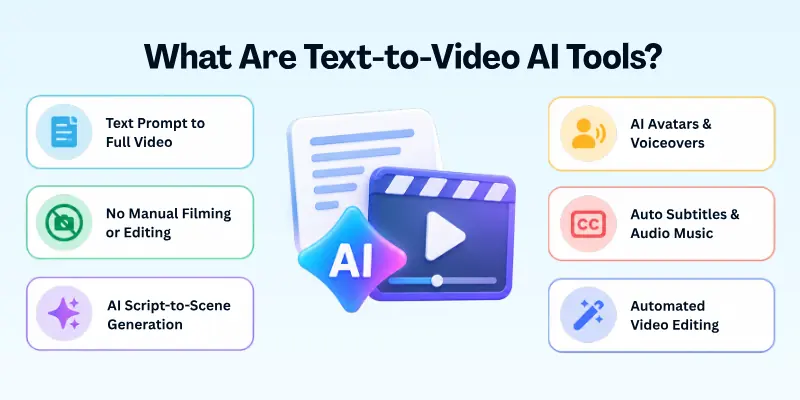
Some tools go further. They can turn a complete script into a sequence of scenes, add AI-generated voices, create avatars, generate background music, add subtitles, or help edit the finished video.
Who Can Use Text-to-Video AI Tools?
These tools can be useful for:
- YouTube creators
- TikTok and Instagram creators
- Digital marketers
- Small businesses
- Teachers and educators
- Course creators
- Freelancers
- Advertising teams
- Filmmakers and visual artists
- Bloggers who want to turn articles into videos
- Beginners learning video creation
They can create different types of content, including social media clips, product demonstrations, explainer videos, cinematic scenes, educational videos, advertisements, presentations, concept videos, and avatar-based videos.
Top Text-to-Video AI Tools
- Google Flow
- Runway
- Kling AI
- Pika
- Luma Dream Machine
- HeyGen
- Synthesia
- InVideo AI
- Adobe Firefly
- Hailuo AI
1. Google Flow
Google Flow is one of the strongest options for creators who want more control over AI-generated filmmaking. It is built around Google’s video and image models, including Veo, and is designed for creating and organizing multiple shots rather than simply producing one isolated clip.
You can use natural-language prompts to generate video, combine text, image, and video inputs, extend clips, and work with scenes through tools such as Scenebuilder. Google also positions Flow for films, music videos, visual concepts, and other creative projects.
- Best For: Filmmakers, visual storytellers, and creators who want cinematic AI video.
- Key Features: Text-to-video, frames-to-video, ingredients-to-video, video extension, video-to-video editing, Scenebuilder, characters, and avatars.
- Video Quality: Supports Veo 3.1 generation, with 1080p upscaling on supported paid plans and 4K upscaling on Ultra.
- AI Capabilities: Veo-based video generation, Gemini-powered assistance, image generation, video editing, and natural-language creative controls.
- Ease of Use: Beginner-friendly interface, although getting consistently good results requires practice with prompting.
- Customization: Strong control over scenes, assets, prompts, and iterative changes.
- Audio/Voice: Veo 3.1 supports generated audio in relevant workflows.
- Pricing: Google Flow currently offers free access with 50 daily Flow credits. Google AI Plus is listed at $4.99/month with 200 monthly Flow credits, Google AI Pro at $19.99/month with 1,000 monthly Flow credits, and Google AI Ultra at $99.99/month with 10,000 monthly Flow credits. A higher $199.99/month Ultra option is also listed with 25,000 monthly credits.
- Important Note: Credit consumption varies by model and generation type. For example, Veo 3.1 Quality uses 100 credits for an 8-second generation, while Veo 3.1 Fast uses 20 credits for an 8-second generation for non-Ultra subscribers.
Why choose Google Flow?
Choose Flow if your goal is more than creating random short clips. Its scene-based workflow makes it particularly interesting for people who want to develop a visual story with several connected shots.
2. Runway
Runway is a well-known AI video creation platform aimed at creators who want more control over generative video. Its workflow includes text, image, video, and editing tools, and the platform provides access to several AI video models.
One important distinction is that Runway’s current Gen-4 workflow requires an input image alongside the text prompt. Gen-4 supports 5- and 10-second generations in multiple aspect ratios, while other models and tools provide additional generation options.
- Best For: Content creators, filmmakers, designers, and advanced AI video users.
- Key Features: AI video generation, image generation, video editing, text-to-speech, custom voices, lip sync, and access to multiple video models.
- Video Quality: Gen-4 supports 1280×720 in 16:9 and several other aspect ratios, with 24 FPS output.
- AI Capabilities: Text-guided video generation, image-to-video, generative editing, voice generation, and third-party model access.
- Ease of Use: Fairly accessible for beginners but offers enough controls for experienced creators.
- Customization: Strong prompt, image, aspect ratio, and editing controls.
- Audio/Voice: Text-to-speech and custom voices are available on supported paid plans.
- Pricing: Runway currently has Free, Standard, Pro, Max, Team, and Enterprise options. The free plan includes a one-time 125-credit allocation, Standard provides 625 monthly credits, Pro provides 2,250, and Max provides 9,500 monthly credits.
- Plan Change: Runway is moving away from its old Unlimited model. New subscribers are directed toward Max for high-volume generation, while eligible legacy Unlimited subscribers are scheduled to transition to Max on November 30, 2026.
Why choose Runway?
Runway is a strong choice when you want a broader creative workspace instead of a basic text-to-video generator. It is particularly useful if you expect to generate, edit, and refine many visual assets in the same platform.
3. Kling AI
Kling AI is a popular tool for creating AI videos. Its Kling 3.0 model supports text-to-video and image-to-video generation. It also offers native audio, multi-shot scenes, character consistency, and 4K video. These features help creators make detailed videos with realistic movement and complex scenes.
- Best For: Creators who want detailed cinematic AI video and advanced generation controls.
- Key Features: Text-to-video, image-to-video, multi-shot generation, video extension, native audio, and 4K video generation.
- Video Quality: Kling 3.0 supports 1080p and native 4K generation on supported workflows.
- AI Capabilities: Text prompts, multimodal inputs, character and scene generation, native audio, and motion-focused video generation.
- Ease of Use: Relatively simple for basic generations, although advanced features take more experimentation.
- Customization: Strong controls for duration, model selection, resolution, and creative direction.
- Audio/Voice: Kling 3.0 supports native audio generation and audio synchronization.
- Pricing: Kling’s official pricing information lists a free Basic option and paid Standard, Pro, Premier, and Ultra tiers. Its July 2026 credit guide listed Standard at $6.99/month with 660 credits, Pro at $25.99/month with 3,000 credits, Premier at $64.99/month with 8,000 credits, and Ultra at $127.99/month with 26,000 credits.
- Commercial Use: Paid plans listed by Kling include commercial use, while the free Basic tier is described as non-commercial.
Why choose Kling AI?
Kling is worth considering if visual quality and realistic movement matter more to you than having a traditional presentation-style video editor.
4. Pika
Pika focuses on making AI video creation accessible and playful. It supports text-to-video and image-to-video generation, while its creative effects and transformation tools allow users to experiment with unusual visual ideas.
Its current Pika 2.5 system supports text-to-video and image-to-video at different resolutions, while tools such as Pikascenes, Pikadditions, Pikaswaps, Pikatwists, and Pikaffects provide additional creative workflows.
- Best For: Social media creators, beginners, short-form content creators, and people experimenting with creative effects.
- Key Features: Text-to-video, image-to-video, Pikascenes, Pikadditions, Pikaswaps, Pikatwists, Pikaffects, and Pikaframes.
- Video Quality: Pika 2.5 supports 480p, 720p, and 1080p depending on the plan and generation type.
- AI Capabilities: Text-to-video, image animation, object additions and swaps, creative transformations, and effects.
- Ease of Use: Very beginner-friendly.
- Templates: Creative workflows and effects make it easy to experiment without building every scene from scratch.
- Customization: Good for stylized and social-media-oriented video concepts.
- Audio/Voice: Pikaformance supports audio-driven image animation in supported workflows.
- Pricing: Pika currently lists a Free plan, Standard at $10/month, Pro at $35/month, and Fancy at $95/month on its monthly pricing page. The paid tiers provide larger monthly credit allocations.
- Commercial Use: Paid plans include commercial use according to Pika’s current pricing information.
Why choose Pika?
Pika is a good option if you want to create short, eye-catching clips without learning a complicated filmmaking workflow.
5. Luma Dream Machine
Luma’s Dream Machine is designed for generative video and visual creation. It is particularly useful for creators who want to turn ideas, images, and prompts into cinematic-looking clips.
The platform has evolved beyond simple prompt-based generation and includes different video models and workflows. Luma’s current documentation also lists Ray3.14 and related video capabilities.
- Best For: Filmmakers, designers, concept artists, and creators interested in cinematic AI video.
- Key Features: Text-to-video, image-to-video, video generation, visual editing, and creative iteration.
- Video Quality: Available quality depends on the model, plan, and generation workflow.
- AI Capabilities: Prompt-based generation, image animation, video creation, and creative transformations.
- Ease of Use: The basic workflow is simple, although achieving consistent professional results requires prompt experimentation.
- Customization: Useful controls for visual direction and generation settings.
- Audio/Voice: Audio capabilities depend on the selected model and current product workflow.
- Pricing: Luma’s current documentation lists a free tier for limited exploration and paid plans, including a Lite option listed at $9.99/month on the web.
- Best Advantage: It is particularly useful for visual experimentation and cinematic concepts.
Why choose Luma Dream Machine?
Luma makes sense when your project is visually driven and you want to explore different camera movements, environments, and cinematic ideas quickly.
6. HeyGen
HeyGen takes a different approach from purely cinematic text-to-video models. Instead of focusing only on generating fictional scenes, it specializes in turning scripts into videos featuring AI avatars, presenters, voiceovers, and other business-oriented video elements.
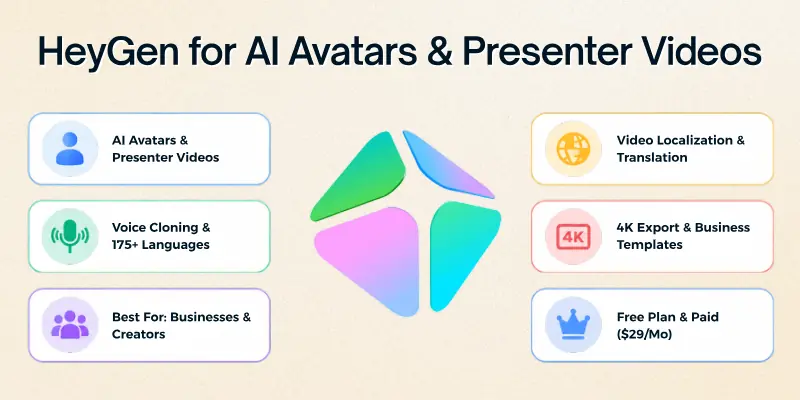
You can select an avatar, provide a script, and generate a presenter-style video. HeyGen also offers AI video generation, voice cloning, translation, and avatar-based workflows.
- Best For: Businesses, marketers, educators, course creators, and social media professionals.
- Key Features: AI avatars, text-to-video, script-based video creation, voiceovers, translation, video localization, and AI-generated visuals.
- Video Quality: Free and Creator plans support up to 1080p, while Pro supports 4K export.
- AI Capabilities: AI video generation, Avatar IV, voice cloning, photo avatars, translation, and AI-generated video assets.
- Ease of Use: Excellent for beginners.
- Templates: Includes video templates for common business and creator workflows.
- Customization: You can change avatars, scripts, visuals, branding, layouts, and other video elements.
- Audio/Voice: Voice cloning and 175+ languages and dialects are available on Creator and higher plans.
- Pricing: Free includes up to 3 videos per month with videos up to one minute. Creator is $29/month with 600 credits, Pro starts at $49/month with 1,000 credits and 4K export, and Business is $149/month plus $20 per additional seat.
Why choose HeyGen?
HeyGen is a better choice than a cinematic generator when your main goal is to create a presenter, training video, marketing video, product explanation, or multilingual business video.
7. Synthesia
Synthesia is another strong option for script-to-video production, especially for businesses and educational teams. Instead of asking you to create every visual scene manually, it lets you build videos around AI avatars, voices, scripts, templates, and branded layouts.
It is particularly useful for training, internal communication, onboarding, presentations, and instructional content. Synthesia currently supports AI avatars and voiceovers in 160+ languages.
- Best For: Training videos, business communication, educational content, presentations, and corporate teams.
- Key Features: AI avatars, script-to-video, AI Video Assistant, dubbing, templates, brand kits, and collaborative editing.
- Video Quality: Designed for professional business video production; export and feature availability depend on the plan.
- AI Capabilities: Script generation, AI avatars, AI-generated images, dubbing, translation, and video editing.
- Ease of Use: Very beginner-friendly.
- Templates: Strong selection for business, education, training, and presentation videos.
- Customization: Branding tools allow users to control colors, fonts, layouts, avatars, and other visual elements.
- Audio/Voice: AI voices and dubbing are major parts of the platform.
- Pricing: Synthesia currently lists Basic at $0/month, Starter at $29/month, Creator at $89/month, and Enterprise with custom pricing. Annual billing lowers the effective monthly price for Starter and Creator.
- Free Plan: Basic includes 1,200 credits per month and can be used for up to 10 minutes of video under the current credit system.
Why choose Synthesia?
Choose Synthesia if you need polished business videos rather than cinematic AI-generated scenes. It is particularly useful when the script and presenter are more important than complex visual storytelling.
8. InVideo AI
InVideo AI is designed around the idea of turning an idea or script into a complete video project. It combines AI generation with an editor, stock media, voiceovers, and other production tools.
This makes it different from pure text-to-video models that generate short visual clips. InVideo AI is more suitable when you want an entire social video, marketing video, explainer, or YouTube-style project.
- Best For: YouTube creators, marketers, social media managers, and beginners who want complete videos.
- Key Features: AI video generation, script-to-video, editing, stock footage, AI agents, voiceovers, and professional editing tools.
- Video Quality: Output depends on the selected model and workflow.
- AI Capabilities: Script generation, scene creation, AI video models, voice generation, editing, and media selection.
- Ease of Use: Highly beginner-friendly.
- Templates: Useful for common marketing and social video formats.
- Customization: Timeline editing, color, audio, 3D tools, and other professional editing options are available on paid plans.
- Audio/Voice: AI voice generation and other audio features are included in the platform.
- Pricing: InVideo currently lists Starter at $20 per seat/month when billed annually, Plus at $50, and Max at $100 on its current annual pricing page. Credit allocations and available models vary by plan.
- AI Models: Depending on the plan, users can access selected models and newer video-generation systems such as Seedance.
Why choose InVideo AI?
If your goal is to enter a topic or script and receive something closer to a finished YouTube or social media video, InVideo AI can be more practical than a pure cinematic video generator.
9. Adobe Firefly
Adobe Firefly is a strong choice for creators who already use Adobe’s creative ecosystem or want AI generation combined with established editing applications.
Firefly supports text-to-video through its Generate Video feature and also provides access to selected partner AI models. Adobe’s current Firefly plans include access to models from Adobe, Google, and other providers, depending on the plan.
- Best For: Designers, marketers, Adobe users, and professional creative teams.
- Key Features: Text-to-video, generative image creation, video generation, creative editing, and access to selected partner models.
- Video Quality: Firefly’s Generate Video supports 540p, 720p, and 1080p depending on the generation and available credits.
- AI Capabilities: Text-to-video, image generation, generative editing, and partner video models.
- Ease of Use: Beginner-friendly if you already understand Adobe’s creative tools.
- Customization: Strong creative controls and integration with Adobe’s wider ecosystem.
- Audio/Voice: Adobe also provides audio and video translation and sound-generation features in supported plans.
- Pricing: Adobe’s Firefly plans use monthly generative credits. Current plan information includes 4,000, 10,000, and 50,000-credit tiers, with higher plans providing more access to premium video models and features.
- Credit Usage: Adobe currently lists Firefly Generate Video at 20 credits/second for 540p, 50 credits/second for 720p, and 100 credits/second for 1080p.
- Partner Models: Depending on the plan, Firefly can provide access to models from companies such as Google, Runway, Kling, and Luma.
Why choose Adobe Firefly?
Firefly is especially attractive if you already work with Photoshop, Premiere Pro, Adobe Express, or other Adobe products and want generative AI inside a broader creative workflow.
10. Hailuo AI
Hailuo AI is another platform worth considering for short AI-generated video clips. It focuses on prompt-based visual generation and has attracted attention from creators experimenting with AI filmmaking, animation, and social content.
Like other generative video platforms, it works best when prompts clearly describe the subject, environment, movement, camera direction, and visual style.
- Best For: AI video experimentation, short-form content, visual concepts, and social media creators.
- Key Features: Text-to-video, image-to-video, character and scene generation, and creative video workflows.
- Video Quality: Output options depend on the selected model and current plan.
- AI Capabilities: Prompt-based video generation and image animation.
- Ease of Use: Suitable for beginners who want to experiment with generative video.
- Customization: Prompt detail has a major effect on the final result.
- Audio/Voice: Audio availability depends on the current model and workflow.
- Pricing: Hailuo’s plans and credit structure can change as new models are introduced, so check the platform’s current pricing before purchasing credits.
- Best Advantage: It provides another option for creators who want to test different AI video models rather than relying on one platform.
Why choose Hailuo AI?
Hailuo can be useful when you want another generative video model to compare against platforms such as Kling, Pika, Runway, or Luma.
Text-to-Video AI Tools Comparison
Choosing the best platform becomes easier when you compare what each one is actually designed to do.
| Tool | Best For | Text-to-Video | Avatars | Editing | 4K / High-End Output |
| Google Flow | Cinematic storytelling | Yes | Yes | Strong | Yes, supported workflows |
| Runway | Creative AI video | Yes, model dependent | Limited | Strong | 4K upscale on higher plans |
| Kling AI | Cinematic generation | Yes | Yes | Moderate | Yes |
| Pika | Creative short clips | Yes | Limited | Moderate | 1080p on paid plans |
| Luma Dream Machine | Visual concepts | Yes | Limited | Moderate | Model dependent |
| HeyGen | Presenter videos | Yes | Excellent | Strong | 4K on Pro |
| Synthesia | Business videos | Script-to-video | Excellent | Strong | Plan dependent |
| InVideo AI | Complete social videos | Yes | Yes | Excellent | Model dependent |
| Adobe Firefly | Professional creative work | Yes | Limited | Excellent ecosystem | 1080p Generate Video |
| Hailuo AI | AI video experiments | Yes | Model dependent | Moderate | Model dependent |
Best Text-to-Video AI Tools for Beginners
If you are completely new to AI video generation, start with a platform that matches your goal.
- Best for cinematic storytelling: Google Flow
- Best for advanced creative control: Runway
- Best for detailed AI video: Kling AI
- Best for creative effects: Pika
- Best for cinematic experimentation: Luma Dream Machine
- Best for AI presenters: HeyGen
- Best for business training: Synthesia
- Best for complete YouTube-style videos: InVideo AI
- Best for Adobe users: Adobe Firefly
- Best for experimenting with another video model: Hailuo AI
How to Choose the Best Text-to-Video AI Tool
Choosing the right tool becomes easier when you match its features with the type of video you want to create. Here are some useful options for different video needs:
- For Cinematic AI Videos: Google Flow, Runway, Kling AI, and Luma Dream Machine are suitable for cinematic scenes, visual storytelling, and creative projects.
- For Talking AI Avatar Videos: HeyGen and Synthesia work well for digital presenters, lessons, business content, and scripted videos.
- For YouTube Videos: InVideo AI, HeyGen, and Synthesia can help with different YouTube formats, from narrated content to virtual presenter videos.
- For Short Social Media Videos: Pika, Kling AI, Runway, and InVideo AI are useful for creating engaging short videos and creative visual content.
- For Business and Training Videos: Synthesia and HeyGen are practical choices for scripts, avatars, voiceovers, branding, and multilingual content.
- For Adobe Users: Adobe Firefly is a useful option for creators who already use Adobe tools and want AI video generation within their creative workflow.
What Makes a Good Text-to-Video AI Tool?
Before choosing a platform, look beyond the words “AI video generator.”
A useful tool should match your actual workflow.
1. Prompt Understanding
The model should understand the relationship between objects, actions, environments, and camera instructions.
A prompt such as:
“A woman walks through a rainy city street while the camera slowly moves backward.”
contains more useful information than simply writing:
“Rainy city.”
Specific prompts usually give the model more direction.
2. Consistency
If you are creating multiple scenes, look for tools that help maintain consistent characters, objects, environments, or visual styles.
This becomes particularly important for storytelling.
3. Video Length
Many generative video models focus on relatively short clips. If you need a 10-minute or 20-minute video, a script-to-video platform may be more practical than a cinematic generator.
4. Resolution
Check whether the platform supports 720p, 1080p, or 4K output.
Higher resolution is useful for professional production, but it can also consume more credits.
5. Audio
Some AI video platforms generate visuals only. Others provide speech, sound effects, music, or synchronized audio.
If audio is important to your project, check exactly what the plan includes.
6. Editing Tools
A generator can create a good clip, but you may still need to edit it.
Useful editing features include:
- Timeline editing
- Scene replacement
- Clip extension
- Subtitles
- Transitions
- Voiceovers
- Music
- Branding
- Aspect-ratio controls
7. Commercial Rights
Do not assume that every AI-generated video can automatically be used commercially.
Before publishing advertisements, client work, or monetized content, read the platform’s current licensing terms.
Tips for Getting Better Results
- Start With a Clear Idea: Know what the scene should communicate before writing the prompt.
- Describe Movement: Tell the model what should move and how the camera should move.
- Mention the Visual Style: You can describe a realistic, animated, documentary, cinematic, product-commercial, or other visual direction.
- Generate Short Clips First: Short clips make it easier to identify problems before spending more credits on a long project.
- Save Good Prompts: When you get a result you like, save the prompt and settings. You can use them as a starting point for related scenes.
- Edit the Final Video: Do not publish every generation immediately. Review the footage, remove strange frames, check audio, add captions where necessary, and make sure the final sequence makes sense.
Conclusion
Text-to-video AI has made video creation more accessible, but the tool you choose should depend on the type of video you want to produce. A cinematic generator, an AI avatar platform, and a script-to-video editor may all be called AI video tools, but they can have very different workflows.
The best results usually come from treating AI as part of the creative process rather than expecting one prompt to produce a perfect finished video. Write clear prompts, generate several versions when necessary, review the output carefully, and use editing tools to turn good AI clips into a coherent final video.
As these platforms continue to improve, creators have more options for turning written ideas into visual content without needing to handle every part of traditional video production themselves.
FAQs
To help you better understand text-to-video AI tools, here are answers to some common questions.
Text-to-video AI tools use artificial intelligence to create video content from written prompts, descriptions, or scripts. Depending on the platform, they can generate individual scenes, complete scripted videos, AI presenters, voices, and other visual assets.
The best tool depends on your project. Google Flow, Runway, Kling AI, and Luma are strong options for cinematic generation, while HeyGen and Synthesia are better for avatar-based videos, and InVideo AI is useful for complete social or YouTube-style projects.
Yes, several platforms offer free plans or trial credits. However, free accounts often have limits on generation quantity, resolution, features, or commercial use.
Yes. Platforms such as HeyGen, Synthesia, and InVideo AI are designed to turn scripts or ideas into more complete videos. Cinematic generators usually work better for creating individual scenes or short clips.
Modern AI video models can create highly realistic-looking scenes, but results are not always perfect. Motion, faces, objects, text, and physical interactions can still contain errors.
It depends on the platform, plan, model, and licensing terms. Always check the current commercial-use rules before using generated content for advertisements, client projects, or monetized content.
The right option depends on the channel. InVideo AI can be useful for complete narrated videos, while Runway, Kling, Google Flow, and Luma can help create original visual footage.
Yes. HeyGen and Synthesia are particularly focused on AI avatar videos. They allow users to provide scripts and generate videos featuring digital presenters and AI voices.
Some do, and some focus primarily on visuals. Platforms with native or integrated audio capabilities can generate speech, sound effects, music, or synchronized audio, but the exact features depend on the model and subscription.





- Be Respectful
- Stay Relevant
- Stay Positive
- True Feedback
- Encourage Discussion
- Avoid Spamming
- No Fake News
- Don't Copy-Paste
- No Personal Attacks
- Be Respectful
- Stay Relevant
- Stay Positive
- True Feedback
- Encourage Discussion
- Avoid Spamming
- No Fake News
- Don't Copy-Paste
- No Personal Attacks
