How to Use AI for Coding Practice: Tools & Tips
Published: 25 May 2026
Artificial intelligence is transforming the way developers and students learn programming. Earlier, coding practice required heavy documentation reading, debugging for hours, and waiting for mentor feedback.
Now AI tools provide instant explanations, real-time debugging, code suggestions, and even project ideas. This makes learning faster, more interactive, and less frustrating.
If you want to understand how to use AI for coding practice, this guide will walk you through practical methods, smart strategies, and expert-level usage tips to improve your coding skills efficiently.
How to Use AI for Coding Practice
Guys, here are the best ways you can use AI to improve your coding practice:
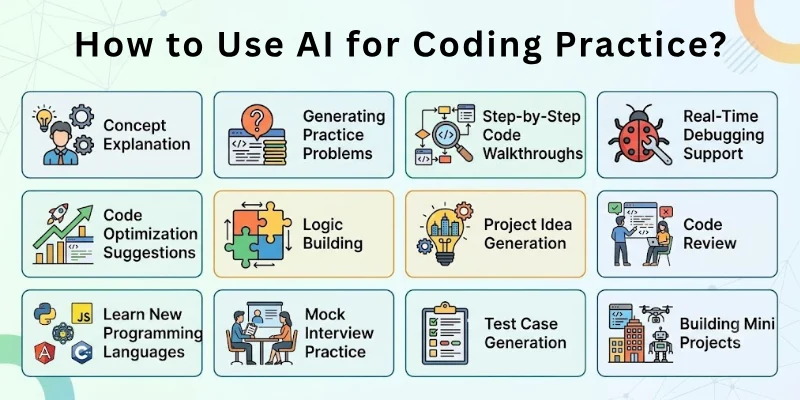
- Concept Explanation and Clarification
- Generating Practice Problems
- Step-by-Step Code Walkthroughs
- Real-Time Debugging Support
- Code Optimization Suggestions
- Algorithm and Logic Building
- Project Idea Generation
- Code Review and Feedback
- Learning New Programming Languages
- Mock Interview Practice
- Test Case Generation
- Building Mini Projects with AI Guidance
So guys, let us learn about each in detail.
1. Concept Explanation and Clarification
When learning programming, understanding core concepts is critical. AI can explain topics like loops, recursion, object-oriented programming, or data structures in simple terms.
How to Use It:
- Ask AI to explain a coding concept in simple English
- Request real-life examples
- Ask for differences between similar concepts
- Request diagrams or structured breakdown
- Summarize explanation in your own words
2. Generating Practice Problems
Practice is the key to mastering coding. AI can generate unlimited practice problems based on difficulty level. You can request beginner, intermediate, or advanced challenges. This allows continuous improvement without searching manually. Regular problem-solving strengthens logical thinking.
How to Use It:
- Ask AI to generate 10 coding problems on a topic
- Specify difficulty level
- Request problems with input-output examples
- Solve them independently first
- Ask AI to check your solutions
3. Step-by-Step Code Walkthroughs
Sometimes understanding how code works is more important than writing it. AI can break down complex programs line by line. It explains why each step is necessary. This improves logical clarity and debugging skills. Detailed walkthroughs accelerate learning.
How to Use It:
- Paste your code into AI
- Ask for line-by-line explanation
- Request simplified explanation
- Ask what happens if certain lines change
- Analyze logic deeply
4. Real-Time Debugging Support
Debugging can be frustrating for beginners. AI can identify syntax errors, logical mistakes, and optimization issues. It explains why the error occurred and how to fix it. This reduces wasted time and increases productivity. Faster debugging means more practice.
How to Use It:
- Paste error message into AI
- Share the problematic code
- Ask for root cause explanation
- Apply suggested fix
- Test code again
5. Code Optimization Suggestions
Writing working code is good, but writing efficient code is better. AI can suggest improvements in performance and readability. It helps reduce time complexity and memory usage. This builds professional-level coding habits. Optimization improves coding confidence.
How to Use It:
- Share your working code
- Ask for performance improvements
- Request time and space complexity analysis
- Implement optimized version
- Compare outputs
6. Algorithm and Logic Building
AI helps design algorithms before coding. It can outline logical steps clearly. Strong logic makes coding easier and more accurate. AI can also compare multiple algorithm approaches. This improves problem-solving depth.
How to Use It:
- Describe the problem
- Ask AI to design algorithm steps
- Compare brute-force vs optimized methods
- Convert algorithm into code
- Test with sample inputs
7. Project Idea Generation
Projects are essential for practical learning. AI can suggest project ideas based on your skill level. It can also outline features and development steps. Building projects strengthens real-world coding skills. AI can act as your development assistant.
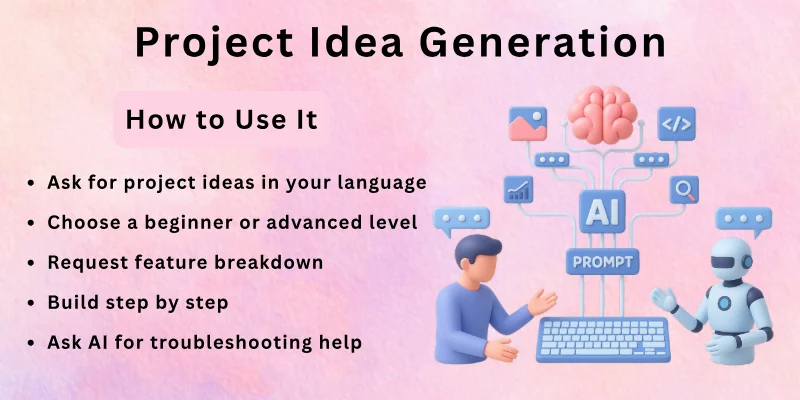
How to Use It:
- Ask for project ideas in your language
- Choose a beginner or advanced level
- Request feature breakdown
- Build step by step
- Ask AI for troubleshooting help
8. Code Review and Feedback
Getting feedback improves coding quality. AI can review your code and suggest improvements. It checks readability, structure, and best practices. Regular feedback builds professional coding habits. This prepares you for real-world development.
How to Use It:
- Paste complete project code
- Ask for review and improvement suggestions
- Request clean coding practices
- Refactor code accordingly
- Compare old and improved version
9. Learning New Programming Languages
AI makes learning new languages easier. It can compare syntax differences between languages. You can ask for beginner tutorials or small practice exercises. AI helps bridge knowledge gaps quickly. This reduces learning time.
How to Use It:
- Ask AI to explain basics of a new language
- Compare with a language you already know
- Generate small practice tasks
- Build mini programs
- Request feedback
10. Mock Interview Practice
AI can simulate technical interviews. It can ask coding questions and evaluate your answers. This helps improve confidence and communication skills. Mock practice reduces interview anxiety. Regular preparation increases job readiness.
How to Use It:
- Ask AI to act as technical interviewer
- Request coding interview questions
- Solve problems within time limit
- Ask for evaluation
- Improve based on feedback
11. Test Case Generation
Testing is critical in coding practice. AI can generate multiple test cases including edge cases. This ensures your program works correctly in all conditions. Learning to test thoroughly builds strong developer habits. AI saves time in designing test scenarios.
How to Use It:
- Share your function or program
- Ask for test case suggestions
- Include edge cases
- Run tests manually
- Fix failing cases
12. Building Mini Projects with AI Guidance
Mini projects consolidate learning. AI can guide each development stage from setup to deployment. It suggests tools, frameworks, and best practices. Guided practice accelerates learning and builds confidence. You gain hands-on experience.
How to Use It:
- Choose a small project idea
- Ask AI for step-by-step roadmap
- Implement each stage
- Debug with AI assistance
- Deploy and review final output
Future of AI in Coding Practice
AI is becoming more advanced in software development. In the future, AI may act as a real-time coding mentor. It could provide instant code corrections while you type.
Personalized AI coding tutors may adapt lessons based on your skill level. AI may also simulate real-world project environments.
Future possibilities include:
- Real-time AI pair programming
- Automated performance optimization tools
- Personalized coding learning paths
- AI-based competitive programming training
- Smart project scaffolding systems
- Predictive debugging and error prevention
AI will not replace developers, but it will significantly improve coding efficiency and learning speed.
Final Note
In this guide we have covered how to use AI for coding practice in a detailed and practical way.
As an expert, I recommend using AI as a learning assistant, not a shortcut. Always attempt solving problems on your own before asking AI for help. Focus on understanding logic deeply rather than copying code. When you combine discipline, consistent practice, and AI support, your coding skills will grow rapidly. Now let us move to the FAQs.
FAQs
Here are some of the most commonly asked questions related to how to use AI for coding practice:
No, AI supports learning but does not replace practice. You must write and test code yourself. AI only assists with explanations and debugging.
AI is helpful for debugging, but always verify the solution. Sometimes AI suggestions may need adjustments. Testing manually is important.
Yes, AI is very beginner-friendly. It explains concepts simply and provides examples. Beginners can learn faster with guided practice.
Yes, if used correctly. AI helps you understand different approaches. However, try solving problems independently first.
Yes, AI can simulate interviews and generate coding questions. Practicing regularly improves confidence and performance.
It depends on context. For learning and practice, AI is a helpful tool. In exams or assessments, follow official guidelines.
Yes, AI can suggest project structures and code. However, you should customize and understand the implementation fully.
Attempt solving problems before asking AI. Use AI only for clarification and review. Build independent thinking habits.
AI supports most languages, including Python, Java, C++, JavaScript, and more. It adapts explanations based on your request.
The biggest benefit is instant feedback and guidance. It reduces frustration and accelerates learning. Consistent use improves coding confidence and efficiency.





- Be Respectful
- Stay Relevant
- Stay Positive
- True Feedback
- Encourage Discussion
- Avoid Spamming
- No Fake News
- Don't Copy-Paste
- No Personal Attacks
- Be Respectful
- Stay Relevant
- Stay Positive
- True Feedback
- Encourage Discussion
- Avoid Spamming
- No Fake News
- Don't Copy-Paste
- No Personal Attacks
