How to Use AI Tools for YouTube Scripts for Better Videos
Published: 2 Oct 2026
Earlier, I used to write YouTube scripts in a traditional way by thinking for hours, writing lines again and again, and still feeling confused. Many times, I was not sure if my script was engaging or clear enough for viewers. Things became easier when I started using artificial intelligence for script writing.
In this guide, I will explain how to use AI tools for YouTube scripts in a simple and practical way. I will cover clear steps, personal tips, and useful tools so you can confidently learn how to use AI tools for YouTube scripts and save time.
How to Use AI Tools for YouTube Scripts
Here are the methods for using AI tools in YouTube scripts that I personally follow:
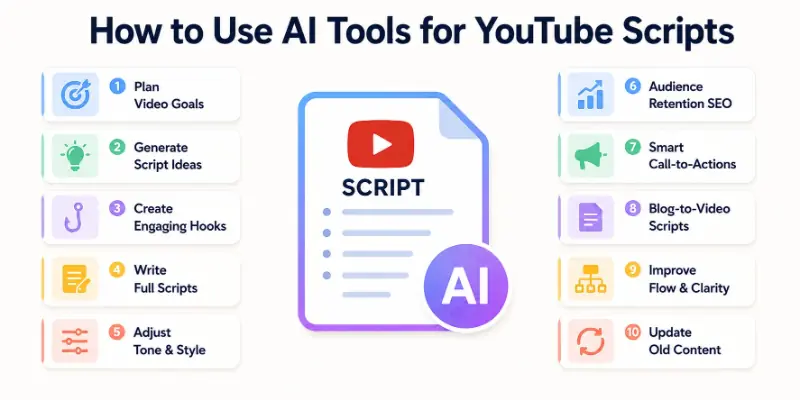
- Plan Video Goals Using AI
- Generate Script Ideas with AI
- Create Video Hooks Using AI
- Write Full YouTube Scripts with AI
- Adjust Tone and Style Using AI
- Optimize Scripts for Audience Retention
- Add Call to Action Lines with AI
- Turn Blog Content into Video Scripts
- Improve Script Flow and Clarity
- Update Old YouTube Scripts Using AI
Let us cover all in detail.
1. Plan Video Goals Using AI
I always begin by defining the purpose of my YouTube video. I tell AI what my video topic is and what result I want, such as views, engagement, or education. AI helps me refine this idea into a clear script goal. This step removes confusion and keeps my content focused. When goals are clear, the script feels more natural. I find this step very helpful for consistent content.
Tools I use
- ChatGPT
- Notion AI
2. Generate Script Ideas with AI
When I feel stuck, AI helps me generate fresh script ideas. I enter my niche and audience type, and AI suggests video topics. This helps me stay consistent on YouTube. I also ask for trending angles and simple explanations. It saves brainstorming time and boosts creativity. I rely on this step often.
Tools I use
- ChatGPT
- TubeBuddy
3. Create Video Hooks Using AI
Hooks decide whether people keep watching or leave. I use AI to write strong opening lines for my videos. AI suggests attention grabbing questions and statements. I choose the one that matches my style. A good hook increases watch time. This step improves video performance.
Tools I use
- Jasper
- ChatGPT
4. Write Full YouTube Scripts with AI
This is where AI saves me the most time. I provide my topic and outline, and AI writes a full script. I then personalize it to match my voice. The structure is usually clear and easy to follow. This helps me focus on delivery instead of writing stress. Full script creation becomes faster.
Tools I use
- Jasper
- ChatGPT
5. Adjust Tone and Style Using AI
Different videos need different tones. I ask AI to rewrite my script in a friendly, professional, or casual style. This helps me match audience expectations. Tone control improves viewer connection. I use this method for different channels and topics. It keeps content flexible.
Tools I use
- Writesonic
- ChatGPT
6. Optimize Scripts for Audience Retention
AI helps me improve script flow and pacing. It suggests where to add examples, pauses, or questions. This keeps viewers engaged till the end. I notice better retention when scripts feel conversational. Optimization improves overall video quality. This step is very useful for long videos.
Tools I use
- VidIQ
- ChatGPT
7. Add Call to Action Lines with AI
Sometimes I forget to add clear calls to action. AI helps me write simple lines for likes, comments, and subscriptions. These lines sound natural and not forced. I place them at the right points in the script. This improves channel growth. AI makes this step easy.
Tools I use
- Jasper
- ChatGPT
8. Turn Blog Content into Video Scripts
I often reuse blog content for YouTube. AI helps convert written content into spoken scripts. This saves rewriting time and keeps consistency. The script becomes more conversational. This method is perfect for content repurposing. I use it regularly.
Tools I use
- ChatGPT
- Notion AI
9. Improve Script Flow and Clarity
After writing, I ask AI to improve clarity. AI removes complex lines and simplifies sentences. This makes scripts easier to speak and understand. Clear scripts improve delivery confidence. I always use this step before recording. It helps avoid mistakes.
Tools I use
- Grammarly
- ChatGPT
10. Update Old YouTube Scripts Using AI
I do not like rewriting old scripts from scratch. AI helps refresh outdated scripts easily. I update examples, tone, and structure. This keeps content relevant and useful. Updating becomes faster and stress-free. I find this very practical.
Tools I use
- ChatGPT
- Writesonic
Why AI Tools Make YouTube Script Writing Easier
For me, the biggest relief came when I no longer had to stare at a blank page for hours. Before, I would get stuck trying to think of the right words, and it often delayed my video schedule.
Now, I can quickly outline my ideas and let the tools help structure them. This makes the whole process feel lighter, and I enjoy writing again. My scripts flow naturally, and I feel confident before I even start recording.
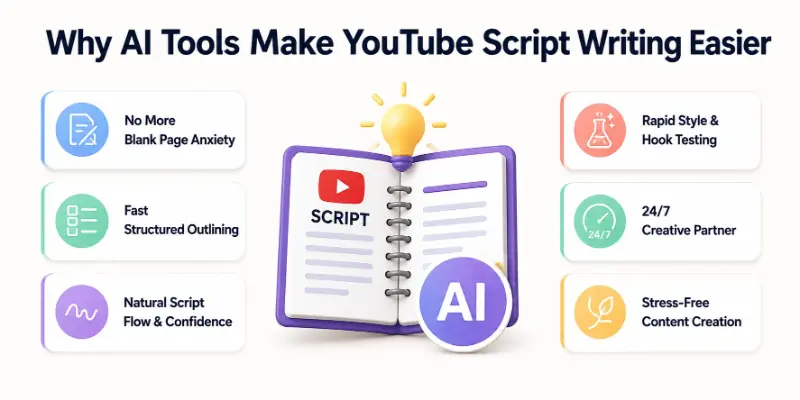
Another thing I love is how much faster I can experiment with different video styles. I can test hooks, tones, and formats without wasting days rewriting. It feels like having a creative partner who understands my audience. I can focus on what really matters, engaging my viewers, while the tools handle repetitive tasks. From my experience, this has made content creation much more enjoyable and less stressful.
Conclusion
In this guide, I have covered how to use AI tools for YouTube scripts from planning to improvement in a clear and practical way. I personally suggest starting with one tool and learning it properly. AI supports creativity, but your voice matters most. Now that you understand how to use AI tools for YouTube scripts, let us see the FAQs below.
FAQs About How to Use AI Tools for YouTube Scripts
Here are some of the most commonly asked questions related to how to use AI tools for YouTube scripts:
This is true; it is simple to learn. When I first began, I began with simple topics and basic prompts. If you practice it enough, it will become very smooth. It can be learned by anyone.
Yes, even novices will have no trouble using them. Technical expertise is not required in any way. I found them to be very user-friendly for novices. You are led through each step by them.
In the right way, they have the potential to be interesting. I customize scripts so that they correspond to my tone. The result is that they sound more natural. The quality is improved by review.
They do, in fact, save a great deal of time. Writing a script becomes less difficult and more efficient. I am able to concentrate more on recording. This results in increased productivity.
In a word, editing is very simple. I am able to alter both the structure and the words at any time. I continue to maintain complete control. This ensures that the content is genuine.
They are effective for long videos; that is true. Using AI, content can be structured more clearly. As a result, viewer retention is improved. Longer scripts have a sense of neatness.
It is true that they quickly update outdated scripts. When I update content, I do so without completely rewriting it. The videos remain relevant as a result. Revisions are made much easier.
Yes, free tools are sufficient to get started. I began by testing out the free versions. The paid plans come with additional features. Free of charge for novices to begin.





- Be Respectful
- Stay Relevant
- Stay Positive
- True Feedback
- Encourage Discussion
- Avoid Spamming
- No Fake News
- Don't Copy-Paste
- No Personal Attacks
- Be Respectful
- Stay Relevant
- Stay Positive
- True Feedback
- Encourage Discussion
- Avoid Spamming
- No Fake News
- Don't Copy-Paste
- No Personal Attacks
