How to Use AI Tools for Scripting: Complete Step-by-Step Guide
Published: 10 Sep 2026
Before AI tools, I spent hours writing scripts for videos, podcasts, webinars, and presentations. I would get stuck trying to structure ideas, choose the right words, and maintain a consistent tone.
It was exhausting and often delayed my projects. Artificial intelligence has completely transformed the way I create scripts. Now, I can generate drafts in minutes, improve dialogues, add transitions, and create professional scripts without spending days on writing.
In this guide, I will explain how to use AI tools for scripting step by step, share the best AI tools, and give you practical tips to write scripts faster while keeping your unique voice.
How to Use AI Tools for Scripting
AI can make scripting faster, more organized, and creative. Here’s my detailed workflow:
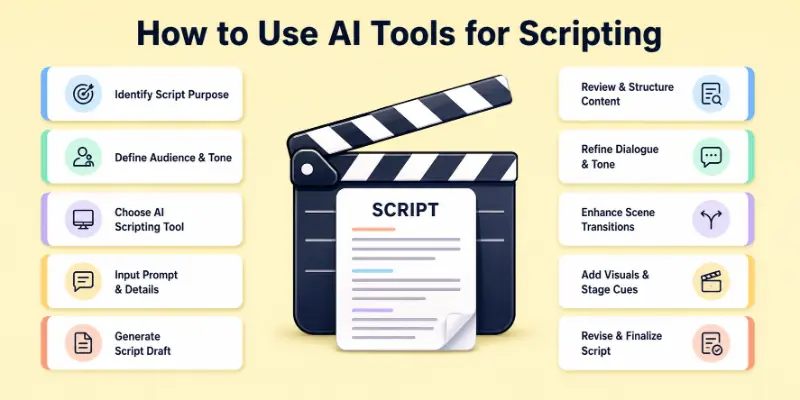
- Identify Your Script Purpose
- Define Your Audience and Tone
- Choose the Right AI Scripting Tool
- Input Key Details and Instructions
- Generate a Full Script Draft
- Review, Edit, and Organize Content
- Add Dialogue, Characters, and Voice
- Enhance Transitions and Flow
- Include Timing, Stage Directions, or Visual Cues
- Test, Revise, and Finalize
Let’s explore each step in depth.
1. Identify Your Script Purpose
Before I use AI, I always clarify the purpose of the script. This is crucial because AI works best when it understands the “why” behind the content. I ask myself:
- Is this script for a YouTube video, podcast, webinar, or presentation?
- Do I want it to educate, entertain, or sell a product?
- What is the expected length or duration?
For example, when I create a YouTube video script, I focus on keeping sentences short, using hooks, and including calls to action. For a webinar, I emphasize explanations and step-by-step demonstrations.
Tip: Writing down your goals in 3–5 sentences helps the AI understand your requirements clearly.
2. Define Your Audience and Tone
As soon as I specify my audience and tone, the AI scripts I write become more interesting. My question is:
- Who will watch or read this script?
- Should the tone be casual, formal, humorous, or inspirational?
For instance, if I write a tech review video for beginners, I tell the AI to use simple words and explain technical terms. If it’s a business webinar, I use professional and persuasive tone.
Tip: Creating a “tone guide” with a few adjectives (friendly, expert, motivating) helps the AI maintain consistency throughout the script.
3. Choose the Right AI Scripting Tool
The choice of tool impacts quality, speed, and creativity. Here’s what I use in 2026:
- ChatGPT: Versatile tool for scripts, dialogue, and long-form content.
- Jasper AI: Excellent for creative storytelling and video scripts.
- Copy.ai: Quick templates for introductions, hooks, and summaries.
- Descript: Perfect for scripts integrated with video and audio editing.
- WriteSonic: Strong for long scripts with structured sections.
- Sudowrite: Creative assistant for imaginative and unique content.
- Peppertype.ai: Quick ideas and short-form scripts.
- Rytr: Budget-friendly AI for smaller projects.
- ShortlyAI: Detailed long-form content for webinars or courses.
- Scriptbook: AI-assisted analytics and engagement insights for scripts.
Tip: Use a combination of tools: one for idea generation, another for polishing, and a third for final edits.
4. Input Key Details and Instructions
AI creates better scripts when I provide clear instructions. I usually give:
- Topic or script title
- Target audience
- Script format (video, podcast, webinar)
- Tone and style preferences
- Key points or sections to cover
Example prompt for ChatGPT: “Write a 10-minute YouTube script on ‘How to Use AI Tools for Scripting.’ Use a friendly tone, explain each step clearly, and include a short introduction, main body, and conclusion with a call to action”.
Tip: The more detailed your input, the more precise the AI output. Including examples, keywords, or style notes helps.
5. Generate a Full Script Draft
Once I enter details, AI generates a full draft. Most tools provide:
- An introduction that grabs attention
- Organized main points with headings or segments
- Transitions and bridges between sections
- Conclusions with calls to action
Example: In my draft, AI writes: “Welcome to this video! Today we will explore 10 AI tools to create amazing scripts faster. By the end, you will have practical steps to save hours every week.”
Tip: Don’t worry about perfection in this draft. Treat it as a base you can refine.
6. Review, Edit, and Organize Content
AI drafts are fast but need human review. I read line by line, checking:
- Clarity and readability
- Accuracy of facts
- Tone consistency
- Relevance to audience
I also organize content into sections or scenes. For example, I separate YouTube scripts into “Hook,” “Explanation,” “Demo,” and “CTA.”
Tip: Editing improves engagement and ensures the script feels natural.
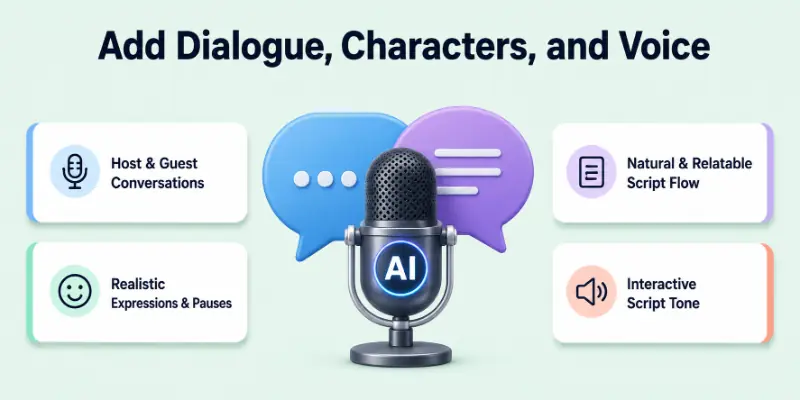
7. Add Dialogue, Characters, and Voice
If my script involves characters or interviews, AI helps write natural dialogue. I tell AI to:
- Create a conversation between host and guest
- Use realistic expressions
- Include humor or pauses where needed
Example:
Host: “So, how can AI help small businesses?”
Guest: “It saves hours of manual work and helps focus on growth.”
Tip: Dialogue makes scripts interactive and relatable.
8. Enhance Transitions and Flow
Smooth transitions keep viewers or listeners engaged. I use AI to rewrite sentences that connect sections.
- Original: “Next, let’s see tool number 2.”
- Improved: “Now that you know the first tool, the next one will take your scripting to the next level.”
Tip: AI can suggest multiple options; pick the one that feels most natural.
9. Include Timing, Stage Directions, or Visual Cues
For video or audio scripts, I add:
- [Pause 2 seconds]
- [Show on-screen title]
- [Background music starts]
- [Voice softens]
These instructions help me during recording. AI can automatically add timing cues if prompted.
Tip: Use this especially for tutorials, presentations, or podcasts.
10. Test, Revise, and Finalize
Before using a script publicly, I:
- Read it aloud to check pacing
- Share it with peers for feedback
- Make minor improvements for clarity, flow, and engagement
Tip: Even AI scripts benefit from a human touch to sound natural and persuasive.
Additional Tips for Using AI in Scripting
You can use these tips too:
- Combine AI with your creativity: AI is a helper, not a replacement.
- Use multiple drafts: Generate 2–3 versions and merge the best parts.
- Keep a template: Over time, AI scripts help you create reusable templates.
- Incorporate visuals: If the script is for video, add cues for images or slides.
- Focus on audience engagement: AI helps with structure, but human insight ensures emotional connection.
Why AI Tools for Scripting Matter
AI tools save hours of work, reduce creative blocks, and improve consistency. I used to spend days writing scripts; now AI generates drafts in minutes. By combining AI intelligence with my personal editing, I create high-quality scripts faster and more efficiently. For creators, marketers, and educators, AI scripting is a game changer this year.
Conclusion
In this guide, I shared how to use AI tools for scripting with a step-by-step process, examples, tips, and recommended AI tools. My personal advice is to start by defining your script purpose and audience clearly, use AI to generate drafts, and refine them in your own voice. AI makes scripting faster, organized, and more creative, but your human touch ensures the script connects with people. Start experimenting with AI scripts today, and see how much time and effort you can save.
Now, let us move on to the FAQs related to this topic.
FAQs
Here are the most common questions about how to use AI tools for scripting:
Certainly, even novices can benefit from using AI tools to write structured scripts. I generate drafts with the help of AI, and then I work on refining them using my voice. Time is saved, and stress is reduced as a result.
Yes, AI can generate scripts for multiple formats including YouTube, webinars, podcasts, and live presentations. Just provide the format and tone in your instructions.
You are correct; every AI draft is one of a kind because of your input. To ensure that it is original, I always modify it to fit my style and the audience I am speaking to.
Although most AI tools permit commercial use, I always make sure to check the licensing. The use of artificial intelligence scripts for clients, monetized videos, or podcasts is widely permitted.
AI can produce a draft in a matter of minutes. In most cases, I devote additional time to reviewing, editing, and adding necessary cues. When compared to writing by hand, it is significantly quicker overall.
Artificial intelligence can, in fact, closely match your brand voice if you specify the tone, style, and audience. When I want the best possible results, I always provide the AI with clear instructions.
Jasper, WriteSonic, and ChatGPT are examples of software programs that are capable of managing scripts for lengthy videos, courses, or presentations. Intelligence maintains the structure’s order.
Some AI tools have free plans or trials, like ChatGPT and Copy.ai. Paid versions offer advanced features, export options, and higher word limits.





- Be Respectful
- Stay Relevant
- Stay Positive
- True Feedback
- Encourage Discussion
- Avoid Spamming
- No Fake News
- Don't Copy-Paste
- No Personal Attacks
- Be Respectful
- Stay Relevant
- Stay Positive
- True Feedback
- Encourage Discussion
- Avoid Spamming
- No Fake News
- Don't Copy-Paste
- No Personal Attacks
