AI Tools for Anime Character Design: Best Picks
Published: 12 Nov 2026
Designing an anime character involves more than choosing a hairstyle or eye color. You may need to plan the character’s outfit, expressions, poses, personality, and overall art style while keeping the design consistent across different images.
AI tools for anime character design help artists, writers, game developers, and anime fans turn their ideas into illustrations without drawing every detail from scratch. Depending on the tool, you can generate original characters from text prompts, customize existing images, create anime avatars, or develop artwork for comics and stories.
In this article, we’ll explore 10 options, compare their key features and pricing, and explain which tools may suit different character-design projects.
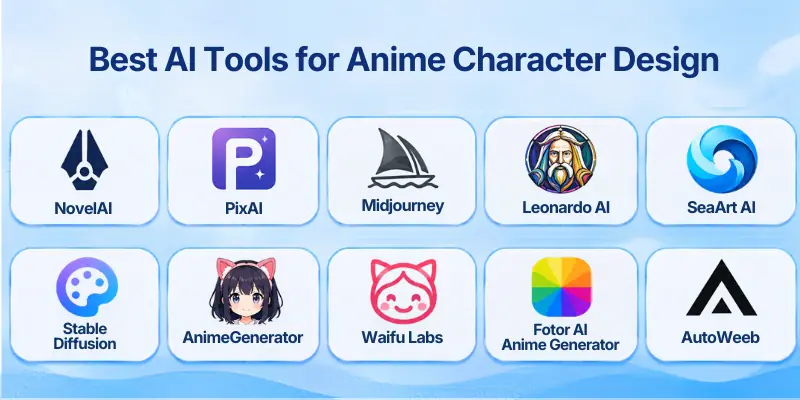
Best AI Tools for Anime Character Design
Here are the tools covered in this guide:
- NovelAI
- PixAI
- Midjourney
- Leonardo AI
- SeaArt AI
- Stable Diffusion
- AnimeGenerator
- Waifu Labs
- Fotor AI Anime Generator
- AutoWeeb
1. NovelAI
NovelAI is an image-generation platform known for anime-oriented artwork and detailed visual storytelling. It lets users describe characters through prompts and tags to guide details such as hair, clothing, expressions, poses, and backgrounds.
It can be useful when you need original character illustrations, group scenes, or artwork for a manga-inspired project, although results still depend on prompt quality and the selected model. Its available controls and limits vary by subscription tier.
Best For: Anime artists, writers, and creators who want detailed character illustrations.
Key Features
- Anime-focused image-generation models
- Prompt and tag-based character customization
- Options for creating individual characters and multi-character scenes
- Image-generation settings that vary by plan
Pros
- Designed with anime artwork in mind
- Supports detailed visual prompts
- Useful for character concepts and story illustrations
Cons
- Some features require a paid subscription
- Prompting may take practice
- Keeping a character identical across separate images can require extra work
Pricing: NovelAI offers paid subscription plans, with available image-generation limits and features depending on the tier. Check its official pricing page for current plans and allowances.
2. PixAI
PixAI is an anime-focused image-generation platform that offers different models, style options, and customization features. Users can experiment with character designs, clothing, facial expressions, poses, and visual themes, making it suitable for original characters and fan-inspired concepts.
Its community model ecosystem also gives users different artistic directions to explore, but model quality and licensing conditions may vary, so review the terms for the specific model and intended use.
Best For: Creators who want a broad selection of anime styles and model-based customization.
Key Features
- Anime-oriented image-generation models
- Style and character customization options
- Community models and related creative resources
- Credit-based generation options, depending on the current plan
Pros
- Offers a wide range of anime styles
- Useful for experimenting with original character concepts
- Provides options for users with different experience levels
Cons
- Choosing the right model may take time
- Generation limits can apply to free access
- Community model terms may differ
Pricing: PixAI offers free access with limits and paid options. Check its official pricing page for current subscription prices, credit allowances, and features.
3. Midjourney
Midjourney creates polished illustrations from text prompts and reference images. Its Niji model is designed for anime and illustrative styles, making it a useful option for characters with distinctive outfits, dramatic poses, expressive faces, and carefully composed scenes.
It is particularly helpful when visual quality and art direction matter, but users may need repeated generations and reference-based workflows to maintain a character’s appearance across a series.
Best For: Artists who want refined anime artwork and strong visual styling.
Key Features
- Niji model for anime-inspired imagery
- Text prompts and image references
- Variations and image refinement
- Tools for guiding the visual direction of generated artwork
Pros
- Can produce visually polished illustrations
- Offers flexibility in mood, composition, and art style
- Useful for concept art and character inspiration
Cons
- Paid subscription is generally required for regular use
- Fine control over every character detail can take experimentation
- Consistency across multiple images may require careful reference workflows
Pricing: Midjourney offers several subscription tiers. Check its official plans for current prices, generation limits, and privacy options.
4. Leonardo AI
Leonardo AI is a general-purpose image-creation platform that supports illustration and character-art workflows. It can help users develop anime-inspired characters by generating concepts from prompts, refining images, and working with available reference and image-guidance features.
This flexibility makes it useful for exploring different costumes, color palettes, and character variations, though its exact anime output depends on the model and settings selected.
Best For: Artists and game developers who need character concepts and varied visual assets.
Key Features
- Text-to-image generation
- Image editing and refinement tools
- Reference-guided creation features, where supported
- Multiple models and visual styles
Pros
- Offers more than one illustration style
- Useful for exploring character variations
- Can support broader concept-art workflows
Cons
- Features and limits vary across models and plans
- Advanced settings may feel complicated to beginners
- Consistent results often need detailed prompts and references
Pricing: Leonardo AI provides limited free access and paid plans. Confirm the current pricing, token allowances, and commercial-use terms on its official website.
5. SeaArt AI
SeaArt AI offers image generation with a range of community models and anime-oriented styles. It can help users create original characters, test different hairstyles and outfits, and experiment with visual themes without building a model from scratch.
Its model variety is useful for creative exploration, but the quality, safety settings, and permitted uses may differ between models and platform features.
Best For: Users who want to explore different anime looks and community-created models.
Key Features
- Anime-style image generation
- Community model library
- Prompt-based character creation
- Image and video features where available
Pros
- Provides a broad range of styles to explore
- Useful for experimenting with character concepts
- Offers free access options, subject to limits
Cons
- Model selection can feel overwhelming
- Free credits or generation limits may apply
- Users should check the terms and quality of individual models
Pricing: SeaArt AI has offered free and paid access options. Check its official pricing page for current credit limits, subscription tiers, and feature availability.
6. Stable Diffusion
Stable Diffusion is an image-generation model family that gives users considerable control over the creative process through compatible interfaces and model extensions. With suitable anime checkpoints and LoRA models, users can create original characters, adjust art styles, guide poses, and refine details.
It can be a strong option for experienced creators who want more control, but setup, hardware requirements, model selection, and licensing need careful attention.
Best For: Advanced users who want customization and control over their image-generation workflow.
Key Features
- Support for anime-focused models and checkpoints
- Compatible LoRA options for styles or character concepts
- Image-to-image workflows and pose guidance through supported tools
- Local or hosted workflows, depending on the setup
Pros
- High degree of customization
- Can be run locally with suitable hardware and software
- Offers a large ecosystem of community models
Cons
- Setup can be difficult for beginners
- Performance depends on hardware or hosting costs
- Model licenses and output rights vary
Pricing: Some Stable Diffusion models and tools are available without a software subscription, but hardware, cloud computing, or hosted platforms may cost money. Review the license for the specific model you use.
7. AnimeGenerator
AnimeGenerator is a web-based option for creating anime-style images from written prompts and, where supported, reference images. It can help users turn a basic character description into an illustration and explore variations in appearance, clothing, and setting.
Before choosing it for a long-term project, check its current reference-image controls, project-saving features, output limits, and commercial-use terms.
Best For: Beginners who want a straightforward way to create anime-style concepts.
Key Features
- Prompt-based anime image generation
- Character and scene concept creation
- Reference-guided options, where available
- Web-based workflow
Pros
- Easy to explore without setting up a local model
- Useful for quick character ideas
- Can help users test different prompts
Cons
- Available controls may be more limited than advanced tools
- Free access and output limits can change
- Character consistency should be tested before using it for a series
Pricing: Free and paid options may be available depending on the current offering. Check the official website for up-to-date plan details and limits.
8. Waifu Labs
Waifu Labs focuses on generating anime-style character portraits through a guided selection process. Instead of relying entirely on long prompts, users can explore generated options and make choices to move toward a preferred look. It is useful for quick portrait concepts and anime-inspired avatars, but it offers less flexibility than a full illustration workflow when you need precise poses, complex scenes, or detailed storyboards.
Best For: Users who want quick anime portrait concepts with a guided process.
Key Features
- Anime-style portrait generation
- Guided visual selection
- Character appearance exploration
- Simple browser-based experience
Pros
- Easy to try for character inspiration
- Useful for portrait and avatar concepts
- Requires less prompt-writing experience
Cons
- Less control over complex character details
- Not designed for every illustration or comic workflow
- Current availability and features should be checked before relying on it
Pricing: Waifu Labs has been known for offering a free experience. Confirm current access and terms on its official website.
9. Fotor AI Anime Generator
Fotor’s AI Anime Generator is designed to help users transform photos or visual ideas into anime-style artwork. It can be useful when you want an anime-inspired portrait, profile image, or stylized version of a character based on an existing photo.
It is more focused on accessible image transformation than specialist character-model training, so users who need detailed control over an original character may prefer an anime-specific platform.
Best For: Beginners who want to turn photos into anime-style portraits.
Key Features
- Photo-to-anime transformation
- AI image-generation features
- Additional image editing tools within the platform
- Browser-based workflow
Pros
- Beginner-friendly approach
- Useful for portraits and profile images
- Combines generation with other image-editing options
Cons
- Some features may require credits or a paid plan
- Detailed character consistency may be limited
- Results can vary with the input image
Pricing: Fotor offers free and paid features, with some AI functions subject to usage limits. Check its official pricing page for current credits, plan costs, and commercial-use terms.
10. AutoWeeb
AutoWeeb is designed around anime-style character creation and storytelling workflows. It can help users develop characters and use them in scenes or storyboard-like projects, making it relevant for creators who want more than a single standalone portrait. Its suitability depends on the amount of character reuse, scene control, and export flexibility available in the current plan.
Best For: Creators who want to build anime-style characters for stories and scene sequences.
Key Features
- Anime-style character and scene generation
- Story-oriented creative workflow
- Character reuse features, where supported
- Tools for developing visual story concepts
Pros
- More story-focused than a simple portrait generator
- Useful for planning anime-inspired scenes
- Can help organize a character-led creative project
Cons
- Advanced features may require payment
- Character consistency and export options should be tested
- May not offer the same fine-grained control as advanced image-generation workflows
Pricing: AutoWeeb has offered free and paid options. Review the official website for current pricing, generation limits, and available storytelling features.
Comparison of AI Anime Character Design Tools
| Tool | Best For | Free Access | Main Strength |
| NovelAI | Detailed anime illustrations | Limited trial or access may vary. | Anime-focused generation |
| PixAI | Anime styles and customization | Yes, with limits | Community models |
| Midjourney | Polished character artwork | Regular use generally requires a paid plan. | Visual quality and art direction |
| Leonardo AI | Character concepts and assets | Limited free access | Flexible image creation |
| SeaArt AI | Exploring different anime models | Yes, with limits | Model variety |
| Stable Diffusion | Advanced customization | Model/software access may be free. | Control and extensions |
| AnimeGenerator | Quick anime concepts | Check current offering. | Straightforward web workflow |
| Waifu Labs | Anime portraits | Historically free | Guided character creation |
| Fotor AI Anime Generator | Photo-to-anime portraits | Limited free features | Simple image transformation |
| AutoWeeb | Characters and story scenes | Check current offering. | Story-oriented workflow |
Common Uses of AI Anime Character Design Tools
The top AI tools for anime character design can support different creative projects, from personal avatars to early-stage concept art.
- Original character design: Develop a character’s appearance, clothing, colors, and personality.
- Manga and webcomic planning: Create visual references before drawing panels or building a story.
- Game character concepts: Explore possible designs for heroes, supporting characters, enemies, and non-player characters.
- Profile pictures and avatars: Make anime-inspired portraits for social media, gaming profiles, or online communities.
- Story illustrations: Generate visual references for scenes, locations, and character interactions.
- Costume exploration: Compare uniforms, fantasy outfits, modern clothing, and other design directions.
- Creative inspiration: Explore different styles when you are unsure how a character should look.
How to Choose the Right Tool
The Best AI Tools to Create Anime Characters depend on the kind of artwork you need and how much control you want.
- For anime-focused artwork: Compare NovelAI and PixAI for their anime-oriented models and creative controls.
- For polished illustrations: Try Midjourney if art direction and composition are your priorities.
- For flexible concept art: Consider Leonardo AI for varied image-generation workflows.
- For advanced customization: Explore Stable Diffusion if you are comfortable with model setup and configuration.
- For photo-based avatars: Consider Fotor’s anime transformation features.
- For story-led projects: Explore AutoWeeb if you need character-led scenes rather than individual portraits.
- For beginners: Start with a simple web-based tool and test its free access before paying.
Tips for Better Anime Character Results
Use these practices to get more consistent results from AI anime character creator tools.
- Describe the character clearly: Include age range, hairstyle, eye color, clothing, body type, and personality where relevant.
- Name the visual style: Specify details such as cel shading, soft colors, manga line art, fantasy anime, or chibi proportions.
- Define the pose and expression: Explain whether the character is standing, running, smiling, or looking serious.
- Use reference images when available: References can guide appearance, but they do not guarantee perfect consistency.
- Save useful prompts: Keep a record of prompts and settings that produce a suitable design.
- Create a character sheet: Generate front, side, and back views if the tool supports them.
- Review usage rights: Confirm the platform’s terms and any model-specific restrictions before publishing or selling the work.
Are AI Anime Character Design Tools Worth Using?
AI tools for creating anime characters can be useful when you need quick visual ideas, alternative designs, or references for a larger project. They can also help beginners explore anime styles without learning every drawing technique first.
However, AI-generated images may include mistakes or inconsistent details, especially when the same character appears across multiple scenes. For professional work, review and edit the results, maintain a character reference sheet, and confirm the licensing rules before using the artwork commercially.
Conclusion
In this guide, we have covered AI tools for anime character design. These tools can help you develop original anime characters, experiment with different art styles, and prepare visual references for avatars, comics, games, and stories. The right choice depends on your creative goals, budget, and need for character consistency.
Personal Recommendation: Choose PixAI or NovelAI for anime-focused artwork and Midjourney for polished visuals. Test designs before subscribing, and check commercial usage rights.
Have you tried any of these tools, or do you have another favorite for anime character design? Share your experience in the comments below! 🎨✨
FAQs
Explore the following FAQs to learn how AI anime character design tools work, which platforms to choose, and what to consider when creating, customizing, and using anime artwork.
1. What Are AI Tools for Anime Character Design?
AI tools for anime character design help users generate or edit anime-style characters using text prompts, reference images, and customization options. They can create character portraits, outfits, poses, and visual concepts. The available styles and editing controls vary by platform.
2. Which AI Tool Is Best for Detailed Anime Characters?
The best choice depends on the style and level of detail you want. NovelAI and PixAI are worth exploring for anime-focused artwork, while Midjourney offers options for polished illustrations and creative art direction. Try similar prompts across different tools to compare their results.
3. Are There Any Free AI Anime Character Generators?
Yes, several platforms offer free credits, limited generations, or trial access. However, image limits, advanced features, and export options may require payment. Check the current pricing and usage limits before starting a large project.
4. How Can I Keep an Anime Character Consistent Across Images?
Maintaining the same character appearance can be challenging when generating multiple images. Look for tools that support reference images, character guidance, or custom models. Reusing a character sheet with consistent descriptions of facial features, hair, clothing, and colors can also help.
5. Can Beginners Use AI Anime Character Design Tools?
Absolutely. Many online generators let beginners create anime characters by entering simple prompts without learning complex design software. Start with a tool that offers an easy interface and basic customization options. You can explore advanced controls as your skills improve.
6. Can I Sell AI-Generated Anime Character Designs?
Commercial use depends on the platform’s terms, the model license, and the artwork itself. A paid subscription does not automatically provide unrestricted commercial rights. Review the applicable licensing rules and check for any third-party copyright or trademark concerns before selling your designs.
7. Which AI Tools Can Turn a Photo Into an Anime Character?
Some AI image generators support photo-to-anime conversion or image-to-image editing. Fotor is one option to explore for transforming photos into anime-style artwork. Before uploading an image, make sure you have permission to use it and review the platform’s privacy policy.
8. How Do You Write a Good Anime Character Prompt?
A useful prompt describes the character’s appearance, clothing, pose, expression, and surroundings. You can also include details about the anime style, lighting, colors, and image composition.
For example, try: “Anime girl with silver hair, blue eyes, a black fantasy outfit, a confident expression, soft cinematic lighting, and a detailed illustrated background.”
9. Can AI Anime Character Generators Help With Manga Creation?
Yes, these tools can help manga creators explore character designs, test outfits, and develop visual references before drawing panels. Some platforms also support scene planning or storyboard-related workflows. However, you may need additional editing to keep character appearances, poses, and panel layouts consistent.
10. What Should You Look for in an AI Anime Avatar Creator?
Before choosing a tool, consider these key factors:
- Art style: Does it generate the anime style you prefer?
- Customization: Can you adjust facial features, outfits, poses, and backgrounds?
- Reference support: Can you reuse images to guide character appearance?
- Image quality: Does it export at a resolution suitable for your project?
- Pricing and licensing: Are the usage limits and commercial rights clear?
Compare these features with your needs to find a suitable tool for creating anime avatars or original characters.



- Be Respectful
- Stay Relevant
- Stay Positive
- True Feedback
- Encourage Discussion
- Avoid Spamming
- No Fake News
- Don't Copy-Paste
- No Personal Attacks
- Be Respectful
- Stay Relevant
- Stay Positive
- True Feedback
- Encourage Discussion
- Avoid Spamming
- No Fake News
- Don't Copy-Paste
- No Personal Attacks
