How to Use AI Chatbots Effectively
Published: 8 Aug 2026
AI chatbots have become a daily tool for writing, learning, and business tasks in 2026. Millions of users now rely on tools like ChatGPT, Gemini, and Claude to complete work faster and with better structure.
These tools can help with emails, blogs, research, and even planning tasks when used correctly. The real difference comes from how well you guide the chatbot with clear instructions. How to use AI chatbots effectively is now a key skill for students, freelancers, and professionals who want better results in less time.
In this article, we will discuss about how to use AI chatbots effectively in detail and understand simple methods that improve your results step by step.
What Does “Using AI Chatbots Effectively” Mean?
Using AI chatbots effectively means getting clear, accurate, and useful results by giving the right instructions in the right way. It is not just about asking questions but about guiding the chatbot so it understands your goal and gives responses that actually help you in real tasks like writing, research, learning, or planning.
Definition of effective usage: Effective usage means giving clear, specific, and structured prompts so the AI chatbot produces accurate, relevant, and usable answers on the first or improved attempt.
Common mistakes beginners make
Below are the most common mistakes users make while using AI chatbots, which often lead to weak or unclear results:
- Generic prompts: Users write very short or unclear instructions like “write an article” instead of explaining topic, tone, or purpose.
- Unclear instructions: Users do not provide enough context, so the chatbot misunderstands the goal and gives off-target answers.
- No refinement: Users accept the first response without improving it through follow-up prompts or corrections, which reduces output quality.
Choosing the Right AI Chatbot for Your Needs
Selecting the right AI chatbot depends on what you want to achieve. Different tools work better for different tasks like writing, research, coding, or business work. When you match the tool with your goal, you get faster, clearer, and more accurate results.
Best chatbot for writing, research, coding, business use
Each AI chatbot performs better in specific areas, so your choice should depend on your daily work needs and tasks.
Comparison of AI chatbots
- ChatGPT → general productivity & writing
It works well for blog writing, emails, brainstorming, and everyday tasks where you need quick and clear content. - Gemini → Google ecosystem integration
It connects well with Google tools and helps in research, search-based tasks, and productivity inside Google apps. - Claude → long-form reasoning & analysis
It performs strongly in deep thinking tasks, long content writing, and detailed analysis where structured reasoning matters.
How to decide based on your goal
Choose the chatbot based on your main purpose. If you focus on writing and daily tasks, go for ChatGPT. If you depend on Google tools and research, Gemini fits better. If you need deep analysis or long, structured content, Claude gives stronger results.
Core Principles of Using AI Chatbots Effectively
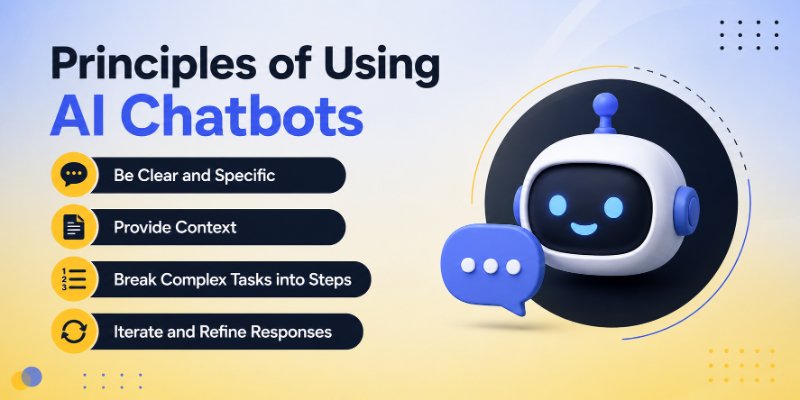
Using AI chatbots effectively depends on a few basic principles that improve the quality of every response. When you follow these principles, you guide the chatbot in a better way and get more accurate, useful, and structured answers for your tasks.
Let’s discuss further in detailed:
1. Be Clear and Specific
Clear and specific instructions help the AI understand exactly what you want and reduce confusion in the response.
Why vague prompts reduce output quality
Vague prompts make the chatbot guess your intent, which often leads to general, incomplete, or off-topic answers. When instructions are unclear, the output loses focus and does not match your real goal.
Example of bad vs good prompt
- Bad prompt:
“Write about marketing.” - Good prompt:
“Write a simple 500-word blog post about digital marketing strategies for small businesses, using easy English and real-life examples.”
The second prompt works better because it gives clear direction, purpose, and format, which improves the final output quality.
2. Provide Context
Context plays a major role in getting better results from AI chatbots. When you add background details and define a clear role, the chatbot understands your situation more clearly and gives more accurate and useful responses.
Role-based prompting (e.g., “act as a marketing expert”)
Role-based prompting means assigning a specific role to the AI before giving instructions. This helps the chatbot respond in the right tone, style, and level of knowledge.
- Example: “Act as a marketing expert and create a social media plan for a small bakery.”
This approach improves focus because the AI follows the mindset of that role instead of giving a general answer.
Background information improves accuracy
When you provide background details, the chatbot understands your goal better and avoids generic responses. More context leads to more relevant and practical outputs.
- Example:
Instead of saying “write an email,” say:
“Write an email to a client explaining a project delay due to technical issues in a polite and professional tone.”
This extra information helps the chatbot produce a response that fits your exact situation and improves overall accuracy.
3. Break Complex Tasks into Steps
Large or complex tasks often confuse AI chatbots when you give them in one single prompt. Breaking them into smaller steps helps the chatbot understand each part clearly and deliver better results.
Step-by-step prompting strategy
Step-by-step prompting means dividing your task into simple instructions instead of asking everything at once. This makes the output more organized and easier to control.
- Example:
Instead of saying “create a full marketing plan,” break it into steps like: - Step 1: Define target audience
- Step 2: Suggest marketing channels
- Step 3: Create content ideas
Why chunking improves results
Chunking improves accuracy because the AI focuses on one task at a time. It reduces confusion and increases clarity in each response. This method also helps you correct or adjust each step before moving forward, which leads to a more polished final output.
4. Iterate and Refine Responses
Getting the best result from AI chatbots often requires multiple attempts. The first response is usually a starting point, and you can improve it by refining your instructions.
Follow-up prompts
Follow-up prompts help you guide the chatbot to adjust tone, improve clarity, or add missing details.
- Example:
“Make it simpler.”
“Add real-life examples.”
“Rewrite in a professional tone.”
These small adjustments help shape the response closer to your exact needs.
Editing and improving outputs
AI outputs should not be used as final without review. You should always edit, improve structure, and adjust wording to match your goal. This combination of AI output and human editing gives the best results in writing, research, and business tasks.
Advanced Prompting Techniques
Advanced prompting techniques help you get more precise, structured, and high-quality results from AI chatbots. When you move beyond basic questions and start using smarter instructions, the output becomes more useful for real work like writing, coding, and planning.
1. Role prompting (teacher, marketer, developer, etc.)
Role prompting means assigning a clear role to the AI before giving instructions. This sets the tone, knowledge level, and style of the response.
- Example: “Act as a teacher and explain digital marketing in simple words for beginners.”
- Example: “Act as a developer and debug this code step by step.”
This technique improves focus and makes responses more relevant to your task.
2. Chain-of-thought prompting
Chain-of-thought prompting guides the AI to explain its reasoning step by step instead of jumping directly to the answer. This improves logic and accuracy in complex tasks.
- Example: “Explain step by step how to solve this math problem.”
- Example: “Show your reasoning before giving the final answer.”
It helps you understand not just the result but also how the result is formed.
3. Few-shot examples (showing sample output)
Few-shot prompting means giving examples of the output you want before asking the AI to generate more.
- Example:
“Here are two sample headlines:
- Boost Your Sales with Simple Marketing Tricks
- Grow Your Business with Easy Online Strategies
Now write 5 similar headlines.”
This technique helps the AI match your expected style and format more accurately.
4. Tone control (formal, persuasive, friendly, etc.)
Tone control means telling the AI how the response should sound. This is useful for different audiences and purposes.
- Formal: for business emails and reports
- Persuasive: for sales copy and marketing
- Friendly: for blogs, social posts, and casual content
- Example: “Write a friendly and simple explanation of AI chatbots for beginners.”
This ensures your content matches the audience and purpose perfectly.
Productivity Hacks Using AI Chatbots
AI chatbots can significantly improve your daily productivity by reducing manual effort and speeding up routine tasks. When used correctly, they help you work smarter, not harder.
Below are some practical productivity hacks you can use to save time and improve output quality while working with AI chatbots.
- Automating repetitive tasks: AI chatbots can handle repeated writing or formatting tasks like summaries, replies, or basic content creation, which saves a lot of time in daily work.
- Creating templates (emails, posts, reports): You can quickly generate reusable templates for emails, social media posts, reports, and documents that you can edit and use anytime.
- Brainstorming ideas quickly: AI helps you generate fresh ideas for blogs, business names, marketing campaigns, or study topics within seconds when you feel stuck.
- Time-saving workflows: You can build step-by-step workflows with AI to complete tasks faster, such as drafting, editing, and refining content in one smooth process.
Common Mistakes to Avoid
Many users do not get the best results from AI chatbots because they repeat small but important mistakes. If you avoid these errors, your output quality improves instantly and becomes more reliable for real work.
Below are some common mistakes people make while using AI chatbots, along with simple ways to understand them better.
- Over-relying on AI without verification: Many users trust AI responses completely, but AI can still make errors, so checking important information is always necessary before using it.
- Using unclear prompts: When prompts are not clear or specific, the chatbot guesses your intent, which often leads to weak or unrelated answers.
- Ignoring fact-checking: Some users skip verification and accept all information as correct, which can lead to mistakes in research, content, or decision-making tasks
- Not refining outputs: Many users stop at the first response, but improving results through follow-up prompts and edits always produces better and more accurate content.
Best Practices for High-Quality Results
Getting high-quality results from AI chatbots depends on how you guide and refine the output. When you follow the right practices, you can turn basic responses into clear, accurate, and useful content.
Small improvements in your prompting style and review process can make a big difference in the final output quality and usefulness.
These simple practices can guide you toward more accurate and dependable results from AI chatbots.
- Always review and edit AI output
- Combine human creativity with AI assistance
- Use multiple prompts instead of one long query
- Maintain consistency in instructions
- Test different prompt variations to compare output quality
- Set a clear goal before starting each AI interaction
Future of AI Chatbots
AI chatbots are evolving quickly and becoming a core part of daily digital life. In the coming years, they will become more advanced, more human-like, and more deeply integrated into tools we use every day.
Below is a simple overview of how AI chatbots are expected to grow and change in the future.
- More human-like conversations: AI chatbots will understand tone, emotion, and intent more naturally, making conversations feel more realistic and smooth.
- Better personalization: Future chatbots will adapt to user behavior and preferences to give more customized and relevant responses.
- Multimodal capabilities: They will handle text, images, voice, and video together, making interactions more powerful and flexible.
- Deeper integration in daily apps: AI will become part of email, documents, search engines, and business tools, making workflows faster and more automated.
Conclusion
In this guide, we have covered how to use AI chatbots effectively. We discussed practical strategies that help you write better prompts, choose the right chatbot, avoid common mistakes, and improve the quality of AI responses.
Using AI chatbots effectively is not about using more features. It is about giving clear instructions, providing context, and refining outputs to get the results you need. With regular practice, these skills become easier and more natural over time.
My recommendation is to start with simple prompts and gradually test advanced techniques as you gain experience. Small improvements in the way you interact with AI can lead to much better results in your daily work.
Thank you for taking the time to read this guide. I hope it helps you use AI chatbots with more confidence and better results in the future.
💬 We would love to hear your thoughts and experiences with AI chatbots. Share your feedback or questions in the comments below and join the conversation! 🚀
FAQs
Below are some frequently asked questions about how to use AI chatbots effectively, along with simple answers for beginners.
The best way to use AI chatbots effectively is to give clear instructions and enough context about your task. Specific prompts usually produce more accurate and useful results than short or vague requests. Reviewing and refining the output also improves quality.
Yes, beginners can use AI chatbots without any coding or technical background. Most chatbots work through simple conversations and questions.
Here are a few things that help beginners:
- Start with simple prompts.
- Explain your goal clearly.
- Ask follow-up questions when needed.
For many users, ChatGPT works well for blog writing, emails, and content creation because it handles different writing styles easily. Other tools may perform better for specific tasks depending on your workflow. The right choice depends on your content goals and preferred features.
Good prompts include details about the topic, tone, length, and purpose of the content. The more information you provide, the easier it becomes for the chatbot to understand your request.
A better prompt usually includes:
- A clear goal
- The desired format
- The target audience
No, AI chatbots can sometimes provide incorrect or outdated information. This is why fact-checking is important, especially for research, health, finance, or business topics. Verification helps you avoid mistakes and improve reliability.
AI chatbots save time by handling repetitive tasks and generating drafts quickly.
Some common productivity benefits include:
- Writing emails faster
- Creating summaries
- Brainstorming ideas
- Organizing information
Yes, AI chatbots can explain difficult concepts in simple language and provide study support. They can create summaries, quizzes, and practice questions for many subjects. Students often use them to improve understanding and save time.
Many users expect perfect answers from the first prompt and skip the refinement process.
Common mistakes include:
- Using vague prompts
- Ignoring fact-checking
- Providing little context
- Accepting the first response without edits
The answer depends on what you want to accomplish. Some chatbots focus on writing, while others perform better for research or long-form analysis. Matching the tool to your task usually gives better results.
AI chatbots will likely assist people rather than replace them completely. Human creativity, judgment, and decision-making still play an important role in most industries. The strongest results often come from combining human skills with AI assistance.






- Be Respectful
- Stay Relevant
- Stay Positive
- True Feedback
- Encourage Discussion
- Avoid Spamming
- No Fake News
- Don't Copy-Paste
- No Personal Attacks
- Be Respectful
- Stay Relevant
- Stay Positive
- True Feedback
- Encourage Discussion
- Avoid Spamming
- No Fake News
- Don't Copy-Paste
- No Personal Attacks
