AI Tools for Presentation Making – AI Slide Generators
Published: 24 Jun 2026
AI Tools for Presentation Making has changed how people create slides for work, study, and business. Many users now complete full presentations in minutes instead of spending hours on design and formatting.
This shift has made presentation work faster and more structured. These tools now help users turn simple text into clean slides with layouts, visuals, and proper flow.
In this article, we will discuss AI tools for presentation making in detail and also explore how these tools improve speed, design quality, and overall presentation impact.
What Are AI Tools for Presentation Making?
AI Tools for Presentation Making our software that helps users create professional slides quickly. These tools take your ideas or text and turn them into ready-made presentations with proper structure and design. They reduce manual effort and improve overall presentation quality.
Instead of starting from a blank slide, users can now generate full presentations in minutes. These tools are widely used in business, education, and marketing because they save time and improve results.
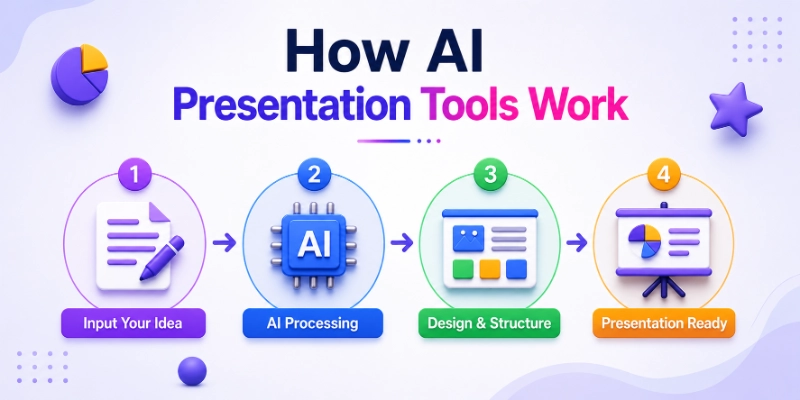
How AI Presentation Tools Work
AI presentation tools work by analyzing your input and turning it into structured slides. You enter a topic, text, or document, and the system creates headings, content flow, and design automatically.
- You input your topic or text
- The tool breaks content into slides
- It adds layout, design, and visuals
- You can edit and customize slides easily
- The final output is ready for download or sharing
In simple terms, these tools follow a smart step-by-step process to convert ideas into complete presentations.
Best AI Tools for Presentation Making
Choosing the right AI Tools for Presentation Making can make a big difference in how fast and how well you create slides. These tools help you turn simple ideas into professional presentations without spending hours on design work. Below are some of the best options available today.
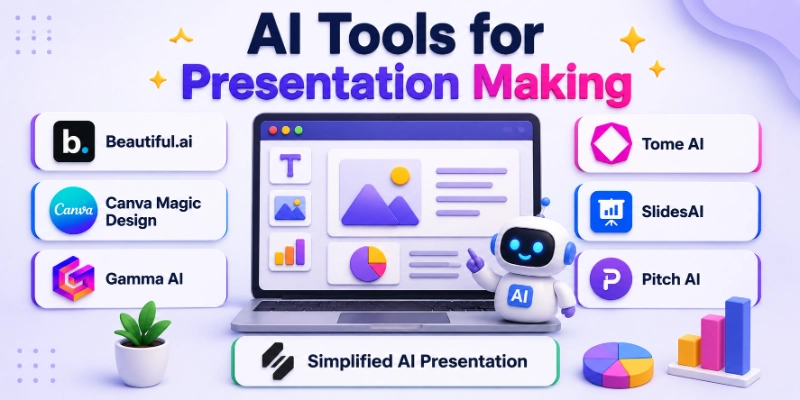
Below are the most popular AI Tools for presentations. Making that helps users create clean, structured, and visually appealing presentations in less time.
- Beautiful.ai
- Canva Magic Design
- Gamma AI
- Tome AI
- SlidesAI
- Pitch AI
- Simplified AI Presentation
1. Beautiful.ai
Beautiful.ai is a smart presentation platform that automatically designs your slides as you add content. It focuses on clean layouts and saves time by handling formatting and alignment for you. It is widely used for business and professional presentations.
Features
Below are the main features of Beautiful.ai that makes it a useful presentation tool:
- Smart slide design that adjusts automatically
- Ready-to-use professional templates
- Consistent layout across all slides
- Easy drag-and-drop editing system
- Cloud-based access for teams and individuals
Pros and Cons
Below are the advantages and limitations of Beautiful.ai:
Pros:
- Saves time in slide design
- Produces clean and professional presentations
- Very easy for beginners to use
- Maintains consistent formatting automatically
Cons:
- Limited advanced design control
- Some features are locked behind paid plans
- Requires internet access to work
- Less flexible compared to manual tools
Best Use Cases
Below are the most common use cases where Beautiful.ai works best:
- Business presentations and reports
- Startup pitch decks for investors
- Academic projects and seminars
- Marketing and strategy presentations
- Quick professional slide creation for meetings
2. Canva Magic Design
Canva Magic Design is a popular tool that turns simple text into full presentations with ready-made visuals and layouts. It is widely used because it combines design flexibility with ease of use. Users can quickly create slides without design experience.
Features
Below are the main features of Canva Magic Design:
- Converts text prompts into presentation slides
- Large library of templates and design elements
- Easy drag-and-drop editing
- Brand kit support for consistent designs
- Cloud-based collaboration
Pros and Cons
Below are the advantages and limitations of Canva Magic Design:
Pros:
- Very easy to use for beginners
- Huge collection of templates and graphics
- Fast presentation creation
- Strong customization options
Cons:
- Some premium assets require paid plan
- Can feel overwhelming for new users
- Internet required for access
- Limited offline editing
Best Use Cases
Below are the best use cases for Canva Magic Design:
- Marketing presentations and social media slides
- Educational projects and student work
- Business proposals and reports
- Creative and visual storytelling
- Freelance client presentations
3. Gamma AI
Gamma AI is a modern presentation tool that focuses on creating structured, clean, and interactive slides. It transforms text into well-designed presentations quickly. It is widely used for startup and business storytelling.
Below are the key details of Gamma AI.
Features
Below are the main features of Gamma AI:
- Converts text into structured presentations
- Modern and minimal slide designs
- Interactive presentation formats
- Easy editing and content updates
- Web-based sharing options
Pros and Cons
Below are the advantages and limitations of Gamma AI:
Pros:
- Very fast slide creation
- Clean and modern design output
- Great for storytelling presentations
- Easy sharing with links
Cons:
- Limited advanced design control
- Requires internet connection
- Some features need paid plan
- Less traditional PowerPoint feel
Best Use Cases
Below are the best use cases for Gamma AI:
- Startup pitch decks
- Business storytelling presentations
- Product presentations
- Investor reports
- Online sharing presentations
4. Tome AI
Tome AI is a storytelling-focused presentation tool that helps users turn ideas into visual narratives. It is designed to create engaging and flow-based presentations. It is commonly used for creative and business storytelling.
It also offers smart design suggestions that help users create professional presentations quickly. It uses AI to organize content and improve the visual layout. This makes it a useful tool for startups, marketers, and teams who want to share ideas in a clear and attractive way.
Features
Below are the main features of Tome AI:
- AI-powered storytelling slides
- Automatic content generation
- Visual-rich presentation layouts
- Simple prompt-based input
- Easy sharing and collaboration
Pros and Cons
Below are the advantages and limitations of Tome AI:
Pros:
- Strong storytelling structure
- Visually appealing slides
- Easy for beginners
- Fast content generation
Cons:
- Limited manual design control
- Needs internet access
- Some advanced features are paid
- Less suitable for complex data slides
Best Use Cases
Below are the best use cases for Tome AI:
- Creative storytelling presentations
- Startup pitch decks
- Product showcases
- Marketing ideas presentations
- Educational storytelling
5. SlidesAI
SlidesAI is a simple tool that converts text into Google Slides presentations. It works as an add-on and is useful for users who already use Google Workspace. It focuses on speed and simplicity.
Below are the key details of SlidesAI.
Features
Below are the main features of SlidesAI:
- Google Slides integration
- Text-to-slide conversion
- Quick presentation generation
- Lightweight and simple interface
- Supports basic customization
Pros and Cons
Below are the advantages and limitations of SlidesAI:
Pros:
- Very easy to use
- Works inside Google Slides
- Fast content conversion
- Good for basic presentations
Cons:
- Limited design options
- Depends on Google Slides
- Fewer advanced features
- Not ideal for complex presentations
Best Use Cases
Below are the best use cases for SlidesAI:
- Student presentations
- Quick classroom slides
- Basic business reports
- Internal team updates
- Fast content-to-slide conversion
6. Pitch AI
Pitch AI is a collaborative presentation tool designed for teams and businesses. It focuses on productivity, teamwork, and modern slide design. It is commonly used in startups and corporate environments.
Features
Below are the main features of Pitch AI:
- Real-time team collaboration
- Modern presentation templates
- Easy sharing and editing
- Analytics for presentations
- Cloud-based workflow
Pros and Cons
Below are the advantages and limitations of Pitch AI:
Pros:
- Strong team collaboration features
- Professional design output
- Easy sharing and updates
- Good for business use
Cons:
- Limited offline access
- Some features require subscription
- Learning curve for beginners
- Not ideal for personal use
Best Use Cases
Below are the best use cases for Pitch AI:
- Team presentations
- Startup pitch decks
- Business reports
- Corporate meetings
- Collaborative projects
7. Simplified AI Presentation
Simplified AI Presentation is an all-in-one tool that combines design, content creation, and presentation building. It is widely used by marketers and content creators for fast slide creation.
Features
Below are the main features of Simplified AI Presentation:
- All-in-one design and presentation tool
- Text-to-slide generation
- Ready-made templates
- Brand customization options
- Simple user interface
Pros and Cons
Below are the advantages and limitations of Simplified AI Presentation:
Pros:
- Easy for beginners
- Combines multiple tools in one platform
- Fast slide creation
- Good for marketing content
Cons:
- Limited advanced design control
- Some features behind paywall
- Internet required
- Can feel basic for professionals
Best Use Cases
Below are the best use cases for Simplified AI Presentation:
- Marketing presentations
- Social media pitch decks
- Content creator slides
- Small business reports
- Quick promotional presentations
Comparison Table of AI Presentation Tools
Below is a simple comparison of popular AI tools for presentation making to help you choose the right one based on your needs.
| Tool | Ease of Use | Templates | AI Features | Export Options | Best For |
| Beautiful.ai | Very Easy | Modern & Professional | Auto slide design, smart formatting | PPT, PDF | Business presentations, pitch decks |
| Canva Magic Design | Easy | Huge template library | Text-to-slide, design suggestions | PPT, PDF, Image | Marketing, education, creative slides |
| Gamma AI | Easy | Minimal & modern | Text-to-presentation, structured slides | Web link, PDF | Startups, storytelling decks |
| Tome AI | Easy | Visual storytelling templates | AI-generated narratives | Web link, PDF | Story-based presentations |
| SlidesAI | Very Easy | Basic Google Slides templates | Text-to-Google Slides conversion | Google Slides, PPT | Students, quick presentations |
| Pitch AI | Medium | Professional team templates | Collaboration + smart editing | PPT, Web link | Team presentations, business use |
| Simplified AI Presentation | Easy | Basic + marketing templates | Text-to-slide + content tools | PPT, PDF | Marketing, small businesses |
Features to Look for in AI Presentation Tools
Below are the most important features you should check when choosing AI tools for presentation making. These features help you create professional, fast, and well-structured presentations.
- Smart Slide Generation: Creates complete slides automatically from your text or topic. It saves time by turning ideas into structured presentations.
- Design Automation: Automatically adjusts layouts, colors, and spacing. It keeps slides clean and visually balanced without manual work.
- Content Structuring: Organizes your raw ideas into proper slide flow. It ensures your presentation follows a logical and easy-to-understand order.
- Brand Kit Support: Allows you to apply your brand colors, fonts, and logos. It helps maintain a consistent and professional identity across slides.
- Collaboration Features: Enables multiple users to edit and work on the same presentation. It is useful for teams and group projects.
- Export to PowerPoint & PDF: Lets you download or share your presentation in common formats. It ensures compatibility with most platforms and devices.
Common Mistakes When Using AI Presentation Tools
Below are some common mistakes people make while using AI tools for presentation making. Avoiding these will help you create clearer, more professional, and more effective presentations.
- Overloading Slides with Text: Adding too much text makes slides hard to read. Keep content short and focus on key points only.
- Not Customizing Templates: Using default templates without changes makes presentations look generic. Always adjust colors, fonts, and layout to match your purpose.
- Ignoring Brand Consistency: Inconsistent colors and fonts reduce professionalism. Always maintain a uniform style across all slides.
- Poor Visual Hierarchy: When headings, images, and text are not organized properly, slides look confusing. Use proper spacing and size to guide attention.
- Relying Fully on AI Output: Trusting AI without editing can lead to weak or irrelevant content. Always review and refine the final presentation manually.
Tips to Make Better Presentations Using AI Tools
Below are some simple but effective tips to improve your results when using AI tools for presentation making. These tips help you create clear, engaging, and professional slides.
- Keep Slides Minimal: Keep your slides clean and simple. Use fewer words and focus only on the most important points.
- Use Visual Storytelling: Use images, icons, and visuals to explain your ideas. It makes your presentation more engaging and easy to understand.
- Focus on One Idea Per Slide: Avoid mixing multiple ideas in one slide. Each slide should explain only one clear point.
- Use Charts and Graphics Smartly: Use charts and graphs to present data in a simple way. It helps the audience understand information faster.
- Always Review AI Output: Always check the final slides before presenting. Make small edits to improve clarity and accuracy.
Conclusion
In this guide, we have covered ‘AI Tools for Presentation Making.’ We explored how these tools work, their key features, and the best options available for creating fast and professional presentations.
AI presentation tools help users save time, improve design quality, and turn simple ideas into clear and structured slides. They are useful for students, professionals, and businesses who want better results with less effort.
Personal Recommendation: You should try at least one AI presentation tool based on your needs, such as Canva for design or Gamma for structured slides. Always add your own edits to make your presentation more personal and impactful.
Thank you for reading this guide. It was a pleasure helping you understand this topic in a simple way.
💬 Don’t forget to share your thoughts or drop a comment below if you found this helpful. 🚀✨
FAQs
Below are some common questions users ask about AI tools for presentation making, AI slide generators, and AI presentation software. These answers will help you understand how to use these tools effectively.
AI Tools for Presentation Making our software that helps users create slides automatically from text or ideas. They save time by generating layouts, content structure, and design in seconds. These tools are widely used for business, education, and marketing presentations.
AI presentation tools are faster because they create slides automatically from your input. PowerPoint gives more manual control, but it takes more time and effort. Many users now combine both for better results.
There are many popular options like Beautiful.ai, Canva Magic Design, Gamma AI, and Tome AI. Each tool has different strengths depending on your needs. For example, Canva is great for design, while Gamma is better for structured presentations.
Yes, most AI presentation tools offer free versions with basic features. However, advanced templates, exports, and branding options often require a paid plan. Free versions are usually enough for simple presentations.
AI slide generators take your text or topic and convert it into structured slides.
Below is how the process usually works:
- You enter your topic or content
- AI creates slide structure automatically
- It adds design, visuals, and formatting
This makes presentation creation much faster and easier.
Yes, AI-generated presentations look clean and modern if used correctly. However, you should always review and edit the final output. This ensures better accuracy and personalization.
Students can use these tools for school projects, assignments, and seminars. These tools help them save time and improve presentation quality. They are especially useful for quick and structured slide creation.
Most modern tools include collaboration features for teams. Users can edit slides together in real time and share feedback easily. This is useful for business meetings and group projects.
Below are key features to check before choosing a tool:
- Smart slide generation
- Easy design automation
- Export options like PPT and PDF
- Template library
- Brand customization support
These features help create better and faster presentations.
Yes, most trusted platforms use secure systems to protect user data. However, always check the privacy policy before uploading sensitive information. It is best to use well-known and reliable tools for safety.






- Be Respectful
- Stay Relevant
- Stay Positive
- True Feedback
- Encourage Discussion
- Avoid Spamming
- No Fake News
- Don't Copy-Paste
- No Personal Attacks
- Be Respectful
- Stay Relevant
- Stay Positive
- True Feedback
- Encourage Discussion
- Avoid Spamming
- No Fake News
- Don't Copy-Paste
- No Personal Attacks
