How to Write Effective Prompts for ChatGPT – Step-by-Step Guide
Published: 25 Sep 2026
Have you ever typed a quick question into ChatGPT and gotten a vague, unhelpful, or completely off-topic answer? You are not alone. Many users struggle to get consistent, high-quality results from AI because they treat ChatGPT like a traditional search engine instead of an AI assistant.
Knowing how to write effective prompts for ChatGPT can help you save time, improve response accuracy, and generate useful content on the first try. From researching prompt engineering best practices, writing a great prompt comes down to giving clear instructions, providing context, and setting explicit boundaries. ChatGPT works best when you guide it with the right structure rather than giving one-word commands.
In this article, we will discuss how to write effective prompts for ChatGPT in detail, including the core components of a prompt and how to refine your prompts step by step. We will also cover essential prompting rules, real-world examples, and common mistakes to avoid.
Step-by-Step Guide to Effective ChatGPT Prompts
Writing a great prompt becomes easy when you follow a structured approach. The process starts with defining your main goal and ends with refining the response through clear follow-up instructions.
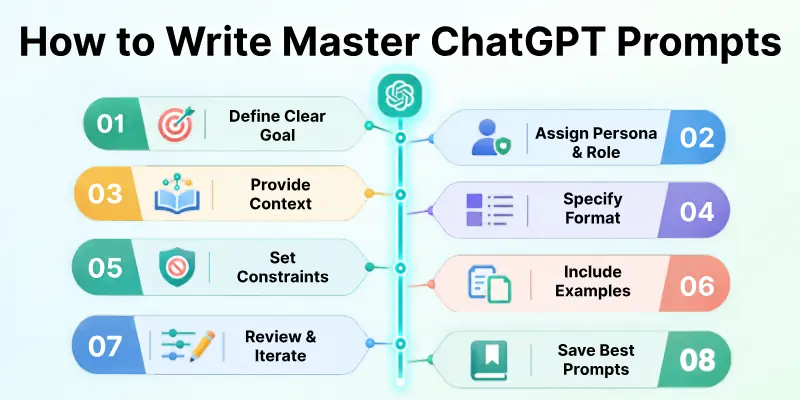
If you want to get accurate and relevant outputs from ChatGPT every time, follow each step in the right order. Below are all the steps you need to write effective prompts for ChatGPT.
Step 1: Define a Clear Goal or Task
The first step in learning how to write effective prompts for ChatGPT is deciding exactly what you want the AI to do. Vague requests like “Write about marketing” lead to generic answers, whereas specific tasks like “Draft a 300-word email introducing a new product” give ChatGPT a clear direction.
Before you type your prompt, ask yourself what specific outcome you expect.
Before you start:
- Identify the main topic or objective.
- Choose an action verb (e.g., summarize, explain, rewrite, generate, draft).
- State the specific deliverable you need (e.g., an article outline, bullet points, a Python script).
- Avoid open-ended queries when you need a specific format.
Note: If your goal is unclear, ChatGPT will make its own assumptions, which may not match what you actually need.
Step 2: Assign a Persona or Role to ChatGPT
After defining your goal, assign ChatGPT a specific role or persona. Giving the AI a perspective helps it adopt the right tone, vocabulary, and expertise level for your task.
For example, asking ChatGPT to write as a “senior software engineer” produces technical, code-focused answers, while asking it to write as a “middle school teacher” generates simple, easy-to-understand explanations.
Check these details first:
- Who is the AI speaking as? (e.g., SEO specialist, copywriter, financial advisor).
- Who is the intended audience? (e.g., beginners, executives, students).
- What level of expertise should the answer reflect?
- What tone should the response use? (e.g., professional, friendly, persuasive).
Step 3: Provide Relevant Background Context
Once you set the role, feed ChatGPT the relevant context it needs to understand your situation. ChatGPT does not know your project details, personal background, or business goals unless you explicitly share them.
Adding context prevents the AI from making generic assumptions and keeps the answer relevant to your specific needs.
Before submitting, check:
- Relevant facts, background data, or meeting notes are included.
- Source text or reference articles are pasted into the prompt.
- Target audience details are clearly stated.
- Project constraints or rules are mentioned.
This step matters because ChatGPT provides much better outputs when it works with specific reference material.
Step 4: Specify the Output Format and Structure
After providing context, tell ChatGPT exactly how you want the answer organized. Without layout instructions, ChatGPT defaults to long blocks of text or basic lists.
If you need a specific layout, ask for it directly. You can request tables, bullet points, numbered steps, or markdown headings.
Specify your output preferences:
- Choose a structure (e.g., markdown table, bulleted list, multi-paragraph essay).
- Set word limits or length bounds (e.g., “Under 200 words” or “3 detailed paragraphs”).
- Request visual elements like bold headers or subheadings.
- Define section titles if you want a custom layout.
Step 5: Set Negative Constraints and Boundaries
Once you outline what you want, specify what ChatGPT should not do. Setting negative constraints keeps the AI focused and prevents annoying patterns like filler phrases, overly formal jargon, or unwanted introductions.
Adding clear boundaries ensures the result is ready to use without extra editing.
Remember:
- Exclude buzzwords, clichés, and corporate jargon.
- Tell ChatGPT to avoid generic intro phrases like “Sure, here is…” or “In today’s fast-paced world”.
- Instruct the AI not to guess missing facts.
- Ask it to stick strictly to provided files or data sources.
Step 6: Provide Examples (Few-Shot Prompting)
Now you can add an example of your preferred output format or writing style. In AI prompting, giving one or two examples is called “few-shot prompting,” and it is one of the most reliable ways to get exact results.
When you give ChatGPT an example, it learns the structure, tone, and style instantly.
In your prompt, you can include:
- Sample Input: The raw data or statement.
- Sample Output: An example of the ideal answer.
- Style Reference: A short text snippet showing your preferred writing voice.
Do not rely on text descriptions alone when a simple example can show ChatGPT exactly what you want.
Step 7: Review and Iterate on the AI Response
After receiving the response, don’t stop at the first attempt. Prompting is a conversational process, and you can refine the output with follow-up prompts.
Reviewing the generated text and giving constructive feedback helps shape the final output to match your needs.
Pay attention to:
- Overall tone and accuracy.
- Missing details or skipped constraints.
- Formatting consistency.
- Fact-checking key numbers, names, or dates.
If the response isn’t quite right, ask ChatGPT to modify specific sections instead of restarting the entire chat.
Step 8: Save Your Best Prompts for Future Use
Once you find a prompt combination that yields great results, save it to build your own personal prompt library. Reusing successful prompt templates saves time and keeps your future content consistent.
Keeping a record of working prompts makes your AI workflow much faster over time.
For a better workflow:
- Keep a document of high-performing prompts.
- Replace specific project details with reusable placeholders like [Insert Topic] or [Insert Audience].
- Note which models perform best for specific tasks.
- Share effective prompt patterns with your team.
Core Requirements of an Effective Prompt
Before you hit send on a prompt, verify whether it contains the core building blocks. A complete prompt gives ChatGPT all the necessary guardrails to respond accurately.
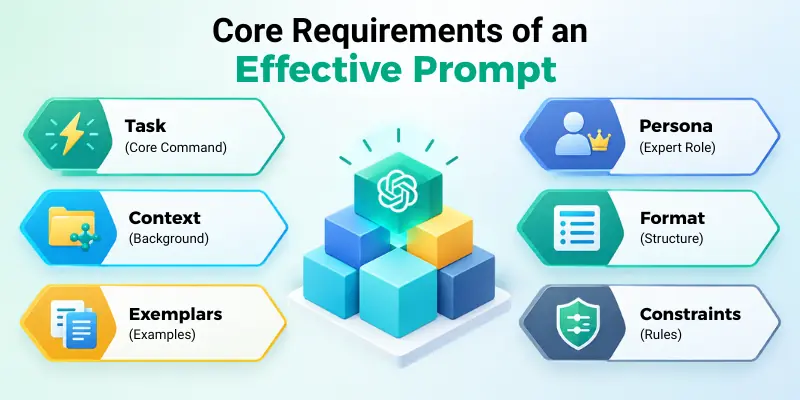
A good prompt gives ChatGPT enough information to understand what you need and how you want the response. Adding the right details, such as the task, context, examples, format, and limits, can make your instructions clearer and more useful.
Prompt Elements Framework
An effective prompt usually combines several key structural elements:
- Task: The core command describing what you want built or written.
- Context: Background information, target audience, or source materials.
- Exemplars: Clear examples showing the expected style or format.
- Persona: The expert role or tone ChatGPT should adopt.
- Format: Layout requirements, length limits, or structural guides.
- Constraints: Hard rules about what to include or omit.
The Ideal Prompt Blueprint
To help you structure your inputs, here is a practical checklist comparing a weak prompt to an effective prompt:
| Component | Weak Prompt | Effective Prompt Blueprint |
| Role | None | “Act as a senior content strategist…” |
| Task | “Write a post about productivity.” | “Write a 500-word blog post on 3 time-management techniques.” |
| Context | None | “The target audience is remote software developers facing burnout.” |
| Format | Paragraphs | “Use markdown subheadings, bullet points, and short paragraphs.” |
| Constraints | None | “Avoid fluffy intro sentences and do not use corporate buzzwords.” |
Quick Checklist Before Hitting Send
Before submitting your prompt, check:
- Did you specify the primary task clearly?
- Did you mention the target audience or voice?
- Did you attach or paste necessary source text?
- Did you specify length or layout limits?
- Is the prompt easy to read without conflicting rules?
How Accurate Are ChatGPT Responses?
While ChatGPT can produce impressive text, code, and ideas, its responses depend entirely on the quality of your prompt and the source material provided. Understanding how AI models process prompts helps you avoid relying on false information.
- AI Hallucinations: ChatGPT can sometimes state incorrect facts with complete confidence if it lacks clear data.
- Garbage In, Garbage Out: Vague or contradictory prompts lead to inaccurate or confusing answers.
- Prompt Clarity: Precise prompts with reference sources produce significantly more accurate results.
- Human Verification: Always review factual claims, figures, citations, and code outputs before publishing or using them.
- Model Limits: AI models generate text based on pattern recognition, not real human understanding.
- Source Anchoring: For critical research, paste the actual source text into the prompt and tell ChatGPT to restrict its answer strictly to that material.
Is There a “Perfect” Prompt Template?
There is no single “perfect” prompt template that works for every single task, but using a modular framework ensures consistent output across different work tasks.
- No One-Size-Fits-All: Coding prompts require strict structural constraints, while creative prompts benefit from open-ended guidance.
- Adaptability Over Rigidity: Adjust your prompt elements depending on whether you need quick answers or deep analytical reports.
- Iterative Prompting: The best prompts evolve through multi-turn conversations and testing.
- System Customization: Features like Custom Instructions allow you to save global prompt preferences across all your chats.
- Focus on Quality: Clarity and clear constraints matter far more than using fancy technical jargon.
Common Mistakes When Writing ChatGPT Prompts
Writing prompts for ChatGPT require clear communication. Avoiding a few common mistakes can dramatically improve the quality of your responses.
Keep the following points in mind when drafting your prompts:
- Writing short, single-word prompts with no context
- Asking multiple unrelated questions within a single prompt
- Forgetting to specify the desired format or word limit
- Expecting ChatGPT to know private business details without providing context
- Accepting the first response without refining or asking follow-up questions
- Using contradictory instructions (e.g., “Be extremely detailed but keep it under 50 words”)
- Relying on ChatGPT for real-time facts without using web search parameters
- Neglecting to state what tone or audience the content is for
Tips for Prompting ChatGPT Responsibly
Using ChatGPT effectively means applying sound judgement and keeping your work accurate, original, and ethical.
Below are practical tips to help you write effective prompts responsibly:
- Fact-check all critical data, names, dates, and statistics generated by AI.
- Do not input private, confidential, or sensitive personal data into prompts.
- Respect copyright rules and avoid asking ChatGPT to copy existing content word-for-word.
- Use AI as an assistant to brainstorm and draft, rather than as a total replacement for human oversight.
- Clearly cite sources when using AI-generated research or summaries.
- Refine the language to ensure the final voice sounds natural and human.
- Combine AI-generated ideas with your own expert insights.
- Review generated code thoroughly in a test environment before deployment.
Conclusion
In this guide, we have covered how to write effective prompts for ChatGPT. You learned how to set clear goals, assign expert roles, provide context, specify formats, and avoid common prompting mistakes.
ChatGPT is a powerful tool, but its output quality depends entirely on how well you communicate. By treating prompting as a step-by-step skill and refining your requests, you can get reliable, high-quality answers every time.
My recommendation: Build your own prompt library with templates that work well for your daily tasks. Focus on providing clear context and strong constraints instead of writing overly complicated prompts.
Thank you for reading this guide! I hope it helps you get much better results from ChatGPT, and I wish you the best of luck with your AI workflows.
💬 Have a favorite prompt structure or a tip that works for you? Share it in the comments below and let us know how you use ChatGPT!
FAQs
Below are answers to common questions about writing effective ChatGPT prompts, packed with quick tips and clear examples to help you master AI prompting fast:
Writing effective prompts comes down to clear communication. Instead of giving one-word commands, provide explicit instructions, assign a specific role to the AI, and define the exact format you want in response. Treating ChatGPT like a smart assistant that needs background details will instantly double the quality of your output.
To get the best results, your prompt should cover these core elements:
- Task: The core command or action verb (e.g., summarize, draft, analyze).
- Persona: The role ChatGPT should play (e.g., senior copywriter, Python expert).
- Context: Relevant background facts, target audience, or raw reference data.
- Format: The layout requirement (e.g., markdown table, bulleted list, 300 words).
- Constraints: Clear rules on what not to include (e.g., no corporate jargon, no intro text).
Use explicit negative constraints at the very end of your prompt. Add this exact rule: “Directly provide the answer. Do NOT include opening greetings, generic transitional phrases like ‘In today’s fast-paced world’, or concluding summaries.”
Here are the primary reasons ChatGPT might ignore your prompt instructions and how to fix them:
- The prompt is too long: Keep instructions focused so critical details don’t get buried.
- Conflicting rules: Double-check that your prompt doesn’t ask for “deep detail” while capping length to “50 words.”
- Weak placement: Place your most important rules at the very end of the prompt for higher priority attention.
Yes, absolutely. You can turn ChatGPT into a prompt generator by using a meta-prompt. Simply ask: “I want to create an effective prompt for [insert your task]. Ask me 5 clarifying questions one by one to help me build the ultimate prompt for this.”
To deal with incorrect or hallucinated AI responses effectively, follow these core strategy steps:
- Verify key figures: Always double-check names, dates, and statistics manually.
- Anchor with sources: Paste the exact text or article into the prompt and restrict ChatGPT to rely only on that data.
- Ask for reasoning: Instruct the AI to show its step-by-step logic before giving a final answer.




- Be Respectful
- Stay Relevant
- Stay Positive
- True Feedback
- Encourage Discussion
- Avoid Spamming
- No Fake News
- Don't Copy-Paste
- No Personal Attacks
- Be Respectful
- Stay Relevant
- Stay Positive
- True Feedback
- Encourage Discussion
- Avoid Spamming
- No Fake News
- Don't Copy-Paste
- No Personal Attacks
