How to Use AI for Data Analysis (Beginner-Friendly Guide)
Published: 7 Apr 2026
Many people today want to understand data, make smart decisions, and save time. But looking at large files, numbers, and patterns can feel confusing. This is where smart tools help you work faster. In this guide, you will learn how to use AI for data analysis in a simple and clear way so even a complete beginner can understand everything easily.
You will learn what these tools do, how they work, where to use them, and how to get real value from them.
What Is AI Data Analysis?
This section gives you a clear idea of what the process means and why people use it.
AI data analysis means using smart tools to study information, find patterns, and give answers. These tools can read large files that would take humans many hours.
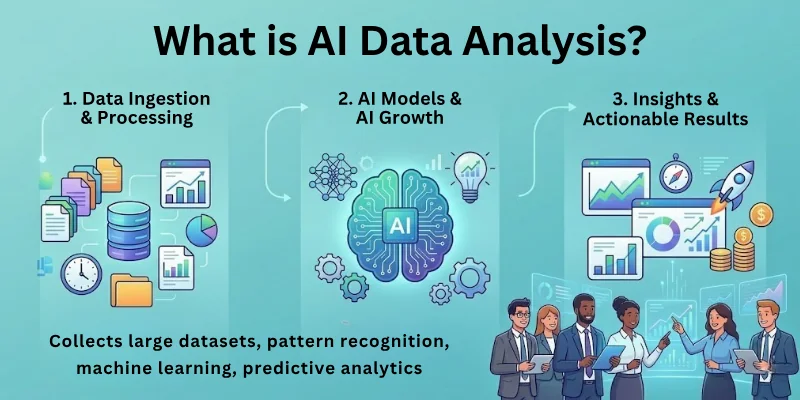
They find hidden trends and give suggestions to help you make better decisions. When you use these tools the right way, your work becomes faster and more accurate.
Why People Use AI for Data Analysis
Here is what this section explains. You will understand the main reasons people prefer smart tools for data study.
- Saves many hours of manual work
- Finds patterns humans usually miss
- Helps in business planning
- Reduces mistakes
- Gives clear insights in simple words
- Works well with large data files
- Supports real time decision making
Types of Data You Can Analyze With AI
This part will tell you what kinds of information these tools can handle.
- Numbers like sales or income
- Text such as reviews, comments, or messages
- Images
- Customer behavior
- Website activity
- Product performance
- Social media trends
- Industry reports
AI can understand almost every type of data if it is cleaned and structured.
How to Use AI for Data Analysis: Step by Step
This is the main part of the guide. Here you will learn each step in simple and detailed form. This also naturally helps you understand how to use AI for data analysis properly in real life.
Step 1: Collect Your Data
This section explains how to gather information before starting the analysis.
- Download CSV or Excel files
- Collect survey responses
- Gather customer reviews
- Save website analytics reports
- Export data from tools like Google Analytics
- Collect internal business numbers
You need all data in one place before you begin.
Step 2: Clean Your Data
This part explains why cleaning matters.
Cleaning makes your data neat and ready for study. AI tools work best when the information is organized. If there are missing values or wrong entries, the results become weak. Clean data gives you better accuracy and better predictions.
- Remove empty rows
- Fix spelling errors
- Correct dates
- Remove duplicates
- Arrange columns
- Standardize format
Step 3: Pick the Right AI Tool
This section will show you how to choose the best tool for your goal.
- For cleaning data use DataRobot or Google Sheets smart tools
- For insights use ChatGPT or Gemini
- For dashboards use Power BI or Tableau AI
- For predictions use RapidMiner or H2O
- For automation use MonkeyLearn or Akkio
Choose a tool that matches your skill level.
Step 4: Upload or Paste Your Data Into the Tool
Here you learn how to enter your information.
Most tools let you upload files directly. Some tools allow copy paste. Once the data is inside the tool, it reads everything carefully. It scans for trends, patterns, and errors.
- Upload CSV files
- Upload Excel sheets
- Copy and paste values
- Connect databases
Step 5: Ask Clear Questions
This section teaches you how to get good insights.
Clear questions give better answers. If your question is confusing, the tool may not understand your intent. So always be specific.
Examples:
- Why are sales dropping in June
- Which product is performing best
- What pattern can you see in customer feedback
- Which location gives the highest profit
When you do this, you will understand how to use AI for data analysis in the smartest way.
Step 6: Study the Insights
This part explains how to read the results.
The tool will show graphs, summaries, or predictions. Read them slowly. Check which areas improved and which did not. Try to find the root cause of every pattern.
- Look at trend lines
- Read summaries
- Study customer behavior
- Compare past and present data
- Identify weak areas
Step 7: Make Predictions With AI
This section explains how predictions work.
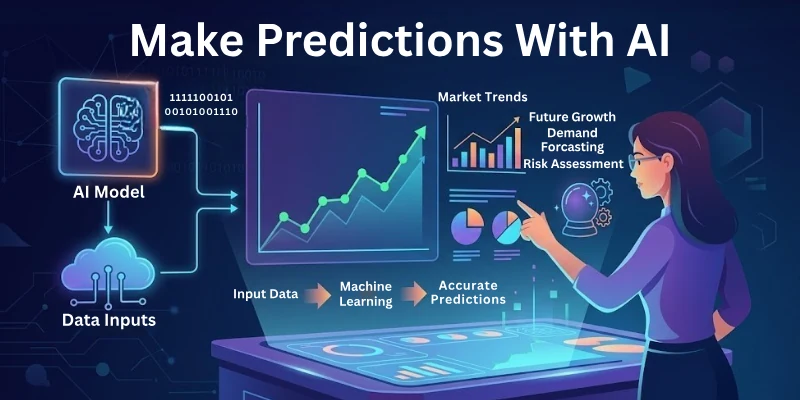
AI tools can predict future numbers based on past patterns. This helps you make strong business decisions.
- Sales prediction
- Growth forecast
- Customer demand prediction
- Risk detection
- Performance projection
When you use these predictions well, your decisions become more confident.
Step 8: Create Reports
This part explains how to present your results.
AI tools can build simple reports that are easy to share. You can turn insights into charts or clean summaries.
- Bar charts
- Line charts
- Pie charts
- Summary paragraphs
- Key points
Reports help you present data clearly to your team.
Step 9: Automate Your Data Work
This section explains how automation saves time.
Once you know what tasks you repeat daily, you can automate them. AI tools can do them automatically.
- Auto clean data
- Auto generate reports
- Auto detect unusual numbers
- Auto update dashboards
This saves many hours every week.
Top Use Cases of AI in Data Analysis
This part explains where you can apply these tools.
- Customer feedback study
- Sales analysis
- Market trends
- Competitor research
- Risk assessment
- Employee performance study
- Social media tracking
- Product review analysis
- Medical records study
- Website traffic study
Top 10 AI Tools for Data Analysis
This section lists the best tools to get started.
- ChatGPT
- Google Gemini
- IBM Watson Studio
- DataRobot
- RapidMiner
- MonkeyLearn
- Tableau AI
- Power BI with Smart Insights
- Akkio
- H2O AI
Common Mistakes People Make
This section tells you what to avoid.
- Giving unclear questions
- Using unclean data
- Expecting perfect results
- Misunderstanding predictions
- Ignoring data privacy rules
- Choosing the wrong tool
When you avoid these mistakes, your work becomes smooth.
Final Note
In this guide, we covered how to use AI for data analysis in full detail. You learned how these tools work, why people use them, and how to make smart decisions with the help of insights. Always start with clean data and clear questions because both decide the quality of your results.
If you ever feel confused, come back to this guide. Take your time, understand each step, and slowly your skills will grow. Good luck with your data journey and thank you for reading.
FAQs: How to Use Artificial Intelligence for Data Analysis
Here are some of the most commonly asked questions related to how to use AI tools for data analysis:
AI data analysis means using smart tools to study information, find patterns, and give answers quickly. These tools handle large files and complex numbers in minutes. They help beginners and professionals understand trends faster.
Yes, beginners can use these tools easily because they give step-by-step guidance. You do not need to know all programming details. Many people search for how to use AI tools for data analysis to learn faster.
Numbers, text, images, and website activity all work well. Tools can study customer reviews, sales data, and social media trends. Structured and clean data gives the best results.
They analyze past information and look for repeated trends. Then they show results visually or in simple summaries. This helps you make quick and accurate decisions.
Yes, they can predict sales, growth, or customer behavior based on past patterns. These predictions help businesses plan smarter. Always check the prediction and compare it with real data.
Yes, many tools offer free versions with basic features. ChatGPT, Google Sheets smart features, and Tableau Public are some examples. Paid versions usually give more advanced insights.
They convert patterns into graphs, charts, and summaries. This makes data easier to read and share with teams. Some tools even make dashboards that update automatically.
Yes, many tools detect missing values, duplicates, and errors. They organize data for better analysis. Clean data improves the accuracy of insights and predictions.
Yes, they are useful for business, marketing, education, healthcare, finance, and more. Any field that uses data can benefit from AI-assisted analysis. The key is using the right tool for your type of data.
Common mistakes include giving unclear questions, using messy data, ignoring predictions, and relying completely on tools. Always double-check results and learn from insights to improve your skills.






- Be Respectful
- Stay Relevant
- Stay Positive
- True Feedback
- Encourage Discussion
- Avoid Spamming
- No Fake News
- Don't Copy-Paste
- No Personal Attacks
- Be Respectful
- Stay Relevant
- Stay Positive
- True Feedback
- Encourage Discussion
- Avoid Spamming
- No Fake News
- Don't Copy-Paste
- No Personal Attacks
