Best AI Photo Restoration Tools in 2027: 10 Options Compared
Published: 2 Nov 2026
Old photographs often hold valuable family memories, but scratches, fading, blur, and physical damage can make them difficult to enjoy. Restoring these images manually can take time and may require photo-editing skills.
AI photo restoration tools make this process easier by helping users sharpen blurry faces, reduce image noise, repair visible damage, improve resolution, and add color to black-and-white pictures. However, each tool offers different features, and some focus more on portrait enhancement than repairing damaged photographs.
In this article, we will explore the best AI photo restoration tools in 2027, compare their key features, advantages, limitations, and pricing options, and help you choose the right tool for your photos.
Best AI Photo Restoration Tools
The right tool depends on the condition of your photographs and the results you want. Some platforms focus on repairing old family pictures, while others specialize in facial enhancement, colorization, image sharpening, or detailed photo editing.
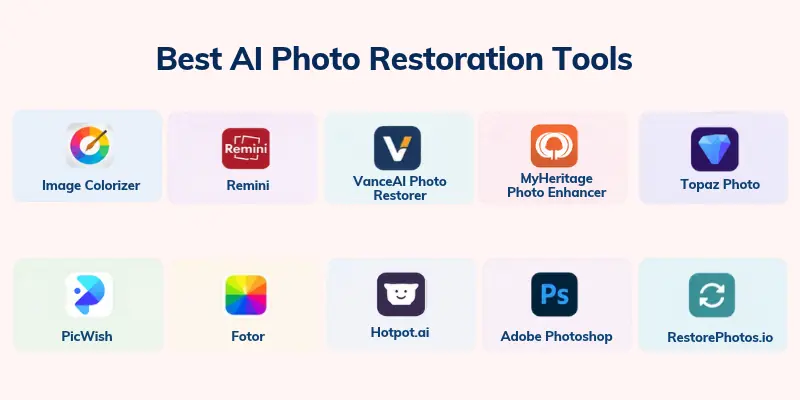
The following Top AI Photo Restoration Tools offer different approaches to improving old and damaged photographs. Compare their features to find the option that best matches your needs.
- ImageColorizer
- Remini
- VanceAI Photo Restorer
- MyHeritage Photo Enhancer
- Topaz Photo
- PicWish
- Fotor
- Hotpot.ai
- Adobe Photoshop
- RestorePhotos.io
1. ImageColorizer
ImageColorizer provides AI-powered tools for restoring old photographs, colorizing black-and-white images, and improving portrait quality. It is useful for people who want to repair family pictures and enhance their appearance without learning advanced photo-editing techniques.
The platform combines several image-enhancement features, making it worth considering for faded photographs, old portraits, and scanned family albums. Available tools and usage limits may vary depending on the current plan.
Best For: Users who want an online solution for restoring and colorizing old photographs.
Key Features
These features make ImageColorizer useful for different restoration tasks:
- Old photo restoration: Improve the appearance of old or faded photographs using AI.
- Photo colorization: Add estimated colors to supported black-and-white images.
- Portrait enhancement: Improve the clarity and appearance of faces.
- Image enhancement: Refine image quality for easier viewing and sharing.
Pros
Here are some advantages to consider:
- Offers several photo restoration and enhancement features.
- Supports colorization for black-and-white photographs.
- Provides an online workflow without requiring complex editing software.
Cons
Keep these limitations in mind:
- Some features or high-resolution downloads may require payment.
- Results can vary depending on the condition of the original photograph.
- AI colorization may not reproduce the original colors accurately.
Pricing: Free access or limited use may be available, with paid options for additional features. Check the official website for current plans and export limits.
2. Remini
Remini is a popular option for improving blurry portraits and enhancing facial details in low-quality images. Its mobile-focused experience makes it convenient for people who want to improve old family pictures or restore the appearance of faces in photographs.
Unlike dedicated damage-repair tools, Remini is particularly useful when the main problem is a blurry or unclear face. It can produce a sharper-looking image, but the enhanced details may differ from the person’s actual appearance.
Best For: Mobile users who want to sharpen blurry faces and improve old portraits.
Key Features
The following features make Remini worth considering for portrait restoration:
- Face enhancement: Improve the visibility of facial details in supported images.
- Blur reduction: Make some unclear photographs appear sharper.
- Image enhancement: Improve the overall appearance of low-quality pictures.
- Mobile access: Restore images through a compatible mobile app.
Pros
These benefits may appeal to casual users:
- Offers a straightforward mobile editing experience.
- Can improve the appearance of blurry portraits.
- Requires less manual editing than traditional software.
Cons
Consider these limitations before choosing it:
- Some features may require a paid subscription.
- AI-enhanced facial details may not be completely accurate.
- It is not a complete solution for every type of physical photo damage.
Pricing: Free use or trial access may be limited, while additional features may require a subscription. Check the current app listing for regional pricing and subscription terms.
3. VanceAI Photo Restorer
VanceAI Photo Restorer is designed to improve old photographs by addressing common problems such as scratches, fading, blur, and poor image quality. It can be useful for people who want to restore family photos or prepare old images for digital storage.
The platform also offers other image-processing tools, which may help users who need restoration alongside upscaling and general enhancement. If you have a large collection of old photographs, check the available batch-processing features and credit limits before choosing a plan.
Best For: Users restoring old photographs and improving multiple images.
Key Features
These features can support different photo restoration workflows:
- Damage repair: Improve the appearance of supported scratches, marks, and other visible damage.
- Photo enhancement: Refine image clarity and visual quality.
- Image upscaling: Increase image dimensions using supported enhancement tools.
- Batch processing: Check available options for processing multiple images.
Pros
The main advantages include:
- Offers tools designed for old-photo restoration.
- Provides additional image-enhancement options.
- May suit users working with multiple photographs.
Cons
Keep these points in mind:
- Continued use may require credits or a paid plan.
- Results depend on the severity of the damage.
- Large restoration projects may require comparing processing costs.
Pricing: Limited free credits or trial access may be available. Review the official pricing page for current plans, credits, and batch-processing conditions.
4. MyHeritage Photo Enhancer
MyHeritage Photo Enhancer helps improve the appearance of faces in historical and family photographs. It is particularly relevant to people researching their family history who want clearer portraits of parents, grandparents, or earlier generations.
The tool focuses on facial enhancement rather than serving as a complete manual restoration suite. It can make faces easier to see, although it cannot guarantee that reconstructed details accurately reflect the original person.
Best For: Families and genealogy enthusiasts who want to enhance historical portraits.
Key Features
The following features are relevant to family photo restoration:
- Face enhancement: Improve the visible details of faces in supported photographs.
- Historical photo improvement: Make older portraits clearer for viewing and sharing.
- Family history workflow: Use enhanced images alongside family history research.
- Online access: Process supported images through the available web-based service.
Pros
Here are the main benefits:
- Useful for enhancing portraits from older family collections.
- Fits naturally into family history research.
- Can make unclear faces easier to view.
Cons
Consider these limitations before using it:
- Access to some features may depend on a subscription.
- It may not repair every scratch, tear, or damaged area.
- Enhanced facial details may not be historically accurate.
Pricing: Availability and access may depend on the current MyHeritage plan. Check the official website for the latest subscription requirements before purchasing.
5. Topaz Photo
Topaz Photo is a desktop photo-enhancement application designed to improve image quality through tools such as sharpening, noise reduction, and upscaling. It is worth considering when you need clearer photographs for printing, professional projects, or high-resolution digital archives.
Unlike a simple one-click old-photo restorer, Topaz Photo offers a more specialized enhancement workflow. It can improve existing details, but it should not be treated as a guaranteed solution for reconstructing missing sections of a badly damaged photograph.
Best For: Photographers and advanced users who need high-quality image enhancement.
Key Features
These features can help improve photographs for different uses:
- Noise reduction: Reduce distracting noise in supported images.
- Sharpening: Improve the appearance of soft or slightly blurry details.
- Image upscaling: Increase image resolution for larger displays or prints.
- Desktop workflow: Work with images using dedicated photo-enhancement software.
Pros
The main advantages include:
- Offers dedicated tools for sharpening and noise reduction.
- Useful for improving images intended for larger prints.
- Provides specialized enhancement options.
Cons
Keep these limitations in mind:
- Paid access may be required.
- It may take time to learn the available controls.
- Enhancement tools cannot recover every detail lost through severe damage.
Pricing: Topaz Photo offers paid access, with current prices and licensing terms available on its official website. Review the latest plan details before purchasing.
6. PicWish
PicWish offers online image-editing tools, including features for improving old photographs and enhancing faces. Its browser-based workflow suits beginners who want to restore family portraits without installing a desktop application.
It is worth exploring if you need a simple way to improve image clarity and repair common photo-quality issues. Before processing a large collection, check the available restoration options, output resolution, and free-use restrictions.
Best For: Beginners who want an accessible online photo restoration tool.
Key Features
The following features may help with everyday restoration tasks:
- Old photo enhancement: Improve the visual quality of supported older images.
- Face restoration: Enhance facial clarity where the feature is available.
- Image upscaling: Improve the size and appearance of supported images.
- Browser-based editing: Restore photographs online without a complex setup.
Pros
Here are some potential advantages:
- Easy to access through a web browser.
- Offers additional image-editing tools.
- Suitable for simple photo-enhancement tasks.
Cons
Consider these points before choosing it:
- Free processing may have usage limits.
- Advanced exports or features may require payment.
- Results may vary with heavily damaged or low-quality images.
Pricing: Free access may be available with limits, while some features require payment or credits. Check the official website for current pricing and export conditions.
7. Fotor
Fotor is an online photo editor that combines AI-powered image enhancement with other editing features. It can be a practical choice if you want to improve an old photograph and make additional adjustments without switching between multiple applications.
Its broader editing tools make it useful for casual users, content creators, and people preparing photographs for social media or personal albums. However, not every general enhancement feature specifically repairs scratches or physical damage, so check the tool’s current restoration capabilities.
Best For: Users who want photo restoration alongside general image editing.
Key Features
These features can support different photo-editing needs:
- AI photo enhancement: Improve the overall appearance of supported images.
- Image sharpening: Make some blurry photographs look clearer.
- Color adjustment: Adjust colors and visual tones using available editing controls.
- Additional editing tools: Crop, retouch, and refine photographs in the same workflow.
Pros
The main advantages include:
- Combines enhancement with general photo editing.
- Offers an accessible online workflow.
- Supports several types of personal and creative projects.
Cons
Keep the following limitations in mind:
- Some AI features may require a paid plan.
- Dedicated damage repair may be limited compared with specialized restorers.
- Results depend on the original image and selected settings.
Pricing: Fotor offers free and paid options, but feature access and export limits can vary. Check the current pricing page for subscription details.
8. Hotpot.ai
Hotpot.ai offers AI-powered image tools, including options for restoring old photographs. It may be useful if you want to improve a personal photo without setting up advanced editing software.
Its online approach can help users experiment with restoring faded or damaged pictures. Since free usage and processing options can change, check the current terms before relying on it for a large collection of photographs.
Best For: Users who want to try online AI restoration for personal photos.
Key Features
The following features may be useful for basic restoration:
- Photo restoration: Improve the appearance of supported older photographs.
- Face enhancement: Refine facial details where supported.
- Image processing: Work with photographs through an online interface.
- Additional AI tools: Explore other image-related features available on the platform.
Pros
Here are some reasons to consider it:
- Provides an online workflow.
- Can be useful for quick restoration experiments.
- Offers additional AI image tools.
Cons
Consider these limitations before using it:
- Free usage may be restricted.
- Results can vary depending on the source photograph.
- Advanced controls may be limited for detailed restoration work.
Pricing: Free or credit-based access may be available depending on the tool. Confirm current costs and usage terms on the official website.
9. Adobe Photoshop
Adobe Photoshop combines traditional photo editing with AI-assisted tools that can help repair and improve old photographs. It is especially useful when a picture needs more than automatic enhancement, such as removing marks, adjusting faded colors, or correcting individual areas manually.
Photoshop gives experienced users greater control over the final result than many one-click restoration tools. However, it has a steeper learning curve, and some restoration tasks require careful manual editing rather than relying on AI alone.
Best For: Photographers and editors who want detailed control over photo restoration.
Key Features
These features make Photoshop useful for more involved projects:
- Repair and retouching: Use available tools to remove or reduce visible marks.
- AI-assisted editing: Apply supported AI features to selected editing tasks.
- Color correction: Adjust faded colors, brightness, contrast, and tone.
- Layer-based editing: Keep changes organized and refine individual parts of an image.
Pros
The main advantages include:
- Offers extensive manual editing controls.
- Supports detailed retouching and color correction.
- Useful for restoration projects that require several adjustments.
Cons
Keep these limitations in mind:
- Requires time to learn effectively.
- Paid access may be required.
- Severe damage can still require substantial manual work.
Pricing: Photoshop is available through paid Adobe plans, with pricing depending on the subscription and region. Check Adobe’s official website for current plan details.
10. RestorePhotos.io
RestorePhotos.io focuses on improving old photographs, particularly portraits with unclear or blurry faces. Its straightforward approach can appeal to users who want to try an AI restorer without navigating a full photo-editing suite.
It is worth comparing with broader image editors if your main goal is to improve an old family portrait quickly. As with other AI restoration tools, the result may look sharper without accurately recovering every original facial detail.
Best For: Users who want a simple tool for enhancing old portrait photographs.
Key Features
The following features may support basic restoration tasks:
- Old portrait enhancement: Improve the appearance of supported older photos.
- Face clarity: Enhance visible facial details where supported.
- Simple online workflow: Process photographs without installing complex editing software.
- Digital photo improvement: Prepare restored images for sharing or personal archives.
Pros
Here are some potential benefits:
- Focuses on a common old-photo restoration need.
- Offers a simple approach for beginners.
- Can be useful for improving portraits before saving or sharing them.
Cons
Consider these limitations before choosing it:
- Specialized tools may be needed for scratches, tears, and missing areas.
- Output quality can vary with the source image.
- Available features and usage limits may change.
Pricing: Check the official website for current free-use conditions, supported features, and any paid options.
AI Photo Restoration Tools Compared
Choosing between tools is easier when you compare their main purposes and limitations. The following table summarizes the options discussed in this guide.
| Tool | Best For | Main Capabilities | Free Access |
| ImageColorizer | General old-photo restoration | Restoration, colorization, enhancement | Limited access may be available. |
| Remini | Blurry portraits | Face enhancement, image sharpening | May be limited |
| VanceAI Photo Restorer | Old photos and multiple images | Damage repair, enhancement, upscaling | Limited credits may be available |
| MyHeritage Photo Enhancer | Historical family portraits | Facial enhancement | Depends on the current plan. |
| Topaz Photo | High-quality image enhancement | Sharpening, denoising, upscaling | Check current trial options. |
| PicWish | Beginners and online editing | Photo enhancement, face restoration | Limited access may be available. |
| Fotor | General photo editing | Enhancement, sharpening, color adjustment | Free options may be limited. |
| Hotpot.ai | Quick online restoration | AI photo restoration and image tools | Check current terms. |
| Adobe Photoshop | Detailed manual restoration | Retouching, color correction, AI-assisted editing | Paid access is generally required. |
| RestorePhotos.io | Old portrait enhancement | Face-focused photo improvement | Check current terms. |
How to Choose the Right AI Photo Restoration Tool
Not every photo restoration tool can fix the same types of damage. Before selecting one, consider the condition of your photographs, the level of editing you need, and whether you want to work online or on your computer.
- Type of Damage: Choose a tool that can address your specific issue, such as scratches, fading, blur, noise, or damaged facial details.
- Restoration Quality: Look for natural-looking results that preserve the person’s identity, original features, and important details.
- Colorization Support: If you have black-and-white photographs, check whether the tool can add color and whether you can adjust the result.
- Free and Paid Plans: Compare credits, image resolution, watermarks, batch processing, and subscription costs before paying.
- Ease of Use: Beginners may prefer browser-based AI photo restoration software, while experienced editors may benefit from more advanced controls.
- Privacy and Security: Review how uploaded images are stored, processed, and deleted, especially when restoring personal or family photographs.
- Printing Requirements: If you plan to print restored photographs, check the maximum output resolution and whether the tool preserves enough detail for your intended print size.
For occasional projects, free AI photo restoration tools may be enough. If you regularly restore large photo collections, compare paid plans based on image quality, processing limits, and the features you actually need.
Common Uses of AI Photo Restoration Tools
The top AI photo restoration tools can support several personal and professional tasks, depending on their features.
- Restoring Family Memories: Improve old family portraits, wedding pictures, and photographs of previous generations.
- Repairing Damaged Photographs: Reduce the appearance of scratches, stains, creases, and other visible damage.
- Enhancing Blurry Faces: Improve facial clarity in old portraits and low-quality images.
- Colorizing Black-and-White Photos: Add estimated colors to monochrome photographs for a different viewing experience.
- Preparing Photos for Printing: Improve image clarity and resolution before creating physical copies.
- Creating Digital Archives: Improve scanned photographs before saving them in digital family albums.
- Restoring Historical Images: Enhance photographs for personal research, educational projects, or authorized archival work.
Specialized AI-powered photo restoration tools may work well for common damage, while advanced editing software can provide more control when a photograph needs careful manual correction.
Conclusion
In this guide, we have covered best AI photo restoration tools and explored 10 options for restoring old, blurry, faded, and damaged photographs. We also compared their features, advantages, limitations, and pricing considerations to help you find a suitable solution for your photo restoration needs.
The right tool depends on whether you want to enhance faces, repair damaged prints, colorize old pictures, or prepare high-resolution images for printing. Compare the available features and test a sample photograph before choosing a tool for your entire collection.
My Recommendation: I recommend ImageColorizer or PicWish for simple restoration, Remini or Topaz Photo for enhancement, and Adobe Photoshop for detailed manual repairs.
💬 Have you tried any of these photo restoration tools? Leave a comment below and share which tool worked best for you or which one you would like to try next! 📸😊
FAQs
Here are some common questions about AI photo restoration tools, their features, and how to choose the right option for your photographs.
1. What are AI photo restoration tools used for?
AI photo restoration tools use artificial intelligence to improve the appearance of old, blurry, faded, or damaged photographs. Depending on the software, they can sharpen faces, reduce noise, repair some visible damage, and add color to black-and-white images. These tools are useful for preserving family memories and improving scanned photographs.
2. Which AI photo restoration software is best for old family photos?
The best option depends on the condition of your photographs and the type of restoration you need. Consider these options when comparing AI tools for restoring old photos:
- ImageColorizer: Worth exploring for restoration and colorization.
- MyHeritage Photo Enhancer: Useful for improving historical family portraits.
- VanceAI Photo Restorer: Worth considering for damaged photos and additional enhancement tasks.
Test the same photograph with different tools to compare facial details and overall image quality.
3. Are there free AI photo restoration tools available?
Yes, some platforms provide free credits, limited image processing, or free access to selected features. Options worth checking include PicWish, ImageColorizer, and Hotpot.ai. Review their current usage limits because free downloads, high-resolution exports, and advanced features may require payment.
4. Can AI restore severely damaged or torn photographs?
AI can improve some damaged photographs, but it cannot guarantee a complete or historically accurate restoration. Tools may repair visible marks or reconstruct missing areas, depending on their capabilities. For photographs with major tears or missing sections, you may need manual editing alongside AI restoration.
5. Which AI photo restoration apps are best for mobile users?
Mobile users can consider AI photo restoration apps such as Remini for enhancing blurry faces and improving portrait quality. Some other restoration services also provide mobile-friendly websites or apps. Check device compatibility, export resolution, and subscription requirements before installing an application.
6. Can AI colorize black-and-white photographs accurately?
AI colorization tools estimate colors based on patterns learned from their training data and the contents of an image. They can produce convincing results, but they cannot always determine the original colors of clothing, buildings, or other objects. If historical accuracy matters, treat the colorized image as an interpretation rather than a verified reproduction.
7. What is the difference between photo restoration and photo enhancement?
Photo restoration focuses on improving old or damaged images by addressing issues such as scratches, fading, and deterioration. Photo enhancement generally improves image quality through sharpening, color correction, noise reduction, or upscaling. Some AI-based photo restoration tools offer both types of functionality in one platform.
8. Can AI photo restoration tools improve blurry faces?
Yes, tools such as Remini and other portrait enhancement applications can make some blurry faces appear sharper. However, AI may generate details that were not captured in the original photograph, especially when the face is extremely unclear. Compare the restored image with the original to make sure the result remains appropriate for your intended use.
9. Is AI photo restoration software safe for private family pictures?
Safety depends on how the service handles uploaded images and personal information. Before using Best AI Photo Restoration Software, review its privacy policy, retention period, deletion options, and rules for using uploaded content. For sensitive photographs, consider an offline option after verifying that it processes files locally.
10. How do I choose the best AI tool to restore old photos?
Start by identifying whether you need damage repair, face enhancement, colorization, or upscaling. Then compare the best AI tools to restore photos based on output quality, ease of use, supported formats, privacy, and pricing. Test one or two images before committing to a paid plan or processing your full photo collection.




- Be Respectful
- Stay Relevant
- Stay Positive
- True Feedback
- Encourage Discussion
- Avoid Spamming
- No Fake News
- Don't Copy-Paste
- No Personal Attacks
- Be Respectful
- Stay Relevant
- Stay Positive
- True Feedback
- Encourage Discussion
- Avoid Spamming
- No Fake News
- Don't Copy-Paste
- No Personal Attacks
