How to Use AI to Make Study Notes Fast and Easy
Published: 22 Apr 2026
Studying becomes easier when your notes are clear, organized, and simple. Many students feel confused because long chapters drain energy and take too much time.
Technology is changing learning and helping people understand information faster. This is where learning how to use AI to make study notes gives you a strong advantage. It can collect key ideas, highlight important points, and convert long text into short and easy notes. You can use it for school, college, professional exams, and online courses.
This guide will show you how to use AI to make study notes in many smart ways. Let us cover everything in detail so you study with more clarity and less stress.
How to Use AI to Make Study Notes
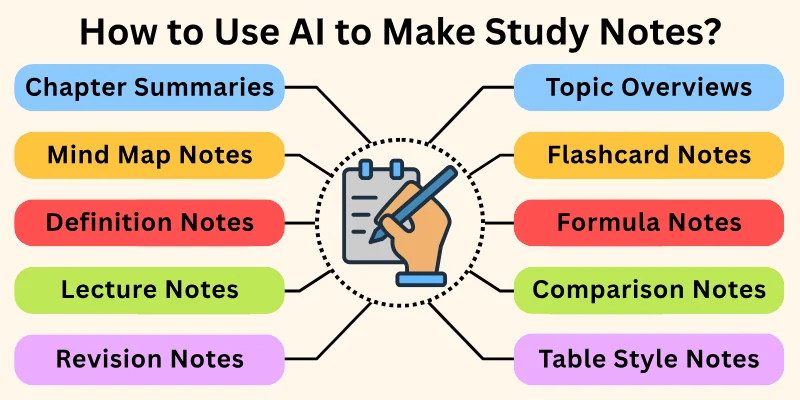
Here are the major ways you can use AI to make study notes every day:
- Chapter Summaries
- Topic Overviews
- Key Points Extraction
- Bullet Notes Creation
- Mind Map Notes
- Flashcard Notes
- Definition Notes
- Formula Notes
- Lecture Notes
- Question and Answer Notes
- Comparison Notes
- Step by Step Notes
- Table Style Notes
- Memory Boost Notes
- Revision Notes
Let us learn about each in detail.
1. Way 1: Chapter Summaries
Traditionally, summarizing a chapter takes a long time because you read the whole content, highlight lines, and then rewrite them. Many students skip this step because it feels overwhelming. When you learn how to use AI to make study notes, you save time because the tool reads the text for you. It turns long chapters into short summaries in clear words. You can understand the idea faster and revise with ease.
Prompts you can use:
- “Summarize this chapter in simple notes.”
- “Give short notes for this chapter.”
- “Make a clear summary of this text.”
- “Convert this chapter into study notes.”
- “Extract the main ideas from this chapter.”
- “Give me short key points for this chapter.”
- “Turn this long text into short and easy notes.”
- “Summarize the chapter for quick revision.”
2. Way 2: Topic Overviews
Traditionally, creating topic overviews takes effort because you need to read multiple sources. It gets confusing when the topic is wide or technical. AI makes this easy by giving a short overview in simple words. It explains the topic like a teacher talking to you directly. You understand what the topic covers and why it matters. This helps you build a strong base before reading details.
Prompts you can use:
- “Give an overview of this topic.”
- “Explain this topic in simple short notes.”
- “Make an introduction and overview for this topic.”
- “Create easy notes on this topic.”
- “Explain the topic like I am a beginner.”
- “Help me understand this topic quickly.”
- “Give clear and short points about this topic.”
- “Provide a simple overview for revision.”
3. Way 3: Key Points Extraction
Traditionally, you underline books and copy important lines manually. This takes time and gives mixed results. Learning how to use AI to make study notes helps you extract key points instantly. It picks the most important lines and ideas from any text. You get clean notes without extra detail. This helps you revise faster and focus on what matters most.
Prompts you can use:
- “Extract key points from this text.”
- “Give the most important points only.”
- “Highlight main ideas from this chapter.”
- “Make short key point notes.”
- “Give all important points in bullets.”
- “Remove extra details and give key ideas.”
- “Pick the top 10 points from this text.”
- “Give clear and short key points.”
4. Way 4: Bullet Notes Creation
Traditionally, turning long text into bullet notes takes effort. You read the content, break it down, and format it. When you know how to use AI to make study notes, you can do this instantly. AI creates simple bullets that are clear and readable. Bullets help you revise fast because your eyes move easily from point to point. This saves time and keeps you focused.
Prompts you can use:
- “Turn this text into bullet notes.”
- “Make bullet points for quick study.”
- “Give short bullets for this chapter.”
- “Break this topic into simple bullet notes.”
- “Make clear and easy bullet points.”
- “Rewrite this content as study bullets.”
- “Make point wise notes for revision.”
- “Give bullets with clear meaning.”
5. Way 5: Mind Map Notes
Traditionally, drawing mind maps takes time because you need to connect ideas and design the layout. AI helps by creating a mind map structure in text form. It shows the main idea, sub ideas, and branches clearly. This helps you see the full picture in one view. Mind maps improve memory because they show how each part connects.
Prompts you can use:
- “Create a mind map for this topic.”
- “Show main idea and sub ideas in a mind map format.”
- “Make mind map style notes.”
- “Break this chapter into connected branches.”
- “Show key points in a mind map structure.”
- “Give text based mind map notes.”
- “Organize this topic like a mind map.”
- “Make a simple mind map for revision.”
6. Way 6: Flashcard Notes
Traditionally, flashcards take time because you create each card manually. AI creates flashcard style notes quickly. It gives questions and answers, terms and meanings, or short prompts. These help with fast revision and memory. Flashcards work well for exams, quizzes, and interviews.
Prompts you can use:
- “Make flashcard notes for this chapter.”
- “Give question and answer style flashcards.”
- “Turn this topic into flashcard format.”
- “Give terms and meanings for quick study.”
- “Make short flashcards for revision.”
- “Create study flashcards for me.”
- “Make memory flashcards for this topic.”
- “Give important facts in flashcard style.”
7. Way 7: Definition Notes
Traditionally, collecting definitions requires reading many pages. Learning how to use AI to make study notes helps you collect definitions instantly. It explains terms in simple short words. You can understand difficult concepts quickly. This helps when the subject has special terms or jargon.
Prompts you can use:
- “Give definitions for all key terms.”
- “Explain these terms in simple notes.”
- “Make glossary style notes for this chapter.”
- “Give one line meaning for each term.”
- “Explain all important terms clearly.”
- “Make short definition notes.”
- “Give simple meanings for these terms.”
- “Create definition list for this topic.”
8. Way 8: Formula Notes
Traditionally, gathering formulas from books takes time. AI helps by collecting all formulas in one place. It also explains how each formula works. This makes revision faster and stress free. Formula notes help you solve problems with more confidence.
Prompts you can use:
- “Collect all formulas from this chapter.”
- “Give formula notes with short meanings.”
- “Explain each formula in simple words.”
- “Make formula sheet for quick revision.”
- “Give all important formulas in one list.”
- “Show formula with example use.”
- “Help me learn these formulas clearly.”
- “Give formula list for exams.”
9. Way 9: Lecture Notes
Traditionally, you listen to a lecture and write notes at the same time. This feels stressful and tiring. When you understand how to use AI to make study notes, you can convert recorded lectures into clear notes. AI picks the main ideas and organizes them. It removes extra talk and keeps only useful content. This helps you revise without rewatching long videos.
Prompts you can use:
- “Make notes from this lecture.”
- “Give key points from this recorded class.”
- “Turn this lecture into short notes.”
- “Extract important ideas from lecture text.”
- “Summarize lecture in simple points.”
- “Make clean lecture notes for study.”
- “Give main takeaways from this lesson.”
- “Create study notes from this video transcript.”
10. Way 10: Question and Answer Notes
Traditionally, making questions takes time and requires thinking. AI does this instantly and gives answers too. You get clear QnA style notes for revision. This helps you prepare for tests where questions come in this format. QnA notes are easy to memorize and revise.
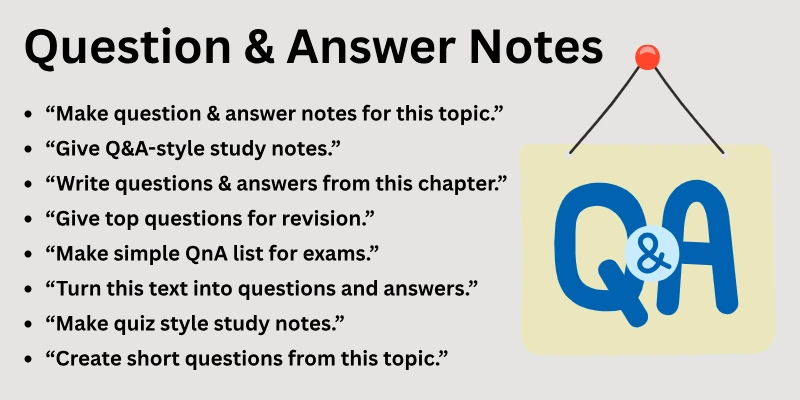
Prompts you can use:
- “Make question and answer notes for this topic.”
- “Give QnA style study notes.”
- “Write questions and answers from this chapter.”
- “Give top questions for revision.”
- “Make simple QnA list for exams.”
- “Turn this text into questions and answers.”
- “Make quiz style study notes.”
- “Create short questions from this topic.”
11. Way 11: Comparison Notes
Traditionally, writing comparisons takes time because you must check similarities and differences. AI can compare two topics or concepts easily. It gives side by side notes with clear points. This helps you understand the difference quickly. Comparison notes are great for exams and essays.
Prompts you can use:
- “Compare these two topics in notes.”
- “Give side by side comparison.”
- “Make comparison notes with bullets.”
- “Show differences and similarities clearly.”
- “Make simple comparison table.”
- “Explain how these two ideas differ.”
- “Give comparison list for study.”
- “Break both topics into clear comparison points.”
12. Way 12: Step by Step Notes
Traditionally, breaking a concept into steps takes time and effort. When you use AI to make study notes, it gives simple step by step notes. It explains each part slowly so your mind understands the flow. This helps with science, maths, and practical subjects. Step notes improve clarity and confidence.
Prompts you can use:
- “Make step by step notes for this topic.”
- “Explain this concept in steps.”
- “Break this chapter into clear steps.”
- “Make simple steps for easy learning.”
- “Explain the process in step form.”
- “Give step notes for revision.”
- “Teach this topic in clear steps.”
- “Break down this concept for beginners.”
13. Way 13: Table Style Notes
Traditionally, making tables takes formatting time. AI creates neat table style notes in text form. It organizes information into rows and columns clearly. You can compare topics or understand patterns easily. Table notes are great for subjects with facts, dates, and data.
Prompts you can use:
- “Make table style notes for this chapter.”
- “Show this information in a table.”
- “Give table format notes.”
- “Organize this topic in columns.”
- “Make a simple table for study.”
- “Put this information in row wise format.”
- “Make comparison table for these ideas.”
- “Show clear table notes for revision.”
14. Way 14: Memory Boost Notes
Traditionally, you try to remember everything by rewriting again and again. AI creates memory boost notes that shorten the text and add simple words. It gives mnemonics, short tricks, and memory helpers. This makes learning faster and easier. You remember more with less effort.
Prompts you can use:
- “Make memory boost notes.”
- “Give simple tricks to remember this topic.”
- “Create mnemonic style notes.”
- “Make memory helper notes for this chapter.”
- “Give simple memory techniques for revision.”
- “Make short and memorable notes.”
- “Give me easy ways to remember this content.”
- “Provide memory tricks for these points.”
15. Way 15: Revision Notes
Traditionally, you rewrite notes before exams which takes time. Learning how to use AI to make study notes helps you create quick revision sheets. AI picks only the top ideas. You revise faster and avoid stress. Revision notes improve confidence before tests.
Prompts you can use:
- “Make revision notes for this chapter.”
- “Give quick revision points.”
- “Make last minute study notes.”
- “Give only the most important points.”
- “Make simple revision sheet.”
- “Help me revise this topic fast.”
- “Create a short revision guide.”
- “Give revision notes for exams.”
Best AI Study Notes Tools
Here are some top AI tools for making study notes, great for summarizing content, organizing learning material, and boosting study efficiency:
- AI Study Notes Generator (Algor) – Turns text, PDFs, videos & audio into clear, structured study notes quickly.
- Quizgecko AI Study Notes Generator – Generates organized notes from uploaded content (PDFs, URLs, docs) and lets you customize details.
- Mindgrasp AI Notes Generator – Creates smart, easy-to-review study notes from lectures, PDFs, videos, and more.
- Musely AI Study Notes Generator – Converts course materials into detailed notes with headings, summaries, and key-point highlights.
- NotebookLM (Google) – AI “research assistant” that analyzes your uploaded documents and helps synthesize notes and insights.
- Notion AI – Helps organize and summarize notes, outlines, and study material inside your Notion workspace.
- Scholarcy – Summarizes research papers and textbooks into concise, highlight-focused study notes.
- SummarizeBot – Extracts key information from documents and creates organized notes for revision.
- Quizlet AI (notes & flashcards) – Generates study notes, flashcards, and learning sets to help with memorization.
- AI Study Notes Summarizer (Heyhlo) – Condenses long notes or study content into readable, concise summaries fast.
Final Note
In this guide we covered how to use AI to make study notes in many simple and smart ways. You learned how to summarize chapters, extract key points, create bullets, make mind maps, design flashcards, prepare QnA notes, and build revision sheets. Each method helps you study faster and remember more.
Keep your learning simple and use these tools only as helpers. Study with focus and enjoy the learning journey.
Personal Advice
Start with two methods instead of all fifteen. Use the ones that match your subject style. Make notes daily so your study becomes light and clear. Keep things simple and trust your learning pace. Your progress becomes smooth when your notes stay organized.
Have a good day and take care. Study with peace and keep your mind calm.
FAQs
Here are the most commonly asked questions related to how to use AI to make study notes:
Yes, you can use it for science, maths, history, English, or any subject. It reads text and creates clear notes. This saves time and reduces stress. You understand tough topics faster and easier.
Yes, it explains long chapters in short words. You get clean and simple notes. This helps you understand better. You stay more focused while reading.
Yes, it converts long text into short bullets quickly. Bullets help in fast revision. You remember points better. Your notes become more organized.
Yes, you can make quick revision sheets in seconds. This helps before tests. You feel more confident while revising. You save a lot of time during exam days.
Yes, it pulls key points from lectures. You do not need to rewatch the whole video. This keeps your notes clean. You learn with less effort.
Yes, it creates QnA style flashcards for study. This helps with memory. You revise fast and stay focused. Flashcards work well for tests.
Yes, it explains terms in short and easy meaning. This helps with difficult subjects. You understand each term clearly. You build strong basics.
Yes, it shows differences and similarities clearly. This helps in essay writing. You get clean side by side notes. Your concepts become clear.
Yes, it collects formulas and explains each one. This helps in maths and science. You revise faster with formula sheets. You feel more confident in problem solving.
Yes, it creates short memory helpers. This improves learning. You remember topics with less stress. Your revision becomes faster and smoother.




- Be Respectful
- Stay Relevant
- Stay Positive
- True Feedback
- Encourage Discussion
- Avoid Spamming
- No Fake News
- Don't Copy-Paste
- No Personal Attacks
- Be Respectful
- Stay Relevant
- Stay Positive
- True Feedback
- Encourage Discussion
- Avoid Spamming
- No Fake News
- Don't Copy-Paste
- No Personal Attacks
