Best AI Image Generator Tools: Create Stunning Images
Published: 15 Mar 2026
AI image generators are tools that can create pictures from text or ideas. They help people make visuals quickly without drawing or taking photos.
These tools are useful for designers, marketers, writers, and anyone who needs images for projects. In this article, we will look at the best AI image generator tools.
So, what are you waiting for? Let us cover the best AI image generators in detail.
Best AI Image Generator Tools
Here are the 15 best image generator tools that we have researched and compared with many other generators in the market. These tools are popular, reliable, and offer unique features to create amazing visuals.
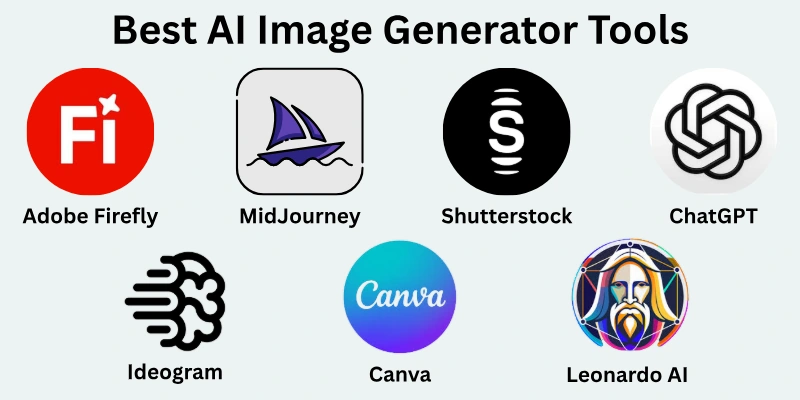
Top 15 AI Image Generators:
- Adobe Firefly
- MidJourney
- Shutterstock AI Image Generator
- ChatGPT
- Ideogram
- Leonardo AI
- Stable Diffusion
- Canva
- Gemini
- Getimg.ai
- DALL-E
- Recraft
- Flux
- NightCafe Studio
- Artbreeder
Let us examine their details and see what makes each tool special and unique.
1. Adobe Firefly
We have tried Adobe Firefly and found it very easy to use. This tool helps you create images from simple text or ideas in just a few clicks. It is part of the Adobe suite, so it works well with Photoshop and Illustrator.
Adobe Firefly is mostly paid, but it also offers a limited free version to try. We found it very useful for making marketing visuals, social media posts, and creative artwork.
Best Features & Case Uses:
- Text-to-Image Generation: Quickly turn words into images for social posts or blogs.
- Style Options: Choose different artistic styles to match your project needs.
- Integration with Adobe Tools: Easily move images to Photoshop or Illustrator for editing.
- Background Removal & Editing: Perfect for designing banners and ads.
Pros:
- Easy and beginner-friendly
- Works well with Adobe products
- High-quality and professional results
Cons:
- Mostly paid, free version is limited
- Requires Adobe account to use
2. MidJourney
We have used MidJourney and found it excellent for creating artistic and detailed images. It allows you to turn simple text prompts into creative visuals quickly. MidJourney is a paid tool, but it offers a trial version for testing.
We liked it most for making illustrations, concept art, and unique visuals that stand out. It works mainly through Discord, which makes it easy to share and collaborate with others.
Best Features & Case Uses:
- Artistic Image Generation: Create high-quality art and illustrations.
- Custom Styles: Apply different art styles like digital painting, anime, or realistic.
- Community Feedback: Share your creations and get suggestions from other users.
- Fast Rendering: Quickly generate multiple versions for your ideas.
Pros:
- High-quality and detailed images
- Easy to experiment with styles
- Strong community support
Cons:
- Paid subscription required for full features
- Works mainly on Discord, may feel confusing at first
3. Shutterstock AI Image Generator
We tried Shutterstock’s AI Image Generator and found it simple and professional. It helps you create images that are ready for commercial use. The tool is mostly paid, but Shutterstock offers some free trials for new users.
It is very useful for marketers, bloggers, and designers who need stock-quality visuals quickly. We liked that the images can be used directly in campaigns and social media posts.
Best Features & Case Uses:
- High-Quality Stock Images: Perfect for professional projects and campaigns.
- Customizable Templates: Quickly adapt images for social media, ads, and blogs.
- Commercial Use Ready: Images are licensed for business and marketing.
- Easy Editing: Adjust colors, text, and background directly in the tool.
Pros:
- Professional and polished images
- Ready for commercial use
- Simple and fast to use
Cons:
- Mostly paid with limited free options
- Less creative freedom compared to fully artistic tools
4. ChatGPT
We have used ChatGPT not only for writing but also for generating images in its AI image feature. It allows you to create visuals from text prompts quickly and easily. ChatGPT’s image tool is included in the paid version, though free users can try limited prompts.
We found it helpful for creating illustrations, icons, and simple visuals for blogs or social media. It is very beginner-friendly and does not require any design skills.
Best Features & Case Uses:
- Text-to-Image Creation: Quickly generate simple visuals for content.
- Multiple Styles: Create realistic, cartoon, or artistic images.
- Easy Prompt Editing: Modify your description to refine the image.
- Fast Results: Get images in seconds for blog or social media use.
Pros:
- Very easy for beginners
- Fast image generation
- Works with other ChatGPT features
Cons:
- Paid plan needed for unlimited use
- Limited advanced artistic control
5. Ideogram
We tried Ideogram and found it great for generating unique and creative images. It focuses on turning ideas into visuals quickly. Ideogram is mostly free for basic use, with paid options for higher resolution and advanced features.
We liked it for making concept art, storyboards, and creative illustrations. It is very simple to use and works well even for beginners.
Best Features & Case Uses:
- Quick Image Generation: Perfect for brainstorming visuals.
- Custom Styles: Choose different art styles and themes.
- High-Resolution Output: Great for professional projects.
- Simple Interface: Easy to navigate and start creating.
Pros:
- Simple and fast
- Free version available
- Good for creative ideas and concepts
Cons:
- Advanced features require paid plan
- Limited editing options after creation
6. Leonardo AI
We have used Leonardo AI for professional and creative image generation. It helps you make highly detailed images from simple prompts.
Leonardo AI is paid but offers a free trial for new users. We found it very useful for digital art, concept designs, and illustrations for projects. It is beginner-friendly but also powerful for advanced users who want more control.
Best Features & Case Uses:
- High-Quality Art Creation: Ideal for digital artists and designers.
- Customizable Styles: Choose from realistic, fantasy, or abstract styles.
- Fast Rendering: Quickly produce multiple image versions.
- Project Templates: Save and reuse prompts for consistent results.
Pros:
- Excellent image quality
- Works for professional and personal projects
- Fast and customizable
Cons:
- Paid tool with limited free trial
- May take time to learn advanced features
7. Stable Diffusion
We have tried Stable Diffusion and found it powerful and flexible. It allows users to generate images with a lot of control over style and details. Stable Diffusion is free to use, but some platforms may charge for high-resolution images.
We liked it for digital art, realistic images, and experimental designs. It works best for users who like to customize prompts and settings.
Best Features & Case Uses:
- Customizable Image Generation: Perfect for artists and designers.
- Open-Source: Free and flexible for different projects.
- Style and Detail Control: Adjust prompts for more precise results.
- Community Resources: Access many pre-trained models and templates.
Pros:
- Free and open-source
- Highly customizable
- Works for professional and creative projects
Cons:
- May need technical knowledge for advanced use
- Interface can be less user-friendly for beginners
8. Canva
We have used Canva for years and found its image generator very simple and useful. Canva helps you make images quickly for social media, presentations, and marketing materials. It offers both free and paid versions.
We liked it most for making social media posts, banners, and simple visuals without any design skills. It is beginner-friendly and very fast.
Best Features & Case Uses:
- Drag-and-Drop Interface: Easy for creating visuals quickly.
- Templates: Use pre-made designs for social media or ads.
- Text-to-Image: Generate custom images from prompts.
- Collaboration: Share projects with teams easily.
Pros:
- Very beginner-friendly
- Free version available
- Templates save time
Cons:
- Free version has limited features
- Images may look generic if templates are overused
9. Gemini
We have tried Gemini and found it very fast and easy to use. It creates visuals from text prompts quickly and works well for both beginners and professionals. Gemini is mostly paid, but some features are free to try.
We liked it for creating social media images, marketing visuals, and concept art. The interface is clean and simple, making the design process smooth.
Best Features & Case Uses:
- Quick Image Generation: Ideal for social media and content marketing.
- Custom Styles: Adjust style, colors, and mood to match your project.
- High-Resolution Images: Great for presentations or prints.
- Easy Export: Save and share images directly from the tool.
Pros:
- Fast and beginner-friendly
- High-quality output
- Clean, simple interface
Cons:
- Most features require payment
- Limited free version
10. Getimg.ai
We have used Getimg.ai and found it useful for creating professional images quickly. It allows you to generate visuals for blogs, marketing, and social media campaigns. Getimg.ai has both free and paid plans. We liked it for its speed and variety of styles, which makes it easy to match any project need.
Best Features & Case Uses:
- Fast Image Generation: Perfect for content creators and marketers.
- Multiple Styles: Generate realistic, cartoon, or digital art visuals.
- Template Options: Use templates for social media or ad campaigns.
- High-Quality Downloads: Ideal for professional projects.
Pros:
- Quick and easy to use
- Free version available
- Variety of styles and templates
Cons:
- Advanced features require paid plan
- Some styles may feel limited in the free version
11. DALL-E
We have tried DALL-E and found it very creative and flexible. It turns text prompts into unique images quickly. DALL-E offers free credits for new users, but full use requires payment.
We liked it for creating illustrations, concept art, and social media visuals. It works well for both beginners and advanced users who want high-quality results.
Best Features & Case Uses:
- Creative Image Generation: Perfect for unique illustrations and ideas.
- Multiple Styles and Variations: Adjust prompts to get different looks.
- High-Resolution Output: Suitable for professional use.
- Prompt Editing: Refine images by updating text prompts.
Pros:
- Easy to use
- High-quality results
- Flexible for different projects
Cons:
- Free credits are limited
- Full access requires paid plan
12. Recraft
We have used Recraft and found it simple for generating visuals for digital projects. It focuses on helping users quickly turn ideas into images. Recraft is mostly paid, with some free options for testing.
We liked it for creating marketing visuals, social media content, and illustrations. The interface is very beginner-friendly and smooth.
Best Features & Case Uses:
- Fast Image Generation: Ideal for social media posts and ads.
- Custom Styles: Adjust look, color, and theme for projects.
- High-Resolution Output: Ready for professional use.
- Templates: Pre-made designs for quick results.
Pros:
- Easy and quick to use
- Beginner-friendly interface
- High-quality visuals
Cons:
- Free version is limited
- Some advanced features require payment
13. Flux
We have tried Flux and found it useful for making creative images with minimal effort. It allows fast image generation from text or ideas.
Flux is paid but offers a free trial. We liked it for making social media graphics, ads, and concept art. It is simple to use, even for those with no design experience.
Best Features & Case Uses:
- Quick Visual Creation: Perfect for content marketing and posts.
- Customizable Styles: Choose different artistic styles and themes.
- High-Resolution Images: Great for presentations and professional projects.
- Easy Sharing: Download and share images quickly.
Pros:
- Simple and fast
- High-quality output
- Beginner-friendly
Cons:
- Most features require subscription
- Limited free trial
14. NightCafe Studio
We have used NightCafe Studio and found it very creative and versatile. It allows you to generate artistic images from text prompts easily.
NightCafe Studio has both free and paid options. We liked it for making digital art, creative illustrations, and social media visuals. The tool is beginner-friendly but also offers advanced features for more control.
Best Features & Case Uses:
- Artistic Image Generation: Ideal for creative projects and illustrations.
- Multiple Styles: Choose from different artistic styles and moods.
- Community Gallery: See ideas from other users for inspiration.
- High-Resolution Download: Ready for printing and professional use.
Pros:
- Beginner-friendly
- Free and paid options
- Creative and artistic output
Cons:
- Free version has limited credits
- Advanced features require payment
15. Artbreeder
We have used Artbreeder and found it unique for creating customized images. It allows blending and editing images to generate new visuals.
Artbreeder is mostly free, but some features require payment. We liked it for character creation, concept art, and creative illustrations. It is simple to use but powerful for experimentation.
Best Features & Case Uses:
- Image Blending: Combine different images to create new visuals.
- Customizable Features: Adjust style, color, and details.
- High-Resolution Export: Ideal for professional projects.
- Creative Exploration: Great for experimenting with ideas.
Pros:
- Free version available
- Easy and fun to use
- Powerful for creative projects
Cons:
- Some features require paid plan
- Limited advanced editing compared to professional tools
How AI Image Generators Work?
AI image generators create pictures from text or ideas. They use computer programs that learn from many images to understand patterns, colors, and shapes.
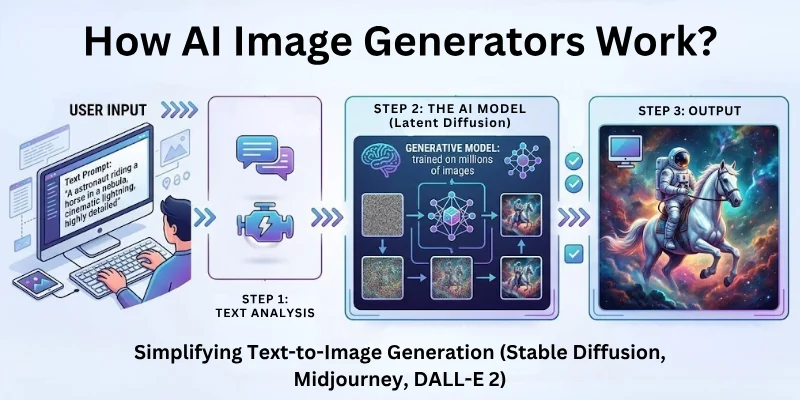
When you give a prompt, the tool uses this knowledge to make a new image that matches your description. These tools save time and help anyone make visuals without drawing or photography skills.
How they work in simple steps:
- You write a text description of the image you want.
- The tool analyzes the words and finds patterns from its learning.
- It generates an image based on your description.
- You can refine or change the prompt to get a better result.
Benefits of using image generators:
- Create visuals quickly without drawing skills.
- Generate ideas for projects or marketing.
- Save money on designers or stock images.
Common use cases:
- Marketing materials and ads.
- Social media posts and content.
- Digital art and illustrations.
- Concept designs and creative projects.
Key Factors to Consider When Choosing an AI Image Generator
Here are some of the key things to consider when choosing an image generator:
- Ease of Use and Interface: Is it simple to learn and navigate?
- Quality of Generated Images: Are the pictures clear and realistic?
- Speed and Rendering Time: How fast does it create images?
- Pricing and Free Trials: Is there a free option or affordable plan?
- Customization Options: Can you choose styles, resolution, or other settings?
Comparison Table: Al Image Generators
Here’s a simple comparison table for all 15 tools for you guys. I’ve kept it clear, beginner-friendly, and focused on the key points you mentioned:
| Tool Name | Pricing | Features | Free Trial / Free Version | Image Quality |
| Adobe Firefly | Paid (limited free) | Text-to-image, style options, Adobe integration | Limited free | High |
| MidJourney | Paid (trial available) | Artistic styles, fast rendering, community support | Trial | High |
| Shutterstock AI | Paid | Stock-quality images, templates, commercial use | Limited free | High |
| ChatGPT | Paid (some free) | Text-to-image, multiple styles, fast results | Limited free | Medium-High |
| Ideogram | Mostly free (paid for high-res) | Quick image generation, custom styles | Yes | High |
| Leonardo AI | Paid (free trial) | High-quality art, style customization, templates | Trial | High |
| Stable Diffusion | Free / Open Source | Customizable, open-source models, style control | Yes | Medium-High |
| Canva | Free + Paid | Templates, text-to-image, drag-and-drop | Yes | Medium |
| Gemini | Paid (limited free) | Fast generation, customizable styles | Limited free | High |
| Getimg.ai | Free + Paid | Fast generation, multiple styles, templates | Yes | High |
| DALL-E | Paid (free credits) | Creative variations, high-res output | Yes | High |
| Recraft | Paid (some free) | Fast generation, templates, high-res output | Limited free | High |
| Flux | Paid (free trial) | Quick visuals, customizable styles | Trial | Medium-High |
| NightCafe Studio | Free + Paid | Artistic styles, community gallery, high-res | Yes | High |
| Artbreeder | Mostly free (paid for advanced) | Image blending, customization, high-res | Yes | Medium-High |
Final Note: My Thoughts
Well guys, in this guide we have covered the best AI image generator tools available today. We tried and tested many of them, and each one has its own strengths.
My personal recommendation:
- For professional and high-quality images, Adobe Firefly or MidJourney are excellent.
- For beginners or quick social media visuals, Canva or ChatGPT works great.
- If you like experimenting and creative designs, Artbreeder or Stable Diffusion is a lot of fun.
I hope this guide helps you find the right tool for your projects. Go ahead and try a few to see which one fits your style best.
Goodbye and happy creating!
FAQs: Best AI Image Generator Tools
Here are some of the most commonly asked questions related to the best AI image generator apps:
AI image generator tools are programs that create pictures from text or ideas. They help you make visuals quickly without drawing skills. Many designers and marketers use them to save time and get creative results.
AI imaging works by understanding patterns from many images and creating new visuals based on your description. You write what you want, and the tool generates a picture. It is useful for social media, blogs, and marketing projects.
Yes, some artificial intelligence creating images tools offer free versions or trials. You can test them before paying for advanced features. This helps beginners make illustrations, social media posts, and concept visuals without cost.
AI generated imagery is used in marketing, social media, and creative projects. It helps you quickly produce visuals without photography or design skills. Many content creators use it to make unique posts and ads.
Yes, artificial intelligence generated images can be very realistic depending on the tool. Some tools focus on artistic styles while others create life-like visuals. They are often used for professional presentations, ads, and websites.
AI image generation services allow you to create visuals online using text or ideas. They are offered by websites or apps and can be free or paid. Many businesses use these services to quickly produce marketing or creative images.
For beginners, AI image generator software like Canva or ChatGPT works very well. They are easy to use and provide templates and simple options. You can make social media posts, banners, or illustrations without learning complex design tools.
The best AI image generator depends on your needs. Tools like MidJourney and Adobe Firefly give professional results, while Canva and ChatGPT are easier for beginners. We recommend trying a few to see which fits your style best.
Yes, the best AI for photos can turn words into images quickly. You just describe what you want, and the tool generates a picture. It is useful for social media, marketing, blogs, and creative projects.
Yes, most AI image generator tools are safe to use. You just need an account to start generating images. They do not require special hardware and can be used for personal or professional projects.




- Be Respectful
- Stay Relevant
- Stay Positive
- True Feedback
- Encourage Discussion
- Avoid Spamming
- No Fake News
- Don't Copy-Paste
- No Personal Attacks
- Be Respectful
- Stay Relevant
- Stay Positive
- True Feedback
- Encourage Discussion
- Avoid Spamming
- No Fake News
- Don't Copy-Paste
- No Personal Attacks
