How to Use AI Tools for Coding: Step-by-Step Guide
Published: 6 Apr 2026
If you are new to programming, you may have seen people talking about tools that help you write code faster. In this guide, you will learn how to use AI tools for coding in a very simple way. I will explain what these tools are, how they work, how to use them for daily tasks, and how beginners can get the most benefit.
This guide covers everything step-by-step so anyone can understand and start using them with confidence.
What Are Coding Tools That Use Intelligence?
This section explains what these tools are and why developers use them.
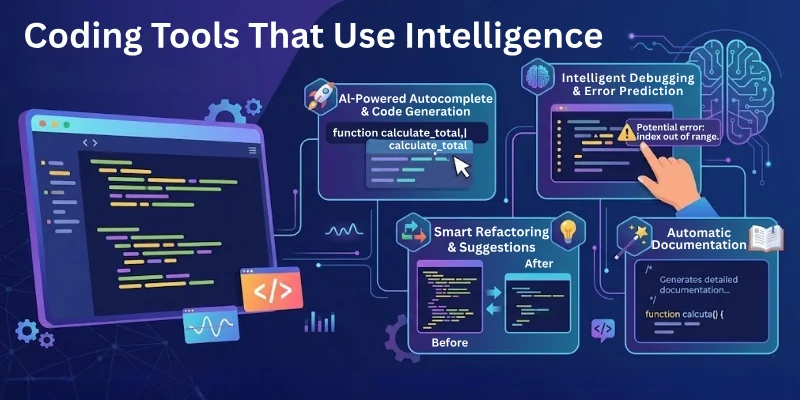
Coding tools that use intelligence are software programs that assist developers in writing, fixing, and improving code. They can understand your commands in plain English, suggest lines of code, detect mistakes early, complete functions, and give you step by step help.
These tools make coding easier for beginners and increase speed for professionals.
Key Points
- They can read your prompt and convert it into code.
- They can explain any code in simple words.
- They can find mistakes and help fix them.
- They can generate examples for any language.
- They reduce time spent on learning difficult syntax.
How AI Tools Help You Write Code Faster
This section covers the main benefits and how they speed up your work.
These tools help you finish tasks faster because they understand your intention and produce ready-to-use code. You can ask for full functions, small fixes, or complete logic. They give results quickly and reduce the need to remember every detail of a programming language.
Key Benefits
- They speed up development by giving instant suggestions.
- They reduce errors because they check your code automatically.
- They help you understand logic with step-by-step explanations.
- They assist in writing long functions with fewer mistakes.
- They allow you to focus more on logic and less on syntax.
How to Use AI Tools to Learn Coding Concepts
This section explains how to use these tools as learning partners.
If you do not understand a coding topic, you can ask these tools to teach you slowly and clearly. They can explain difficult terms in simple steps and give examples that match your learning level.
How These Tools Help You Learn
- They explain concepts like loops, functions, classes, and variables.
- They give sample problems with simple solutions.
- They let you ask unlimited questions without judgment.
- They break down complex logic into small, easy parts.
Best Ways to Learn With Them
- Ask them to explain concepts in simple English.
- Request multiple examples for the same topic.
- Ask them to compare two concepts side-by-side.
- Ask follow-up questions until the idea becomes clear.
How to Use AI Tools to Fix Coding Errors
This section explains how to solve bugs using these tools.
If your code shows an error and you do not know why, you can paste the code into the tool and ask for the reason. These tools quickly scan your code, find the mistake, and explain the fix.
- They detect syntax errors in seconds.
- They suggest correct logic when your logic is wrong.
- They guide you on best coding practices.
- They explain why the mistake happened.
How to Use AI Tools to Generate Complete Functions
This section shows how to get full solutions.
You can ask these tools to generate entire functions for you. They will write complete logic based on your instructions. This is very helpful for beginners who struggle to convert ideas into code.
What You Can Ask For
- Create a login system
- Build a simple calculator
- Make a form validator
- Build a small game logic
- Write data-cleaning scripts
Why This Is Useful
- Saves time
- Helps you learn by reviewing ready-made solutions
- Reduces stress when you get stuck
How to Use AI Tools to Auto-Complete Code
This part explains how auto-suggestions work.
Many tools show suggestions as you type. These suggestions complete your functions, variable names, or logic patterns. This helps you type less and work faster.
Things Auto-Complete Helps With
- Completing function names
- Suggesting full lines
- Predicting your next step
- Repeating code patterns
- Suggesting clean coding styles
How to Use AI Tools for Testing and Optimization
This section explains how to improve your code quality.

These tools not only write code but also help you test and optimize it. They can create test cases, find duplicate logic, and suggest faster methods.
Helpful Things You Can Ask
- Ask for test cases for your function.
- Ask for faster alternatives for your method.
- Ask for improvements in readability.
- Ask for best practices in your language.
How to Use AI Tools in Real-World Projects
This section explains how to use them for bigger tasks.
You can use these tools not only for small code pieces but also for complete projects. They help you plan, structure, and build entire applications.
How They Support Projects
- They can generate folder structures.
- They can plan steps of your project.
- They can help you choose the right frameworks.
- They can guide you in deployment steps.
- They can help you integrate multiple features.
Common Mistakes Beginners Make When Using Coding Tools
This section covers the mistakes you should avoid.
Many beginners depend completely on these tools, which slows down real learning. You should use them for guidance, not fully for everything.
Mistakes to Avoid
- Copying code without reading it.
- Asking for full apps without trying yourself.
- Not checking the output.
- Relying on suggestions blindly.
- Ignoring core concepts.
Best Practices to Use Coding Tools the Right Way
This section teaches the perfect balance.
These tools become powerful only when you use them wisely. Balance is important between learning and relying.
Best Practices
- Use tools to assist, not replace your efforts.
- Understand the code before using it.
- Take their suggestions as guidance.
- Practice manual coding daily.
Top 10 AI Tools for Coding
This section gives you a clear list of the best tools you can use for coding support. Each tool helps in a different way, so you can choose the ones that match your learning and project needs.
Here Are the Top 10 Tools:
- ChatGPT – Great for writing functions, explaining concepts, and debugging.
- GitHub Copilot – Best for auto-completing code while you type in your editor.
- Tabnine – Clean and fast suggestions for many programming languages.
- Replit Ghostwriter – Helpful for beginners building apps inside Replit.
- Codeium – Free tool with strong code completion and refactoring help.
- Amazon CodeWhisperer – Very good for cloud-related coding tasks.
- Google Gemini Code Assist – Helpful for explanations and fixing errors.
- MutableAI – Helps turn short instructions into ready-to-use code.
- AskCodi – Best for generating tests, documentation, and quick code blocks.
- Warp AI Terminal – Helps with writing terminal commands and scripts easily.
Final Note
In this guide, we learned how to use AI tools for coding with very simple explanations and detailed steps. These tools are very helpful if you use them with balance. They can teach you, guide you, and support you like a friendly partner.
Always remember to understand the logic behind the code so your skills grow strong.
Have a wonderful coding journey. 😊
FAQs: AI Tools for Coding
Here are the some of the most commonly asked questions related to the how to use the artificial intelligence tools for coding:
Yes, beginners can use these tools easily because they guide you step by step. The tools explain errors, suggest improvements, and write simple functions. Many learners search for how to use AI tools for coding because it helps them learn faster.
No, they do not replace humans. These tools only support your work by giving suggestions and fixing mistakes. You still need logic, planning, and creativity to build complete projects.
Most tools support popular languages like Python, JavaScript, Java, C, and C plus plus. Some tools also help with HTML, CSS, and SQL. Support keeps growing as more developers use these assistants.
Yes, they can read your code and point out mistakes. They also explain why the mistake happened and how you can fix it. This saves a lot of time and reduces frustration for learners.
They can do both. You can ask for a complete project outline or ask for one small function. This flexibility makes them useful for students and professionals.
It depends on the tool you use. Some tools keep your code private while others store information on their servers. Always read the privacy policy before sharing sensitive files.
Yes, they can break big concepts into simple steps. They also give short examples so you understand how things work. Many learners use these tools as study partners.
Yes, they can rewrite old code to make it cleaner and easier to read. They also suggest better logic and faster methods. This makes your project more stable.
Yes, they write clear comments and helpful documentation for your functions. This saves time and makes your code easy to understand for others. Many teams now rely on this feature in daily work.
Yes, they help you practice interview questions and understand new topics. You can ask them to explain data structures, algorithms, or tricky logic. This makes interview preparation easier and faster.






- Be Respectful
- Stay Relevant
- Stay Positive
- True Feedback
- Encourage Discussion
- Avoid Spamming
- No Fake News
- Don't Copy-Paste
- No Personal Attacks
- Be Respectful
- Stay Relevant
- Stay Positive
- True Feedback
- Encourage Discussion
- Avoid Spamming
- No Fake News
- Don't Copy-Paste
- No Personal Attacks
