How to Use AI for Memory Techniques in a Clear & Simple Way
Published: 28 Apr 2026
Memory skills shape your learning, focus, and confidence. Many people struggle to remember details because daily life feels heavy and fast. New smart tools now help you train your memory in simple and practical ways.
This guide explains how to use AI for memory techniques so you can recall information faster and store it in a neat mental structure. You will learn how these tools bring clarity, help you manage information, and support your learning style.
Let us cover everything in detail.
How to Use AI for Memory Techniques
Here are the 15 ways to use it smartly:
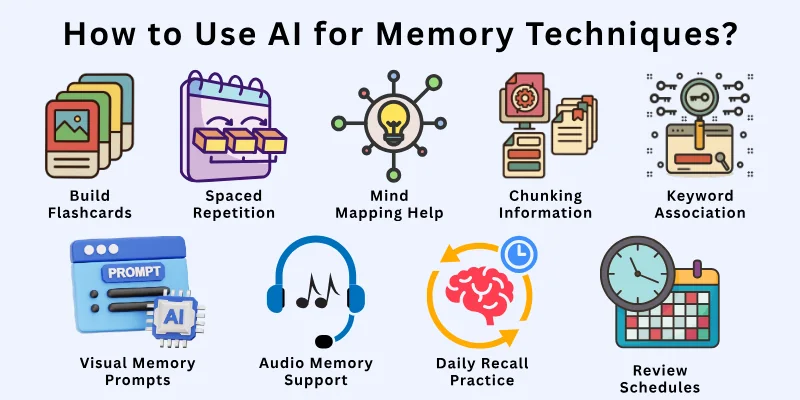
- Create Memory Notes
- Build Flashcards
- Teach Back Method
- Spaced Repetition
- Mind Mapping Help
- Story Based Memory
- Chunking Information
- Keyword Association
- Visual Memory Prompts
- Audio Memory Support
- Summarizing Long Text
- Turning Notes Into Questions
- Daily Recall Practice
- Habit Tracking for Memory
- Review Schedules
Let us learn about each in detail.
1. Create Memory Notes
Traditionally people write memory notes by hand and try to fit everything on a page. This takes time and often becomes messy. When you use AI for memory techniques you get neat and structured notes that highlight important points. It keeps your ideas clear and supports your natural learning style. It helps you remember faster because the information becomes easy to read. You start feeling more confident with every study session.
Prompts to use:
- Make short memory notes from this text.
- Create simple notes that highlight key points.
- Break this chapter into memory friendly notes.
- Write clear notes I can review in one minute.
- Turn this into notes that support fast recall.
2. Build Flashcards
People create flashcards manually and it takes long hours. You can now use AI for memory techniques and turn any topic into instant flashcards. It creates simple questions with short answers so you can test yourself easily. It keeps your study sessions active and clear. It builds a strong recall system in your mind. You learn faster with less pressure.
Prompts to use:
- Make flashcards from this chapter.
- Create 20 flashcards with short answers.
- Turn this topic into memory questions.
- Make flashcards in simple English.
- Build flashcards for revision today.
3. Teach Back Method
Traditionally you read something and try to explain it to yourself which can feel confusing. You can now use AI for memory techniques to simulate the teach back method. You explain the topic and the tool checks your explanation. It tells you what you missed and what you explained well. It trains your brain to recall ideas naturally. You build memory through active learning.
Prompts to use:
- Check if I explained this topic correctly.
- Tell me what parts I missed in my explanation.
- Listen to my explanation and correct mistakes.
- Help me practice the teach back method.
- Test my understanding with follow up questions.
4. Spaced Repetition
People forget to follow a revision timetable. You can now use AI for memory techniques and create spaced repetition cycles. It reminds you when to review and shows what you must revise first. It helps you store information in long term memory. It reduces last minute stress. You build a calm and steady learning routine.
Prompts to use:
- Create a spaced repetition plan for this topic.
- Tell me when to revise this again.
- Make a revision schedule for one month.
- Show me what I should review today.
- Remind me to review earlier lessons.
5. Mind Mapping Help
Mind maps help you see ideas clearly but drawing them takes time. When you use AI for memory techniques you get clean mind maps fast. It arranges ideas into branches and groups. It turns long text into simple shapes that support quick recall. It helps you see the big picture without effort. You remember complex ideas with calm and ease.
Prompts to use:
- Turn this topic into a mind map.
- Create a simple branch based map.
- Show relationships between these ideas.
- Make a mind map for fast revision.
- Summarize this chapter in a visual structure.
6. Story Based Memory
People use stories to remember facts but building stories manually takes effort. When you use AI for memory techniques you can turn details into short stories. It creates memorable lines that stick in your mind. It links facts in a natural flow. It helps you recall information without stress. You learn in a fun and smooth way.
Prompts to use:
- Turn these facts into a short story.
- Make a funny story to remember these terms.
- Create a simple story for these concepts.
- Build a story with clear connections.
- Write a story that helps me memorize this.
7. Chunking Information
Chunking helps you break long topics into small groups. Many people do this manually and feel lost. You can now use AI for memory techniques to chunk information into clean parts. It shows you what belongs together and what should stay separate. It supports faster recall because your brain prefers small sections. It builds a steady memory foundation.
Prompts to use:
- Break this topic into three chunks.
- Group these ideas into simple sections.
- Show me the main chunks of this chapter.
- Create small parts I can memorize fast.
- Turn this text into easy memory groups.
8. Keyword Association
People try to link words manually but forget them later. When you use AI for memory techniques you get strong keyword associations. It gives simple words that match the topic and stick in your mind. It helps you recall long concepts with just one keyword. It supports fast learning. You remember smoothly without pressure.
Prompts to use:
- Give me keywords to remember this topic.
- Create keyword associations for these ideas.
- Make keywords that support long term memory.
- Suggest simple words that match these terms.
- Build keyword links for this subject.
9. Visual Memory Prompts
Visual prompts help your brain store images easily. People try to draw them but it takes time. You can now use AI for memory techniques to create simple visual cues. It gives symbols, shapes, or diagrams that match your topic. It helps your brain recall information faster. Your mind becomes sharper and more active.
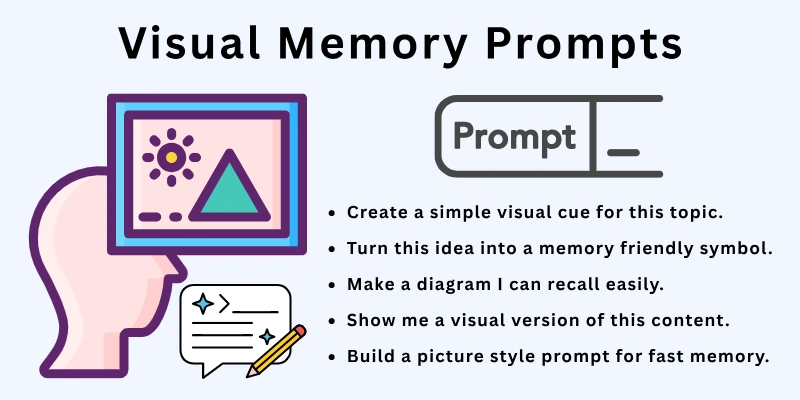
Prompts to use:
- Create a simple visual cue for this topic.
- Turn this idea into a memory friendly symbol.
- Make a diagram I can recall easily.
- Show me a visual version of this content.
- Build a picture style prompt for fast memory.
10. Audio Memory Support
Some people remember better by listening. Traditionally they record themselves which takes effort. When you use AI for memory techniques you can create short audio clips from text. It helps you listen while walking or resting. It builds memory through sound. It makes learning easy and light.
Prompts to use:
- Create a short audio explanation for this topic.
- Turn this text into an easy audio clip.
- Make a listening version for revision.
- Highlight key points in audio form.
- Build a simple audio guide for this chapter.
11. Summarizing Long Text
Long chapters drain your energy and make memory weak. You can now use AI for memory techniques to create neat summaries. It picks only the points that matter. It gives you short lines you can review in minutes. It clears your mind and saves time. You remember more with less effort.
Prompts to use:
- Summarize this text in short points.
- Give me a simple version of this chapter.
- Highlight only important points.
- Make a small summary I can review fast.
- Turn this heavy text into a clean summary.
12. Turning Notes Into Questions
People create study questions manually and it takes time. You can now use AI for memory techniques to turn any text into questions. It gives simple and clear questions that help you think. It trains your recall skills. It keeps your study active. You build stronger memory through practice.
Prompts to use:
- Turn these notes into 15 questions.
- Create short questions from this chapter.
- Build quiz questions for fast recall.
- Make simple memory questions.
- Create a question set for revision.
13. Daily Recall Practice
Memory grows when you recall without looking. Traditionally people test themselves but forget to do it daily. When you use AI for memory techniques you get guided recall sessions. It asks you questions from your topics. It tracks your progress and shows your weak areas. It helps you build daily consistency. You grow steady and confident.
Prompts to use:
- Ask me questions from yesterday’s notes.
- Test my recall for this topic.
- Give me a quick memory quiz.
- Show me recall questions I should practice.
- Help me revise with recall based prompts.
14. Habit Tracking for Memory
Memory improves when habits stay stable. People try to track habits manually and lose interest. When you use AI for memory techniques you get simple habit trackers. It shows your improvement. It reminds you to practice. It builds a healthy study routine. You stay disciplined without stress.
Prompts to use:
- Track my daily memory practice.
- Remind me to review for 10 minutes.
- Show me my progress this week.
- Suggest habits to improve memory.
- Build a simple memory routine for me.
15. Review Schedules
People forget review timing and fall behind. When you use AI for memory techniques you get clear review schedules. It tells you when to revise each topic. It spreads your workload in a calm structure. It helps you remember long term without stress. You feel more in control every day.
Prompts to use:
- Create a weekly review plan.
- Tell me what I should review today.
- Make a 30 day memory schedule.
- Suggest a daily review routine.
- Build a simple plan for long term memory.
Top 10 Best AI For Your Memory
Here are 10 of the best AI tools and apps that help with memory techniques, especially memorization, spaced repetition, flashcards, and mnemonic support:
- Nemorize – AI-powered spaced repetition flashcards and course generator to strengthen long-term memory.
- Memorize.ai – AI tool that optimizes spaced repetition timing to help retain information efficiently.
- Learvo – Personalized learning with AI-generated flashcards, mnemonics, spaced repetition, and audio support.
- Memlex – Smart spaced-repetition flashcards with AI that adapts to your learning pattern and weaknesses.
- Memorai (for Anki) – AI memory assistant that generates flashcards and integrates with Anki’s spaced repetition system.
- Memory Aid (YesChat GPT-powered) – Creates mnemonics, flashcards, and review schedules using classic memory techniques plus AI.
- Testudy.io – AI flashcard generator with adaptive spaced repetition for better recall from notes and documents.
- NotebookLM (Google) – AI study tool with flashcards and quizzes that reinforce memory through active recall.
- ChatGPT (Memory Techniques prompts) – Use custom prompts to generate mnemonic devices, memory palaces, quizzes, and recall schedules.
- Anki (with AI extensions/plugins) – Classic spaced repetition platform that becomes more powerful with AI plugins like flashcard generators.
Final Note
In this guide we covered how to use AI for memory techniques in simple steps. You learned how these methods improve learning, recall, notes, and revision habits. You also learned how to build a smooth routine that supports your growth. Try two or three methods daily and grow your memory with ease. Stay steady and enjoy your learning journey.
Here is my personal advice for you. Keep your approach light and not stressful. Focus on steps that match your natural style. Practice small habits every day. Thank you for reading and take care.
FAQs
Here are some of the most commonly asked questions related to how to use AI for memory techniques.
Yes it helps you create notes, summaries, and recall tools. It guides your learning in a clear structure. It supports faster understanding. You feel more confident with simple routines. This builds long term recall.
Yes it generates questions that help you recall ideas. It makes your practice sessions simple and steady. It strengthens your memory over time. You remember lessons faster. This improves your study habits.
Yes it builds flashcards from any text. It gives short questions for fast review. It reduces manual work. You save time and keep your focus sharp. This helps your learning flow better.
Yes it creates clean review schedules. It reminds you when to revise each topic. It supports long term memory building. You stay organized every day. This makes recall strong.
Yes it turns long text into simple summaries. It shows only the points that matter. It keeps your mind clear. You study in a relaxed way. This saves time.
Yes it makes visuals, diagrams, and cues. It helps your brain remember with pictures. It turns ideas into simple shapes. You recall faster with visual help. This strengthens memory pathways.
Yes it converts notes into clear questions. It creates quizzes that support memory growth. It helps you think actively. You practice with focus. This makes learning strong.
Yes it turns text into audio clips. It supports learning through sound. It lets you study while moving. You remember better with repeated listening. This suits many learners.
Yes it listens to your explanation and corrects mistakes. It shows what you missed. It improves understanding through feedback. You learn with clarity. This builds confidence.
Yes it tracks your habits and sets reminders. It keeps your practice steady. It shows your progress simply. You stay consistent each day. This improves memory skills.




- Be Respectful
- Stay Relevant
- Stay Positive
- True Feedback
- Encourage Discussion
- Avoid Spamming
- No Fake News
- Don't Copy-Paste
- No Personal Attacks
- Be Respectful
- Stay Relevant
- Stay Positive
- True Feedback
- Encourage Discussion
- Avoid Spamming
- No Fake News
- Don't Copy-Paste
- No Personal Attacks
