How to Build an AI Agent – Beginner’s Step-by-Step Guide
Published: 23 Sep 2026
Have you ever wished an AI tool could do more than answer questions? For example, instead of only telling you how to research a topic, it could search for information, organize the results, make decisions, and complete the next steps for you.
That is where AI agents come in. If you want to learn how to build an AI agent, you need to understand more than just how to connect a language model to an app. A useful AI agent needs clear instructions, access to the right tools, a way to manage tasks, and safeguards that keep its actions under control.
This guide explains how AI agents work, what you need to build one, and how to create your first agent step by step. You will also learn about AI agent frameworks, tools, memory, agent workflows, testing, common mistakes, and ways to make an agent more reliable.
What Is an AI Agent?
An AI agent is a software system that uses an AI model to decide what actions to take in order to complete a task.
A normal chatbot usually responds to the message you give it. An AI agent can go further by deciding which tools it needs, using those tools, checking the results, and continuing until it reaches a defined outcome.
For example, imagine a customer support agent.
A basic chatbot might answer:
“Your order is currently being processed.”
An AI agent could instead:
- Identify the customer’s order number.
- Check the order management system.
- Look up the shipping status.
- Determine whether the order is delayed.
- Give the customer an appropriate response.
- Escalate the issue to a human if necessary.
The important difference is that the AI model helps control the workflow rather than simply generating text.
Modern agent systems commonly combine three basic components: a model, tools, and instructions.
What Do You Need to Build an AI Agent?
You do not need a huge system to create your first AI agent. Start with a simple architecture and add complexity only when the use case requires it.
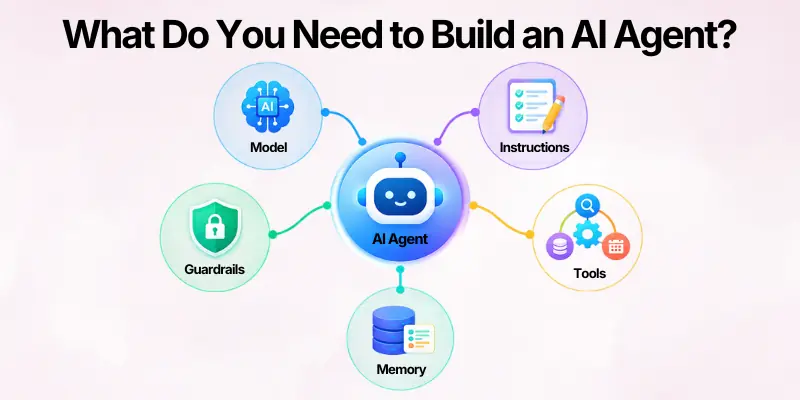
The main components are:
1. AI Model
The model handles language understanding, reasoning, and decision-making.
Depending on your task, you might use a large language model from a provider such as OpenAI, Anthropic, Google, or another model provider.
The most powerful model is not automatically the best choice. A smaller model may work well for simple classification or information retrieval, while a more capable model may be useful for complicated decisions.
A practical approach is to establish a performance baseline first and then test whether smaller models can handle parts of the workflow at lower cost or latency.
2. Instructions
Instructions tell the agent what it should do and how it should behave.
Good instructions should define:
- The agent’s role
- The task it needs to complete
- Available tools
- Steps it should follow
- Information it should request
- Things it must not do
- When it should stop
- When it should ask for human help
Vague instructions can make an agent unpredictable, especially when the workflow contains several possible paths.
3. Tools
Tools allow the AI agent to interact with external systems.
For example, an agent could have access to:
- Web search
- Databases
- APIs
- File search
- Calculators
- Email systems
- CRM software
- Calendar systems
- Code execution
- Internal business applications
Tools generally fall into data tools, action tools, and orchestration tools. Data tools retrieve information, action tools make changes, and orchestration tools can allow agents or specialized components to work together.
4. Memory or Context
An agent may need information from earlier parts of a task.
For example, a travel-planning agent might need to remember:
- The destination
- Travel dates
- Budget
- Preferred activities
- Number of travelers
Not every agent needs long-term memory. Sometimes the current conversation or retrieved data is enough.
5. Guardrails
Guardrails limit what an agent can do.
For example, you may allow an agent to draft an email but require human approval before it sends one.
Guardrails can include:
- Input validation
- Permission checks
- Spending limits
- Output validation
- Tool restrictions
- Human approval
- Maximum execution steps
- Privacy controls
This becomes especially important when an agent can change records, send messages, spend money, or access sensitive information.
How to Build an AI Agent Step by Step
Now let’s move from the concepts to the actual process.
Step 1: Choose One Specific Problem
The first mistake many beginners make is trying to build an agent that can do everything.
Start with one clearly defined problem.
Good examples include:
- Researching a topic
- Summarizing documents
- Answering questions from company data
- Classifying customer requests
- Checking order information
- Creating reports
- Drafting support responses
- Scheduling tasks
AI agents are most useful when the workflow involves multiple steps, judgment, exceptions, or unstructured information. If a simple rule or traditional automation can solve the problem reliably, an agent may not be necessary.
Step 2: Define the Desired Outcome
Before choosing a model or framework, describe what success looks like.
For example:
Poor definition:
“Build a customer support agent.”
Better definition:
“Create an agent that identifies customer questions, checks order information, answers common delivery questions, and sends complicated cases to a human.”
The second description gives you something you can actually test.
Write down:
- Input
- Expected output
- Required actions
- Available information
- Possible failures
- Human approval points
- Completion conditions
This becomes the foundation of your agent workflow.
Step 3: Decide Which Tasks the Agent Should Handle
Break the larger problem into smaller actions.
For a research agent, the workflow could look like:
- Understand the research question.
- Search for relevant sources.
- Collect useful information.
- Remove irrelevant results.
- Compare findings.
- Prepare the response.
- Cite the sources.
This breakdown helps you decide which tools the agent actually needs.
It also prevents a common mistake: giving an AI agent too many unnecessary capabilities.
Step 4: Select an AI Model
Choose a model based on the work your agent needs to perform.
Consider:
| Factor | What to consider |
| Reasoning | How complicated are the decisions? |
| Speed | Does the agent need quick responses? |
| Cost | How many model calls will the workflow make? |
| Context | How much information must the model process? |
| Tool use | Does it need reliable function or API calling? |
| Accuracy | What happens if the model makes a mistake? |
For your first prototype, it can make sense to start with a capable model. Once the workflow works, test less expensive models for simpler steps.
Step 5: Write Clear Agent Instructions
Your instructions act like the operating rules for the agent.
For example:
You are a customer support agent.
Your goal is to help customers check their order status.
1. Ask for the order number if it is missing.
2. Use the order lookup tool to retrieve the latest status.
3. Explain the status in simple language.
4. Do not invent shipping information.
5. If the order cannot be found, ask the customer to verify the number.
6. Escalate refund requests to a human agent.
Notice that these instructions define actions and edge cases rather than simply saying “be helpful.”
Clear instructions should also tell the agent what to do when information is missing or the normal workflow does not apply. OpenAI’s agent guidance similarly recommends breaking tasks into clear actions and accounting for edge cases.
Step 6: Add the Tools Your Agent Needs
Now connect your agent to the external tools and systems it needs to complete its tasks.
For example, suppose you are building a customer support agent that needs to check a customer’s order status. You could create a function that connects to your order database or API:
def get_order_status(order_id):
# Query your order database or API
return {
“status”: “shipped”,
“estimated_delivery”: “Friday”
}
The AI model can then decide when to use this function based on the customer’s request. The model does not need direct access to your database. Instead, your application provides the function as a structured tool that performs the required action and returns the result.
When defining a tool, clearly specify:
- What the tool does
- What inputs it accepts
- What output it returns
- When the agent should use it
- What errors it may return
Clear tool definitions help the agent choose the right tool and use it correctly. Poorly defined tools can lead to unnecessary tool calls, incorrect inputs, or unexpected results.
Step 7: Create the Agent Loop
The agent now needs a way to continue working until the task is complete.
A simplified loop might look like this:
while not task_complete:
response = model. generate(
instructions=instructions,
tools=tools,
conversation=conversation
)
if response.calls_tool:
result = run_tool(response.tool_call)
conversation.append(result)
else:
final_answer = response.text
task_complete = True
This is only a simplified example. Production systems need additional handling for errors, permissions, retries, limits, validation, and unexpected model behavior.
The central idea is simple: the model decides what to do next, while your application controls what actions are actually allowed.
Step 8: Add Memory When Necessary
Memory can make an AI agent more useful, but it should not be added just because the system is called an agent.
There are several forms of memory.
- Short-term memory keeps information within the current task or conversation.
- Long-term memory stores information that may be useful later.
- External knowledge retrieves information from documents, databases, or other sources when needed.
For example, a company support agent could retrieve information from a knowledge base rather than trying to store the entire knowledge base inside the model’s instructions.
Keep memory focused. Storing everything can increase complexity, cost, and privacy risks.
Step 9: Add Guardrails and Permissions
This step should happen before you allow the agent to perform meaningful actions.
Suppose an agent can:
- Send emails
- Update customer records
- Delete files
- Issue refunds
- Place orders
Do not automatically give it unlimited access.
Instead, define permission boundaries.
For example:
Low risk:
- Search documentation
- Read product information
- Draft a response
Higher risk:
- Send an email
- Change an account
- Delete information
- Issue a refund
You can require human approval for higher-risk actions.
A useful rule is to give an agent only the permissions it actually needs.
Guardrails should also evolve as you discover real-world failures. OpenAI recommends starting with privacy and content safety and adding protections based on observed edge cases.
Step 10: Test the AI Agent
Do not assume an agent works because it succeeds on one example.
Create a test set containing different situations.
For example:
Normal case
“Where is order 12345?”
Missing information
“Can you check my order?”
Unexpected request
“Cancel my order and give me a refund.”
Invalid information
“Check order ABCXYZ.”
Potentially risky request
“Change the customer’s billing information.”
Check whether the agent:
- Chooses the correct tool
- Uses the correct arguments
- Follows instructions
- Avoids unsupported claims
- Handles errors
- Stops when appropriate
- Escalates when necessary
Testing should happen repeatedly as you change prompts, models, tools, and workflows.
How Does an AI Agent Work?
Before learning how to build an AI agent, it helps to understand the basic agent loop.
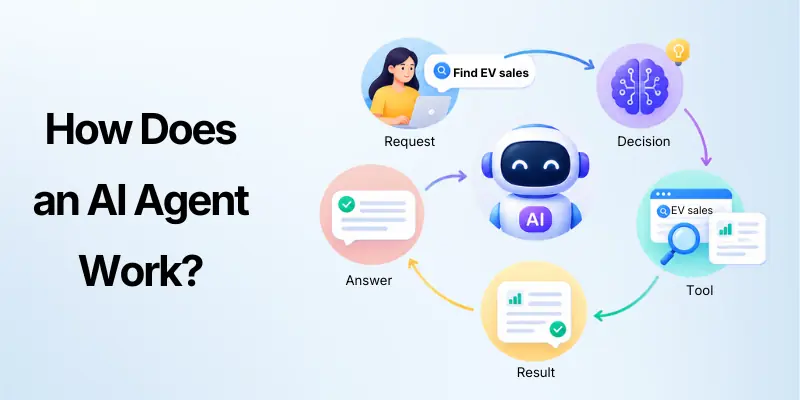
A simplified AI agent workflow looks like this:
User request → AI model → decision → tool call → result → next decision → final answer
Suppose you build a research agent.
A user asks:
“Find the latest information about electric vehicle sales and summarize it.”
The agent might:
- Understand the request.
- Decide that it needs current information.
- Use a web search tool.
- Read relevant sources.
- Extract useful information.
- Compare the findings.
- Create a summary.
- Return the result.
This process can involve multiple model calls and tool calls before the agent produces its final response.
An agent therefore needs an execution loop. The loop continues until the task reaches a defined stopping condition, such as a final answer, a successful tool result, an error, or a maximum number of steps.
Best Framework for Building an AI Agent
There is no single best framework for every project.
Your choice depends on how much control you want and how complicated the workflow is.
Build From Scratch
You can build an agent loop directly using a model provider’s API.
This gives you significant control over:
- Model calls
- Tool execution
- State management
- Permissions
- Error handling
- Application architecture
It can also require more development work.
Use an AI Agent Framework.
Frameworks can provide reusable components for:
- Tool calling
- Agent loops
- Memory
- Routing
- Multi-agent workflows
- Observability
- Guardrails
For example, OpenAI provides an Agents SDK for orchestrating agent workflows, including single-agent and multi-agent patterns.
The important point is to choose a framework because it solves a real development problem, not simply because it is popular.
Use a Managed Agent Platform
Managed platforms can handle parts of the infrastructure for you.
As of 2026, OpenAI also offers an Agents API in public beta for building cloud agents with a managed harness and configurable environments.
This type of approach can reduce the amount of infrastructure you need to build yourself, but you should still understand how your agent’s tools, permissions, data, and execution environment work.
Single-Agent vs Multi-Agent Systems
Beginners often assume that a complex AI project needs multiple agents.
It usually does not.
A single-agent system uses one agent with multiple tools and can handle many workflows.
A multi-agent system divides work between specialized agents.
For example:
Manager Agent
/ |
/ |
Research Writing Review
Agent Agent Agent
A research agent might collect information, a writing agent might organize it, and a review agent might check the final result.
Multi-agent architecture can be useful when tasks have genuinely different responsibilities. But it also introduces more complexity.
A sensible approach is to start with one agent and add specialized agents only when the workflow actually benefits from them. OpenAI’s guidance similarly recommends incrementally adding capabilities before moving to more complex multi-agent orchestration.
Common AI Agent Mistakes
Building an agent is not just about making it capable. You also need to make its behavior predictable.
- Giving the Agent Too Many Tools: More tools do not always make an agent better. Too many similar tools can make tool selection harder.
- Better approach: give the agent a small set of well-defined tools first.
- Using Vague Instructions: “Help the customer” is not enough for a complex workflow.
- Better approach: define specific actions, conditions, limitations, and completion criteria.
- Making Everything Autonomous: Some actions are too risky to automate without approval.
- Better approach: use human review for sensitive or irreversible actions.
- Skipping Evaluation: A successful demonstration does not prove that an agent works reliably.
- Better approach: build a test set with normal, unusual, incomplete, and failure cases.
- Adding Memory Too Early: Memory can introduce unnecessary storage and privacy complexity.
- Better approach: first determine exactly what information the agent needs to remember.
- Building a Multi-Agent System Too Soon: Multiple agents can create more coordination problems.
- Better approach: start with one agent and split responsibilities only when there is a clear reason.
- Allowing Unsupported Answers: An agent may sometimes produce information that sounds convincing but is not supported by its tools or data.
- Better approach: instruct it to rely on available sources, validate important outputs, and clearly acknowledge missing information.
How to Make an AI Agent More Reliable
Reliability comes from the entire system, not just the model.
Focus on these areas:
- Use Clear Tool Definitions: A tool should have a specific purpose and predictable input and output.
- Limit Permissions: Do not give an agent access to systems it does not need.
- Validate Important Actions: Check important tool arguments before executing them.
- Set Execution Limits: Use limits on steps, retries, or tool calls so an agent cannot run indefinitely.
- Log Agent Activity: Keep useful records of user requests, model decisions, tool calls and results, errors, and final outputs to make debugging easier.
- Evaluate Before Deployment: Define measurable success criteria to evaluate tool selection, answer accuracy, safety, escalation, and task efficiency.
AI Agent vs Chatbot: What Is the Difference?
An AI chatbot and an AI agent can both use a large language model, but they do not necessarily work the same way.
| Feature | AI Chatbot | AI Agent |
| Main purpose | Conversation and answers | Completing tasks |
| Tool use | Optional | Often central |
| Decision-making | Usually limited | More dynamic |
| Multi-step tasks | Limited | Common |
| External actions | Usually limited | Can be extensive |
| Autonomy | Lower | Higher, within defined limits |
| Human approval | Sometimes | Often useful for risky actions |
The distinction is not simply whether a system uses an LLM. An application can contain an LLM without being an agent. An agent uses the model to help manage the execution of a workflow and can use tools to interact with external systems.
When Should You Build an AI Agent?
An AI agent makes sense when the problem has enough complexity to justify one.
Good use cases often involve:
- Multiple steps
- Unstructured information
- Context-dependent decisions
- Repeated workflows
- External tools
- Changing inputs
- Exceptions that are difficult to handle with fixed rules
For example, an agent can be useful for research because the information it needs may vary from one request to another.
On the other hand, you probably do not need an agent for something like:
“If a customer enters the wrong password five times, lock the account.”
A simple deterministic rule can handle that more reliably.
The goal is not to make every process agentic. The goal is to use an agent where its ability to reason and choose actions provides a real benefit.
Simple AI Agent Development Roadmap
If you are completely new to agent development, use this progression:
Stage 1: Understand
Learn about:
- LLMs
- Prompts
- APIs
- Tool calling
- Structured outputs
Stage 2: Build
Create a simple agent with:
- One model
- One clear task
- One or two tools
- Basic instructions
Stage 3: Test
Try normal and unusual inputs.
Record failures and improve the instructions or tools.
Stage 4: Add Context
Introduce retrieval, memory, or external data only when the use case needs them.
Stage 5: Add Safety
Introduce:
- Permissions
- Guardrails
- Human approval
- Validation
- Execution limits
Stage 6: Optimize
Measure:
- Accuracy
- Cost
- Speed
- Tool usage
- Failure rate
Stage 7: Deploy
Only move to production after the agent performs reliably across realistic test cases.
Best Practices for Building AI Agents
Keep these principles in mind as your project grows:
- Start with one clearly defined workflow.
- Use the simplest architecture that solves the problem.
- Give the agent only the tools it needs.
- Write explicit instructions.
- Define what the agent should do when something goes wrong.
- Keep high-risk actions behind approval or validation.
- Test tool calls as well as final answers.
- Track agent execution so you can debug failures.
- Measure performance instead of relying on demonstrations.
- Add memory and multi-agent orchestration only when they provide clear value.
- Review privacy and security requirements before connecting real user data.
The best AI agent is not necessarily the most autonomous one. It is the one that completes the intended workflow reliably while staying within clearly defined boundaries.
Conclusion
In this guide, we have covered how to build an AI agent. You learned how to choose a clear use case, select a model, add tools and memory, create an agent workflow, and use guardrails and testing to make the system more reliable.
Building an AI agent does not mean making everything autonomous from the start. Begin with a simple workflow, test it carefully, and add more tools or capabilities only when they provide real value.
My recommendation: Start with one small task and focus on making the agent reliable before expanding its capabilities. Always keep permissions, testing, and human oversight in mind when your agent can take important actions.
Thank you very much for reading this guide. I hope it helps you take your first step toward building a useful AI agent.
💬 Have you built or planned an AI agent? Share your experience or questions in the comments below! 🤖
FAQs
Below are some frequently asked questions about how to build an AI agent, covering common concerns about development, cost, tools, deployment, and more.
Start with one specific task, choose an AI model, write clear instructions, and connect one or two tools. Then create an execution loop that lets the model decide when to use those tools and when to return a final response.
A well-designed AI agent should have defined responses for failed tool calls, missing information, invalid inputs, and unexpected situations. Consider the following safeguards:
- Validate important inputs before using a tool.
- Set limits on retries and execution steps.
- Return clear error messages when something fails.
- Escalate important or unresolved cases to a human.
These measures help prevent a single error from causing a larger problem.
Python is a strong choice because of its large ecosystem for AI, APIs, databases, and data processing. JavaScript and TypeScript are also useful, especially when your agent is closely connected to a web application.
The core components include an AI model, instructions, and tools. Depending on the application, you may also need memory, retrieval, a workflow controller, guardrails, permissions, and evaluation systems.
Many modern AI agents use large language models to understand requests and make workflow decisions. However, the exact architecture depends on the problem, and some systems can combine language models with traditional software and deterministic rules.
The model receives a description of available tools and can decide when a tool is useful. Your application then executes the permitted tool and sends its result back to the model so the agent can continue the workflow.
Traditional automation usually follows predefined rules and steps. An AI agent can dynamically interpret information, select tools, and decide what action to take within the boundaries established by its developer.
Not necessarily. A single agent with well-designed tools can handle many workflows, and you should generally start there. Multiple agents become useful when separate responsibilities or specialized workflows clearly justify the additional complexity.
Give it clear instructions, reliable tools, relevant information, and well-defined boundaries. You should also test it against realistic examples and edge cases instead of judging its quality from a few successful conversations.
The cost depends on the model, number of model calls, tools, infrastructure, data storage, and scale of the application. A small prototype can be inexpensive, while a production system with many users and external tools can require considerably more infrastructure and monitoring.






- Be Respectful
- Stay Relevant
- Stay Positive
- True Feedback
- Encourage Discussion
- Avoid Spamming
- No Fake News
- Don't Copy-Paste
- No Personal Attacks
- Be Respectful
- Stay Relevant
- Stay Positive
- True Feedback
- Encourage Discussion
- Avoid Spamming
- No Fake News
- Don't Copy-Paste
- No Personal Attacks
