Best Tools to Build AI Agents in 2026
Published: 22 Sep 2026
Have you ever wanted to build an AI system that can do more than simply answer questions? For example, an agent that can search the web, use APIs, read files, make decisions, complete several steps, and take action without needing you to guide every step?
That is where AI agent development tools become useful. Instead of building every part of an agent from scratch, developers can use agent frameworks, SDKs, orchestration platforms, and workflow tools to connect models with tools, memory, data, and external services.
But choosing the right platform can be confusing. Some tools are designed for code-first development, while others focus on multi-agent systems, workflow automation, or faster prototyping. In this guide, you will learn about the best tools to build AI agents, what each one offers, and which type of project each tool is best suited for.
Best Tools to Build AI Agents
If you want to compare the main options quickly, here are some of the leading tools for AI agent development:
- OpenAI Agents SDK and Agents API
- Google Agent Development Kit
- Claude Agent SDK
- LangGraph
- CrewAI
- Microsoft Agent Framework
- n8n
1. OpenAI Agents SDK and Agents API
OpenAI provides several current building blocks for developers who want to create agentic applications. The Agents SDK is designed for code-first agent orchestration, while the newer Agents API, introduced in September 2026, provides a managed way to build and run cloud agents using an agent harness based on the technology behind Codex.
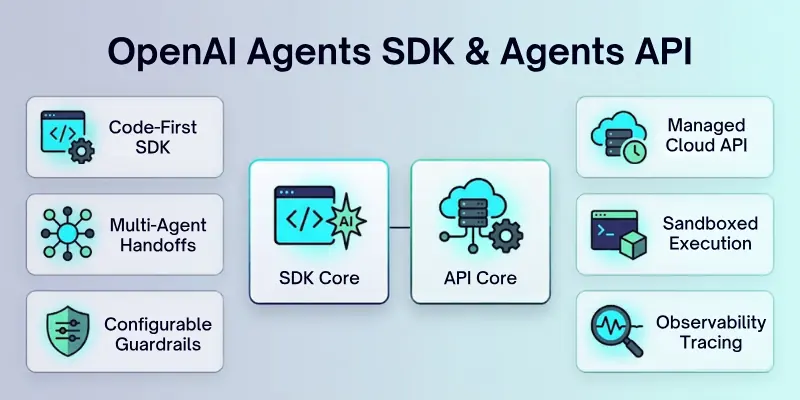
The SDK supports important agent features such as tools, handoffs, guardrails, and tracing. The newer Agents API is aimed at long-running cloud agents that can work with tools, files, subagents, and controlled execution environments.
- Best For: Developers building custom AI agents and agentic applications
- Development Style: Code-first
- Agent Types: Single-agent and multi-agent systems
- Tools: Supports external tools and built-in capabilities such as web search, file search, and computer use
- Orchestration: Supports handoffs and multi-agent workflows
- Safety: Includes configurable guardrails
- Observability: Tracing helps developers inspect agent execution
- Long-Running Tasks: The newer Agents API is designed for agents that can work across longer sessions
- Sandboxing: Agents API supports OpenAI-managed or other execution environments
- Pricing: API and model usage are usage-based; costs depend on the models and tools you use
- Best Feature: A flexible ecosystem for building and scaling custom agents
Important 2026 update: OpenAI says its Agent Builder and Evals products are being wound down from November 30, 2026. For code-based workflows, OpenAI recommends the Agents SDK, while natural-language agent creation can use Workspace Agents in ChatGPT.
2. Google Agent Development Kit
Google’s Agent Development Kit, or ADK, is a code-first framework for building AI agents. It supports agent development across several languages and works with Google’s broader agent development ecosystem.
ADK is useful when you want to create agents with tools, workflows, memory, evaluation, and deployment options. Google’s current Agents CLI can also help with project scaffolding, evaluation, deployment, and observability around ADK projects.
- Best For: Developers building agents with Google’s ecosystem
- Development Style: Code-first
- Languages: Python, JavaScript, Go, Java, and Kotlin support is available across ADK resources
- Agent Workflows: Supports sequential, parallel, and other orchestration patterns
- Tools: Agents can connect to external tools and services
- MCP: Supports MCP integrations
- Evaluation: Includes tools and workflows for testing agent performance
- Deployment: Can be used with Google Cloud services and Agent Runtime
- Code Execution: Google provides sandboxed code execution for suitable agent workflows
- Best Feature: Strong development and deployment ecosystem for agent applications
- Pricing: ADK itself is a development framework; model and cloud service costs depend on the services you use
ADK is particularly interesting for projects that need more than a simple chatbot. Google provides examples for research agents, data science agents, browser-use agents, and multi-agent applications.
3. Claude Agent SDK
The Claude Agent SDK from Anthropic lets developers build agents using the capabilities behind Claude Code. It is designed for agents that can interact with files, run commands, use tools, work with code, and complete multi-step tasks.
One of its key ideas is giving an agent access to a working environment rather than limiting it to text responses. The SDK can manage tool execution, context, retries, sessions, permissions, and MCP connections.
- Best For: Coding agents and computer-based AI workflows
- Development Style: Code-first
- Languages: Python and TypeScript SDKs are available
- Tool Use: Agents can read files, edit files, run commands, and use connected tools
- MCP Support: Can connect agents to MCP servers
- Sessions: Supports multi-turn agent sessions
- Permissions: Developers can control which actions require approval
- Hosting: Agents can be deployed to Docker, cloud environments, and CI/CD workflows
- Best Feature: Gives agents practical computer and development capabilities
- Pricing: API usage is billed based on Anthropic’s applicable model and platform pricing
The SDK is especially useful when you want an agent to inspect a codebase, make changes, run tests, and continue working based on the results. Anthropic’s current documentation also provides managed agent options for cloud-based execution.
4. LangGraph
LangGraph is a low-level orchestration framework from the LangChain ecosystem. It is designed for developers who want more control over how an agent moves between steps, tools, decisions, and states.
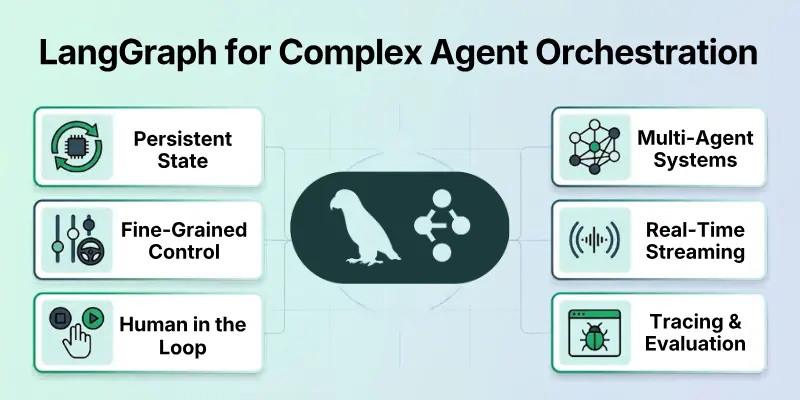
Instead of hiding the entire agent workflow behind a simple abstraction, LangGraph lets you define the structure of the process. Its current documentation highlights durable execution, streaming, persistence, and human-in-the-loop workflows.
- Best For: Complex and stateful AI agents
- Development Style: Code-first
- Control: High control over agent workflows and execution
- State: Supports persistent state across agent steps
- Human Oversight: Supports human-in-the-loop workflows
- Tools: Works with tool-calling models and external tools
- Streaming: Supports streaming agent execution
- Debugging: Can be combined with LangSmith for tracing and evaluation
- Multi-Agent Systems: Can be used to create complex agent graphs
- Best Feature: Fine-grained control over agent orchestration
- Pricing: LangGraph is available as an open-source framework; hosted LangSmith services have separate pricing
LangGraph is a strong option when your agent needs to follow a more complex process. It is also useful when you need the workflow to pause, resume, remember state, or involve human approval.
5. CrewAI
CrewAI focuses heavily on multi-agent systems. Instead of asking one agent to handle every part of a complex task, you can create multiple agents with different roles and let them work together.
Its current architecture uses Crews for collaborative agent teams and Flows for structured workflow control. This makes it possible to combine autonomous agent behavior with predictable workflow steps.
- Best For: Multi-agent applications
- Development Style: Python-based
- Agent Roles: Create specialized agents with different goals and responsibilities
- Crews: Allow multiple agents to collaborate on complex tasks
- Flows: Provide structured, event-driven workflow control
- Memory: Supports agent memory
- Knowledge: Agents can work with connected knowledge sources
- Tools: Supports APIs and external tools
- Human-in-the-Loop: Available for workflows that need human intervention
- Best Feature: Combines collaborative agents with structured workflows
- Pricing: Open-source framework available; enterprise deployment options are separate
CrewAI can be useful for research teams, content workflows, business automation, data analysis, and other tasks where different agents can take specialized roles.
6. Microsoft Agent Framework
Microsoft Agent Framework is Microsoft’s current open-source framework for building AI agents and agent workflows. It brings together concepts from Microsoft’s earlier agent work and provides tools for agents, workflows, memory, security, middleware, and hosting.
The framework supports multiple AI providers, including OpenAI, Azure OpenAI, Anthropic, and Microsoft Foundry. It also supports tools, MCP, RAG, background agents, human-in-the-loop workflows, and checkpoints.
- Best For: Enterprise AI agents and Microsoft-based applications
- Development Style: Code-first
- Languages: Python and C# are supported, with Go currently in public preview
- Model Support: Supports multiple model providers
- Tools: Supports function tools and MCP tools
- Memory: Supports conversations and persistent context
- Workflows: Supports structured and graph-based workflows
- Security: Includes security and middleware capabilities
- Hosting: Supports Microsoft and other infrastructure options
- Best Feature: Broad enterprise integrations and multi-provider support
- Pricing: The framework is open source; model, cloud, and hosting costs depend on your chosen services
Microsoft also positions the framework as the successor to AutoGen for new projects. AutoGen is now in maintenance mode, so it is generally not the first choice for a new agent project in 2026.
7. n8n
n8n takes a different approach from code-first agent frameworks. It is a workflow automation platform that combines AI capabilities with business process automation.
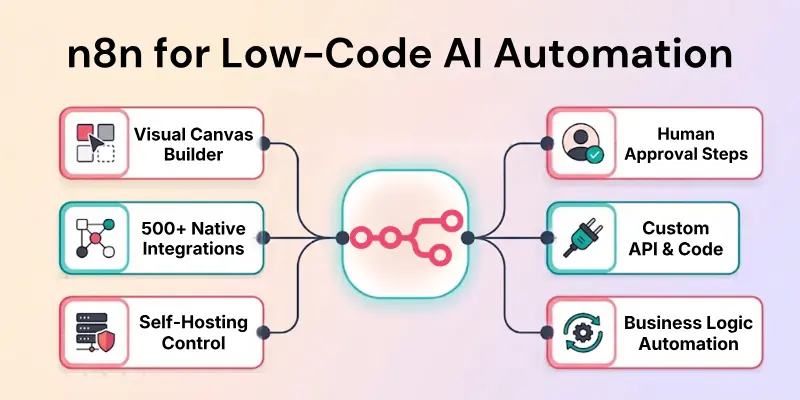
You can create workflows visually and add an AI Agent node that connects models with tools and other workflow steps. This makes n8n useful when your goal is to connect an AI agent with services such as email, databases, APIs, CRM systems, or other business applications.
- Best For: AI automation and low-code workflows
- Development Style: Visual workflow building with optional code
- AI Agents: Includes an AI Agent node
- Integrations: Connects with many external services
- Automation: Combines AI decisions with normal workflow logic
- Human Approval: Supports human review for selected tool actions
- APIs: Useful for connecting agents to external APIs
- Self-Hosting: Available for teams that want more control over deployment
- Best Feature: Combines AI agents with business automation
- Pricing: Self-hosting and n8n Cloud have different options and costs
n8n can be a good choice if you do not want to build every integration from scratch. It is particularly useful for practical automation such as processing incoming messages, updating databases, calling APIs, or routing tasks.
How to Choose an AI Agent Building Tool
The best tool depends on how much control you need and what type of agent you want to build. Consider the following options before choosing a platform:
- For Code-First AI Agents: OpenAI Agents SDK, Claude Agent SDK, Google ADK, and Microsoft Agent Framework offer strong options for developers who want to build with code.
- For Complex Agent Workflows: LangGraph is a strong choice when you need detailed control over states, execution paths, persistence, and human approval.
- For Multi-Agent Systems: CrewAI is useful when several specialized agents need to collaborate on a larger task.
- For Google-Based Projects: Google ADK is a natural option if your project already uses Gemini and Google Cloud services.
- For Coding Agents: Claude Agent SDK is particularly suitable for agents that need to work with files, code, terminals, and development workflows.
- For OpenAI-Based Agents: OpenAI Agents SDK is useful for custom agent applications, while the newer Agents API targets managed cloud agent execution.
- For Business Automation: n8n is useful when your agent needs to connect with APIs, databases, communication tools, and other business workflows.
- For Enterprise Microsoft Environments: Microsoft Agent Framework is worth considering when your application needs Microsoft services, multiple model providers, security controls, and structured workflows.
What to Look for in an AI Agent Tool
Choosing an agent framework is not only about the language model behind it. The development platform should also give you enough control over tools, memory, execution, and monitoring.
Here are the main features to check:
- Tool Calling: The agent should be able to call functions, APIs, databases, or external services.
- Memory: Look for short-term or persistent memory when the agent needs to remember information across tasks.
- Workflow Control: Complex agents need clear ways to control steps, branches, loops, and handoffs.
- Human Approval: Important actions should be able to pause for human review when necessary.
- Observability: Tracing and logs make it easier to understand why an agent succeeded or failed.
- Evaluation: Good agent development requires testing against real tasks instead of relying only on a few successful examples.
- Security: Check how the platform handles permissions, sensitive data, tool access, and execution environments.
- MCP Support: Model Context Protocol can make it easier to connect agents with external tools and data sources.
- Deployment Options: Consider whether you need local hosting, cloud deployment, containers, or managed infrastructure.
- Model Flexibility: Multi-provider support can be useful if you do not want your application tied to one model provider.
AI Agent Tools vs. Traditional Automation
AI agents and traditional automation can both complete tasks, but they work differently. Traditional automation usually follows predefined rules, while an AI agent can choose actions based on the current situation.
The right option depends on the problem you are trying to solve:
- Traditional Automation: Best for predictable processes with clear rules.
- AI Agents: Better suited to tasks that require interpretation, decision-making, tool use, or changing inputs.
- Workflow Automation: Useful when you need fixed steps combined with AI capabilities.
- Hybrid Systems: Often make sense when predictable parts of a process can remain automated while AI handles less structured tasks.
OpenAI’s current guidance also recommends checking whether a problem really needs an agent before building one. If a deterministic workflow can solve the task reliably, a simpler system may be the better choice.
Tips for Building a Reliable AI Agent
A powerful model alone does not guarantee a reliable agent. The instructions, tools, data, permissions, and evaluation process all affect how the system behaves.
Keep these points in mind:
- Start With One Clear Task: Build a focused agent before creating a large multi-agent system.
- Give the Agent Useful Tools: Only connect tools that the agent actually needs.
- Write Clear Instructions: Define what the agent should do, what it should avoid, and when it should ask for help.
- Limit Permissions: Do not give an agent unnecessary access to sensitive systems or actions.
- Add Human Approval: Require confirmation before important or irreversible actions.
- Test Real Scenarios: Evaluate the agent using realistic tasks and failure cases.
- Monitor Agent Traces: Review tool calls, decisions, errors, and final results.
- Control Costs: Set limits around model calls, tool usage, and long-running tasks.
- Keep the Workflow Simple: More agents do not automatically mean better results.
- Improve Gradually: Start with a working prototype, then add memory, tools, evaluation, and advanced orchestration as needed.
Conclusion
In this guide, we have covered best tools to build AI agents. I recommend starting with a simple tool that matches your development skills and the complexity of your project rather than choosing a framework only because it has many features.
For a first project, focus on one useful task, give the agent only the tools it needs, and test its behavior carefully before expanding the system. I hope this guide helps you choose the right platform for your next AI agent project.
Thanks for reading, and best of luck with your AI development journey! If you have a favorite AI agent tool or want to share your experience, leave your thoughts in the comments. 🚀
FAQs
Want quick answers before choosing an AI agent development platform? These FAQs cover some of the most common questions beginners and developers ask.
There is no single best tool for every project. OpenAI Agents SDK, Google ADK, Claude Agent SDK, LangGraph, CrewAI, Microsoft Agent Framework, and n8n all serve different needs.
For a simple code-first project, an SDK may be enough. For complex orchestration, multi-agent systems, or business automation, a specialized framework may be more suitable.
Yes, depending on the platform and the type of agent you want to create.
Options include:
- Visual workflow platforms such as n8n
- Low-code agent builders
- Managed agent platforms
- AI development environments with visual tools
However, advanced agents often require some programming when you need custom tools, databases, authentication, or complex workflows.
CrewAI is specifically designed around collaborative AI agents, using Crews and Flows to combine agent teamwork with structured workflows. LangGraph can also support complex multi-agent architectures when you need lower-level control over orchestration.
Not necessarily. They focus on different development styles.
LangGraph is a strong option when you want detailed control over state and orchestration. CrewAI is attractive when you want role-based agents that collaborate as a team.
For developers, an SDK with a simple agent abstraction can be an easy starting point. For people who prefer visual development, n8n can reduce the amount of code needed for workflows and integrations.
The easiest option depends on whether you are comfortable with programming and how complex the agent needs to be.
Yes. API access is one of the main ways to make an AI agent useful beyond conversation.
An agent can potentially use APIs to:
- Search external information
- Retrieve database records
- Send messages
- Create or update records
- Trigger business processes
- Connect with third-party services
The exact capabilities depend on the framework, permissions, and tools you provide.
An AI chatbot mainly focuses on responding to user messages. An AI agent can go further by deciding what actions to take, calling tools, working through multiple steps, and completing tasks.
In simple terms, a chatbot mainly responds, while an agent can reason, use tools, and act within the permissions you give it.
A capable model can help, but the model is only one part of the system. Tools, instructions, memory, workflow design, permissions, and evaluation also affect agent performance.
A well-designed workflow with an appropriate model can be more useful than a complicated agent built around a model that is not suited to the task.
AutoGen is still available, but its official repository currently marks it as being in maintenance mode. Microsoft recommends Microsoft Agent Framework for new projects, while existing AutoGen users can follow the migration path.
Start with one clear task instead of trying to build a large autonomous system immediately.
A simple process is:
- Choose one use case.
- Select an appropriate model.
- Write clear agent instructions.
- Add only the required tools.
- Test the agent with realistic tasks.
- Add memory or advanced orchestration only when needed.
- Monitor and improve the agent over time.
This approach makes it easier to find problems and improve reliability before your AI agent becomes more complex.





- Be Respectful
- Stay Relevant
- Stay Positive
- True Feedback
- Encourage Discussion
- Avoid Spamming
- No Fake News
- Don't Copy-Paste
- No Personal Attacks
- Be Respectful
- Stay Relevant
- Stay Positive
- True Feedback
- Encourage Discussion
- Avoid Spamming
- No Fake News
- Don't Copy-Paste
- No Personal Attacks
