AI Agent Integration: Connect AI Agents
Published: 18 Sep 2026
What happens when an AI agent needs to do more than answer a question? It may need to access a database, check a website, send an email, update a CRM, read a file, or call an external API.
This is where AI agent integration becomes important. It connects an AI agent with the tools, applications, data sources, and services it needs to complete real tasks.
An integrated agent can retrieve information, use external tools, and take approved actions instead of only generating text. In this guide, you will learn what AI agent integration is, how it works, common integration methods, useful tools and frameworks, practical use cases, security considerations, and how to build an integrated AI agent.
What Is AI Agent Integration?
AI agent integration is the process of connecting an AI agent with external tools, applications, data, or services so it can perform actions beyond generating text.
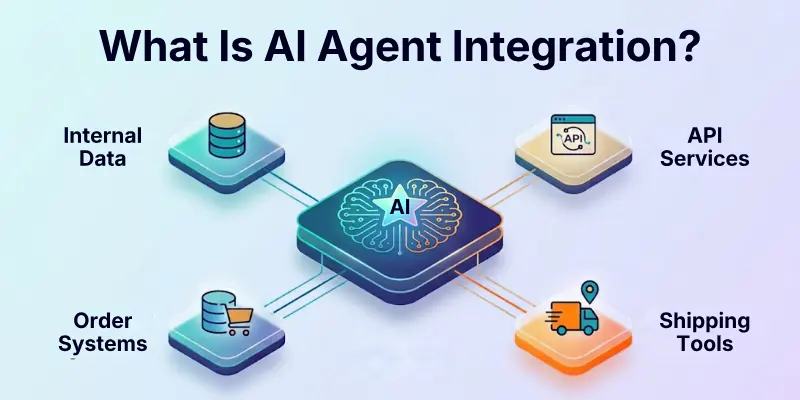
A basic AI model can respond to a prompt. An integrated AI agent can use tools and external information to decide what action should happen next.
For example, a customer service agent could:
- Understand a customer’s question.
- Search the company’s knowledge base.
- Check an order database.
- Call a shipping API.
- Give the customer an updated response.
The agent does not need every piece of information inside its model. Instead, integrations provide controlled access to the systems it needs.
How Does AI Agent Integration Work?
AI agent integration connects several parts of a system. The exact setup depends on the AI model, agent framework, tools, and external services you choose.
A typical workflow looks like this:
User request → AI agent → decision → tool or API → external system → result → AI agent → final response
For example, imagine a customer asks an AI sales assistant, “Show me the latest order status.”
The agent can understand the request, identify the appropriate tool, call an order-management API, receive the order information, and explain the result to the customer.
The important difference is that the agent does not simply generate an answer. It can use an external system to obtain the information required to complete the task.
Common Ways to Integrate AI Agents
There is no single method for connecting an AI agent to an external system. The best approach depends on the system you want to connect and the level of control you need.
1. API Integration
APIs are one of the most common ways to connect AI agents with external applications. An agent can use an API to retrieve information or perform an approved action.
Common examples include:
- CRM APIs
- Payment APIs
- Weather APIs
- E-commerce APIs
- Calendar APIs
- Database APIs
- Email APIs
For example, an e-commerce agent could call an order API to retrieve a customer’s latest order status.
2. Function Calling
Function calling allows developers to define specific functions that an AI agent can use.
The model can determine when a function is useful and provide the arguments required to run it. The application then executes the function and returns the result to the agent.
This method is useful when you want clear control over the actions an agent can perform.
For example, you might create a check_order_status function that allows an agent to retrieve order information without giving it direct access to the entire database.
3. MCP Integration
Model Context Protocol (MCP) provides a standardized way for AI applications to connect with external tools and contextual data.
Instead of building a completely different connection for every AI application, an MCP server can expose tools and information through a common interface.
MCP can be useful when an agent needs to work with several external tools or services while keeping the connection structure consistent.
4. Database Integration
AI agents can access databases through approved tools, APIs, or application layers.
A business agent might need access to:
- Customer records
- Product information
- Inventory
- Orders
- Support tickets
- Internal business data
Direct database access is not always necessary. In many cases, a controlled API or tool is safer because it limits which information and actions the agent can access.
5. Agent-to-Agent Integration
AI agents can also work with other agents.
Instead of asking one agent to handle every task, you can divide the work between specialized agents. For example:
Research agent → Analysis agent → Writing agent
One agent can gather information, another can analyze it, and another can produce the final output.
This approach can be useful for complex workflows where different tasks require different instructions, tools, or responsibilities.
Tools and Frameworks for AI Agent Integration
Developers can use different frameworks and platforms to build and connect AI agents.
Some important options include:
- OpenAI Agents SDK
- OpenAI Apps SDK
- Microsoft Agent Framework
- Google Agent Development Kit
- LangGraph
- n8n
These options serve different purposes. Some provide agent-development frameworks, while others focus on workflows and connecting applications.
MCP should be viewed separately because it is an open protocol for connecting AI applications with external tools and data rather than a complete agent framework.
The right option depends on your technical requirements, existing applications, required tools, and level of control.
AI Agent Integration Use Cases
AI agent integration becomes especially useful when an agent needs real-time information or needs to take an action.
- Customer Support: Connect an agent with a knowledge base, CRM, order system, and ticketing platform. It can use these systems to answer questions and assist with support tasks.
- Sales Automation: An AI sales agent can connect with CRM data, email platforms, calendars, and customer information to support lead management and follow-up tasks.
- E-commerce: An e-commerce agent can work with product catalogs, inventory systems, order databases, and shipping services to help customers find products and track purchases.
- Research: Research agents can use web searches, documents, databases, and other approved tools to gather and organize information.
- Coding: Coding agents can work with code repositories, files, development environments, issue trackers, and testing tools to support software development.
- Business Operations: Agents can connect with internal systems to assist with repetitive tasks such as reporting, document processing, data entry, and workflow management.
- Personal Assistants: Personal AI assistants can connect with approved calendars, email, files, reminders, and other services to help manage everyday tasks.
What Can AI Agents Integrate With?
AI agents can potentially connect with many types of software and data sources, depending on the tools and permissions available to them.
Common integrations include:
- APIs: Communicate with external applications and services.
- Databases: Retrieve approved business information.
- CRM systems: Access customer and sales data.
- Email platforms: Read or send approved messages.
- Cloud storage: Work with selected documents and files.
- Web search: Retrieve current information from the web.
- MCP servers: Access external tools and contextual data through a standardized protocol.
- Business applications: Work with systems used for sales, support, finance, and operations.
- Other AI agents: Allow specialized agents to work together.
The important point is that an agent should not automatically have access to everything a connected system contains. Access should be limited according to the task.
AI Agent Integration With MCP
MCP has become an important option for connecting AI applications with external tools and data.
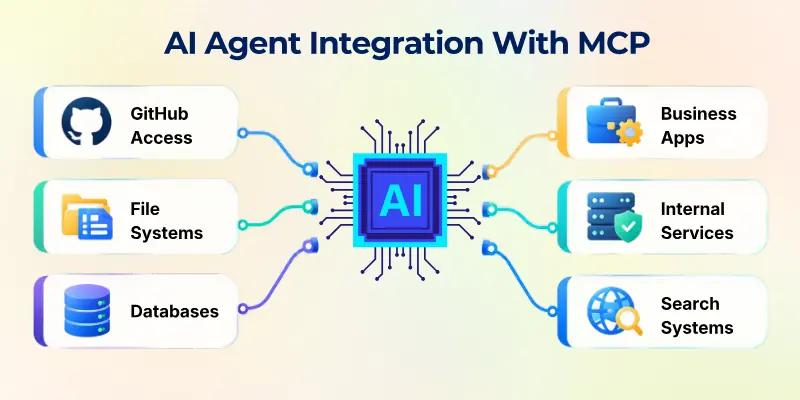
An MCP server can expose a collection of tools or resources through a standardized interface. An AI application can then discover the available capabilities and use the appropriate tool during a task.
For example, an MCP server could provide access to:
- GitHub
- File systems
- Databases
- Business applications
- Internal services
- Search systems
However, using MCP does not automatically make an integration safe.
Before connecting an external MCP server, review what information it can access, what credentials it requires, what actions it can perform, and how your data may be handled.
How to Build AI Agent Integrations
Building an integrated AI agent is easier when you start with one clear task instead of connecting many services at once.
- Define the Task: Decide exactly what you want the agent to accomplish. For example, you might want a customer support agent to check order status and answer customer questions.
- Choose the Model: Select a model that fits your task, budget, speed requirements, and reasoning needs.
- List the Required Tools: Identify the APIs, databases, files, applications, or other services the agent actually needs. Avoid adding tools simply because they are available.
- Choose an Integration Method: Decide whether APIs, function calling, MCP, workflow automation, or another approach is the best fit.
- Define Permissions: Decide exactly what the agent can read, create, update, or delete. For example, an order-support agent may need permission to read order information but not delete customer records.
- Create Agent Instructions: Define the agent’s role, goals, limits, and rules for using its tools. Clear instructions help the agent use integrations more consistently.
- Test Each Integration: Test every tool before giving the agent access to real systems. Check both successful and failed scenarios.
- Add Human Approval: Require human confirmation for sensitive or irreversible actions such as issuing refunds, deleting records, or sending important communications.
- Monitor Agent Activity: Track tool calls, errors, responses, and unexpected behavior. Monitoring helps you understand what happened when something goes wrong.
- Improve the Workflow: Use testing and monitoring results to improve the agent’s instructions, tools, permissions, and workflow.
A Simple Example
Imagine you are building a customer support agent.
The agent could connect to:
- A CRM for customer details
- An order API for order status
- A knowledge base for product information
- A ticketing system for support requests
When a customer asks about an order, the agent can identify the request, call the order tool, retrieve the latest information, and provide an answer.
If the customer asks for a refund, the workflow could require human approval before the refund is processed.
This approach gives the agent useful capabilities while keeping important actions under control.
Best Practices for AI Agent Integration
A successful integration is not just about making a tool work. You also need to consider security, reliability, cost, and user control.
Here are some important practices:
- Give Minimum Access: Only provide the permissions the agent needs.
- Use Trusted Integrations: Review external tools and services before connecting them.
- Protect API Keys: Never expose secret keys inside prompts or client-side code.
- Validate Tool Inputs: Check information before sending it to external systems.
- Add Approval Steps: Require human confirmation for sensitive actions when appropriate.
- Log Tool Calls: Keep records that help you investigate failures.
- Monitor External Services: Remember that an API can fail even when the AI model works correctly.
- Set Usage Limits: Control model and API usage to manage costs.
- Handle Errors: Give the agent safe responses when a tool fails.
- Test Real Scenarios: Test normal requests, incorrect inputs, failed services, and unexpected results.
These practices become increasingly important as an agent gains access to more systems.
AI Agent Integration Security
Security becomes especially important when an AI agent can take actions in external systems.
An agent with read-only access to a knowledge base creates a different level of risk from an agent that can delete records, send emails, or modify financial information.
Important security areas include:
- Authentication: Verify the identity of users, agents, and external services.
- Authorization: Control which actions an agent is allowed to perform.
- Data Protection: Limit sensitive information shared with external tools.
- Credential Management: Store API keys and tokens securely.
- Human Approval: Require confirmation for high-impact actions.
- Audit Logs: Record important agent and tool activity.
- MCP Security: Review third-party MCP servers before connecting them.
- Prompt Injection Protection: Treat external content as potentially untrusted.
- Tool Validation: Verify important tool inputs and outputs.
What Is Prompt Injection?
Prompt injection is an attack in which untrusted content attempts to influence an AI system to ignore its instructions or perform an unintended action.
This is especially important for agents that can read websites, documents, emails, or other external content.
For example, an agent could encounter malicious instructions inside a webpage while searching for information. The system should treat that content as data rather than automatically following its instructions.
AI Agent Integration vs API Integration
AI agent integration and API integration are related, but they are not exactly the same.
An API provides a way for software systems to communicate. AI agent integration adds an AI decision-making layer that can determine when and how to use available tools.
For example:
- API Integration: An application automatically calls a shipping API when an order is created.
- AI Agent Integration: An agent determines whether it needs the shipping API based on a user’s request.
The API provides the connection. The agent determines how that connection can be used within its workflow.
Challenges of AI Agent Integration
Connecting an AI agent to external systems can make it much more useful, but it also introduces new challenges.
- Tool Errors: APIs and external services can fail or return unexpected information.
- Security Risks: Every additional integration creates another system that needs to be protected.
- Complex Workflows: Agents may need to manage several tools, dependencies, and services during one task.
- Data Quality: Poor or outdated information can lead to poor responses or decisions.
- Cost: Frequent model and API calls can increase operating costs.
- Latency: Calling several external services can make an agent slower.
- Permissions: Giving an agent too much access can create unnecessary risk.
- Debugging: When something goes wrong, it can be difficult to determine whether the problem came from the model, tool, API, data, or workflow.
- Reliability: A successful response from an AI model does not guarantee that an external action was completed correctly.
Future of AI Agent Integration
AI agents are moving toward more connected systems in which models can work with tools, applications, data sources, workflows, and other agents.
This means future agent systems may be able to handle more complex tasks by combining several specialized capabilities instead of relying on one model to do everything.
However, more autonomy does not always mean better results. A smaller agent with limited tools, clear permissions, strong testing, and human approval can often be easier to control and maintain.
The goal should not be to connect an agent to every available service. The goal is to give it the right capabilities for a specific task.
Conclusion
In this guide, we have covered AI agent integration and explored how AI agents can connect with APIs, databases, applications, tools, workflows, and other AI systems. These integrations allow agents to access useful information and perform actions beyond generating text.
I recommend starting with one clear use case and connecting only the tools your agent actually needs. Focus on security, limited permissions, testing, and monitoring before expanding the system.
Thank you for reading, and I hope this guide helped you understand AI agent integration more clearly. Wishing you the best as you build and explore your own AI-powered systems.
Have questions or experience with AI agent integration? 💬 Share your thoughts in the comments below! 🚀
FAQs
Looking for quick answers about AI agent integration? Below are some common questions about connecting agents with external tools and systems.
AI agent integration means connecting an AI agent with external tools, applications, APIs, databases, or data sources. These connections allow the agent to retrieve information or perform approved actions instead of only generating text.
For example, a customer service agent could connect to an order system and retrieve the latest shipping status for a customer.
AI agents can use functions or tools that connect to APIs. The agent determines when a particular tool is needed, provides the required inputs, and uses the API result to continue the task.
This allows an agent to interact with external services without requiring the AI model itself to directly manage the underlying system.
MCP stands for Model Context Protocol. It is an open protocol designed to provide a consistent way for AI applications to connect with external tools and contextual data.
It can help developers create standardized connections between AI applications and supported tools or services.
Yes. An AI agent can connect to a database through an approved tool, API, or application layer.
Common examples include:
- Customer databases
- Product catalogs
- Order systems
- Inventory databases
- Internal business systems
The agent should receive only the database access it actually needs.
AI agents can integrate with many types of systems, including APIs, databases, CRM platforms, email services, cloud storage, search tools, business applications, MCP servers, and other agents.
The available integrations depend on the framework, tools, and permissions used to build the agent.
It can be secure when you use proper authentication, authorization, data protection, monitoring, and permission controls.
However, every additional integration creates another potential security risk. Use minimum permissions and carefully review external tools before connecting them.
Yes. Agent-to-agent communication allows specialized agents to work together.
For example:
Research agent → Analysis agent → Writing agent
Each agent can focus on a specific task instead of trying to manage the entire workflow alone.
Traditional automation usually follows predefined rules and steps. AI agent integration allows an AI system to interpret a goal, select appropriate tools, and adapt its actions based on the situation.
Many practical systems combine both approaches. Fixed workflows can handle predictable steps while an AI agent handles tasks that require more flexibility.
The easiest method depends on your technical skills and the system you want to connect.
- For developers: APIs and function tools provide direct control.
- For MCP-compatible services: MCP can provide a standardized connection approach.
- For visual automation: Platforms such as n8n can connect AI agents with business applications through workflows.
Start with the simplest method that meets your requirements.
Start with one simple task and one or two tools. Test the complete workflow before adding more integrations.
A good starting process is:
- Choose one clear use case.
- Select an AI model and framework.
- Connect one tool or API.
- Set strict permissions.
- Test successful and failed scenarios.
- Add monitoring and human approval where needed.
- Expand the agent only after the basic workflow works reliably.





- Be Respectful
- Stay Relevant
- Stay Positive
- True Feedback
- Encourage Discussion
- Avoid Spamming
- No Fake News
- Don't Copy-Paste
- No Personal Attacks
- Be Respectful
- Stay Relevant
- Stay Positive
- True Feedback
- Encourage Discussion
- Avoid Spamming
- No Fake News
- Don't Copy-Paste
- No Personal Attacks
