Top 10 AI Voice Generators – AI Voice Tools Guide
Published: 15 Jul 2026
Which AI voice generator should you choose when dozens of tools claim to offer the most realistic voices? With so many options available, it can be difficult to know which platform delivers the best quality, value, and performance.
Many users waste time testing multiple tools before finding one that meets their needs. Based on my experience reviewing voice generation software, some tools stand out for voice quality, while others offer better pricing, language support, or voice cloning features.
In this article, we will discuss the top 10 AI voice generators in detail. We will also break down the key differences between each tool so you can make an informed decision.
What Is an AI Voice Generator?
AI voice technology has changed the way people create audio content. Today, creators, businesses, educators, and marketers use AI voice generators to produce realistic voiceovers, podcasts, audiobooks, and training materials without recording their own voices. These tools save time, reduce costs, and make content creation much easier.
How AI Voice Generators Work
AI voice generators convert written text into realistic speech through a series of automated processes, helping create natural-sounding audio quickly and efficiently.
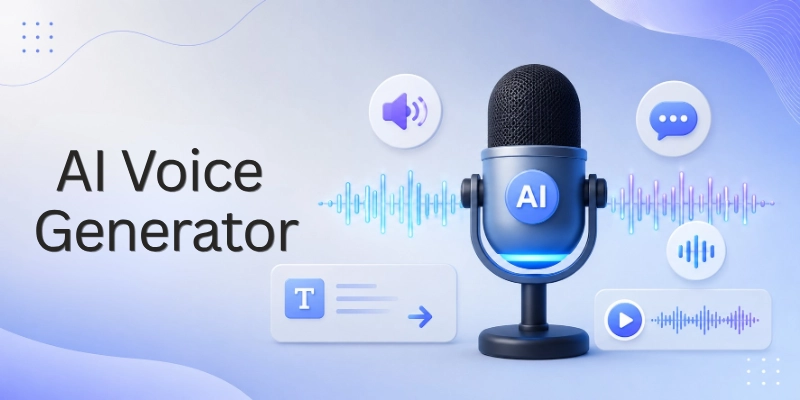
The following steps explain how AI voice generators work:
- Text Input Processing: The system first analyzes the text entered by the user and identifies words, punctuation, numbers, and sentence structure.
- Language and Pronunciation Analysis: AI determines the correct pronunciation of words, abbreviations, symbols, and special terms to ensure accurate speech output.
- Speech Pattern Generation: The software predicts natural speaking patterns, including tone, emphasis, pauses, and pacing, to make the audio sound more human.
- Voice Selection or Voice Cloning: Users can choose from pre-built AI voices or use a cloned voice created from voice samples.
- Audio Synthesis: Advanced AI models convert the processed text into spoken audio by generating realistic speech waveforms.
- Emotion and Tone Adjustment: Many modern tools allow users to adjust emotions, speaking styles, pitch, and energy levels to match different content types.
- Quality Enhancement: The system refines pronunciation, reduces robotic sounds, and improves overall clarity before producing the final audio file.
- Export and Integration: Users can download the generated audio or integrate it directly into videos, podcasts, audiobooks, presentations, and other projects.
Top AI Voice Generators
AI voice generators have become essential tools for content creators, businesses, educators, and marketers. They help create realistic voiceovers, podcasts, audiobooks, and other audio content without the need for professional recording equipment.
The market offers many options, but not every tool delivers the same quality and features. Below, we review the top AI voice generators that stand out for voice quality, ease of use, pricing, and overall performance.
Below are the top 10 AI voice generators discussed in this article:
- ElevenLabs
- Murf AI
- PlayHT
- LOVO AI
- Speechify
- WellSaid Labs
- Resemble AI
- Descript Overdub
- NaturalReader
- Voice.ai
Let’s have a look at them in detail.
1. ElevenLabs – Best Overall AI Voice Generator
ElevenLabs is one of the most popular AI voice generators available today. It is known for producing highly realistic voices with natural tone, emotion, and pronunciation. The platform supports voice cloning, multiple languages, and professional-quality voiceovers, making it a top choice for creators and businesses alike.
Key Features
The following features make ElevenLabs a leading AI voice generation platform:
- Realistic AI Voices: Generates natural-sounding speech with human-like tone and expression.
- Voice Cloning Technology: Allows users to create digital versions of their own voices.
- Multiple Language Support: Supports a wide range of languages and accents for global audiences.
- Text-to-Speech Conversion: Quickly converts written content into professional audio.
- Voice Customization Options: Lets users adjust voice style, stability, and delivery.
- API Access: Provides developer tools for integrating AI voices into applications and workflows.
Pros and Cons
Before choosing ElevenLabs, consider its strengths and limitations:
Pros
- Produces highly realistic voice output.
- Easy-to-use interface for beginners.
- Strong voice cloning capabilities.
- Supports multiple languages and accents.
- Suitable for both personal and commercial projects.
Cons
- Advanced features require a paid plan.
- Free plan includes usage limitations.
- Some premium voices may increase costs for larger projects.
Pricing
ElevenLabs offers flexible pricing options for different types of users:
- Free plan available for testing basic features.
- Affordable entry-level plans for creators.
- Higher-tier plans designed for businesses and professional teams.
- Custom enterprise solutions available for large-scale usage.
Best For
ElevenLabs works particularly well for the following users:
- YouTube creators
- Podcast producers
- Audiobook creators
- Marketing teams
- E-learning professionals
- Businesses needing realistic AI voiceovers
Our Verdict
ElevenLabs earns the top spot because it combines excellent voice quality, powerful voice cloning technology, and an easy-to-use platform. Whether you create content, run a business, or develop audio-based applications, ElevenLabs offers one of the most complete AI voice generation solutions currently available.
2. Murf AI – Best for Professional Voiceovers
Murf AI is a powerful AI voice generator designed for businesses, educators, marketers, and content creators who need professional-quality voiceovers. The platform combines realistic AI voices with advanced editing features, allowing users to create polished audio content without recording equipment or voice actors.
Its intuitive interface and extensive voice library make it suitable for presentations, training videos, advertisements, explainer videos, and corporate content. Murf AI continues to be one of the most trusted solutions for professional voice production.
Key Features
The following features make Murf AI a popular choice for professional voiceovers:
- High-Quality AI Voices: Generates clear and natural-sounding voices suitable for commercial projects.
- Voice Customization Controls: Allows users to adjust pitch, speed, emphasis, pauses, and pronunciation.
- Built-In Voice Editing Studio: Provides editing tools that help refine voiceovers directly within the platform.
- Multiple Languages and Accents: Supports numerous languages and regional accents for global audiences.
- Voice and Video Synchronization: Makes it easy to match voiceovers with presentations and video content.
- Collaboration Features: Enables teams to work together on audio projects more efficiently.
Pros and Cons
Before selecting Murf AI, it is important to understand its strengths and limitations.
Pros
- Produces professional-quality voiceovers.
- User-friendly interface for beginners and professionals.
- Excellent voice editing capabilities.
- Supports multiple languages and accents.
- Suitable for commercial and business projects.
Cons
- Advanced features are available only on paid plans.
- Voice cloning options are more limited than some competitors.
- Larger projects can increase subscription costs.
Pricing
Murf AI offers a free plan for users who want to test the platform before purchasing. Paid plans provide access to additional voices, higher usage limits, advanced editing tools, and commercial rights. Business and enterprise plans are also available for larger teams.
Best For
Murf AI is particularly suitable for:
- Business presentations
- Corporate training videos
- Marketing campaigns
- Product demonstrations
- Educational content
- Professional voiceovers
Our Verdict
Murf AI stands out because of its combination of high-quality voices and powerful editing features. Users who need professional voiceovers for business or educational purposes will find it to be one of the most reliable AI voice generation platforms available today.
3. PlayHT – Best for Realistic Text-to-Speech
PlayHT is a leading AI voice generator that specializes in realistic text-to-speech technology. The platform is widely used by content creators, businesses, developers, and educators who need natural-sounding voiceovers for videos, podcasts, audiobooks, and customer-facing applications.
What sets PlayHT apart is its ability to produce highly human-like voices with accurate pronunciation and natural speech patterns. Combined with its extensive voice library and voice cloning capabilities, PlayHT has become one of the most trusted text-to-speech platforms available today.
Key Features
The following features make PlayHT a strong choice for realistic text-to-speech generation:
- Ultra-Realistic AI Voices:Generates natural-sounding speech that closely resembles human conversation.
- Large Voice Library: Provides access to hundreds of AI voices across different languages and accents.
- Voice Cloning Technology: Allows users to create custom AI voices based on real voice samples.
- Multi-Language Support: Supports numerous languages, making it suitable for international audiences.
- Advanced Text-to-Speech Engine: Converts written content into high-quality audio with natural pacing and pronunciation.
- Developer API Access: Enables businesses and developers to integrate AI voice generation into websites, apps, and products.
Pros and Cons
Before choosing PlayHT, it is important to consider both its advantages and limitations.
Pros
- Produces highly realistic and natural-sounding voices.
- Offers a large selection of voices and accents.
- Strong voice cloning capabilities.
- Supports multiple languages.
- Suitable for both creators and developers.
Cons
- Advanced features require premium subscriptions.
- Some plans can become expensive for heavy users.
- New users may need time to explore all available settings.
Pricing
PlayHT offers a free plan that allows users to test the platform’s core features. Paid plans provide access to premium voices, higher usage limits, voice cloning features, and commercial usage rights. Enterprise solutions are also available for businesses with larger requirements.
Best For
PlayHT is particularly suitable for:
- YouTube creators
- Podcast producers
- Audiobook creators
- E-learning professionals
- Developers and software companies
- Businesses needing realistic AI voiceovers
Our Verdict
PlayHT is one of the best AI voice generators for users who prioritize realistic text-to-speech quality. Its impressive voice library, multilingual support, and advanced voice cloning features make it an excellent choice for creators, businesses, and developers looking for professional-grade audio generation.
4. LOVO AI – Best for Video Creators
LOVO AI is a popular AI voice generator designed for content creators, marketers, educators, and video production teams. The platform combines realistic AI voices with content creation tools, making it easier to produce engaging videos without hiring voice actors or spending hours on audio recording.
One of LOVO AI’s biggest strengths is its ability to generate expressive voiceovers that sound natural and professional. With support for multiple languages, voice styles, and emotions, the platform helps creators produce high-quality content for YouTube, social media, advertising campaigns, and training materials.
Key Features
The following features make LOVO AI a valuable tool for video creators:
- Realistic AI Voices: Generates natural-sounding voices with clear pronunciation and human-like delivery.
- Emotion and Tone Control: Allows users to adjust speaking styles and emotions to match different content types.
- Extensive Voice Library: Provides access to a large collection of voices across various languages and accents.
- Integrated Video Creation Tools: Helps users create and edit video content within the same platform.
- Multi-Language Support: Supports multiple languages for global content creation.
- Fast Voice Generation: Produces professional voiceovers within minutes, helping creators save time.
Pros and Cons
Before choosing LOVO AI, consider its main advantages and limitations.
Pros
- High-quality and expressive AI voices.
- Excellent for video production workflows.
- Easy-to-use interface.
- Supports multiple languages and accents.
- Includes built-in content creation tools.
Cons
- Some advanced features require premium plans.
- Professional users may need more advanced editing controls.
- Higher usage can increase subscription costs.
Pricing
LOVO AI offers a free plan for new users who want to explore its features. Paid plans provide access to premium voices, higher generation limits, advanced editing tools, and commercial usage rights. Business plans are also available for teams and organizations.
Best For
LOVO AI works particularly well for:
- YouTube creators
- Social media marketers
- Video production teams
- Digital marketers
- Online educators
- Advertising agencies
Our Verdict
LOVO AI is one of the best AI voice generators for video creators. Its realistic voices, emotion controls, and integrated content creation tools make it an excellent choice for users who regularly produce video-based content.
5. Speechify – Best for Audiobooks and Reading
Speechify is a leading text-to-speech platform that helps users convert written content into natural-sounding audio. It is widely used by students, professionals, educators, and audiobook enthusiasts who want to listen to articles, documents, books, and study materials instead of reading them.
The platform focuses on accessibility and productivity by making written content easier to consume. With realistic voices, flexible playback controls, and support for multiple file formats, Speechify has become one of the most trusted solutions for audio reading experiences.
Key Features
The following features make Speechify a popular choice for audiobooks and reading:
- Natural-Sounding AI Voices: Converts text into clear and engaging speech that is easy to understand.
- Document and File Support: Works with PDFs, Word documents, web pages, emails, and other text formats.
- Adjustable Listening Speed: Allows users to increase or decrease playback speed according to their preferences.
- Cross-Platform Accessibility: Supports desktop, mobile, and web-based usage for greater convenience.
- Multiple Language Support: Offers various languages and accents for diverse audiences.
- Text Scanning Capability: Can convert printed text and images into spoken audio.
Pros and Cons
Before selecting Speechify, it is important to understand its strengths and limitations.
Pros
- Easy to use for beginners.
- Excellent voice quality for reading content.
- Supports multiple document formats.
- Works across various devices.
- Helps improve productivity and accessibility.
Cons
- Not primarily designed for professional voiceovers.
- Some premium voices require paid subscriptions.
- Advanced creator features are limited compared to dedicated voiceover tools.
Pricing
Speechify offers a free version with basic functionality and premium plans that unlock advanced voices, faster processing, and additional features. Subscription options are available for both individual and professional users.
Best For
Speechify is particularly suitable for:
- Audiobook listeners
- Students and researchers
- Professionals
- Individuals with reading difficulties
- Remote learners
- Productivity-focused users
Our Verdict
Speechify is one of the best AI voice generators for listening to written content. Its realistic voices, ease of use, and broad compatibility make it an excellent solution for anyone who wants to transform text into a convenient audio experience.
6. WellSaid Labs – Best for Business Teams
WellSaid Labs is a premium AI voice generator built specifically for businesses, corporate teams, and organizations that require professional-quality voiceovers. The platform focuses on delivering consistent, studio-grade voices that can be used across training materials, AIXfNp7oL campaigns, product demonstrations, and internal communications.
Its emphasis on reliability and collaboration makes it a popular choice among enterprise users. Businesses that need high-quality voice content at scale often choose WellSaid Labs because of its polished voice library and team-friendly workflow.
Key Features
The following features make WellSaid Labs a strong choice for business teams:
- Professional AI Voice Library: Provides access to high-quality voices designed for commercial and corporate use.
- Consistent Voice Quality: Maintains the same voice style and tone across multiple projects.
- Team Collaboration Tools: Allows multiple team members to work together on voiceover projects.
- Fast Voice Generation: Creates professional audio content within minutes.
- Commercial Usage Rights: Supports business and enterprise applications.
- Project Management Features: Helps teams organize and manage large volumes of audio content.
Pros and Cons
Before choosing WellSaid Labs, consider its advantages and limitations.
Pros
- Excellent voice quality.
- Designed specifically for business use.
- Strong collaboration features.
- Consistent voice output.
- Professional and reliable platform.
Cons
- More expensive than many competitors.
- Limited free access.
- Primarily focused on enterprise users.
Pricing
WellSaid Labs offers premium pricing plans aimed at professionals, businesses, and enterprise customers. Pricing varies based on usage requirements, team size, and commercial needs.
Best For
WellSaid Labs works particularly well for:
- Corporate teams
- Training departments
- Marketing agencies
- E-learning companies
- Enterprise organizations
- Internal communication teams
Our Verdict
WellSaid Labs is one of the best AI voice generators for businesses that need professional-quality voiceovers and team collaboration features. Its reliability and consistency make it a top choice for enterprise users.
7. Resemble AI – Best for Voice Cloning
Resemble AI is a powerful voice generation platform known for its advanced voice cloning technology. It allows users to create custom AI voices that closely match real human speech, making it an excellent solution for businesses, developers, content creators, and media companies.
The platform focuses heavily on voice personalization and synthetic voice creation. Its flexibility and customization options make it one of the leading tools for users who need unique AI-generated voices rather than generic text-to-speech output.
Key Features
The following features make Resemble AI a leader in voice cloning:
- Advanced Voice Cloning: Creates realistic digital versions of human voices using voice samples.
- Custom Voice Creation: Allows users to build unique AI voices tailored to specific projects.
- Real-Time Voice Generation: Produces speech instantly for interactive applications.
- Multi-Language Support: Supports various languages and accents.
- Developer-Friendly API: Enables seamless integration into apps, websites, and software products.
- Speech Editing Tools: Makes it easy to modify generated voice content without re-recording audio.
Pros and Cons
Before selecting Resemble AI, it is important to evaluate its strengths and weaknesses.
Pros
- Exceptional voice cloning capabilities.
- Highly customizable voice options.
- Suitable for professional applications.
- Strong developer support.
- Real-time voice generation features.
Cons
- Advanced tools may require technical knowledge.
- Premium features can be costly.
- Beginners may face a learning curve.
Pricing
Resemble AI offers flexible pricing based on voice generation usage, voice cloning requirements, and business needs. Enterprise solutions are available for larger organizations.
Best For
Resemble AI is particularly suitable for:
- Voice cloning projects
- Software developers
- Gaming companies
- Media production teams
- Businesses creating branded voices
- AI application developers
Our Verdict
Resemble AI stands out as one of the best voice cloning platforms available today. Its advanced customization options and realistic voice replication capabilities make it an excellent choice for professional users.
8. Descript Overdub – Best for Podcast Editing
Descript Overdub is a unique AI voice generation tool that combines voice synthesis with powerful audio and video editing capabilities. It is especially popular among podcasters, content creators, and video editors who want to streamline their production workflow.
Unlike traditional voice generators, Descript allows users to edit audio by editing text. This feature significantly reduces production time and makes content revisions easier than ever.
Key Features
The following features make Descript Overdub ideal for podcast editing:
- AI Voice Recreation: Creates a digital version of your voice for editing and corrections.
- Text-Based Audio Editing: Lets users edit spoken content as easily as editing a document.
- Podcast Production Tools: Includes features designed specifically for podcast creators.
- Audio and Video Editing Integration: Combines voice generation with multimedia editing capabilities.
- Screen Recording Features: Supports content creators producing tutorials and presentations.
- Collaboration Options: Allows teams to work together on content projects.
Pros and Cons
Consider these advantages and limitations before choosing Descript overdub.
Pros
- Excellent podcast editing workflow.
- Easy-to-use editing system.
- Saves time during content revisions.
- Includes video editing tools.
- Suitable for collaborative projects.
Cons
- Limited voice selection compared to dedicated voice generators.
- Some advanced features require paid plans.
- Primarily focused on content creators.
Pricing
Descript offers a free plan along with premium subscriptions that provide additional editing features, higher usage limits, and enhanced collaboration tools.
Best For
Descript Overdub works particularly well for:
- Podcasters
- Video creators
- Content marketers
- Online educators
- Interview-based content producers
- Creative teams
Our Verdict
Descript Overdub is one of the best tools for podcast editing and content production. Its combination of voice generation and text-based editing creates a highly efficient workflow for creators.
9. NaturalReader – Best for Beginners
NaturalReader is a simple and user-friendly text-to-speech platform designed for users who want to convert text into spoken audio without dealing with complicated settings or technical features. Its straightforward interface makes it accessible to students, professionals, and casual users alike.
The platform focuses on ease of use while still delivering clear and natural voice output. Users can quickly transform documents, articles, and web content into audio with minimal effort.
Key Features
The following features make NaturalReader an excellent option for beginners:
- Simple Text-to-Speech Conversion: Converts written content into spoken audio in just a few clicks.
- User-Friendly Interface: Provides an easy learning experience for first-time users.
- Document Compatibility: Supports PDFs, Word files, web pages, and other document formats.
- Cloud-Based Access: Allows users to access content across multiple devices.
- Multiple Voice Options: Offers a variety of voices and accents.
- Reading Assistance Features: Helps users consume content more efficiently.
Pros and Cons
Before choosing NaturalReader, consider its strengths and limitations.
Pros
- Extremely easy to use.
- Suitable for beginners.
- Supports multiple file formats.
- Affordable pricing options.
- Available on various devices.
Cons
- Limited advanced customization.
- No advanced voice cloning features.
- Less suitable for professional voiceover production.
Pricing
NaturalReader offers a free version with basic functionality and premium plans that unlock additional voices, higher-quality audio, and advanced features.
Best For
NaturalReader is particularly suitable for:
- Beginners
- Students
- Casual users
- Professionals
- Personal productivity users
- Individuals who prefer listening over reading
Our Verdict
NaturalReader is one of the best AI voice generators for beginners. Its simplicity, affordability, and ease of use make it an excellent starting point for anyone exploring text-to-speech technology.
10. Voice.ai – Best for Real-Time Voice Changing
Voice.ai is a popular AI voice platform that specializes in real-time voice changing and live voice effects. It allows users to modify their voices instantly during gaming, streaming, online meetings, and content creation, making it a favorite among gamers and digital creators.
Key Features
The following features make Voice.ai one of the leading platforms for real-time voice changing:
- Real-Time Voice Transformation: Changes your voice instantly during live conversations, streams, and gaming sessions.
- Extensive Voice Library: Provides access to a large collection of AI-generated voices and character effects.
- Gaming Platform Integration: Works with many popular gaming and communication platforms.
- Live Streaming Support: Allows content creators to use voice effects while broadcasting in real time.
- Custom Voice Creation: Enables users to personalize and modify voices for unique content.
- AI-Powered Voice Effects: Uses advanced technology to create natural and entertaining voice transformations.
Pros and Cons
Before choosing Voice.ai, it is important to understand both its strengths and limitations.
Pros
- Excellent real-time voice-changing performance.
- Large collection of voice effects and characters.
- Popular among gamers and streamers.
- Easy-to-use interface.
- Supports live content creation.
Cons
- Not designed primarily for professional voiceovers.
- Voice quality may vary depending on hardware and internet performance.
- Some advanced features require premium access.
Pricing
Voice.ai offers a free version that allows users to explore basic voice-changing features. Premium plans unlock additional voice effects, customization options, advanced tools, and higher-quality voice processing capabilities.
Best For
Voice.ai is particularly suitable for:
- Gamers
- Live streamers
- YouTube creators
- Online entertainers
- Virtual content creators
- Users who need real-time voice effects
Our Verdict
Voice.ai is one of the best AI voice tools for users who need real-time voice transformation rather than traditional text-to-speech generation. Its extensive voice library, live processing capabilities, and entertainment-focused features make it an excellent choice for gamers, streamers, and digital creators looking to add creativity to their content.
Features to Look for in an AI Voice Generator
Not all AI voice generators offer the same level of quality, flexibility, and functionality. Choosing a tool with the right features can help you create better audio content and achieve more professional results.
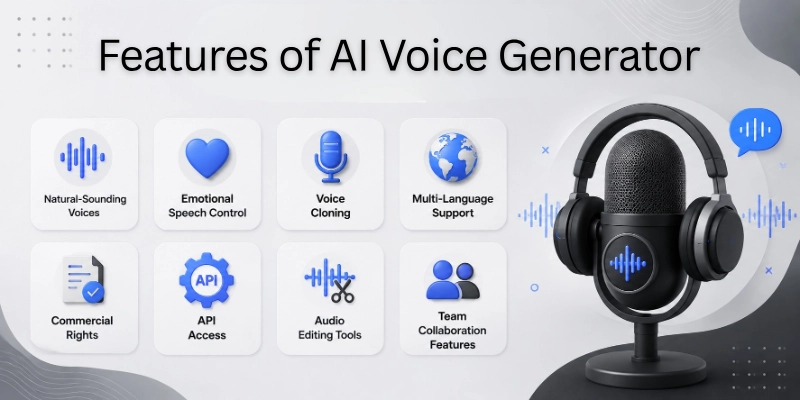
Before selecting an AI voice generator, consider the following important features:
- Natural-Sounding Voices – Look for voices that sound realistic and human-like rather than robotic or unnatural.
- Emotional Speech Control – Choose a platform that allows you to adjust tone, emotion, and speaking style for different types of content.
- Voice Cloning – Consider tools that can create a digital version of a specific voice for personalized audio production.
- Multi-Language Support – Select a generator that supports multiple languages and accents if you target a global audience.
- Commercial Rights – Ensure the platform allows commercial use if you plan to use generated audio for business purposes.
- API Access – Check for API availability if you want to integrate voice generation into websites, apps, or software products.
- Audio Editing Tools – Built-in editing features can help you fine-tune voiceovers without using additional software.
- Team Collaboration Features – Collaboration tools make it easier for teams to manage projects and work together efficiently.
These features can significantly impact the quality, usability, and overall value of an AI voice generator, so it is important to evaluate them before making a decision.
How to Choose the Best AI Voice Generator
The best AI voice generator depends on your specific needs, goals, and type of work. While some tools focus on realistic voiceovers, others offer advanced features such as voice cloning, team collaboration, or developer integrations.
To make the right choice, consider the following recommendations based on your use case:
- For Content Creators – Look for tools that offer realistic voices, multiple voice styles, and easy audio generation for videos, podcasts, and social media content.
- For Businesses – Choose a platform with professional voice quality, commercial rights, brand consistency, and collaboration features for team projects.
- For Educators – Prioritize tools that provide clear pronunciation, multilingual support, and natural-sounding narration for online courses and training materials.
- For Developers – Select a solution that includes API access, customization options, and scalable voice generation capabilities for applications and software products.
- For Agencies – Consider platforms with diverse voice libraries, client-friendly workflows, commercial licensing, and advanced content production features.
By matching the platform’s strengths with your requirements, you can find an AI voice generator that delivers the best value and performance for your projects.
Are AI Voice Generators Legal?
AI voice generators are legal in many countries, but their use depends on how the technology is applied. Users must follow copyright laws, privacy regulations, and platform policies when creating or distributing AI-generated voice content.
To use AI voice technology responsibly, keep the following legal and ethical considerations in mind:
- Copyright Considerations – Make sure your content does not violate copyrights or use protected material without proper permission.
- Voice Cloning Regulations – Some regions have rules regarding the creation and use of cloned voices, especially when replicating real individuals.
- Consent Requirements – Always obtain permission before cloning or using another person’s voice for personal or commercial purposes.
- Ethical Use Guidelines – Use AI-generated voices transparently and avoid creating misleading, deceptive, or harmful content.
Understanding these factors can help you use AI voice generators safely while reducing legal risks and maintaining ethical standards.
Conclusion
In this guide, we have covered the top 10 AI voice generators. We explored the leading AI voice tools, their features, pricing, advantages, limitations, and the types of users they serve best.
Whether you need realistic voiceovers, voice cloning, audiobook narration, podcast editing, or real-time voice changing, there is an AI voice generator that fits your needs. By comparing the available options carefully, you can choose a platform that helps you create high-quality audio content more efficiently.
Personal Recommendation: If you want the best overall combination of voice quality, ease of use, and advanced features, ElevenLabs is an excellent choice. However, the right tool ultimately depends on your specific goals, budget, and content requirements.
Thank you for taking the time to read this guide. I hope it helped you find the ideal AI voice generator for your projects.
💬 Have a favorite AI voice tool or a question to share? We’d love to hear your thoughts in the comments below! 🚀👇
FAQs
To help you better understand AI voice technology, here are answers to some frequently asked questions about the AI voice generators:
Many users consider ElevenLabs one of the best AI voice generators because of its realistic voice quality and advanced voice cloning features. It supports multiple languages and works well for content creators, businesses, and developers. The best choice, however, depends on your specific needs and budget.
Many AI voice generators offer free plans, but they often come with limitations. Before choosing a free tool, consider these common restrictions:
- Limited voice generation credits
- Fewer voice options
- Restricted commercial usage rights
Paid plans usually unlock advanced features and higher-quality voices.
Yes, modern AI voice generators can produce voices that sound remarkably natural. Advanced machine learning models analyze speech patterns, pronunciation, and emotion to generate realistic audio. Some AI voices are difficult to distinguish from human recordings.
AI voice generators support many different use cases. Popular applications include:
- YouTube videos
- Podcasts
- Audiobooks
- E-learning courses
- Marketing campaigns
- Customer support systems
These tools help users create audio content quickly and efficiently.
Voice cloning is generally legal when you have proper authorization. You should always obtain consent before cloning another person’s voice. Following copyright and privacy regulations helps prevent legal issues.
Several platforms work well for YouTube content creation. When evaluating tools, look for:
- Natural-sounding voices
- Multiple voice styles
- Commercial usage rights
- Easy editing features
ElevenLabs, LOVO AI, and Murf AI are popular choices among YouTube creators.
Most leading AI voice generators support multiple languages and accents. This feature allows businesses and creators to reach international audiences without hiring multiple voice actors. Language availability varies from one platform to another.
Yes, many AI voice generators allow commercial use through paid plans. Before publishing content, review the platform’s licensing terms carefully. Commercial rights are especially important for marketing, advertising, and client projects.
When comparing AI voice software, focus on the features that matter most. Important capabilities include:
- Natural-sounding voices
- Voice cloning
- Multi-language support
- Audio editing tools
- API access
- Team collaboration features
These features can significantly improve your overall experience.
AI voice generators can save time, reduce production costs, and simplify content creation. They allow users to generate professional-quality voiceovers without expensive recording equipment or voice actors. For many creators and businesses, they provide excellent value and efficiency.





- Be Respectful
- Stay Relevant
- Stay Positive
- True Feedback
- Encourage Discussion
- Avoid Spamming
- No Fake News
- Don't Copy-Paste
- No Personal Attacks
- Be Respectful
- Stay Relevant
- Stay Positive
- True Feedback
- Encourage Discussion
- Avoid Spamming
- No Fake News
- Don't Copy-Paste
- No Personal Attacks
