Best AI for Python: 7 Tools to Code Faster and Smarter
Published: 1 Oct 2026
Are you trying to find the best AI for Python, but every coding tool seems to promise something different? One may give fast code suggestions, another may explain errors better, while some are designed for larger projects.
That can make choosing the right option surprisingly confusing, especially when you want an AI that can actually fit into your daily Python workflow. The good news is that you do not need the tool with the longest feature list. You need one that matches the way you work.
In this guide, I’ll compare popular AI coding tools, explain what makes each one useful for Python development, and show which options make more sense for beginners, experienced developers, debugging, automation, data science, and larger projects.
What Makes an AI Tool Good for Python?
Not every AI coding tool is equally useful for Python. Some are great at completing short functions, while others can understand a larger project and help you find problems across multiple files. So, when I compare the best AI for Python, I look beyond simple code generation and focus on how well the tool supports the full development process.
Key Things I Would Check
- Python understanding: The tool should handle common Python syntax, libraries, frameworks, and coding patterns accurately.
- Code completion: Good suggestions can save time when writing functions, classes, loops, and repeated code.
- Debugging support: It should help identify errors, explain why they happen, and suggest practical fixes.
- Project context: For larger applications, the AI should understand related files and existing code instead of treating every request separately.
- Code explanation: A useful tool should explain unfamiliar Python code in simple language, which is especially helpful for beginners.
- Testing support: It should help create test cases and improve code reliability before you use it in a real project.
- IDE integration: A smooth workflow inside your coding environment means less switching between different apps.
- Security: Generated code should still be reviewed for unsafe practices, exposed secrets, weak validation, or risky dependencies.
My takeaway: The strongest tool is not simply the one that generates code fastest. It is the one that gives useful support throughout your Python development workflow.
How to Choose the Right AI Tool for Python
Choosing an AI coding tool is easier when you know which features actually matter. A tool may look impressive, but its real value comes from how well it handles your Python code, understands your project, and fits into your normal workflow.
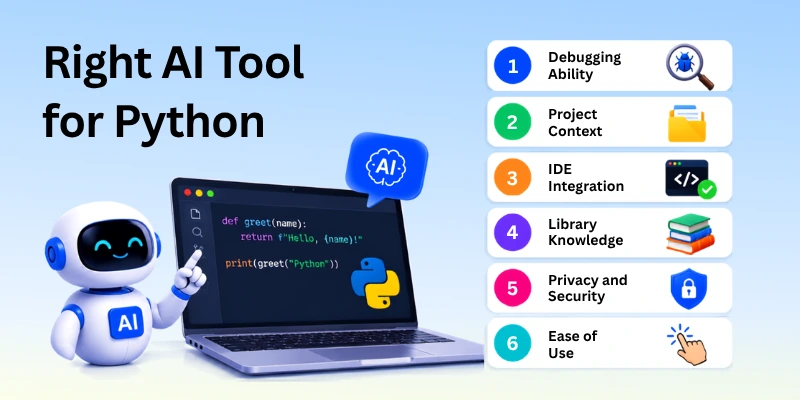
Before making a choice, I would check these seven areas:
- Code Accuracy
- Debugging Ability
- Project Context
- IDE Integration
- Library Knowledge
- Privacy and Security
- Ease of Use
1. Code Accuracy
Accurate suggestions should be one of the first things you check. A tool that produces code quickly is not very helpful if you spend more time correcting its mistakes.
When testing an AI tool, look at whether it can:
- Follow your instructions correctly
- Use valid Python syntax
- Choose suitable approaches for the task
- Handle edge cases
- Produce code that works after testing
For example, if you ask the AI to create a Python function that reads a CSV file and handles missing values, the answer should do more than look correct. You should run it and check how it behaves with real and incomplete data.
2. Debugging Ability
Writing new code is only part of development. You also need help when something stops working. A strong tool should explain the problem clearly instead of giving you a random replacement for the code.
I would check whether it can:
- Understand error messages
- Find likely causes
- Explain the issue in simple words
- Suggest a focused fix
- Improve the code without breaking other parts
For example: Imagine you are calculating the total price in Python, but your code adds a number to text and returns an error. You can show the code and error message to the AI, then ask it to explain the problem and suggest a simple fix.
3. Project Context
A good AI coding tool should understand more than the single line you are currently writing. This becomes important when your Python project has several files, functions, classes, and connected features. Better context helps the AI make suggestions that fit the existing structure instead of creating code that works only on its own.
Look for a tool that can:
- Understand related files and functions
- Follow existing coding patterns
- Remember important project details
- Suggest changes across connected code
- Work with larger Python projects
For example: If your Python app has separate files for users, payments, and database functions, the AI should understand how these parts connect before suggesting a change to the payment system.
4. IDE Integration
An AI tool becomes more useful when it fits naturally inside the environment where you already write code. Good integration lets you request help, view suggestions, and make changes without constantly moving your code into another application.
Check whether the tool provides:
- Inline code suggestions
- AI chat inside the editor
- Code explanations
- Error assistance
- Easy access to project files
- Support for your preferred development environment
For example: If you are building a Python API in VS Code, an integrated AI assistant can suggest code while you type and help explain an error without forcing you to leave the editor.
5. Library Knowledge
Python developers often work with different libraries and frameworks, so an AI tool should understand the ones you use. Good library knowledge can help it suggest the right functions, explain unfamiliar methods, and avoid code that does not match the library version or project setup.
When checking this area, look for support with:
- Popular Python libraries
- Web frameworks
- Data science packages
- Machine learning tools
- API and database libraries
- Current coding practices
For example: If you are working with pandas, you may ask the AI to clean duplicate rows from a dataset. A useful assistant should suggest a suitable pandas approach and explain how it works.
6. Privacy and Security
Your AI coding tool may process parts of your code, project files, or other development data. Before using one for a private or business project, check how it handles that information and what security controls it provides.
Pay attention to:
- Data storage policies
- Code privacy options
- Business or team controls
- Secret and API-key protection
- Permission settings
- Options for limiting data sharing
For example: If your Python project contains an API key, database password, or private customer data, never paste those details into an AI chat simply to get a coding suggestion. Remove sensitive information first.
7. Ease of Use
A Python AI tool should feel simple enough to use during your normal coding routine. Even a powerful assistant can become frustrating if its controls are confusing or if you need too many steps to get a useful answer.
When comparing ease of use, check whether it offers:
- A clear and simple interface
- Easy code suggestions
- Quick access to AI help
- Simple prompt controls
- Helpful error explanations
- Smooth integration with your workflow
For example: If you are learning Python and get stuck on a function, you should be able to ask the AI for a simple explanation without spending time figuring out complicated settings.
Best AI Tools for Python Coding
Many AI tools can help with Python, but they are not all built for the same type of work. Some focus on fast suggestions, while others are better for debugging, larger projects, or learning. Here is a quick comparison to help you see where each option fits.
| AI Tool | Main Strength | Best Use | Python Support | Ideal For |
| GitHub Copilot | Fast code suggestions | Everyday development | Strong | Developers |
| Cursor | Deep project context | Large codebases | Strong | Advanced projects |
| Claude | Clear explanations | Debugging and review | Strong | Learners & developers |
| Amazon Q Developer | AWS integration | Cloud applications | Strong | AWS developers |
| Windsurf | AI-assisted workflows | Building projects | Strong | Modern developers |
| Gemini Code Assist | Google ecosystem | Coding and cloud work | Strong | Google Cloud users |
| Tabnine | Privacy-focused coding | Secure development | Strong | Teams & businesses |
For everyday ai coding in python, GitHub Copilot can be a practical choice. For larger projects, Cursor may be more useful because project context matters more as the codebase grows.
Free vs Paid AI Tools for Python
You do not always need a paid plan to get useful AI coding help. Free options can be enough for learning, small scripts, and simple projects, while paid plans usually provide higher limits, stronger features, and better support for regular development.
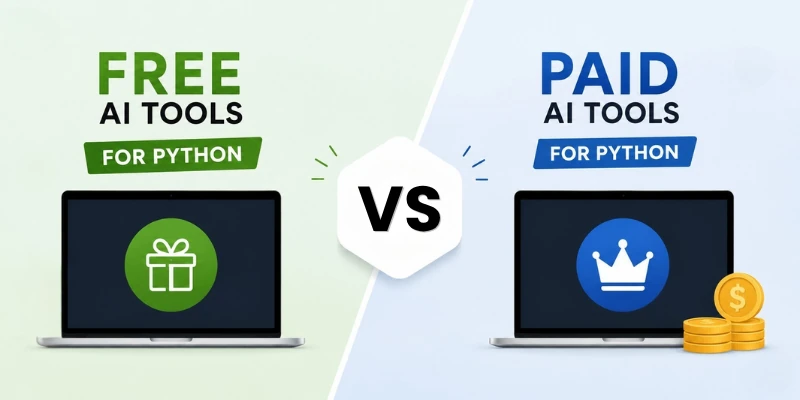
If you are searching for the best free AI for Python coding, these options are worth considering.
Free AI Tools Worth Trying
- Gemini Code Assist: Useful for code suggestions, explanations, and debugging inside supported development environments.
- GitHub Copilot Free: A good starting option for basic coding assistance and limited AI-powered suggestions.
- Amazon Q Developer Free Tier: Helpful for developers who work with Python and AWS services.
- Tabnine Free: Provides AI-assisted code completion for everyday programming tasks.
Paid Options for Regular Development
- GitHub Copilot Pro: Better suited to developers who use AI help frequently.
- Cursor Pro: Useful when you need stronger project understanding and advanced editing support.
- Claude Pro: Helpful for longer coding discussions, code reviews, and complex problem-solving.
- Windsurf Pro: Designed for developers who want deeper AI assistance while working inside an editor.
If you are comparing a python coding assistant, look beyond the free or paid label. Check usage limits, project context, IDE support, privacy controls, and the type of Python work you actually do.
Common Mistakes When Using AI for Python
AI can make Python development faster, but it can also create new problems when you trust every suggestion without checking it. I think the safest approach is to treat AI output as a starting point and review it before adding it to your project.
Mistakes Worth Avoiding
- Blindly copying generated code: AI can produce code that looks correct but may contain logic errors. Read the code and run it before using it.
- Skipping testing: A program may work with one example and fail with another. Test normal inputs, unusual cases, and error conditions before considering the feature complete.
- Giving vague prompts: A request like “write Python code” gives the AI little direction. Explain the goal, inputs, expected output, and any library or framework you are using.
- Ignoring security: Never assume AI-generated code is automatically safe. Check authentication, user permissions, input validation, API keys, and other sensitive areas.
- Not checking dependencies: Generated code may rely on a package you do not have or use functions that are unavailable in your installed version. Check the package and version before adding it.
- Using outdated code: Python libraries change over time. AI may suggest an older method, so check the current documentation when a library or framework is involved.
Quick takeaway: AI can speed up your work, but you should always understand, test, and review the code before trusting it in a real Python project.
Final Thoughts
Choosing the Best AI for Python is not simply about picking the tool with the most features. The better choice depends on what you actually need, whether that means learning Python, writing code, fixing errors, handling a large project, or working with AI and data.
In my view, beginners should start with a tool that explains code clearly and does not make the learning process harder. Experienced developers may prefer stronger project context, faster suggestions, and advanced debugging support. I also recommend trying free options first before paying for features you may not use.
AI can make Python development faster, but it should remain an assistant rather than a replacement for your own judgment.
Pick one tool, test it on a real Python project, and see how much it genuinely improves your workflow.
Frequently Asked Questions
Choosing an AI coding tool can feel confusing when several options offer similar features. These FAQs answer common questions about Python AI tools, their uses, and what to consider before choosing one.
1. Which AI is best for Python coding?
There is no single AI tool that is best for everyone. GitHub Copilot, Cursor, Claude, and other AI coding tools can be useful for different types of Python work.
Your coding level, project size, budget, and need for debugging or project support can help you choose the right tool. It is a good idea to try a few options before making your final choice.
2. Can AI help beginners learn Python?
Yes, AI can be a useful Python learning helper for beginners. It can explain errors, simplify difficult concepts, and show easy examples step by step. This can make learning Python less confusing.
However, beginners should not depend on AI for every line of code. It is better to write and test code yourself so you can understand how Python actually works.
3. What is the best AI for writing Python code?
The best AI for writing Python code depends on the type of support you need. Some tools are better for quick code suggestions, while others can understand larger parts of a project and help with more complex tasks.
You can give the same coding task to a few AI tools and compare their answers. This can help you find the tool that gives you the most useful and accurate results.
4. Is there a free AI for Python programming?
Yes, several AI coding tools offer free plans or free access. A free AI for Python coding can be useful for students, beginners, simple scripts, and people who only code sometimes.
- Free plans can help with basic coding tasks.
- They can explain errors and suggest simple fixes.
- They are useful for learning and small projects.
- Some free versions have daily or monthly usage limits.
5. Can AI generate complete Python programs?
Yes, AI can generate complete Python scripts and even help create larger applications when you give it clear instructions. This can save time when you need a basic starting point for a project.
Still, generated code should never be used without checking it. Run the program, test different cases, and review the code to make sure it works correctly and safely.
6. Why is Python used for AI?
Python is widely used for AI because it has many useful libraries and tools for machine learning, data analysis, automation, and scientific computing. These resources make it easier for developers to build and test AI projects.
Python also has simple and readable syntax. This makes it easier for beginners and experienced developers to experiment with AI ideas and create working projects.
7. Can AI help fix Python errors?
Yes, a Python code assistant can help you understand and fix errors. It can explain an error message, look at the related code, and suggest possible solutions.
For better results, give the AI the exact error message and the smallest part of your code that causes the problem. This gives the tool better context and can lead to a more useful answer.
8. What is a good AI code generator for Python projects?
A good Python AI code generator should offer more than simple code snippets. It should understand your project context and provide useful suggestions that work with the libraries and structure you are already using.
Look for features such as:
- Project and file context
- Code completion
- Debugging help
- Refactoring support
- Compatibility with common Python libraries
Always test AI-generated code before using it in an important project.
9. Is an AI assistant useful for large Python projects?
Yes, an AI coding assistant can be helpful when working on a large Python project. It can save time by helping with repetitive code, debugging, explanations, and refactoring.
For larger projects, choose a tool that can understand multiple files and the existing project structure. This usually works better than a tool that treats every coding question as a separate task.
10. Should I use AI for all my Python coding?
No, AI should be a support tool rather than a replacement for your own coding skills. You can use it for ideas, explanations, debugging, repetitive tasks, and code suggestions.
You should still understand the code you use and test it yourself. A good workflow combines AI assistance with your own knowledge, testing, and final code review.



- Be Respectful
- Stay Relevant
- Stay Positive
- True Feedback
- Encourage Discussion
- Avoid Spamming
- No Fake News
- Don't Copy-Paste
- No Personal Attacks
- Be Respectful
- Stay Relevant
- Stay Positive
- True Feedback
- Encourage Discussion
- Avoid Spamming
- No Fake News
- Don't Copy-Paste
- No Personal Attacks
