AI Agents for HR: Uses, Benefits & Best Tools
Published: 17 Sep 2026
What if an HR team could answer employee questions, schedule interviews, manage onboarding tasks, and update records without handling every request manually?
That is where AI agents for HR come into the picture. Unlike basic chatbots that mainly answer questions, AI agents can work across multiple steps, use connected systems, and take actions based on a specific task or workflow.
HR teams are already exploring these systems for recruitment, employee support, onboarding, learning, performance management, and workforce planning. Companies such as IBM, Microsoft, and Workday are developing or using agent-based HR solutions that connect with existing business systems.
In this guide, you will learn what AI agents for HR are, how they work, their main use cases, benefits, limitations, security concerns, and how businesses can introduce them responsibly.
Best AI Agents for HR
Different platforms approach HR agents in different ways. Some provide ready-made HR agents, while others allow companies to build or customize their own workflows.
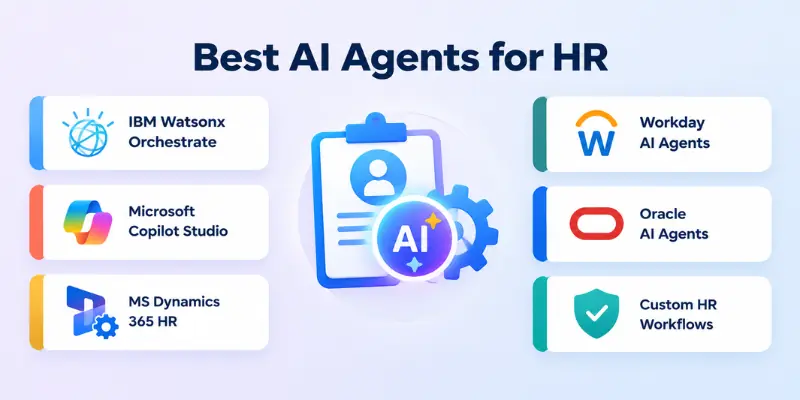
Some notable options include
- IBM Watsonx Orchestrate
- Microsoft Copilot Studio
- Microsoft Dynamics 365 Human Resources
- Workday AI Agents
- Oracle AI Agents
1. IBM Watsonx Orchestrate
IBM Watsonx Orchestrate provides enterprise-focused AI agents designed for HR workflows. IBM’s current HR offering includes agents for employee support, talent acquisition, learning and development, and performance management.
The platform can connect agents with existing enterprise applications and deploy them through channels such as Slack, Microsoft Teams, and HR portals. IBM says its HR agents can work with more than 80 enterprise applications, including major HR platforms.
It can be useful for organizations that want to automate HR service requests while keeping their existing business systems connected.
Key areas include:
- Employee support: Answers HR questions and helps with requests.
- Talent acquisition: Supports job requisitions, sourcing, resume screening, and interview scheduling.
- Learning: Helps identify skill gaps and recommend training.
- Performance: Supports goals, feedback, and appraisal workflows.
- Integrations: Connects with existing enterprise applications.
2. Microsoft Copilot Studio
Microsoft Copilot Studio allows organizations to create and customize AI agents for business workflows.
For HR teams, this can be useful when employees already work within Microsoft products such as Teams and organizations want to connect AI-powered workflows with their existing environment.
Microsoft also highlights HR use cases such as recruitment, onboarding, employee support, and workflow automation.
It can be considered when an organization wants more control over how an internal HR agent behaves and which systems it can access.
Some possible applications include:
- Employee HR questions
- Recruitment support
- Onboarding workflows
- Internal policy guidance
- Employee communications
- Workflow automation
- Custom HR assistants
3. Microsoft Dynamics 365 Human Resources
Microsoft is also adding agent-based capabilities directly to Dynamics 365 Human Resources.
Its onboarding agent can generate draft worker records, assign positions, recommend onboarding checklists, and suggest leave plans based on information such as role, location, and policy. HR managers can review and edit the results before they are finalized.
This human-review step is particularly relevant for HR because employee records and employment decisions can have significant consequences.
The agent can help with:
- Draft worker records
- Position assignment
- Onboarding checklists
- Leave plan suggestions
- Employee information
- HR workflow preparation
4. Workday AI Agents
Workday is developing agentic capabilities around HR and workforce management. Its published HR use cases include recruiting, employee engagement, onboarding, employee support, and workforce planning.
Workday describes agents as a way to handle multi-step HR workflows rather than simply answering isolated questions.
Potential applications include:
- Candidate screening
- Interview scheduling
- Employee support
- Benefits questions
- Onboarding
- Workforce planning
- Employee engagement
- HR service requests
The platform can be particularly relevant to organizations already using Workday because integration with existing HR data and workflows is an important part of agent-based automation.
5. Oracle AI Agents
Oracle provides AI agent capabilities for HR processes such as career development, performance management, compensation, benefits, and employee lifecycle activities.
For example, an agent can help prepare performance review information, answer benefits questions, support career planning, or assist with employee-related workflows.
Oracle’s approach focuses on using AI to handle multi-step tasks while allowing HR professionals and managers to remain involved where human judgment is needed.
What Can AI Agents Do in HR?
AI agents can support many HR activities, from repetitive administrative work to more complex multi-step processes.
The exact capabilities depend on the agent’s design, connected systems, permissions, and organizational policies.
Here are some common areas where organizations are applying agentic AI in HR:
- Recruitment and talent acquisition
- Candidate screening and scheduling
- Employee onboarding
- Employee questions and HR support
- Benefits and leave requests
- Learning and development
- Performance management
- Career development
- Workforce planning
- HR documentation
- Compliance-related workflows
- Employee offboarding
Organizations should not assume that every agent needs access to all HR data. Giving an agent access only to the information and systems required for its specific task can reduce unnecessary risk.
AI Agents for HR Use Cases
The value of an HR agent depends heavily on the problem it is designed to solve. The strongest use cases are usually repetitive, structured, and connected to reliable business data.
1. Recruitment and Talent Acquisition
Recruitment involves many repetitive activities that can consume a recruiter’s time.
An agent can help create job postings, search candidate information, summarize resumes, schedule interviews, and send routine candidate communications.
IBM and other enterprise HR platforms currently describe agent-based recruiting workflows that can support sourcing, screening, scheduling, and candidate management.
Common tasks include:
- Drafting job descriptions
- Screening applications against defined criteria
- Summarizing candidate information
- Scheduling interviews
- Sending interview reminders
- Updating recruitment records
- Drafting candidate communications
Human recruiters should still review important hiring decisions rather than treating an AI-generated recommendation as a final decision.
2. Employee Onboarding
Onboarding includes many small tasks that must happen in the right order.
An HR agent can help coordinate paperwork, training, system access requests, policy acknowledgments, and reminders.
IBM notes that AI agents can support document verification, pre-employment checks, IT requests, employee profiles, and personalized training during onboarding.
An onboarding workflow might include:
- Sending welcome information
- Tracking required documents
- Creating employee records
- Assigning onboarding tasks
- Scheduling training
- Sending reminders
- Answering new-hire questions
- Coordinating with IT
This can create a more consistent onboarding process while reducing manual follow-up.
3. Employee HR Support
Employees often ask HR teams the same questions about policies, benefits, leave, payroll information, and workplace procedures.
An AI agent can provide an initial response using approved company information and route more complicated requests to an HR professional.
For example, IBM’s current HR agent offering includes employee support for questions, time-off requests, payslips, benefits, and onboarding.
Useful tasks include:
- Answering policy questions
- Explaining benefits information
- Checking leave-related information
- Guiding employees through HR processes
- Retrieving approved documents
- Routing complex requests
- Tracking support requests
The quality of these answers depends heavily on whether the agent has access to accurate and current company information.
4. Benefits and Leave Management
Benefits and leave processes often require employees to find specific information and complete several steps.
An agent can help employees understand available options, locate relevant policies, and start approved workflows.
Oracle identifies compensation and benefits management as an important area for AI agents, including questions about salary, benefits, time tracking, and absence management.
Possible tasks include:
- Leave requests
- Benefits questions
- Policy lookup
- Absence management
- Time-related requests
- Benefits documentation
Sensitive cases should be escalated when the agent cannot confidently determine the correct action.
5. Learning and Development
HR teams can also use agents to support employee learning.
An agent could identify available courses based on an employee’s role or skills, answer training questions, send reminders, and help employees follow a development plan.
IBM currently lists learning and development among its prebuilt HR agent areas, including identifying skill gaps and recommending personalized training.
For example, an agent might help an employee:
- Find relevant courses
- Understand training requirements
- Identify skill gaps
- Track learning tasks
- Receive training reminders
- Explore development opportunities
6. Performance Management
Performance management includes goal setting, feedback, reviews, and ongoing employee development.
AI agents can assist with administrative parts of this process, such as gathering information, preparing summaries, and sending reminders.
Oracle describes use cases where agents can gather feedback, prepare draft review content, support career goals, and help organize performance-related workflows.
The agent should support the process rather than make final judgments about an employee’s performance.
It can help with:
- Goal tracking
- Review reminders
- Feedback summaries
- Performance documentation
- Career planning
- Development goals
7. Workforce Planning
Workforce planning requires HR teams to understand current staffing, future needs, skills, and business priorities.
AI agents can connect information from HR, finance, and operational systems to support workforce planning and scenario analysis.
Workday identifies workforce planning and modeling as an area where agentic systems can help HR teams work with changing workforce needs.
Potential uses include:
- Workforce demand analysis
- Skills planning
- Staffing scenarios
- Workforce data summaries
- Hiring needs
- Organizational planning
These systems should provide decision support rather than automatically making high-impact employment decisions.
Benefits of AI Agents in HR
When designed properly, AI agents can reduce repetitive work and make some HR services easier to access. The benefits depend on the quality of the underlying data, integrations, workflows, and human oversight.
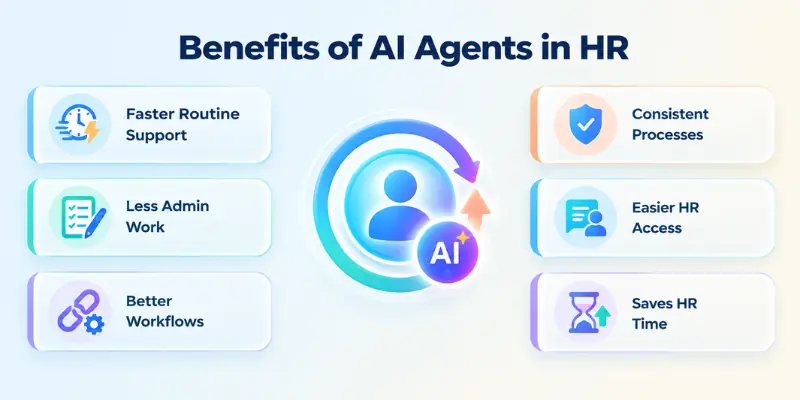
Here are some common advantages:
- Faster Routine Support: Employees can receive answers to common questions without waiting for an HR team member to respond manually.
- Less Administrative Work: Agents can handle repetitive tasks such as scheduling, reminders, record preparation, and basic requests.
- Better Workflow Coordination: An agent can connect multiple steps that would otherwise require several manual handoffs.
- More Consistent Processes: A properly configured agent can follow the same approved workflow for routine requests.
- Improved Employee Access: Employees can interact with HR services through conversational interfaces instead of searching through multiple systems.
- More Time for HR Teams: Reducing repetitive administrative work can give HR professionals more time for activities that require communication, judgment, and relationship-building.
AI Agents vs. Traditional HR Automation
Traditional automation usually follows predefined rules.
For example, an automation workflow might send an onboarding email when a new employee is added to an HR system.
An AI agent can handle a more flexible workflow. It may interpret a request, decide which tools are needed, retrieve information, and determine the next step within its permissions.
The difference can be summarized like this:
| Traditional Automation | AI Agents |
| Follows predefined rules | Can interpret requests and plan steps |
| Best for predictable workflows | Useful for multi-step tasks |
| Usually requires fixed inputs | Can work with natural-language requests |
| Limited decision-making | Can make bounded decisions |
| Often handles one workflow | Can coordinate several tools or actions |
This does not mean agents should replace traditional automation. In many HR systems, both approaches can work together.
How AI Agents Can Integrate With HR Systems
An agent becomes more useful when it can securely access the systems required to complete its tasks.
Common integrations include:
- HR information systems
- Applicant tracking systems
- Payroll platforms
- Benefits systems
- Learning management systems
- Microsoft Teams
- Slack
- Calendar systems
- Document repositories
- Identity and access systems
For example, IBM’s current HR agent platform describes connections with more than 80 enterprise applications and deployment through channels such as Teams, Slack, and HR portals.
The important point is that integration should be based on the agent’s actual job. A recruiting agent does not necessarily need access to payroll information.
How to Implement AI Agents in HR
Introducing an agent into HR requires more than selecting an AI tool. The organization needs to define the workflow, data access, permissions, review process, and success criteria.
A practical implementation can follow these steps:
- Choose One Clear HR Problem
- Start with one specific HR task, such as employee FAQs, interview scheduling, or onboarding.
- Map the Existing Workflow
- Identify the current steps, systems, manual tasks, and points that need human approval.
- Prepare Reliable Data
- Make sure the HR policies, employee information, and connected data are accurate and up to date.
- Define Permissions
- Give the AI agent access only to the data and systems it needs for its assigned tasks.
- Add Human Review
- Keep HR professionals involved in sensitive or high-impact decisions that require human judgment.
- Test Before Deployment
- Test the agent with different requests to check its accuracy, permissions, and ability to handle unusual situations.
- Monitor and Improve
- Track errors, feedback, and performance to improve the agent’s instructions, data, and workflows over time.
How to Choose the Right AI Agent for HR
There is no single solution that fits every HR department.
Before selecting a platform, consider the specific workflow, existing HR software, security requirements, budget, and level of customization needed.
A useful checklist includes:
- HR integrations: Does it connect with your existing HR systems?
- Security: Does it provide appropriate access controls?
- Customization: Can you configure the agent for your workflows?
- Human oversight: Can sensitive tasks require approval?
- Scalability: Can it support your organization as usage grows?
- Analytics: Can you monitor performance and errors?
- Employee experience: Is it easy for employees to use?
- Compliance: Can the system support your organization’s legal and policy requirements?
Starting with one well-defined workflow can make implementation easier than introducing agents across every HR function at once.
Security and Privacy Considerations
HR systems contain highly sensitive information, including employee records, compensation details, performance information, benefits data, and recruitment information.
That makes security a central part of any AI agent deployment.
Organizations should consider:
- Access control: Limit which systems and records each agent can access.
- Data protection: Protect employee information during storage and transmission.
- Audit logs: Track important agent actions and system changes.
- Human approval: Require review for sensitive decisions.
- Data accuracy: Keep policies and employee information current.
- Third-party risk: Review external AI services and integrations carefully.
- Retention policies: Understand how connected services store and process data.
- Permission testing: Confirm that agents cannot access information outside their assigned scope.
An HR agent should not be given broad access simply because that makes integration easier. Least-privilege access is generally a safer starting point.
Best Practices for Using AI Agents in HR
A responsible HR agent should be designed around clear boundaries rather than maximum autonomy.
Consider these practices:
- Start with low-risk, repetitive tasks.
- Use accurate and approved HR information.
- Apply role-based access controls.
- Keep humans involved in high-impact decisions.
- Log important agent actions.
- Test for bias and incorrect outputs.
- Give employees a clear way to reach a human.
- Review agent performance regularly.
- Update policies and knowledge sources.
- Document what the agent can and cannot do.
The goal should be to make HR processes more useful and efficient while keeping accountability with people.
Future of AI Agents in HR
HR agents are moving from simple question-answering systems toward systems that can coordinate multiple steps across business applications.
Current enterprise offerings already cover areas such as recruitment, onboarding, employee support, learning, performance management, and workforce planning.
Future HR systems may connect more closely with enterprise data, workplace applications, and specialized agents.
This could allow one agent to coordinate with other systems or specialized agents while humans remain responsible for important decisions.
The key challenge will be balancing automation with privacy, transparency, security, fairness, and human oversight.
Conclusion
In this guide, we have covered AI agents for HR and explored how they can support recruitment, onboarding, employee support, learning, performance management, benefits, and workforce planning. These systems can handle many repetitive tasks while connecting HR workflows with the business tools employees already use.
Personal Recommendation: I recommend starting with a simple, low-risk HR workflow and expanding gradually after testing the agent’s accuracy, security, and reliability. Keep human oversight in place for sensitive employment decisions and give each agent only the access it actually needs.
Thank you for reading, and I hope this guide helped you understand how AI agents can support modern HR processes. Wishing you success as you explore practical and responsible ways to use AI in human resources.
Have you used an AI agent for recruitment, onboarding, or employee support? 💬 Share your experience or questions in the comments below! 🚀
FAQs
Looking for quick answers about AI agents for HR? Here are some common questions to help you understand their uses, benefits, and limitations.
AI agents for HR are software systems that can understand requests, access approved information, use connected tools, and complete HR tasks. They can support activities such as recruitment, onboarding, employee support, and learning.
They can help with tasks such as screening applications, scheduling interviews, answering employee questions, managing onboarding steps, and supporting workforce planning. Their exact capabilities depend on the systems and permissions connected to them.
Yes, AI agents can support parts of recruitment such as job posting creation, candidate screening, interview scheduling, and candidate communication. Important hiring decisions should still receive appropriate human review.
Yes. An onboarding agent can help manage documents, training tasks, reminders, employee records, and other workflow steps. Some current enterprise systems can also create draft records and recommend onboarding tasks based on employee information.
They can be used with sensitive HR data when organizations apply strong security controls, appropriate permissions, monitoring, and data protection practices. The agent should only receive access to information required for its assigned tasks.
An HR chatbot generally focuses on answering questions or guiding users through predefined interactions. An AI agent can go further by using tools, accessing connected systems, planning multiple steps, and taking approved actions.
AI agents can automate some repetitive HR activities, but they do not remove the need for human judgment in many situations. HR professionals remain important for sensitive employee matters, leadership, communication, conflict resolution, and complex decisions.
Tasks that are repetitive, structured, and based on reliable information are often suitable starting points. Examples include employee FAQs, interview scheduling, onboarding reminders, document preparation, and routine HR requests.
Important risks include inaccurate information, privacy problems, inappropriate access, bias, and over-automation. Organizations should use testing, monitoring, access controls, and human review to manage these risks.
Start with one clearly defined workflow and identify the data, systems, permissions, and human approvals it requires. Test the agent carefully before expanding it to more sensitive or complex HR processes.


- Be Respectful
- Stay Relevant
- Stay Positive
- True Feedback
- Encourage Discussion
- Avoid Spamming
- No Fake News
- Don't Copy-Paste
- No Personal Attacks
- Be Respectful
- Stay Relevant
- Stay Positive
- True Feedback
- Encourage Discussion
- Avoid Spamming
- No Fake News
- Don't Copy-Paste
- No Personal Attacks
