How to Use AI to Manage Files in a Simple and Smart Way
Published: 27 Apr 2026
Managing files takes time and energy in every digital routine. Many people spend long hours searching, sorting, renaming, and organizing their documents. New smart tools now reduce this heavy workload and make your daily system smoother.
This guide explains how to use AI to manage files in a clean, simple, and friendly way. You will learn how it improves traditional file handling and how it turns messy folders into clear spaces. This guide will help you save time and feel more in control.
Let us cover everything in detail.
How to Use AI to Manage Files
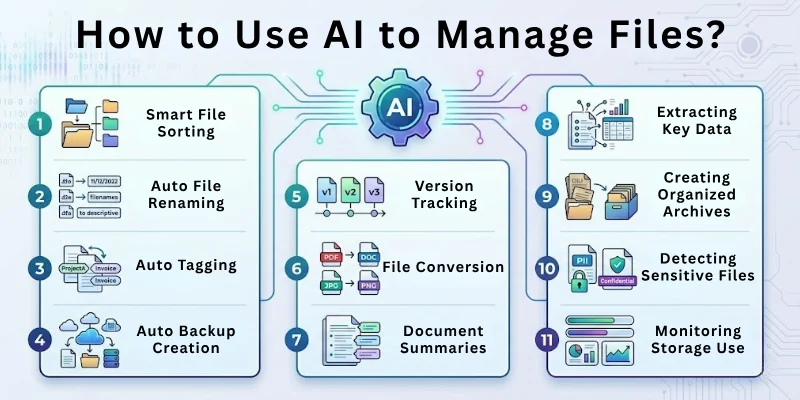
Here are the 15 ways to do it the smart way:
- Smart File Sorting
- Auto File Renaming
- Smart Folder Suggestions
- Duplicate File Detection
- File Cleanup Reminders
- Auto Tagging
- File Search with Natural Language
- Auto Backup Creation
- Version Tracking
- File Conversion
- Document Summaries
- Extracting Key Data
- Creating Organized Archives
- Detecting Sensitive Files
- Monitoring Storage Use
Let us learn about each in detail.
1. Smart File Sorting
Traditionally people drag files manually into folders and try to keep everything in order by hand. This takes effort and becomes confusing when the number of files grows. Now you can use AI to manage files and let the tool sort items by type, date, topic, or project without manual work. It learns your patterns and places files in the right spots instantly. It also reduces clutter and brings a calm and neat structure to your workspace. You feel more collected when everything flows smoothly.
Prompts to use:
- Sort these files into the right folders based on content.
- Create new folders for these files according to themes.
- Show me which files belong to the same category.
- Organize my downloads folder in a clean structure.
- Place all images, documents, and videos in separate folders.
2. Auto File Renaming
People rename files manually to keep names readable which takes time and becomes boring. You can now use AI to manage files and rename hundreds of files in one go. It creates clear names based on content, date, category, or your own rules. It helps you remove old and confusing names from your system. You get neat names that make searching easier. This builds a peaceful and stress free work routine.
Prompts to use:
- Rename these files with clear and simple titles.
- Add dates to each file name in a clean format.
- Remove all random letters from these names.
- Rename all images by project name and number.
- Create a consistent naming rule for all these files.
3. Smart Folder Suggestions
Most people try to guess where a file should go and often forget their own system. When you use AI to manage files you get suggestions for the right folders instantly. It studies the content and tells you the best place for it. It reduces confusion and supports your focus. It makes your system stable and easy to follow. You feel more confident about your structure.
Prompts to use:
- Suggest the best folder for these files.
- Tell me where this document fits in my system.
- Create a new folder if nothing matches.
- Place this file in the most suitable category.
- Show me better folder ideas for this project.
4. Duplicate File Detection
People often save multiple copies of the same file without noticing. This takes space and makes searching harder. When you use AI to manage files you can find repeated files in seconds. It checks names, content, and size to detect duplicates. It also helps you choose which one to keep. You free up storage and feel lighter. Your device works smoothly with fewer leftovers.
Prompts to use:
- Find all duplicate files in this folder.
- Show me files that look similar.
- Tell me which versions are safe to delete.
- Compare these two files and mark the duplicate.
- Clean up repeated photos and documents.
5. File Cleanup Reminders
People forget to clean their system and it becomes messy over time. You can use AI to manage files by setting reminders for cleanup tasks. It nudges you when storage becomes heavy. It highlights old files that you no longer need. It helps you build a clean and organized routine. You stay stress free as your system never overloads.
Prompts to use:
- Remind me to clean unused files every week.
- Show me old files I can delete today.
- Highlight large files that take space.
- Tell me which folders need cleanup.
- Suggest files that I have not opened in months.
6. Auto Tagging
Manually tagging files with keywords takes time and often becomes inconsistent. When you use AI to manage files you can add tags automatically. It reads the file and gives the right labels. It makes searching faster and builds a healthy system. It helps you group files based on topics. Your workflow becomes easy and smooth.
Prompts to use:
- Tag these files with clear keywords.
- Add topic based tags to my documents.
- Create automatic tags for my photos.
- Show me tags for this project folder.
- Suggest better tags for easy searching.
7. File Search with Natural Language
Traditional file search works only with exact names and this wastes time. Now you can use AI to manage files and search with simple sentences. You can search by topic, description, or content. It understands what you need and finds it fast. It reduces frustration and improves your focus. You feel in control of your digital world.
Prompts to use:
- Find the file where I wrote about budget ideas.
- Show me documents related to travel plans.
- Locate the picture from my birthday folder.
- Find files with the word report inside.
- Show me the contract I updated last month.
8. Auto Backup Creation
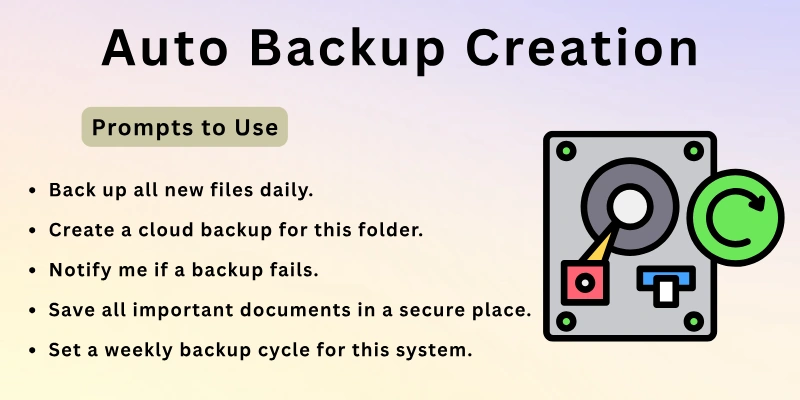
People forget to back up their files and lose important data. You can use AI to manage files by building an automatic backup routine. It checks new files and saves them safely. It protects you from mistakes or sudden issues. It builds a safe zone for your work. You feel relaxed knowing everything stays protected.
Prompts to use:
- Back up all new files daily.
- Create a cloud backup for this folder.
- Notify me if a backup fails.
- Save all important documents in a secure place.
- Set a weekly backup cycle for this system.
9. Version Tracking
People save many versions of the same file and forget which one is latest. You can use AI to manage files by tracking each update. It labels old and new versions. It helps you compare them and keep only the correct one. It reduces confusion and supports clarity. Your workflow stays steady and smooth.
Prompts to use:
- Track all versions of this document.
- Show me the most recent version.
- Compare these two versions.
- Mark old versions for cleanup.
- Keep only the latest version in the main folder.
10. File Conversion
People use different tools to convert files and often face errors. When you use AI to manage files you convert formats easily. It changes PDFs to Word, images to text, audio to text, and more. It helps you reuse information smoothly. It saves time and reduces stress. You feel more flexible in your work.
Prompts to use:
- Convert this PDF to a Word file.
- Change this image into text.
- Convert this audio file into notes.
- Turn these files into a clean format.
- Create a compressed version of these documents.
11. Document Summaries
Reading long documents takes time and drains your focus. You can now use AI to manage files and create summaries. It reads the content and gives clear points. It helps you understand ideas faster. It reduces overload in your day. You stay productive with less effort.
Prompts to use:
- Summarize this document in simple points.
- Give me a short summary of this file.
- Highlight key ideas from this PDF.
- Create a one page summary for this report.
- Show me the main message of this document.
12. Extracting Key Data
People search manually inside files to find details like numbers, names, or dates. You can use AI to manage files and extract key information fast. It saves time and keeps your workflow clean. It helps you collect important data from multiple documents. It reduces manual search work. Your day flows better.
Prompts to use:
- Extract all numbers from this file.
- Show me names and dates from these documents.
- Give me key points only.
- Pull out addresses from this set of files.
- Extract important lines from this report.
13. Creating Organized Archives
Archiving old files takes effort because you must decide what to keep. When you use AI to manage files you can build clean archives quickly. It sorts files by age or topic. It moves them into clear folders. It leaves your main system light and easy. You stay organized without stress.
Prompts to use:
- Archive all old files from this year.
- Create a clean archive for my project files.
- Move old documents into an archive folder.
- Suggest a good archive structure.
- Show me which files are ready for archiving.
14. Detecting Sensitive Files
People sometimes store important files in unsafe places. When you use AI to manage files you detect sensitive items like contracts or documents with private data. It tells you where they are stored and helps you move them to a safer place. It builds trust in your system. You protect your work with ease. You stay safe and confident.
Prompts to use:
- Find sensitive files in my folders.
- Show me files with personal information.
- Suggest a safe place for these documents.
- Move sensitive files into a secure folder.
- Mark files that need extra protection.
15. Monitoring Storage Use
People forget to check their storage and face sudden storage issues. You can now use AI to manage files and track storage space. It shows which folders take the most room. It suggests ways to reduce size. It points out useless files. It helps you make smart cleanup choices. You keep your device fresh and comfortable.
Prompts to use:
- Show me which folders use the most space.
- Suggest files I can delete to reduce size.
- Highlight large files I should review.
- Give me a storage overview in simple words.
- Tell me which folders need cleanup attention.
Best AI Tools to Manage Files
Here are 10 AI tools and smart solutions for managing files, organizing, sorting, tagging, searching, and automating your digital documents efficiently:
- Dropbox Dash (AI file organization) – AI-powered grouping and smart search to organize files and related content across your workspace.
- Zapier AI File Management – Automates file sorting, tagging, and routing across cloud apps based on AI analysis.
- Google Drive AI – Built-in AI helps with smart search, automatic categorization, and file suggestions.
- Microsoft OneDrive AI – AI tagging and personalized recommendations to organize your cloud files.
- Adobe Acrobat Studio – AI assistants help consolidate, organize, and manage multiple document types in one workspace.
- Docupile AI Document Organizer – Automatically groups, labels, and makes documents instantly searchable.
- FileBot – Automates renaming and organizing media files using content recognition.
- AI Folder Organizers (community tools e.g., FileWizardAI) – Projects/tools that auto-structure folders based on file content (GitHub/community versions).
- TagSpaces – File tag manager for organizing and navigating files locally across platforms.
- Custom AI Automations (via Zapier/Make + GPT) – Build personalized AI workflows to auto-organize, label, and move files across tools.
Final Note
In this guide we covered how to use AI to manage files in simple steps. You learned how it improves sorting, naming, archiving, and cleanup. You also learned how it saves hours from your routine. Try a few steps every day and enjoy a cleaner digital space. Keep your system simple and steady.
Here is my personal advice for you. Start with the areas that trouble you the most. Build small habits that support your comfort. Keep your routine light and friendly. Thank you for reading and take care.
FAQs
Here are some of the most commonly asked questions related to how to use AI to manage files.
It sorts files into the right folders based on content. It saves you from manual dragging and searching. It builds a smooth workflow. You feel more relaxed with a clean system. This improves your daily routine.
Yes it can rename hundreds of files with clear rules. It improves readability and reduces confusion. It removes messy names from your system. You get a simple structure. This speeds up your work.
It checks content, size, and patterns. It highlights repeated files in seconds. It helps you choose which to delete. You save storage space. This keeps your device light.
Yes you can search using simple sentences. It understands meaning instead of exact words. It finds your files quickly. You enjoy a stress free experience. This boosts your comfort.
Yes it saves new files in safe places. It protects your work from sudden loss. It builds a stable backup routine. You get peace of mind. This keeps your work secure.
Yes it can sort, tag, and clean huge folders. It reduces overload and improves clarity. It shows patterns you may miss. You feel more organized. This strengthens your digital system.
Yes it converts files into simple formats. It supports PDF, text, audio, and images. It saves you from using many tools. You work faster with fewer steps. This makes life easy.
Yes it detects items with personal details. It guides you to store them safely. It reduces risk and builds protection. You feel secure and confident. This supports your privacy.
Yes it reads the content and gives short points. It saves time and improves understanding. It keeps your focus strong. You learn faster with less effort. This improves productivity.
It shows folders that take the most space. It highlights files ready for cleanup. It gives simple suggestions for reducing size. You keep your device clean. This improves speed.






- Be Respectful
- Stay Relevant
- Stay Positive
- True Feedback
- Encourage Discussion
- Avoid Spamming
- No Fake News
- Don't Copy-Paste
- No Personal Attacks
- Be Respectful
- Stay Relevant
- Stay Positive
- True Feedback
- Encourage Discussion
- Avoid Spamming
- No Fake News
- Don't Copy-Paste
- No Personal Attacks
