Artificial Intelligence for Kids – Easy Guide
Published: 11 Jul 2026
Children now use AI more often than most parents realize. From YouTube recommendations to voice assistants and learning apps, artificial intelligence already shapes how kids study, play, and communicate every day. Recent reports also show that schools and educational platforms continue adding AI tools to classrooms across the world.
As someone who has worked closely with educational technology content for years, I have seen many parents feel curious and concerned at the same time. They want to understand how artificial intelligence for kids works and how it can help children learn useful future skills without creating unhealthy habits.
In this article, we will discuss artificial intelligence for kids in detail. We will also explore its benefits, risks, tools, activities, and practical learning methods for children of different ages.
AI for Kids
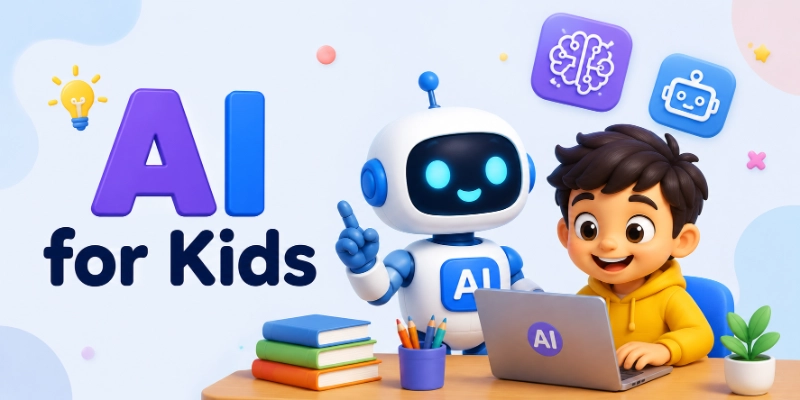
Artificial intelligence, or AI, is a technology that helps computers learn from information and make smart decisions. In simple words, AI allows machines to think and act a little like humans. It can answer questions, recognize faces, understand voices, and even recommend songs or videos based on what people like.
 AI“/>
AI“/>For kids, AI works like a smart helper. When a child asks a voice assistant about the weather or watches suggested cartoons on YouTube, AI helps make those choices. Many schools also use AI-powered learning apps that adjust lessons according to a student’s learning speed and performance.
How AI Works in Easy Words
Artificial intelligence works by learning from information and improving through practice. It studies data and patterns to perform tasks more accurately over time.
- AI collects lots of information and learns patterns from it.
- It learns by studying examples, just like children learn by practice.
- Computers are given data such as pictures, words, or sounds.
- AI tries to understand and recognize this information.
- Over time, AI becomes smarter and improves its performance.
- AI can recognize faces, translate languages, and recommend videos online.
In simple words, AI learns from experience and uses that knowledge to help people in everyday tasks.
Real-Life Examples Kids Already Use
Kids use AI in many fun and helpful ways every day, often without even realizing it.
- YouTube Recommendations: AI suggests videos based on what kids like to watch.
- Alexa/Siri: AI voice assistants answer questions, play music, and follow commands.
- Netflix: AI recommends movies and cartoons that match a child’s interests.
- Video Games: AI controls game characters and makes games more exciting and challenging.
- Face Filters: AI recognizes faces and adds fun filters and effects to photos and videos.
Why Should Kids Learn Artificial Intelligence?
Learning artificial intelligence helps kids understand the modern world and prepares them for the future. AI is becoming part of everyday life, and learning it can make children smarter, more creative, and better at solving problems.
1. Builds Problem-Solving Skills
AI encourages kids to think carefully and find smart solutions to different challenges. It teaches children how to break big problems into smaller and easier steps.
- Kids learn logical and critical thinking.
- AI activities improve decision-making skills.
- Children practice solving real-world problems.
- It helps kids become more confident learners.
Smart Tip: Solving small coding or AI puzzles every day can help kids improve their thinking skills faster.
2. Encourages Creativity
AI allows children to create fun and exciting projects using their imagination. Kids can design games, stories, robots, and digital art with the help of AI tools.
- Kids can create smart games and animations.
- AI inspires new ideas and innovation.
- Children learn creative ways to use technology.
- It makes learning more fun and exciting.
Fun Fact: Some AI tools can even help kids create music, drawings, and stories in just a few seconds.
3. Improves Digital Literacy
Understanding AI helps kids become more comfortable with modern technology. It teaches them how digital tools and smart devices work in daily life.
- Kids learn how apps and smart devices work.
- AI improves computer and technology skills.
- Children become safer and smarter internet users.
- It helps kids understand the digital world better.
Quick Tip: Learning basic AI concepts can help children use technology more responsibly and safely online.
4. Prepares Kids for Future Careers
Many future jobs will require knowledge of AI and technology. Learning AI at a young age gives children an early advantage for future careers.
- AI skills can open new career opportunities.
- Kids become ready for future technology jobs.
- It builds interest in science and engineering fields.
- Children learn skills that may be useful for many industries.
Did You Know? AI experts, game developers, and robot engineers are some of the fastest-growing careers in the world.
5. Makes Learning More Interactive
AI can make education more enjoyable and personalized for kids. Smart learning tools help children learn at their own speed and in fun ways.
- AI learning apps make lessons more engaging.
- Kids receive personalized learning experiences.
- Interactive tools improve focus and understanding.
- Learning becomes more enjoyable through games and activities.
Try This: Kids can use AI-based learning apps to practice math, science, and languages in a fun and interactive way.
Benefits of Artificial Intelligence for Kids
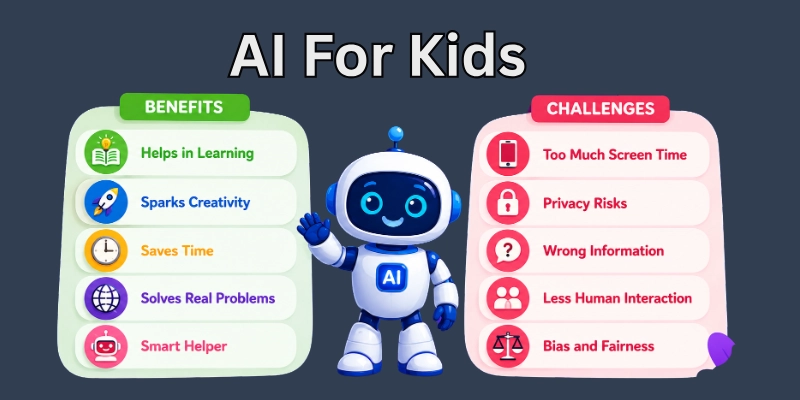
Artificial Intelligence offers many exciting benefits for children in learning and everyday life. It helps kids develop important skills, improves creativity, and makes education more enjoyable and interactive.
AI is not only about robots and machines — it also helps children learn smarter, think creatively, and become more confident with technology.
1. Personalized Learning
AI helps children learn in ways that match their individual needs and learning speed. Smart learning tools can adjust lessons to make learning easier and more fun.
- AI apps can create lessons based on a child’s skill level.
- Kids can learn at their own pace without pressure.
- Personalized quizzes help improve understanding.
- AI tools make difficult subjects easier to understand.
Quick Tip: Personalized learning apps can help children spend more time improving weak subjects like math or reading.
2. Better Homework Support
AI can assist kids with homework by explaining answers and giving step-by-step guidance. It acts like a helpful study partner for children.
- AI tools can answer questions quickly.
- Kids receive help with school assignments anytime.
- Step-by-step explanations improve understanding.
- Homework becomes less stressful and more organized.
Helpful Idea: Kids should use AI to learn and understand homework, not just to copy answers.
3. Language and Reading Improvement
AI helps children improve reading, writing, pronunciation, and vocabulary skills through fun activities and smart learning apps.
- AI reading apps can correct pronunciation mistakes.
- Kids can learn new words and improve spelling.
- Interactive stories make reading more enjoyable.
- Language-learning tools help practice different languages.
Fun Fact: Some AI apps can read stories aloud and even help children practice speaking confidently.
4. Coding and Logical Thinking
Learning AI introduces children to coding and problem-solving skills. It teaches them how to think logically and solve challenges step by step.
- Kids learn basic coding concepts in a fun way.
- AI activities improve logical thinking skills.
- Children become better at solving puzzles and challenges.
- Coding helps kids understand how technology works.
Smart Tip: Simple coding games and robot activities are great ways for kids to start learning AI concepts.
5. Creative Storytelling and Art
AI encourages children to use their imagination to create stories, drawings, music, and digital art projects in exciting new ways.
- Kids can create fun stories with AI tools.
- AI art apps help children design creative pictures.
- Music and animation tools inspire creativity.
- Children can explore new ideas through digital projects.
Try This: Kids can use AI drawing or storytelling apps to create their own comics and cartoons.
6. Confidence in Technology
Learning AI helps children feel more comfortable and confident using modern technology in school and daily life.
- Kids become familiar with smart devices and apps.
- AI learning builds confidence in using technology.
- Children develop important digital skills for the future.
- It encourages curiosity about science and innovation.
Did You Know? Kids who learn technology skills early often feel more prepared for future education and careers.
Risks and Challenges of AI for Children
Artificial intelligence can be very helpful for kids, but it also comes with some risks and challenges. Children need guidance from parents and teachers to use AI safely and responsibly.
While AI makes learning and entertainment easier, it is important to understand its possible dangers and how to avoid them.
1. Too Much Screen Time
Using AI-powered apps and devices for long hours can increase children’s screen time. Spending too much time on screens may affect health, sleep, and physical activity.
- Kids may spend less time playing outdoors.
- Too much screen use can reduce physical activity.
- Long screen time may affect sleep habits.
- Children can become distracted from studies or hobbies.
Healthy Habit: Parents should encourage regular breaks and outdoor activities to balance screen time.
2. Privacy Concerns
Some AI apps collect personal information such as names, voices, or browsing activity. Children may not fully understand how their data is being used online.
- AI apps may collect user information.
- Kids can accidentally share personal details online.
- Some websites track online activity and preferences.
- Privacy settings are important for online safety.
Safety Tip: Parents should check app privacy settings and teach kids never to share personal information online.
3. Incorrect AI Answers
AI tools do not always provide correct or accurate information. Sometimes children may receive wrong answers or confusing explanations.
- AI can make mistakes or give false information.
- Kids may trust incorrect answers without checking facts.
- Some AI tools may not fully understand questions.
- Wrong information can affect learning.
Smart Tip: Children should always confirm important information with parents, teachers, or trusted sources.
4. Dependence on AI
Relying too much on AI can reduce children’s ability to think independently and solve problems on their own.
- Kids may stop thinking creatively on their own.
- Overuse of AI can reduce problem-solving practice.
- Children may become too dependent on technology.
- Independent learning skills can become weaker.
Helpful Advice: AI should be used as a learning helper, not as a replacement for thinking and studying.
5. Exposure to Unsafe Content
Some AI tools or online platforms may show content that is not suitable for children. Kids may accidentally come across harmful or inappropriate material.
- Children may see unsafe or confusing content online.
- Some websites may contain harmful information.
- AI recommendations are not always child-friendly.
- Online supervision is important for safety.
Parental Tip: Use child-safe apps and enable parental controls to create a safer online environment.
How Parents Can Keep Kids Safe with AI
Parents play an important role in helping children use AI safely and responsibly. Proper guidance can help kids enjoy the benefits of AI while avoiding risks.
- Parents should monitor the apps children use.
- Kids should learn basic online safety rules.
- Screen time limits can create healthy habits.
- Family discussions about technology build awareness.
- Parents should turn on privacy and safety settings in AI apps.
- Children should be taught not to share personal information online.
- Use child-friendly AI tools and educational apps only.
- Parents should regularly check browsing history and app activity.
- Encourage kids to ask parents before using new apps or websites.
Good Practice: Parents can explore AI tools together with children to make learning safer, smarter, and more enjoyable.
How to Explain Artificial Intelligence to a Child
Explaining Artificial Intelligence to kids becomes easy when we use simple language and real-life examples. It helps children understand AI in a fun and clear way.
- Use Everyday Examples: AI can be explained using things kids already see and use in daily life like YouTube, games, and voice assistants.
- Compare AI to a Smart Helper: AI works like a smart helper that listens, learns, and helps people complete tasks faster and easier.
- Teach with Games and Activities: Fun games and hands-on activities make it easier for children to understand how AI learns and works.
- Encourage Questions and Exploration: Letting kids ask questions and explore helps them learn AI in a curious and interactive way.
Simple Tip: When AI is explained using fun examples, children understand it quickly and enjoy learning more about technology.
Best Artificial Intelligence Tools for Kids
Artificial intelligence tools help children learn creativity, problem-solving, coding, and communication skills in a fun and interactive way. Many schools and parents now use beginner-friendly AI platforms to introduce children to modern technology at an early age. I have reviewed educational technology tools for years, and the best AI tools for kids always focus on simple learning, safe experiences, and hands-on activities instead of complicated technical lessons.
1. ChatGPT for Kids Learning
ChatGPT helps kids ask questions, learn new topics, practice writing, and explore creative ideas through conversation.
Best Age Group: 10 years and above with adult guidance
Features:
- Answers questions in simple language
- Helps with homework and brainstorming
- Supports creative writing and storytelling
- Explains science, math, and history topics
Educational Benefits: Kids improve reading, writing, research, and critical thinking skills. It also encourages curiosity and independent learning.
Free or Paid: Free version available with optional paid plans
Safety Notes: Parents should supervise younger children because AI can sometimes give incorrect or confusing answers. Kids should avoid sharing personal information.
2. Scratch with AI Extensions
Scratch allows children to create games, animations, and coding projects using beginner-friendly blocks and AI extensions.
Best Age Group: 8 to 16 years
Features:
- Drag-and-drop coding system
- AI-powered image and voice projects
- Interactive animations and games
- Beginner-friendly design tools
Educational Benefits: Scratch teaches coding logic, creativity, problem-solving, and computational thinking in an easy way.
Free or Paid: Free
Safety Notes: Scratch offers a child-friendly learning environment, but parents should still monitor public project sharing and online interactions.
3. Google Teachable Machine
Google Teachable Machine helps kids train simple AI models using images, sounds, and body movements.
Best Age Group: 10 years and above
Features:
- Image recognition projects
- Sound and voice detection
- Gesture-based learning
- No coding required for beginners
Educational Benefits: Children learn how machine learning works through real examples and practical activities.
Free or Paid: Free
Safety Notes: Kids should use the platform with guidance while uploading images or recording audio online.
4. Canva AI
Canva includes AI tools that help children create presentations, posters, artwork, and classroom projects quickly.
Best Age Group: 9 years and above
Features:
- AI image generation
- Presentation design assistance
- Templates for school projects
- Easy drag-and-drop editor
Educational Benefits: Canva improves creativity, design skills, visual communication, and project organization.
Free or Paid: Free version available with premium features
Safety Notes: Parents and teachers should guide kids while using AI image generation tools and online templates
5. Khanmigo
Khanmigo is an AI tutor developed by Khan Academy to support students with personalized learning.
Best Age Group: 8 years and above
Features:
- Step-by-step homework help
- Writing assistance
- Coding support
- Personalized tutoring experience
Educational Benefits: Students learn independently while improving math, reading, science, and problem-solving skills.
Free or Paid: Limited free access with paid options
Safety Notes: Khanmigo focuses strongly on educational safety and student-friendly learning, but adult supervision still helps younger children.
6. Quick, Draw!
Quick, Draw! is a fun drawing game that teaches kids how AI recognizes images and patterns.
Best Age Group: 5 years and above
Features:
- Fast drawing challenges
- AI image recognition
- Interactive gameplay
- Simple and colorful interface
Educational Benefits: Kids learn how AI identifies objects while improving creativity and observation skills.
Free or Paid: Free
Safety Notes: The game is safe for children, but younger kids should still use it with screen-time limits.
7. Code.org AI Lab
Code.org offers AI learning tools and beginner-friendly coding lessons for students.
Best Age Group: 10 years and above
Features:
- AI and coding projects
- Interactive lessons
- Machine learning basics
- Classroom-friendly activities
Educational Benefits: Children develop coding knowledge, logical thinking, and an understanding of how AI systems make decisions.
Free or Paid: Mostly free
Safety Notes: The platform provides a safe educational environment, but parents and teachers should guide children through advanced AI topics.
Fun Artificial Intelligence Activities for Kids
Artificial intelligence becomes more exciting when kids learn it through fun, hands-on activities that help them explore how AI works in real life.
- Train an Image Recognition Model: Kids can teach AI to recognize objects like animals, fruits, or toys using simple online tools.
- Create AI Art: Children can use AI tools to generate drawings, paintings, and creative digital artwork.
- Build a Simple Chatbot: Kids can design a basic chatbot that answers simple questions and has fun conversations.
- AI Story Writing: AI can help children create interesting stories by giving ideas, characters, and plot suggestions.
- AI Drawing Games: Fun games where kids draw pictures and AI tries to guess what they are drawing.
- Voice Recognition Experiments: Kids can explore how AI understands speech by using voice-based activities and commands.
AI Projects for Kids by Age Group
AI learning can be made easier and more fun when activities are matched with a child’s age and understanding level. Each stage helps kids build new skills step by step.
- AI Projects for Ages 5–7: Simple AI games, drawing activities, and voice assistants help young kids explore basic AI ideas in a fun way.
- AI Projects for Ages 8–10: Kids can try block coding, simple chatbots, and AI drawing tools to understand how AI makes decisions.
- AI Projects for Ages 11–13: Students can build small AI models, create beginner coding projects, and experiment with image or speech recognition.
- AI Projects for Teenagers: Teenagers can work on advanced projects like machine learning models, AI apps, and real-world problem-solving tools.
Best AI Books for Kids
Reading books about artificial intelligence helps kids understand complex ideas in a simple and fun way. These books are designed to match different age groups and learning levels.
- Beginner AI Books: Simple books that introduce basic AI concepts using easy language, pictures, and real-life examples for young learners.
- AI Storybooks for Young Children: Fun story-based books that explain AI through characters, adventures, and imaginative storytelling.
- AI Learning Books for Teens: More detailed books that teach teenagers how AI works, including coding basics and real-world applications.
- Interactive AI Activity Books: Hands-on books with puzzles, exercises, and activities that make learning AI engaging and practical.
Reading Tip: Choosing age-appropriate AI books helps kids learn step by step while staying interested and motivated.
How Parents and Teachers Can Introduce AI to Kids
The following are key ways parents and teachers can introduce AI to kids in a simple, safe, and effective manner:
- Start with Simple Concepts: Introduce AI using everyday examples like voice assistants, smart devices, and recommendation systems so children can easily relate and understand.
- Use Safe AI Platforms: Choose trusted, child-friendly learning tools and apps that allow kids to explore AI in a safe and guided environment.
- Focus on Creativity Instead of Automation: Encourage children to use AI for creative work such as drawing, storytelling, music, and fun learning activities instead of only automated tasks.
- Encourage Critical Thinking: Help kids ask questions about how AI works, why it can make mistakes, and how to verify information before trusting it.
- Set Healthy Technology Limits: Maintain a balanced routine between screen time and offline activities so children develop healthy learning and lifestyle habits.
Future Careers in Artificial Intelligence for Kids
The following are some exciting future career paths in artificial intelligence that kids can explore as they grow, helping them understand where their skills and interests can lead in the tech world:
- AI Engineer: Builds and develops intelligent systems that can think, learn, and solve real-world problems using AI technology.
- Robotics Expert: Designs and creates smart robots that can perform tasks automatically in industries, healthcare, and daily life.
- Game Developer: Uses AI and programming to create interactive and intelligent video games with realistic behaviors and experiences.
- Data Scientist: Works with large amounts of data to find patterns, insights, and solutions using AI and analytical tools.
- Machine Learning Engineer: Develops systems that allow computers to learn from data and improve their performance over time without being explicitly programmed.
- AI Designer: Focuses on creating user-friendly AI systems, interfaces, and experiences that are easy and enjoyable for people to use.
Conclusion
In this guide, we have covered artificial intelligence for kids. We looked at what AI means in simple terms, how children already use it in daily life, useful tools, books, and ways parents and teachers can introduce it safely. AI works best as a learning support that helps children build skills instead of replacing their thinking.
AI will continue to grow in education and daily life, so children need guidance to use it in a balanced way. When kids stay curious and creative, they learn how to use technology in a smarter and more responsible manner.
Personal Recommendation: I personally recommend introducing AI step by step instead of rushing into advanced tools. Start with simple activities that build understanding before moving to complex concepts. This approach helps children stay confident and interested in learning.
Thank you for reading this guide. I hope it helped you understand the topic in a clear and practical way. Take care and have a great day ahead.
Feel free to share your thoughts or experiences in the comments below. 💬✨
FAQs
The following are some commonly asked questions about artificial intelligence for kids that can help parents, teachers, and beginners understand the topic more clearly:
Artificial intelligence for kids means teaching children how smart computers and machines can learn, think, and make decisions. Kids already use AI in apps like YouTube, Alexa, Siri, and learning games every day. Learning AI helps children understand modern technology in a simple and fun way.
Parents can introduce AI to kids through simple activities and beginner-friendly tools. The following methods work well for beginners:
- Use AI learning apps and games
- Try simple coding platforms like Scratch
- Explore voice assistants and smart devices
- Watch educational AI videos for kids
These small activities help children understand AI step by step without feeling overwhelmed.
AI can be safe for kids when parents provide proper supervision and guidance. Children should use trusted educational platforms and avoid sharing personal information online. Setting screen-time limits and enabling parental controls also helps create a safer learning environment.
Artificial intelligence education helps children prepare for future careers and modern digital life. It improves creativity, logical thinking, and problem-solving skills. Kids who learn AI early often become more confident with technology and innovation.
Many beginner-friendly AI tools help children learn in fun and interactive ways. Some popular options include:
- ChatGPT for learning and creativity
- Scratch for coding and animations
- Canva AI for design projects
- Google Teachable Machine for simple AI experiments
- Khanmigo for personalized learning
These tools make artificial intelligence learning easier for different age groups.
Yes, children can learn basic AI concepts without advanced coding skills. Many AI platforms use games, drag-and-drop tools, and visual activities designed for beginners. Kids can understand how AI works through fun projects before learning programming later.
AI makes learning more personalized and interactive for students. Smart learning tools can adjust lessons based on a child’s learning speed and performance. AI also helps kids practice subjects like math, reading, science, and languages more effectively.
Kids can enjoy many creative AI activities while learning new skills. Here are a few exciting examples:
- AI drawing and guessing games
- Story writing with AI tools
- Voice recognition experiments
- Creating simple chatbots
- Training image recognition models
These activities help children explore AI in an enjoyable and practical way.
Children can start learning simple AI concepts as early as 5 or 6 years old through games and visual activities. Older kids can gradually move toward coding, machine learning projects, and AI experiments. The best approach is to match AI activities with the child’s age and understanding level.
AI may change how people work, but it will also create many new career opportunities. Future jobs like AI engineer, robotics expert, machine learning engineer, and data scientist are growing rapidly. Teaching kids AI skills today can help them prepare for tomorrow’s technology-driven careers.




- Be Respectful
- Stay Relevant
- Stay Positive
- True Feedback
- Encourage Discussion
- Avoid Spamming
- No Fake News
- Don't Copy-Paste
- No Personal Attacks
- Be Respectful
- Stay Relevant
- Stay Positive
- True Feedback
- Encourage Discussion
- Avoid Spamming
- No Fake News
- Don't Copy-Paste
- No Personal Attacks
