How to Use AI for Task Scheduling in a Simple & Smart Way
Published: 29 Apr 2026
Daily tasks feel stressful when everything stays in your head. Many people forget deadlines, delay work, or feel overwhelmed by long to do lists. Smart tools now help you plan tasks clearly and calmly.
This guide explains how to use AI for task scheduling so you can organize your day without pressure. You will learn how it improves traditional planning and keeps your routine smooth.
Let us cover everything in detail.
How to Use AI for Task Scheduling
Here are the 15 ways to manage your tasks better:
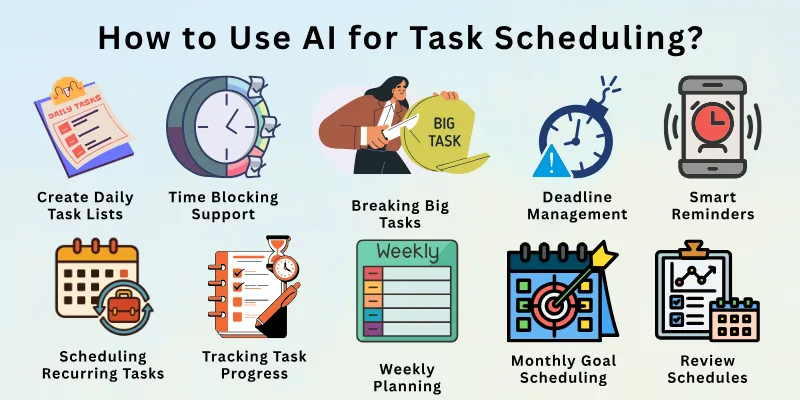
- Creating Daily Task Lists
- Prioritizing Important Tasks
- Time Blocking Support
- Deadline Management
- Smart Reminders
- Breaking Big Tasks
- Scheduling Recurring Tasks
- Adjusting Plans Automatically
- Work and Personal Balance
- Focus Time Planning
- Tracking Task Progress
- Weekly Planning
- Monthly Goal Scheduling
- Reducing Task Overload
- Review and Improve Schedules
Let us learn about each in detail.
1. Creating Daily Task Lists
Traditionally people write daily tasks on paper or notes apps. They often forget items or write unclear goals. When you use AI for task scheduling you can create clean daily task lists in seconds. It organizes tasks by time and importance. It keeps your day realistic and focused. You feel more relaxed with a clear plan.
Prompts to use:
- Create a daily task list for today.
- Organize my tasks into a simple plan.
- Make a clear to do list with priorities.
- Plan my work tasks for today.
- Create a balanced task list for my day.
2. Prioritizing Important Tasks
People struggle to decide what task matters most. They often start easy tasks and delay important ones. When you use AI for task scheduling it ranks tasks by urgency and impact. It helps you focus on what truly matters. It removes confusion from your routine. You work with confidence and direction.
Prompts to use:
- Rank these tasks by importance.
- Show me which task I should do first.
- Help me prioritize my to do list.
- Highlight urgent tasks for today.
- Sort my tasks by priority level.
3. Time Blocking Support
Time blocking takes effort when done manually. Many people guess time and fail to follow it. When you use AI for task scheduling it assigns realistic time blocks. It spreads tasks evenly across the day. It avoids overload and burnout. You stay focused and calm.
Prompts to use:
- Create a time blocked schedule for today.
- Assign time slots to my tasks.
- Help me plan focused work hours.
- Build a balanced time block plan.
- Adjust my schedule into time blocks.
4. Deadline Management
People forget deadlines or remember them too late. Manual tracking often fails. When you use AI for task scheduling it tracks deadlines clearly. It reminds you early so you can prepare. It reduces last minute stress. You stay ahead of your work.
Prompts to use:
- Track deadlines for all my tasks.
- Remind me before deadlines approach.
- Show upcoming deadlines this week.
- Organize tasks by deadline date.
- Create alerts for urgent deadlines.
5. Smart Reminders
Basic reminders trigger at fixed times and feel limited. When you use AI for task scheduling reminders become smarter. It reminds you based on workload and time availability. It sends alerts at the right moment. You stay on track without pressure.
Prompts to use:
- Set smart reminders for my tasks.
- Remind me when I have free time.
- Create flexible reminders for today.
- Notify me before task start time.
- Adjust reminders based on my schedule.
6. Breaking Big Tasks
Large tasks feel heavy and confusing. People delay them due to fear or lack of clarity. When you use AI for task scheduling it breaks big tasks into small steps. Each step feels manageable and clear. You make steady progress. Motivation stays high.
Prompts to use:
- Break this task into small steps.
- Divide this project into daily actions.
- Help me simplify this big task.
- Create a step by step task plan.
- Turn this goal into simple tasks.
7. Scheduling Recurring Tasks
People forget recurring tasks like bills or reviews. Manual repetition wastes time. When you use AI for task scheduling it handles recurring tasks easily. It repeats them automatically. It keeps your routine stable. You never miss regular responsibilities.
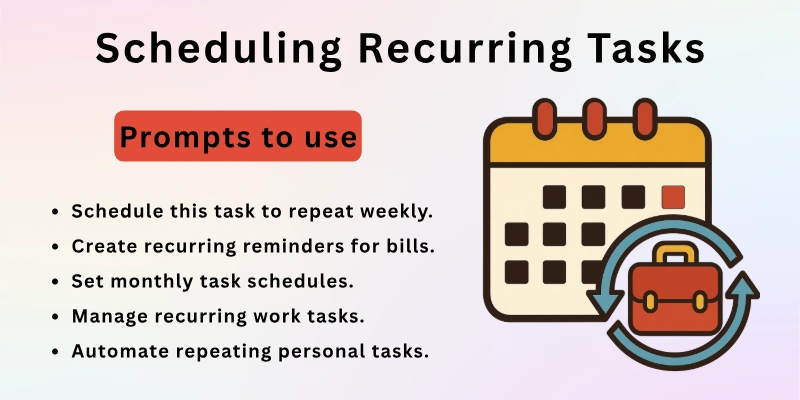
Prompts to use:
- Schedule this task to repeat weekly.
- Create recurring reminders for bills.
- Set monthly task schedules.
- Manage recurring work tasks.
- Automate repeating personal tasks.
8. Adjusting Plans Automatically
Life changes often and fixed plans break easily. People struggle to adjust schedules manually. When you use AI for task scheduling it reshuffles tasks when delays happen. It keeps your plan realistic. You stay flexible and calm. Stress reduces naturally.
Prompts to use:
- Adjust my schedule after this delay.
- Reschedule tasks I missed today.
- Rebuild my plan based on changes.
- Shift tasks to a new time slot.
- Update my schedule automatically.
9. Work and Personal Balance
People mix work and personal tasks without structure. This creates imbalance and fatigue. When you use AI for task scheduling it separates work and personal time. It ensures rest and self care stay included. You maintain a healthy routine. Your energy improves.
Prompts to use:
- Balance my work and personal tasks.
- Add self care tasks to my schedule.
- Create a healthy daily routine.
- Separate office and home tasks.
- Plan breaks with my tasks.
10. Focus Time Planning
Distractions reduce productivity. People underestimate focus needs. When you use AI for task scheduling it plans focus sessions. It protects deep work time. It limits interruptions. You complete tasks faster and better.
Prompts to use:
- Schedule focus time for deep work.
- Create distraction free work blocks.
- Plan focus sessions for today.
- Help me avoid interruptions.
- Build a focus based schedule.
11. Tracking Task Progress
People forget what they completed. This reduces motivation. When you use AI for task scheduling it tracks progress clearly. It shows completed and pending tasks. It boosts confidence. You stay motivated daily.
Prompts to use:
- Track progress on my tasks.
- Show completed tasks today.
- Highlight pending work items.
- Create a progress overview.
- Monitor my task completion rate.
12. Weekly Planning
Weekly planning takes time when done manually. People skip it often. When you use AI for task scheduling it builds weekly plans quickly. It spreads workload evenly. It avoids overload. You feel prepared for the week.
Prompts to use:
- Create a weekly task plan.
- Plan my tasks for next week.
- Balance workload across the week.
- Organize weekly priorities.
- Build a clear weekly schedule.
13. Monthly Goal Scheduling
Long term goals feel distant. People forget monthly planning. When you use AI for task scheduling it connects daily tasks to monthly goals. It keeps progress visible. It maintains direction. You move forward steadily.
Prompts to use:
- Schedule tasks for monthly goals.
- Break monthly goals into tasks.
- Plan my goals for this month.
- Track progress toward monthly targets.
- Create a monthly task roadmap.
14. Reducing Task Overload
Too many tasks create stress and burnout. People overload their days. When you use AI for task scheduling it limits tasks realistically. It suggests removing or delaying tasks. It protects your energy. You feel lighter and focused.
Prompts to use:
- Reduce overload in my schedule.
- Suggest tasks to postpone.
- Create a lighter daily plan.
- Help me avoid burnout.
- Simplify my task list.
15. Review and Improve Schedules
Many people never review their plans. Mistakes repeat daily. When you use AI for task scheduling it reviews your patterns. It suggests improvements. It helps you plan better tomorrow. Growth becomes consistent.
Prompts to use:
- Review my schedule performance.
- Suggest improvements for my routine.
- Analyze my task habits.
- Help me plan better tomorrow.
- Improve my scheduling strategy.
Best AI Tools for Task Scheduling
Here are 10 best AI tools for task scheduling, perfect for planning your day, blocking time, organizing tasks, and automating your calendar:
- Motion – AI planner that automatically schedules tasks, meetings, and deep work into your calendar based on priorities and deadlines.
- TimeHero – Auto schedules tasks and projects by analyzing availability and adjusting plans when priorities shift.
- Reclaim.ai – Smart time-blocking AI that schedules work tasks, breaks, and habits while syncing with your calendar.
- SkedPal – AI task scheduler that intelligently budgets your time across tasks and optimizes your day.
- Akiflow – Centralized scheduling tool that pulls tasks from apps (Gmail, Slack, Notion) and lets you plan them into your calendar.
- Todoist (AI features) – Smart task suggestions and natural language scheduling within a popular to-do list app.
- Any.do – AI-enhanced task manager with intelligent reminders and calendar sync to keep your schedule organized.
- Structured – Planning app that lets you build schedules and tasks with voice or natural language input.
- ChatGPT “Tasks” & Scheduled Actions – Built-in AI feature to set reminders, recurring actions, and planned tasks directly through AI prompts.
- Calendar AI Assistants (e.g., Toki / Clockwise) – Tools that automate meeting bookings, optimize time blocks, and protect focus time across teams and calendars.
Final Note
In this guide we covered how to use AI for task scheduling in clear and practical ways. You learned how it improves planning, focus, balance, and productivity. Start small with two or three methods. Build consistency slowly. Keep your routine simple and flexible.
Here is my personal advice for you. Do not overload your day. Respect your energy. Review your schedule daily. Thank you for reading and take care.
FAQs
Here are some of the most commonly asked questions related to how to use AI for task scheduling.
Yes it creates clear daily task plans. It organizes tasks by time and priority. It reduces confusion. You stay focused. This improves productivity.
Yes, it assigns a priority level to each task. This highlights work that is urgent. It makes decision making more effective. There is clarity in your work. It is time-saving thus.
Yes it automates repeating tasks easily. It tracks schedules consistently. It prevents missed routines. You stay organized. This supports stability.
No, it does reorganize the tasks whenever there is a delay. It ensures that plans are grounded in reality. It is relieving of stress. You maintain your adaptability. The workflow is further improved.
The daily workload is, in fact, reduced. It recommends getting rid of unnecessary responsibilities. This safeguards the energy. Burnout is avoided by you. This maintains a sense of equilibrium.
Yes, it does a good job of assigning time slots. Focus time is safeguarded by it. It raises the level of productivity. You are better at managing your time. Therefore, routines are strengthened.
Indeed, it keeps track of tasks that have been finished. It displays items that are still pending. It is a motivational booster. Progress is readily apparent to you. This instills a sense of courage.
Yes it creates weekly schedules quickly. It balances workload. It reduces planning effort. You feel prepared. This supports consistency.
Yes it separates work and personal tasks. It adds breaks and self care. It creates balance. You feel healthier. This improves life quality.
Indeed, it makes complicated routines easier to perform. It is flexible and adaptable. It is a time saver. You have the impression of being in command. With this, busy lives are supported.






- Be Respectful
- Stay Relevant
- Stay Positive
- True Feedback
- Encourage Discussion
- Avoid Spamming
- No Fake News
- Don't Copy-Paste
- No Personal Attacks
- Be Respectful
- Stay Relevant
- Stay Positive
- True Feedback
- Encourage Discussion
- Avoid Spamming
- No Fake News
- Don't Copy-Paste
- No Personal Attacks
