How to Use AI for Learning Programming – Step by Step
Published: 12 Apr 2026
Learning programming can feel overwhelming. You might struggle with understanding concepts, writing code, or debugging errors.
Modern AI tools make this easier by guiding you step by step, offering examples, and helping you practice effectively. In this guide, we will explain how to use AI for learning programming in a simple and practical way.
How to Use AI for Learning Programming
AI can act like a personal tutor. It can explain programming topics in simple words, generate code examples, help debug mistakes, and create mini projects for practice.
Before we dive into details, here’s a quick list of the steps you need to follow:
- Understand what AI can do for learning programming
- Choose the right AI tools
- Learn concepts step by step
- Practice coding with AI help
- Build mini projects
- Learn algorithms and data structures
- Explore multiple programming languages
- Improve problem-solving skills
- Plan your learning path
- Stay motivated with AI feedback
Let us cover all these steps in detail.
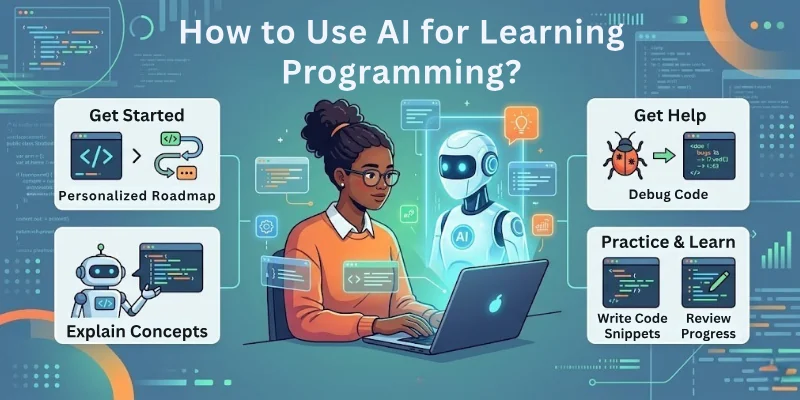
Step 1: Understand What AI Can Do for Learning Programming
AI is like having a personal tutor available anytime. It can:
- Explain programming concepts in simple language
- Show example code for better understanding
- Detect errors and suggest corrections
- Recommend exercises for practice
- Organize your learning path
Remember: AI helps you learn faster, but you still need to practice writing code on your own.
Step 2: Choose the Right AI Tools
Selecting the right tools makes your learning efficient. Here are some options:
- ChatGPT / GPT-based tools → Explains concepts and examples
- Replit → Run code online with AI assistance
- Codewars / LeetCode → Practice coding challenges
- Copilot → Suggests code while you write
- Khan Academy / Codecademy AI → Beginner-friendly lessons
- PyCharm / VS Code AI → AI-assisted IDEs
- Coursera AI Assistance → Structured guided learning
- HackerRank AI → Coding problems with hints
Step 3: Learn Concepts Step by Step
Break programming into small topics: variables, loops, functions, classes, data structures, and algorithms.
How to use AI:
- Ask for simple explanations
- Request visual examples or diagrams
- Solve small exercises after each concept
- Repeat explanations until clear
Example prompt: “Explain Python loops for beginners with 3 simple examples and one exercise.”
Step 4: Practice Coding With AI Help
Writing code yourself is essential. AI can help you:
- Give hints for tricky problems
- Detect errors and suggest fixes
- Explain mistakes line by line
- Encourage experimenting with modifications
Example: “Here is my Python code. Why is it not printing correctly? Explain line by line.”
Step 5: Build Mini Projects
Projects help apply what you learn. AI can guide without doing everything for you.
Mini project ideas:
- Calculator app
- To-do list app
- Simple game like tic-tac-toe
- Weather app
- Personal portfolio website
AI can provide:
- Project structure
- Example code snippets
- Step-by-step explanations
- Debugging support
Step 6: Learn Algorithms and Data Structures
Algorithms and data structures are important but tricky. AI can simplify them.
How to use AI:
- Explain algorithms with examples
- Provide diagrams for structures like trees, graphs, arrays
- Solve practice problems
- Teach time and space complexity in simple words
Step 7: Explore Multiple Programming Languages
AI can teach syntax and differences between languages.
How to use AI:
- Translate code from one language to another
- Provide simple examples in Python, JavaScript, Java, or C++
- Compare features and uses of each language
- Give exercises in multiple languages
Example prompt: “Show the difference between Python function and JavaScript function with simple examples.”
Step 8: Improve Problem-Solving Skills
Programming is about solving problems. AI can help:
- Suggest step-by-step approaches
- Explain logic in simple terms
- Debug errors
- Provide multiple solutions for comparison
Step 9: Plan Your Learning Path
AI can create a roadmap for your learning.
Example plan for beginners:
- Week 1–2: Variables, loops, conditions
- Week 3–4: Functions and exercises
- Week 5–6: Data structures and basic algorithms
- Week 7–8: Mini projects
- Week 9+: Advanced topics and more practice
AI can adjust this roadmap to match your pace.
Step 10: Stay Motivated With AI Feedback
Consistency is key. AI can help you stay motivated:
- Suggest exercises based on skill level
- Reward progress with next-level challenges
- Give positive feedback
- Make learning interactive with quizzes
Top 10 Tools for Learning Programming With AI
Here are the best tools to use:
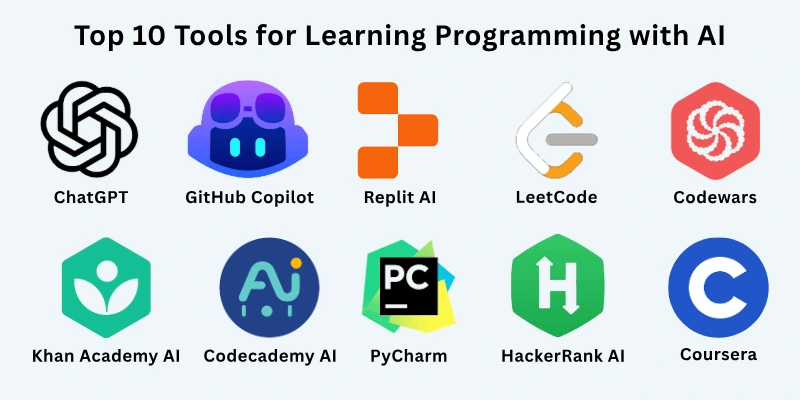
- ChatGPT / GPT
- GitHub Copilot
- Replit AI
- Codewars
- LeetCode
- Khan Academy AI
- Codecademy AI
- PyCharm / VS Code AI
- Coursera AI Assistance
- HackerRank AI
Common Mistakes to Avoid
Here are some of the major mistakes to avoid while using AI tools for programming:
- Relying entirely on AI without practicing
- Skipping basic concepts and jumping to projects
- Copy-pasting code without understanding
- Ignoring debugging explanations
- Not experimenting with your own variations
- Skipping planning and roadmap
- Failing to take notes or record learning
Avoiding these mistakes ensures effective learning.
Final Note
In this guide, we have covered how to use AI for learning programming in great detail. You now know how to understand concepts, practice coding, build projects, and improve problem-solving step by step.
Remember, AI is a helpful assistant, but real learning comes from writing code yourself. Take small steps, practice consistently, and personalize your projects. Keep exploring, stay curious, and enjoy your programming journey. You can do it!
FAQs: How to Use AI Tools for Learning Programming
Here are some of the most commonly asked questions related to the how to use AI for learning programming:
You can start by picking a beginner-friendly AI tool like ChatGPT or Replit. Ask AI to explain basic programming concepts in simple language. Then practice with small exercises provided by the AI to build your confidence.
Python is the easiest for beginners because it has simple syntax. AI can also guide you in JavaScript, Java, or C++ if you want alternatives. It helps you understand syntax differences and provides coding examples in each language.
Yes, AI can detect errors and explain why your code is not working. It provides step-by-step suggestions to fix mistakes. This makes learning faster and prevents frustration when coding.
AI can generate practice problems based on your skill level. It can also suggest hints or step-by-step solutions. This helps you improve problem-solving skills while learning programming.
Yes, AI can suggest mini-project ideas like a calculator or to-do app. It can provide project structure and example code snippets. You can also ask AI for help when facing difficulties during the project.
AI can explain complex algorithms and data structures in simple language. It provides examples, diagrams, and exercises for practice. This makes difficult topics easier to understand.
Yes, AI can show you how the same code works in different languages. It can compare features and syntax of each language. This helps you switch languages confidently.
AI can track your progress and suggest challenges based on your level. It provides feedback and encourages you to improve. This keeps your learning consistent and enjoyable.
AI cannot fully replace structured courses but complements them well. It provides quick explanations, examples, and instant practice. You still need to apply concepts and write code to truly learn.
Do not rely entirely on AI without practicing yourself. Avoid copy-pasting code without understanding. Always experiment and modify examples to strengthen your skills.




- Be Respectful
- Stay Relevant
- Stay Positive
- True Feedback
- Encourage Discussion
- Avoid Spamming
- No Fake News
- Don't Copy-Paste
- No Personal Attacks
- Be Respectful
- Stay Relevant
- Stay Positive
- True Feedback
- Encourage Discussion
- Avoid Spamming
- No Fake News
- Don't Copy-Paste
- No Personal Attacks
