How to Use AI for Automation Tasks – Work Smarter
Published: 14 Apr 2026
Managing repetitive tasks manually can take a lot of time. From emails to data entry, project management, and social media, these tasks slow down productivity. AI tools can automate many of these tasks, making work faster, smarter, and more accurate.
In this guide, you will learn how to use AI for automation tasks, step by step. By the end, you will know how to save time, reduce errors, and focus on high-priority work.
How to Use AI for Automation Tasks
AI can act as your personal assistant, handling repetitive work while you focus on important decisions.
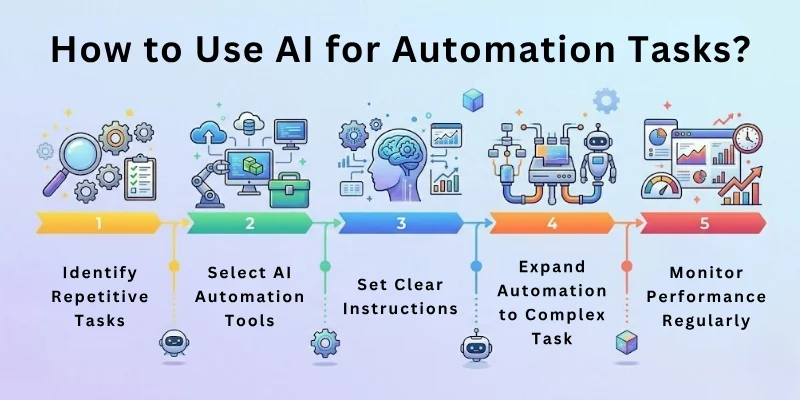
Here are the main steps for using AI to automate tasks:
- Identify Repetitive Tasks to Automate
- Choose the Right AI Automation Tools
- Start Small with Simple Tasks
- Set Clear Instructions or Workflows
- Test AI Automation for Accuracy
- Expand Automation to Complex Tasks
- Monitor Performance Regularly
- Refine and Improve Workflows
- Combine Multiple Tools for Efficiency
- Keep Backups and Safety Measures
Let us cover all these steps in detail.
Step 1: Identify Repetitive Tasks to Automate
Before you start, know exactly what tasks take up your time.
- Look for tasks you do every day or every week, such as sending emails, creating reports, or posting on social media.
- Focus on tasks that have clear rules and predictable steps. For example, updating a spreadsheet with daily data is perfect for automation.
- Avoid tasks that require complex decision-making or creativity, as AI may not handle them well yet.
By targeting repetitive tasks first, you maximize time savings and reduce frustration.
Step 2: Choose the Right AI Automation Tools
The right tools depend on the type of task you want to automate.
- Zapier → Connect different apps and trigger workflows automatically. For example, save all Gmail attachments to Google Drive.
- UiPath → Automate office tasks like data entry, invoice processing, and report generation.
- Microsoft Power Automate → Integrate Microsoft tools such as Outlook, Teams, or Excel.
- ChatGPT / GPT tools → Automate text-based tasks like email drafts, summaries, or chatbot replies.
- IFTTT → Automate simple online and IoT tasks, like posting social media updates or reminders.
Pick a tool that suits your technical comfort level and task type.
Step 3: Start Small With Simple Tasks
Begin with simple automation projects before tackling complex workflows.
- For example, set AI to automatically categorize incoming emails based on keywords.
- Schedule social media posts at specific times using AI tools.
- Auto-generate simple daily or weekly reports from spreadsheets.
Starting small reduces errors, builds confidence, and gives you a clear understanding of how automation works.
Step 4: Set Clear Instructions or Workflows
AI works best when you provide precise instructions.
- Define triggers: the exact event that starts the automation, such as receiving an email or a new spreadsheet entry.
- Specify actions: what the AI should do after the trigger, like sending a reply, saving files, or updating a database.
- Include rules for exceptions: for example, “If the email is marked urgent, send a notification to my phone.”
Clear workflows prevent errors and ensure reliable performance.
Step 5: Test AI Automation for Accuracy
Never skip testing. Even small errors can cause problems.
- Run your automation in a test environment first.
- Check each output carefully to ensure the task is completed correctly.
- Adjust prompts, instructions, or rules until the automation works reliably.
Testing ensures that your AI behaves exactly as you want before full implementation.
Step 6: Expand Automation to Complex Tasks
Once you are confident, you can automate bigger workflows.
- Combine multiple tasks into a single workflow. For instance, automatically collect customer feedback, summarize it, and send a weekly report to your team.
- Use AI to summarize data, generate documents, or draft emails based on rules.
- Integrate project management tools with reporting and communication tools for seamless workflow.
Expanding gradually avoids overwhelming complexity and maximizes efficiency.
Step 7: Monitor Performance Regularly
Automation is not a “set and forget” process.
- Check outputs regularly to catch errors or unusual results.
- Identify tasks that still need human intervention.
- Make adjustments as needed to maintain accuracy and efficiency.
Regular monitoring ensures smooth operations and prevents mistakes from accumulating.
Step 8: Refine and Improve Workflows
Continuous improvement is key for long-term success.
- Optimize rules based on performance and feedback.
- Combine steps or simplify workflows to save more time.
- Update automation processes whenever your work changes or grows.
Refining ensures that your AI automation adapts to real needs and stays effective.
Step 9: Combine Multiple Tools for Efficiency
Different AI tools have different strengths.
- Use Zapier or IFTTT to connect multiple apps.
- Use ChatGPT to generate text or summarize data.
- Use UiPath for detailed office automation like invoice processing.
Combining tools provides more powerful and flexible automation than relying on one tool alone.
Step 10: Keep Backups and Safety Measures
Automation errors can happen. Always prepare for them.
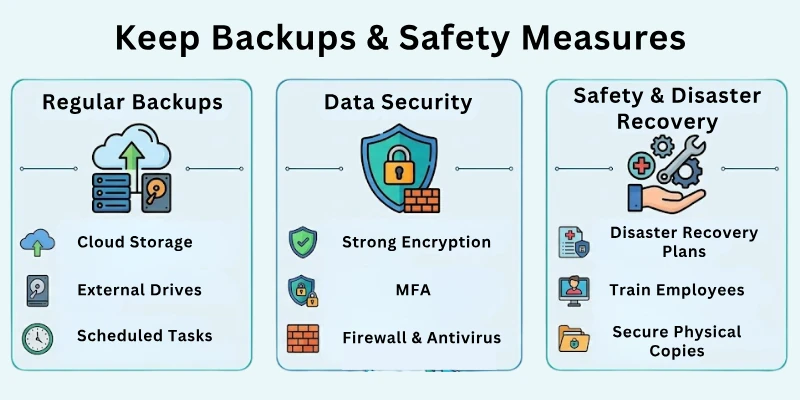
- Keep backups of important data before automating tasks.
- Include manual checkpoints for critical or sensitive tasks.
- Regularly review your workflows to prevent mistakes from affecting operations.
Safety measures protect your work and give you confidence in using automation.
Top 10 Tools for AI Task Automation
Here are the best tools to automate work efficiently:
- Zapier → Connect apps and automate tasks
- Make (Integromat) → Workflow automation
- UiPath → Robotic process automation
- Microsoft Power Automate → Office automation
- ChatGPT / GPT tools → Text generation and summarization
- IFTTT → Simple task automation
- Notion AI → Organize and automate content tasks
- Trello AI → Automate project boards and tasks
- Jasper.ai → Content and marketing automation
- HubSpot AI → CRM and email automation
Common Mistakes to Avoid
Please avoid these common mistakes:
- Automating tasks without clear instructions
- Ignoring testing before implementation
- Over-automating tasks that need human judgment
- Forgetting to monitor AI outputs
- Not combining tools efficiently
- Skipping backups and safety checks
Avoiding these mistakes ensures smooth and reliable automation.
Final Note
In this guide, we have covered how to use AI for automation tasks in great detail. You now know how to identify repetitive tasks, choose tools, set workflows, test processes, and expand automation.
Remember, AI is a helper, not a replacement for critical thinking. Monitor results, refine workflows, and combine your creativity with AI to maximize efficiency. With consistent practice, automation will save you time and make your work easier. Good luck and enjoy smarter productivity! 🌟
FAQs: How to Use AI Tools for Automation Tasks
Here are some of the most commonly asked questions related to the how to use AI for automation tasks:
AI automation uses intelligent tools to perform repetitive tasks automatically. It can save time on emails, data entry, or social media posting. Using it correctly improves productivity and reduces human error.
You can automate routine office tasks like scheduling meetings, generating reports, or sorting emails. AI tools follow your rules and perform tasks faster. This frees up time for more important work.
Tasks that are repetitive and rule-based work best. Examples include invoice processing, file organization, and social media updates. Complex creative work usually still requires human input.
Popular tools include Zapier, UiPath, Microsoft Power Automate, and ChatGPT. Each tool is designed for specific tasks like workflow automation, office processes, or text generation. Choose one that fits your needs.
Start by identifying repetitive tasks and defining clear instructions. Set triggers, actions, and exceptions for each task. Testing is important before full implementation to ensure accuracy.
Yes, errors can happen if instructions are unclear or workflows are complex. Always test outputs and monitor results regularly. Refining and adjusting rules prevents mistakes from affecting your work.
You can integrate tools like Zapier for workflows and ChatGPT for text generation. Combining tools allows you to automate larger and more complex tasks. This increases efficiency and productivity.
Yes, small businesses can use AI to save time and reduce manual work. Automating tasks like customer emails, social media posts, or order tracking can free resources. It allows small teams to focus on growth and strategy.
Regularly check outputs and track performance to identify errors. Adjust rules and refine workflows for better results. Continuous monitoring ensures smooth operation and reliability.
Do not automate tasks without clear rules or skip testing. Avoid relying entirely on AI for critical decisions. Always monitor, refine, and keep backups to prevent errors.






- Be Respectful
- Stay Relevant
- Stay Positive
- True Feedback
- Encourage Discussion
- Avoid Spamming
- No Fake News
- Don't Copy-Paste
- No Personal Attacks
- Be Respectful
- Stay Relevant
- Stay Positive
- True Feedback
- Encourage Discussion
- Avoid Spamming
- No Fake News
- Don't Copy-Paste
- No Personal Attacks
